Nº 563 of 605
Terminal prompt footer
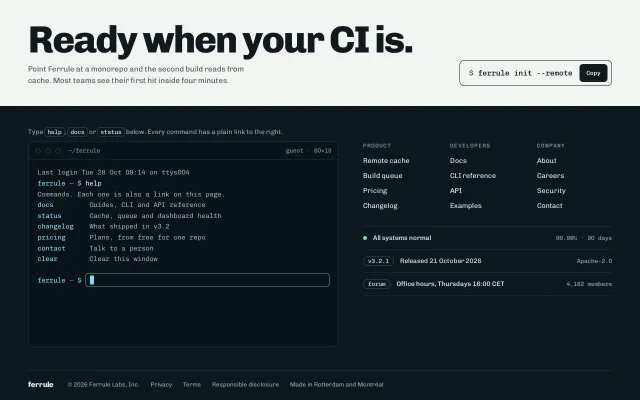
A developer-tool footer with a calm working prompt: type help, docs or status to print links, with history and Tab completion, beside plain link columns and a live status row.
Preview
Use it
Free to use · credit appreciated1 Once, in your project · Node 22.20+
npx skills add SusanAcharya/Design-Lounge 2 Then ask
Using the Design Lounge skill, build "Terminal prompt footer" (piece footer-terminal-prompt) in my stack. Match its brief; restyle it onto my product's theme.
No skill? Paste the brief instead. It carries the numbers, tokens and behaviour.
<!-- Design Lounge Nº 563 · "Terminal prompt footer" · www.designlounge.live -->

# Terminal prompt footer

> **Build brief for a coding agent.** Rebuild this piece in the reader's stack. If they haven't said which stack, ask once, then default to semantic HTML + CSS + a little vanilla JS. Match the numbers below; don't "improve" them.

## What it is

The footer of the marketing and docs site for Ferrule, an invented remote build cache. The left half is a small, quiet terminal with a real prompt: type `help`, `docs`, `status`, `changelog`, `pricing` or `contact` and it prints the answer with links in it. It has history on the arrow keys, Tab completion and Ctrl+L to clear. The right half is an ordinary footer, three link columns plus status, version and forum rows, so nobody has to type to get anywhere. Above it sits the end of the docs page, a light band with an 76px "Ready when your CI is." and a copyable install command. Worth copying because the terminal is calm, with no green-on-black hacker costume, no typing animation and no fake boot log. It feels like the product's own CLI.

## Reference behaviour

1. Initial state: the terminal shows "Last login Tue 28 Oct 09:14 on ttys004", then `ferrule ~ $ help` already run, its output (one intro line and six command rows), a blank line, and a live prompt with a solid 1ch cyan block cursor. The cursor starts blinking after 2.4s, once every 1.1s.
2. In the help output each command name is a button. Clicking `status` runs it exactly as if typed.
3. Clicking anywhere in the terminal that is not a link or button focuses the input without scrolling the page.
4. Typing moves the block cursor; it sits at `selectionStart × 1ch`, so arrow keys and clicks inside the text move it too. The native caret is hidden.
5. Enter echoes the line after the prompt, prints the output, adds one blank line, clears the input and scrolls the screen to the bottom. Empty Enter echoes a bare prompt.
6. Unknown input prints, in amber, "command not found: foo. Try help, or use the links." (the echoed name is capped at 24 characters).
7. `clear` or Ctrl+L empties the log. ArrowUp and ArrowDown walk the history; ArrowDown past the newest entry gives an empty line.
8. Tab completes when exactly one command starts with the typed text (`st` becomes `status`); otherwise Tab moves focus as normal.
9. `status` prints a green "● All systems normal", three aligned metric lines (cache p95 41 ms, queue 312 jobs, uptime 99.98%) and a "Status page" link.
10. On the right, the status row's dot pulses a 7px green ring every 2.4s. The Copy button in the page band changes to "Copied" for 1600ms.

## Structure

```
1280 × 800
┌──────────────────────────────────────────────────────────────────────┐
│ .end band (bg --page, padding 44 56 40)                              │
│  Ready when your CI is.  (76px/800)              ┌ $ ferrule init… [Copy] ┐│
│  Point Ferrule at a monorepo…                    └────────────────────┘│
├──────────────────────────────────────────────────────────────────────┤ y≈212
│ footer (padding 44 56 28, grid 1.25fr 1fr, gap 48)                   │
│  Type help, docs or status…                  PRODUCT  DEVELOPERS  COMPANY│
│ ┌ ○○○ ~/ferrule ────────── guest · 80×18 ┐   4 links  4 links    4 links │
│ │ Last login …                            │  ─────────────────────────── │
│ │ ferrule ~ $ help                        │  ● All systems normal 99.98% │
│ │ docs       Guides, CLI and API …        │  [v3.2.1] Released 21 Oct    │
│ │ status     Cache, queue and …           │  [forum] Office hours  4,182 │
│ │ …                                       │  ─────────────────────────── │

… 183 more lines. Copy or download for the full brief. Loading the source…Brief
223 linesBuild brief for a coding agent. Rebuild this piece in the reader’s stack. If they haven’t said which stack, ask once, then default to semantic HTML + CSS + a little vanilla JS. Match the numbers below; don’t “improve” them.
What it is
The footer of the marketing and docs site for Ferrule, an invented remote build cache. The left half is a small, quiet terminal with a real prompt: type help, docs, status, changelog, pricing or contact and it prints the answer with links in it. It has history on the arrow keys, Tab completion and Ctrl+L to clear. The right half is an ordinary footer, three link columns plus status, version and forum rows, so nobody has to type to get anywhere. Above it sits the end of the docs page, a light band with an 76px “Ready when your CI is.” and a copyable install command. Worth copying because the terminal is calm, with no green-on-black hacker costume, no typing animation and no fake boot log. It feels like the product’s own CLI.
Reference behaviour
- Initial state: the terminal shows “Last login Tue 28 Oct 09:14 on ttys004”, then
ferrule ~ $ helpalready run, its output (one intro line and six command rows), a blank line, and a live prompt with a solid 1ch cyan block cursor. The cursor starts blinking after 2.4s, once every 1.1s. - In the help output each command name is a button. Clicking
statusruns it exactly as if typed. - Clicking anywhere in the terminal that is not a link or button focuses the input without scrolling the page.
- Typing moves the block cursor; it sits at
selectionStart × 1ch, so arrow keys and clicks inside the text move it too. The native caret is hidden. - Enter echoes the line after the prompt, prints the output, adds one blank line, clears the input and scrolls the screen to the bottom. Empty Enter echoes a bare prompt.
- Unknown input prints, in amber, “command not found: foo. Try help, or use the links.” (the echoed name is capped at 24 characters).
clearor Ctrl+L empties the log. ArrowUp and ArrowDown walk the history; ArrowDown past the newest entry gives an empty line.- Tab completes when exactly one command starts with the typed text (
stbecomesstatus); otherwise Tab moves focus as normal. statusprints a green ”● All systems normal”, three aligned metric lines (cache p95 41 ms, queue 312 jobs, uptime 99.98%) and a “Status page” link.- On the right, the status row’s dot pulses a 7px green ring every 2.4s. The Copy button in the page band changes to “Copied” for 1600ms.
Structure
1280 × 800
┌──────────────────────────────────────────────────────────────────────┐
│ .end band (bg --page, padding 44 56 40)                              │
│  Ready when your CI is.  (76px/800)              ┌ $ ferrule init… [Copy] ┐│
│  Point Ferrule at a monorepo…                    └────────────────────┘│
├──────────────────────────────────────────────────────────────────────┤ y≈212
│ footer (padding 44 56 28, grid 1.25fr 1fr, gap 48)                   │
│  Type help, docs or status…                  PRODUCT  DEVELOPERS  COMPANY│
│ ┌ ○○○ ~/ferrule ────────── guest · 80×18 ┐   4 links  4 links    4 links │
│ │ Last login …                            │  ─────────────────────────── │
│ │ ferrule ~ $ help                        │  ● All systems normal 99.98% │
│ │ docs       Guides, CLI and API …        │  [v3.2.1] Released 21 Oct    │
│ │ status     Cache, queue and …           │  [forum] Office hours  4,182 │
│ │ …                                       │  ─────────────────────────── │
│ │ ferrule ~ $ █                           │                              │
│ └──────────────── screen 372px ───────────┘                              │
│ ──────────────────────────────────────────────────────────────────── │
│ ferrule  © 2026 Ferrule Labs, Inc.  Privacy  Terms  Responsible disclosure│
└──────────────────────────────────────────────────────────────────────┘
<section class="end" aria-label="Get started">:<h2>,<p>, and.cmd(a 52px bordered row with the command text and a<button>Copy).<footer>, two-column grid.- Left:
<p class="hint" id="hint">with<kbd>s, then.term: a 36px title bar (aria-hidden), then.screen(372px,overflow-y: auto) holding#log(role="log" aria-live="polite") and the prompt line. - Prompt line:
<span class="ps">then a<label class="field">holding a visually hidden “Command” label, the<input id="cli">and the.curblock cursor span. - Right:
<nav class="cols" aria-label="Footer">with three<h3>+<ul>columns, then.meta, three 46px rows between hairlines (status link, version, forum link). .legalspans both columns: wordmark, copyright, three links and a place line.
- Left:
Tokens
:root {
  /* page band */
  --page: #F2F4F1;        /* end-of-page band */
  --page-ink: #10191E;    /* band text, command border, Copy fill */
  --page-ink-2: #4C5A60;  /* band secondary, 6.9:1 */
  --page-line: #D3D9D6;

  /* footer */
  --bg: #0D181E;          /* footer and body */
  --term: #0A1318;        /* terminal screen */
  --panel: #13222A;       /* reserved */
  --line: #22343D;        /* hairlines, terminal border */
  --line-2: #34505C;      /* kbd and tag borders, dashed link underline */
  --ink: #DCE6E8;         /* primary text, 13.9:1 on --term */
  --ink-2: #93A7AE;       /* output text, 7.6:1 */
  --ink-3: #7E949B;       /* labels, path, column headings, 5.7:1 */
  --cyan: #86D6E2;        /* prompt, cursor, command buttons, hover, focus */
  --ok: #7BD9A0;          /* status only */
  --warn: #F0C674;        /* command not found only */

  /* type */
  --font: "Chivo", system-ui, sans-serif;
  --mono: "Chivo Mono", ui-monospace, monospace;
  --fs-display: clamp(40px, 6vw, 76px);
  --fs-term: 13.5px;
  --fs-body: 14px;
  --fs-meta: 12px;
  --fs-label: 11px;

  /* shape */
  --r: 10px;              /* terminal, command row */
  --screen-h: 372px;
  --row-h: 46px;          /* meta rows */

  /* motion */
  --t-fast: 140ms;
  --t-mid: 260ms;
  --blink: 1.1s;          /* steps(1), 2.4s delay */
  --pulse: 2.4s;
  --ease: cubic-bezier(.2, .7, .2, 1);
}
Typography
| Role | Family | Size | Weight | Line-height | Tracking | Case |
|---|---|---|---|---|---|---|
| Page band headline | Chivo | clamp(40px, 6vw, 76px) | 800 | 0.94 | −0.04em | sentence |
| Band body | Chivo | 15px | 400 | 1.5 | 0 | sentence |
| Install command | Chivo Mono | 15px | 500 | 1 | 0 | lowercase |
| Terminal text | Chivo Mono | 13.5px | 400 | 1.6 | 0 | as typed |
| Title bar | Chivo Mono | 12px | 400 | 1 | 0 | lowercase |
| Column heading | Chivo Mono | 11px | 500 | 1 | +0.1em | UPPERCASE |
| Footer link | Chivo | 14px | 400 | 1.5 | 0 | sentence |
| Meta row value | Chivo Mono | 12px | 400 | 1.4 | 0 | as is |
| Wordmark | Chivo | 15px | 800 | 1 | −0.02em | lowercase |
Help rows use a 12ch 1fr grid so descriptions align like real CLI help. Metric lines in status and pricing are aligned with spaces inside white-space: pre-wrap.
Motion
| Element | Trigger | Property | From → To | Duration | Easing | Notes |
|---|---|---|---|---|---|---|
| Block cursor | always | opacity | 1 → 0 → 1 | 1100ms | steps(1) | 2.4s delay so the first frame shows it solid |
| Block cursor | typing | left | n × 1ch | 0 | — | jumps per character, never glides |
| Status dot | always | box-shadow | 0 0 0 0 → 0 0 0 7px, alpha .45 → 0 | 2400ms | --ease | 70% of the cycle, then rests |
| Output | Enter | none | lines appear at once | 0 | — | no typewriter effect |
| Screen | Enter | scrollTop | to bottom | 0 | — | |
| Copy label | click | text | Copy → Copied → Copy | 1600ms | — |
Reduced motion: the cursor stays solid, the dot does not pulse, and every transition is 1ms. Nothing else changes, because output was never animated.
States
- Input field: the input carries its own edge: 28px tall, 8px side padding, 1px
--ink-3border (5.7:1), 6px radius; the border turns--cyanon focus. The cursor sits atleft: calc(9px + n × 1ch)to clear padding and border. - Cursor: a solid
--cyan1ch × 1.3em block attop: 2px. It keeps blinking while the input is focused or not; the input hascaret-color: transparent. - Command button (in help output):
--cyantext; hover underlines with a 3px offset; focus-visible draws a 2px cyan outline at 1px offset. - Output link:
--inktext with a 1px dashed--line-2underline; hover turns both cyan. - Error line:
--warnamber, never red. It is a hint, not a failure. - Footer link hover:
--cyan. Status row hover: its label turns cyan. - Focus-visible (everywhere): 2px
--cyanoutline, 2px offset, 4px radius. In the light band the Copy button’s outline is--page-ink. - Copied: the button text reads “Copied” for 1600ms; if the clipboard API is blocked it still confirms, because the text is visible to copy by hand.
- Empty log (after clear): only the prompt line remains at the top of the screen.
Accessibility
- The output container is
role="log"witharia-live="polite"andaria-label="Command output", so each command’s output is announced once. - The input has a visually hidden label “Command” and
aria-describedby="hint", pointing at the line that says plain links exist. - Every destination the terminal prints is also a link in the right-hand columns or meta rows. The terminal is a shortcut, never the only route.
- The title bar is decorative and
aria-hidden. - Keyboard: Tab reaches the Copy button, then the help command buttons, the input, then the columns. Inside the input: Enter runs, ArrowUp/ArrowDown walk history, Tab completes only on a unique match (so it does not trap focus), Ctrl+L clears.
- Contrast on
--term:--ink13.9:1,--ink-27.6:1,--ink-35.7:1,--cyan11.2:1,--warn11.6:1. The tag and kbd borders (--line-2) carry text that already passes; they are not the only cue. - Hit targets: meta rows 46px, Copy 36px, footer links 21px tall with 9px gaps.
Responsive rules
- ≥ 1280: as specified.
- 901–1279: same two columns; the band headline scales with
6vw. - ≤ 900: the footer becomes one column (terminal, then link columns, then meta rows); the band stacks the command row under the copy.
- ≤ 640: padding 20px; terminal text 12.5px, screen 260px; help grid
10ch 1fr, descriptions wrap under themselves; link columns 2 + 1; the title bar drops “guest · 80×18”. No sideways scroll at 390.
Acceptance checklist
Always
- The terminal works: Enter runs, output appears at once, the screen scrolls to the newest line.
- History on ArrowUp/ArrowDown, unique-match Tab completion,
clearand Ctrl+L. - Every printed destination also exists as a normal link outside the terminal.
- Output is in a
role="log"polite live region; the input has a label and a describing hint. - Unknown commands print a calm hint, not a red error.
- The block cursor follows
selectionStartand the native caret is hidden. - Reduced motion leaves a solid cursor and a still status dot.
- No sideways scroll at 390px; the footer stacks to one column below 900px.
This demo
- First frame shows
helpalready run with six command rows and a live prompt. - Prompt reads
ferrule ~ $in#86D6E2, terminal text 13.5px Chivo Mono on#0A1318. - Screen height 372px; terminal radius 10px; title bar 36px.
- Status row shows “All systems normal” and “99.98% · 90 days” with a pulsing green dot.
- Version row shows “v3.2.1”, “Released 21 October 2026” and “Apache-2.0”.
- Band headline “Ready when your CI is.” at 76px, weight 800.
Implementation notes
A block cursor without measuring text. In a monospace face every character is 1ch, so the cursor position is just the selection index. Hide the native caret and move a span:
.field { position: relative; }
.field input { all: unset; box-sizing: border-box; display: block; width: 100%; height: 28px; padding: 0 8px;
               border: 1px solid var(--ink-3); border-radius: 6px; font: inherit; caret-color: transparent; }
.cur { position: absolute; top: 1px; left: calc(9px + var(--n, 0) * 1ch);
       width: 1ch; height: 1.3em; background: var(--cyan);
       animation: blink 1.1s steps(1) 2.4s infinite; pointer-events: none; }
@keyframes blink { 50% { opacity: 0; } }
const sync = () => cur.style.setProperty('--n', cli.selectionStart ?? cli.value.length);
['input', 'click', 'keyup', 'focus'].forEach(t => cli.addEventListener(t, sync));
cli.addEventListener('keydown', () => requestAnimationFrame(sync)); // after the key landsCommands are data, output is escaped. Keep a map of command to lines; render with textContent or an escaper so typed text can never inject markup:
const C = {
  status: [['ok', '● All systems normal'], ['out', 'cache    p95 41 ms'], ['link', 'Status page', 'Incidents']],
};
function run(raw) {
  const c = raw.trim().toLowerCase();
  echo(raw);                                  // prompt + escaped input
  if (c === 'clear') return (log.innerHTML = '');
  (C[c] || [['err', `command not found: ${esc(c.slice(0, 24))}. Try help, or use the links.`]])
    .forEach(printLine);
}
Tab should complete, not trap. Only preventDefault when there is exactly one match; otherwise let Tab move focus so keyboard users can leave the field.
Common mistakes: autofocusing the input on load (it steals focus and scrolls the page to the footer); animating output character by character (it is slow and screen readers read half-lines); making the terminal the only way to reach docs or status; using #0f0 on black, which reads as a costume, not a product.
Details
- Palette
- Type
- Chivo · Chivo Mono
- Motion
- Subtle motion
- Build
- One session
- Tags
Studied
LinearShow the product doing the work. Fade it at the edges and keep one colour for what matters.
All sourcesSimilar
Sitemap columns footer
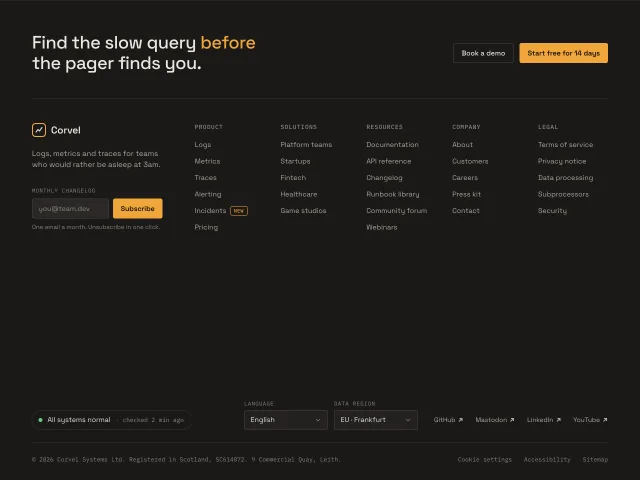
A quiet charcoal product footer: CTA row, brand and newsletter, five link columns, status line, language and region selects. Columns fold into accordions under 640px.
Enterprise sitemap footer
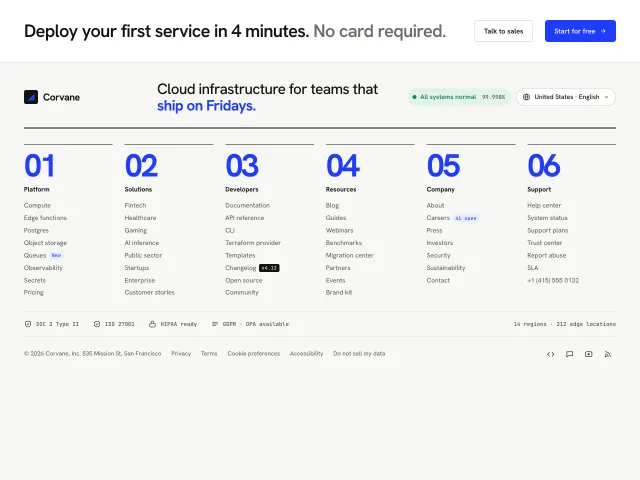
A dense six-column Swiss sitemap footer with giant index numerals, a live status pill with a 90-day uptime card, and a region and language popover.
Giant wordmark reveal footer
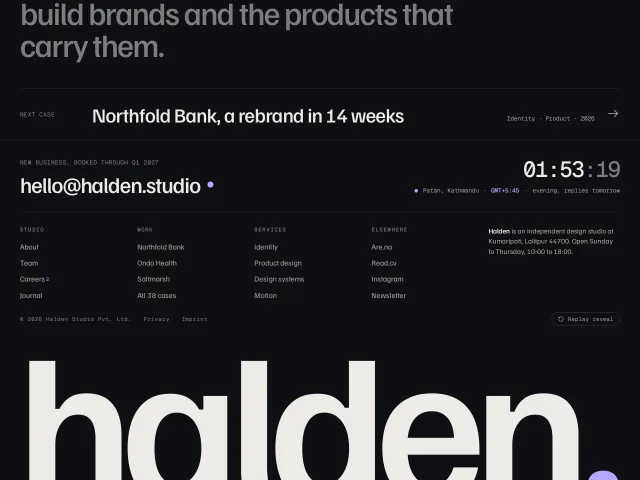
A dark studio footer whose full-width wordmark rises letter by letter out of the bottom edge as you scroll in, with a sitemap and a live local clock.
Docs install steps with code panels
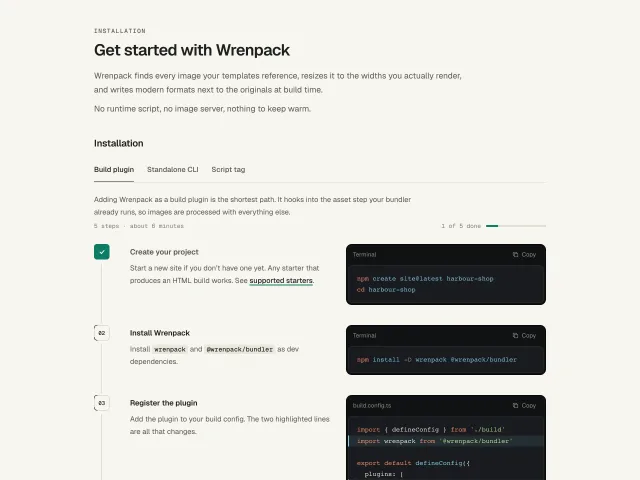
Numbered install steps for a docs page: prose on the left, a dark code panel on the right with highlighted added lines, guide tabs and tick-off numbers.
Agent at work hero
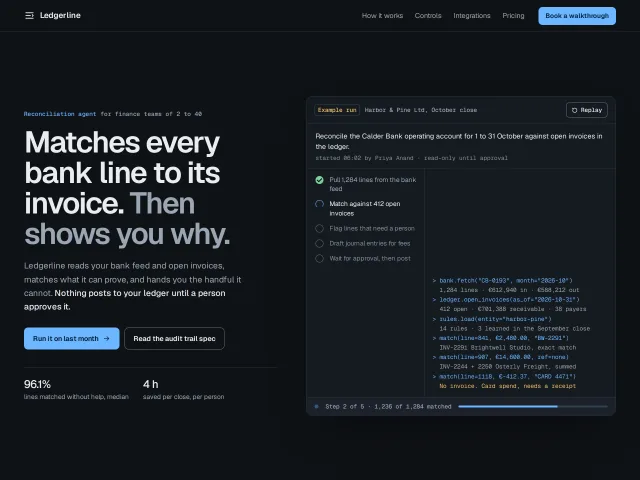
A hero for an invented reconciliation agent that shows a labelled example run: a five-step plan ticking off, tool calls and results scrolling, a journal diff, and a status line.
Dark mono repository card
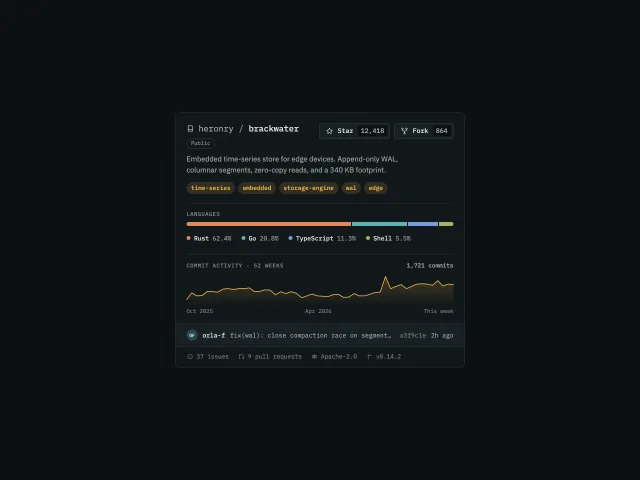
A code repository card in dark mono: star toggle with a ring pop, a growing language bar with legend highlight, and a 52-week commit sparkline you can scrub.