Nº 500 of 520
M3 modal bottom sheet with predictive back
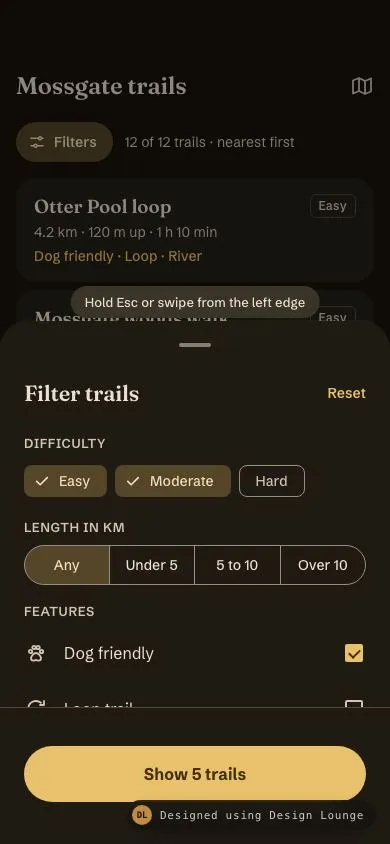
An Android M3 filter sheet over a trail list: scrim, drag handle, partial and full heights, spring settle, drag to dismiss and a predictive-back shrink.
Preview
Use it
Free to use · credit appreciated1 Once, in your project
npx skills add SusanAcharya/Design-Lounge 2 Then ask
Using the Design Lounge skill, build "M3 modal bottom sheet with predictive back" (piece m3-modal-bottom-sheet) in my stack. Match its brief; restyle it onto my product's theme.
No skill? Paste the brief instead. It carries the numbers, tokens and behaviour.
<!-- Design Lounge Nº 500 · "M3 modal bottom sheet with predictive back" · www.designlounge.live -->

# M3 modal bottom sheet with predictive back

> **Build brief for a coding agent.** Rebuild this piece in the reader's stack. If they haven't said which stack, ask once, then default to semantic HTML + CSS + a little vanilla JS. Match the numbers below; don't "improve" them. This is the Android counterpart of `ios-bottom-sheet-detents`: M3 sheets have a visible drag handle, a 32% black scrim, square bottom corners and Android's predictive-back shrink.

## What it is

The **Filter trails** sheet of "Fernhollow", a walking-trails app, in Material 3 on a dark ochre scheme. Behind it is the "Mossgate trails" list (12 trail cards). The sheet opens **partially expanded** (62% of the viewport) over a scrim. It has a 32 × 4 drag handle, a Fraunces "Filter trails" headline with a Reset text button, Difficulty filter chips, a Length segmented button and six Feature checkboxes. A **filled 56px button** reading "Show 5 trails" stays pinned to the bottom of the screen and counts live matches as filters change. Drag it up to **expanded** (top at 64px), down to dismiss, or fling. It settles on a real spring with slight overshoot. Holding Esc, or swiping in from the left edge, plays Android's **predictive back**: the sheet shrinks toward its bottom centre, the scrim lightens, and a back chevron grows at the left edge. Releasing commits the dismissal.

Language: Material 3 Expressive on dark tonal surfaces (`ModalBottomSheet` with `skipPartiallyExpanded = false`).

## Reference behaviour

1. **Initial state (hero).** The sheet is open and partially expanded. At an 844px viewport its top edge is at y 321 (visible height `round(0.62 × H)` = 523px). The scrim is `#000` at 40% opacity over the list, and the list is `inert`. A 32px pill "Hold Esc or swipe from the left edge" floats 48px above the sheet's top edge. Pre-selected filters: Difficulty Easy and Moderate, Length Any, Features Dog friendly. The button reads "Show 5 trails". Behind the scrim, the list is unfiltered: "12 of 12 trails · nearest first".
2. **Partial layout, top to bottom:** handle area 48px (handle at 22px from the top); header row 52px with "Filter trails" (Fraunces 600, 22/28) and Reset; "DIFFICULTY" label and three 32px chips in 48px targets; "LENGTH IN KM" label and a 4-segment button (Any, Under 5, 5 to 10, Over 10) of 40px segments in 48px targets; "FEATURES" label and the first two 56px checkbox rows. The rest is hidden below the footer. Body scrolling is disabled while the sheet is partial.
3. **Footer.** A 1px `--outline-v` top border, 12px top padding, an 18px helper line, a 56px full-width pill button, and 42px bottom padding (34px home indicator plus 8px). The footer is pinned to the **screen** bottom while the sheet is between expanded and partial. Below partial (while dismissing), it moves down with the sheet.
4. **Drag.** A pointer down on the handle, the header, or the body (body only while partial, or while expanded and scrolled to the top and dragging down) starts tracking. After 6px of movement the sheet follows the pointer 1:1. Above the expanded position, resistance applies: `y = −sqrt(−raw) × 4`. A drag that started on a chip or checkbox doesn't toggle it on release.
5. **Release.** Velocity is measured over the last 6 pointer samples, in px/ms. The projected position is `y + v × 180`. The target is the nearest of expanded (0), partial (`yP`) and hidden (`yH`). Expanded and partial settle with a spring of stiffness 380 and damping ratio 0.78, starting with the release velocity, which gives a small overshoot. Hidden runs as a dismissal.
6. **Wheel.** A downward wheel over the body while partial expands the sheet instead of scrolling.
7. **Handle tap or Enter.** Toggles between partial and expanded with the same spring. The handle's `aria-label` switches between "Expand filters" and "Collapse filters to half height".
8. **Expanded.** The top is at 64px (10px below the 54px safe area), all six features are visible, and the body scrolls if the content is taller than the space.
9. **Filters.** Chips toggle (multi-select). Segments are single-select. Checkboxes need every checked feature to match (AND). After every change, the button updates to "Show N trail(s)".
10. **No matches (error state).** For example, Easy plus Moderate plus Dog friendly plus Reachable by bus gives 0 matches. The button becomes disabled with the text "No trails match", and the helper line reads "Try removing a feature or widening the length."
11. **Reset** clears all chips, sets Length to Any, and unchecks every feature. The button reads "Show 12 trails".
12. **Apply.** "Show N trails" applies the filters to the list, sets the Filters badge to the number of active filters (chips + non-Any length + features, so 3 in the hero), updates the count line ("5 of 12 trails · nearest first"), and dismisses.
13. **Dismiss.** The sheet runs a critically damped spring (stiffness 520, damping ratio 1) to `yH = sheetHeight + 24`. The scrim fades in proportion to position. Then the sheet is hidden, the list is un-inerted, and focus returns to the Filters button.
14. **Scrim tap** dismisses.
15. **Predictive back, keyboard.** Esc keydown (ignoring repeats) tweens a back progress `pb` from 0 to 1 over 260ms with a cubic ease-out. The sheet is transformed by `scale(1 − .1pb, 1 − .04pb)` around `50% 100%`, the scrim drops to 65% of its strength, the hint hides, and a 40px back chevron at the left edge scales from 0.6 to 1 and slides 12px in. Esc keyup commits: dismiss with 0.4 px/ms of starting velocity, keeping the shrink. Then `pb` resets.
16. **Predictive back, edge swipe.** A pointer down within 24px of the left edge, while the sheet is open, captures the gesture before anything else. Then `pb = clamp(dx / (0.45 × width), 0, 1)`. On release, `pb > 0.4` commits; otherwise `pb` tweens back to 0 over 200ms and the sheet stays.
17. **Reopen.** The Filters button opens the sheet from hidden to partial with a spring (stiffness 380, damping ratio 0.82), and focus moves to the sheet headline.

## Structure

```
390 × 844, partial                         expanded
┌────────────────────────────────────┐     ┌────────────────────────────────────┐
│ (54px safe area)                   │     │ (54px)  scrim                      │
│ Mossgate trails               [▱]  │     ├─╭────────────────────────────────╮─┤ y 64
│ (≡ Filters ③)  12 of 12 trails     │     │ │             ────               │ │ handle 32×4

… 231 more lines. Copy or download for the full brief. Loading the source…Brief
271 linesBuild brief for a coding agent. Rebuild this piece in the reader’s stack. If they haven’t said which stack, ask once, then default to semantic HTML + CSS + a little vanilla JS. Match the numbers below; don’t “improve” them. This is the Android counterpart of
ios-bottom-sheet-detents: M3 sheets have a visible drag handle, a 32% black scrim, square bottom corners and Android’s predictive-back shrink.
What it is
The Filter trails sheet of “Fernhollow”, a walking-trails app, in Material 3 on a dark ochre scheme. Behind it is the “Mossgate trails” list (12 trail cards). The sheet opens partially expanded (62% of the viewport) over a scrim. It has a 32 × 4 drag handle, a Fraunces “Filter trails” headline with a Reset text button, Difficulty filter chips, a Length segmented button and six Feature checkboxes. A filled 56px button reading “Show 5 trails” stays pinned to the bottom of the screen and counts live matches as filters change. Drag it up to expanded (top at 64px), down to dismiss, or fling. It settles on a real spring with slight overshoot. Holding Esc, or swiping in from the left edge, plays Android’s predictive back: the sheet shrinks toward its bottom centre, the scrim lightens, and a back chevron grows at the left edge. Releasing commits the dismissal.
Language: Material 3 Expressive on dark tonal surfaces (ModalBottomSheet with skipPartiallyExpanded = false).
Reference behaviour
- Initial state (hero). The sheet is open and partially expanded. At an 844px viewport its top edge is at y 321 (visible height
round(0.62 × H)= 523px). The scrim is#000at 40% opacity over the list, and the list isinert. A 32px pill “Hold Esc or swipe from the left edge” floats 48px above the sheet’s top edge. Pre-selected filters: Difficulty Easy and Moderate, Length Any, Features Dog friendly. The button reads “Show 5 trails”. Behind the scrim, the list is unfiltered: “12 of 12 trails · nearest first”. - Partial layout, top to bottom: handle area 48px (handle at 22px from the top); header row 52px with “Filter trails” (Fraunces 600, 22/28) and Reset; “DIFFICULTY” label and three 32px chips in 48px targets; “LENGTH IN KM” label and a 4-segment button (Any, Under 5, 5 to 10, Over 10) of 40px segments in 48px targets; “FEATURES” label and the first two 56px checkbox rows. The rest is hidden below the footer. Body scrolling is disabled while the sheet is partial.
- Footer. A 1px
--outline-vtop border, 12px top padding, an 18px helper line, a 56px full-width pill button, and 42px bottom padding (34px home indicator plus 8px). The footer is pinned to the screen bottom while the sheet is between expanded and partial. Below partial (while dismissing), it moves down with the sheet. - Drag. A pointer down on the handle, the header, or the body (body only while partial, or while expanded and scrolled to the top and dragging down) starts tracking. After 6px of movement the sheet follows the pointer 1:1. Above the expanded position, resistance applies:
y = −sqrt(−raw) × 4. A drag that started on a chip or checkbox doesn’t toggle it on release. - Release. Velocity is measured over the last 6 pointer samples, in px/ms. The projected position is
y + v × 180. The target is the nearest of expanded (0), partial (yP) and hidden (yH). Expanded and partial settle with a spring of stiffness 380 and damping ratio 0.78, starting with the release velocity, which gives a small overshoot. Hidden runs as a dismissal. - Wheel. A downward wheel over the body while partial expands the sheet instead of scrolling.
- Handle tap or Enter. Toggles between partial and expanded with the same spring. The handle’s
aria-labelswitches between “Expand filters” and “Collapse filters to half height”. - Expanded. The top is at 64px (10px below the 54px safe area), all six features are visible, and the body scrolls if the content is taller than the space.
- Filters. Chips toggle (multi-select). Segments are single-select. Checkboxes need every checked feature to match (AND). After every change, the button updates to “Show N trail(s)”.
- No matches (error state). For example, Easy plus Moderate plus Dog friendly plus Reachable by bus gives 0 matches. The button becomes disabled with the text “No trails match”, and the helper line reads “Try removing a feature or widening the length.”
- Reset clears all chips, sets Length to Any, and unchecks every feature. The button reads “Show 12 trails”.
- Apply. “Show N trails” applies the filters to the list, sets the Filters badge to the number of active filters (chips + non-Any length + features, so 3 in the hero), updates the count line (“5 of 12 trails · nearest first”), and dismisses.
- Dismiss. The sheet runs a critically damped spring (stiffness 520, damping ratio 1) to
yH = sheetHeight + 24. The scrim fades in proportion to position. Then the sheet is hidden, the list is un-inerted, and focus returns to the Filters button. - Scrim tap dismisses.
- Predictive back, keyboard. Esc keydown (ignoring repeats) tweens a back progress
pbfrom 0 to 1 over 260ms with a cubic ease-out. The sheet is transformed byscale(1 − .1pb, 1 − .04pb)around50% 100%, the scrim drops to 65% of its strength, the hint hides, and a 40px back chevron at the left edge scales from 0.6 to 1 and slides 12px in. Esc keyup commits: dismiss with 0.4 px/ms of starting velocity, keeping the shrink. Thenpbresets. - Predictive back, edge swipe. A pointer down within 24px of the left edge, while the sheet is open, captures the gesture before anything else. Then
pb = clamp(dx / (0.45 × width), 0, 1). On release,pb > 0.4commits; otherwisepbtweens back to 0 over 200ms and the sheet stays. - Reopen. The Filters button opens the sheet from hidden to partial with a spring (stiffness 380, damping ratio 0.82), and focus moves to the sheet headline.
Structure
390 × 844, partial                         expanded
┌────────────────────────────────────┐     ┌────────────────────────────────────┐
│ (54px safe area)                   │     │ (54px)  scrim                      │
│ Mossgate trails               [▱]  │     ├─╭────────────────────────────────╮─┤ y 64
│ (≡ Filters ③)  12 of 12 trails     │     │ │             ────               │ │ handle 32×4
│ ╭ Otter Pool loop ──────── Easy ╮  │     │ │ Filter trails           Reset  │ │
│ │ 4.2 km · 120 m up · 1 h 10 min│  │     │ │ DIFFICULTY                     │ │
│ ░░░░░░░░░ scrim 40% ░░░░░░░░░░░░░  │     │ │ [✓ Easy] [✓ Moderate] [Hard]   │ │
│   (Hold Esc or swipe from the …)   │     │ │ LENGTH IN KM                   │ │
│╭──────────────────────────────────╮│ 321 │ │ (Any|Under 5|5 to 10|Over 10)  │ │
││              ────                ││     │ │ FEATURES                       │ │
││ Filter trails             Reset  ││     │ │ ⌘ Dog friendly             [✓] │ │
││ DIFFICULTY                       ││     │ │ ↻ Loop trail               [ ] │ │
││ [✓ Easy] [✓ Moderate] [Hard]     ││     │ │ ≈ Waterfall or river       [ ] │ │
││ LENGTH IN KM                     ││     │ │ △ Mostly shaded            [ ] │ │
││ (Any |Under 5|5 to 10|Over 10)   ││     │ │ ⊙ Step-free sections       [ ] │ │
││ FEATURES                         ││     │ │ ▣ Reachable by bus         [ ] │ │
││ ⌘ Dog friendly               [✓] ││     │ │────────────────────────────────│ │
││──────────────────────────────────││     │ │ ( Show 5 trails )              │ │
││ (        Show 5 trails         ) ││ 56  │ │ (34px)                         │ │
││ (34px + 8)                       ││     │ ╰────────────────────────────────╯ │
└╰──────────────────────────────────╯┘ └────────────────────────────────────┘.app(list screen) is a<header>with<h1>, a map<button>, a tonal Filters<button aria-haspopup="dialog" aria-controls="sheet">with a badge, and anaria-livecount, plus a<ul class="list">of<li class="card">. It getsinertwhile the sheet is open.<button class="scrim" tabindex="-1" aria-label="Close filters">:position:absolute; inset:0; z-index:5.<p class="hint" aria-hidden="true">and<div class="edge" aria-hidden="true">are visual-only.<section class="sheet" role="dialog" aria-modal="true" aria-labelledby="stitle">: absolute,top:64px,height: calc(100% − 64px),max-width: 640px, centred, top corners 28px,transform-origin: 50% 100%. An::afterextends the surface 120px below the sheet, so overdrag never shows a gap.<button class="grab">: the 48px handle area..shead:<h2 id="stitle" tabindex="-1">and the Reset<button>..sbody: absolute fromtop:100pxtobottom:0, with 140px bottom padding. It contains the chip group (role="group",aria-pressedbuttons), the segmented control (role="radiogroup"with native radios), and the features (<label>+ checkbox rows)..sfoot: absolute at the bottom, holding thearia-livehelper<p>and<button class="fill">.
Trails (name, km, metres up, difficulty, features):
| Name | km | up | Difficulty | Features |
|---|---|---|---|---|
| Otter Pool loop | 4.2 | 120 | Easy | dog, loop, water |
| Mossgate woods walk | 2.6 | 60 | Easy | shade, dog, step, loop |
| Old quarry line | 3.1 | 40 | Easy | step, bus, loop |
| Heron Reach | 4.8 | 90 | Easy | water, loop, dog |
| Saltmarsh boardwalk | 5.4 | 10 | Easy | step, bus |
| Bellwether falls path | 6.5 | 280 | Moderate | water, dog, shade |
| Tanner’s Beck | 7.2 | 300 | Moderate | water, shade |
| Gorse Hill circuit | 8.4 | 390 | Moderate | loop, dog |
| Ravenscar scramble | 9.7 | 810 | Hard | water |
| Cobbler’s Edge | 10.4 | 520 | Moderate | loop, shade |
| Harrow Beacon ridge | 11.8 | 640 | Hard | bus |
| Long Mynde traverse | 14.6 | 720 | Hard | bus, dog |
Walking time is km / 4.5 + up / 600 hours, rounded to 5 minutes (“1 h 10 min”, “40 min”). Length buckets: Under 5 is < 5, 5 to 10 is 5 ≤ km ≤ 10, and Over 10 is > 10. Feature labels on cards: Dog friendly, Loop, River, Shaded, Step-free, Bus.
Tokens
:root {
  /* primary: ochre, seed #E9C16C (dark scheme) */
  --primary: #e9c16c;          /* filled button, checkbox, badge, Reset, focus */
  --on-primary: #3f2e00;
  --primary-c: #5b4300;
  --on-primary-c: #ffdea3;
  --secondary-c: #554529;      /* selected chip and segment, Filters tonal button */
  --on-secondary-c: #f5e0bb;

  /* surfaces, warm dark */
  --surface: #17130b;          /* list screen */
  --surface-low: #1f1b13;      /* sheet, footer */
  --surface-c: #231f17;        /* trail cards */
  --surface-high: #2e2921;
  --surface-highest: #393428;  /* hint pill, back chevron */
  --on-surface: #ebe1d4;
  --on-surface-v: #d0c5b4;     /* labels, icons, checkbox ring, handle */
  --outline: #998f80;          /* chip and segment borders */
  --outline-v: #4d4639;        /* footer rule, card difficulty tag */
  --scrim: #000; --scrim-a: .4;

  /* type */
  --f-head: "Fraunces", Georgia, serif;
  --f-body: "Schibsted Grotesk", system-ui, sans-serif;

  /* geometry */
  --sheet-top: 64px;           /* expanded top edge */
  --partial: .62;              /* visible fraction of viewport height */
  --r-sheet: 28px; --r-card: 20px; --r-chip: 8px; --r-full: 999px;
  --handle-w: 32px; --handle-h: 4px; --handle-top: 22px;
  --btn-h: 56px;
  --edge-zone: 24px;

  /* motion */
  --spring-settle: 380 / .78;    /* stiffness / damping ratio */
  --spring-open: 380 / .82;
  --spring-dismiss: 520 / 1;
  --fling-projection: 180ms;
  --pb-in: 260ms;               /* cubic ease-out */
  --pb-cancel: 200ms;
  --ease-std: cubic-bezier(.2, 0, 0, 1);
  --t-ripple: 450ms;
}
Typography
| Role | Family | Size / line | Weight | Tracking | Case |
|---|---|---|---|---|---|
| Screen title | Fraunces | 24 / 32 | 600 | −0.01em | sentence |
| Sheet headline | Fraunces | 22 / 28 | 600 | −0.01em | sentence |
| Card title | Fraunces | 19 / 24 | 600 | −0.005em | sentence |
| Section label | Schibsted Grotesk | 13 / 20 | 600 | 0.6px | uppercase |
| Chip, segment | Schibsted Grotesk | 14 / 20 | 500 | 0 | sentence |
| Feature row | Schibsted Grotesk | 16 / 24 | 400 | 0 | sentence |
| Card meta | Schibsted Grotesk | 14 / 20 | 400 / 500 features | 0 | sentence |
| Filled button | Schibsted Grotesk | 16 / 24 | 700 | 0.1px | sentence |
| Helper, hint | Schibsted Grotesk | 13 / 18 | 400 / 500 | 0 | sentence |
| Badge | Schibsted Grotesk | 12 / 20 | 700 | 0 | numeral |
Fraunces at display weights gives the outdoors brand a field-guide voice. Schibsted Grotesk keeps the controls compact and legible on the dark surface.
Motion
| Element | Trigger | Property | From → To | Timing |
|---|---|---|---|---|
| Sheet | drag | translateY | follows pointer 1:1, rubber band above 0 | direct |
| Sheet | release to expanded / partial | translateY | current → 0 / yP | spring k 380, ζ .78, v0 = release velocity |
| Sheet | open | translateY | yH → yP | spring k 380, ζ .82 |
| Sheet | dismiss | translateY | current → yH | spring k 520, ζ 1 |
| Footer | any sheet move | translateY | −min(y, yP) | follows sheet |
| Scrim | any sheet move | opacity | .4 × clamp((yH − y)/(yH − yP)) × (1 − .35pb) | follows sheet |
| Hint | sheet move | translateY / opacity | 48px above sheet top; 0 when expanded or during back | 200ms linear fade |
| Sheet | back progress | scale | 1,1 → .9,.96 at origin 50% 100% | Esc: 260ms cubic out; swipe: direct |
| Edge chevron | back progress | opacity, translateX, scale | 0, 0, .6 → 1, 12px, 1 | with pb |
| Back cancel | swipe release, pb ≤ .4 | pb | current → 0 | 200ms cubic out |
| Chip select | click | padding-left | 16 → 8px, check appears | 200ms --ease-std |
| Checkbox | change | fill, check scale | 0 → 1 | 150ms --ease-std |
| Ripples | press | scale / opacity | 0 → 1 / .12 → 0 | 450ms / 300ms |
Reduced motion: springs and the back tween jump straight to their targets. CSS transitions are 1ms. Ripples appear at full size at 10% without growing. Esc still dismisses, and the sheet still opens at partial.
States
- Partial: body
overflow:hidden; wheel-down or drag-up expands. - Expanded:
.expandedon the sheet; bodyoverflow-y:auto. - Dragging: no transition; chips and checkboxes ignore the click that ends a drag.
- Hidden:
visibility:hidden, scrimpointer-events:none, list not inert. - Chip selected:
--secondary-cfill, 18px check, no border. Unselected: 1px--outlineborder. - Segment selected:
--secondary-cfill. The outer segments get 20px end radii and the borders overlap by 1px. - Checkbox checked: 18px
--primarybox with an--on-primarycheck. Unchecked: 2px--on-surface-vring, 2px radius. - Button enabled:
--primary/--on-primary. Disabled (no matches):rgba(235,225,212,.12)fill, 38% text, helper text shown. - Focus-visible: 2px
--primaryoutline offset 2px on chips, segments, buttons and the Filters button; inset on feature rows. The handle shows a 2px primary ring around the pill. - Badge: hidden when 0; a
--primarypill with the count otherwise. - Empty list: applying zero results is blocked by the disabled button, but the list still renders “No trails match these filters.” if filters change from elsewhere (a deep link, say).
Accessibility
- The sheet is
role="dialog" aria-modal="true", labelled by its headline. The background.appgetsinertwhile open, so Tab stays inside the sheet. On open, focus moves to the headline (tabindex="-1"). On dismiss, focus returns to the Filters button. - Esc is the keyboard equivalent of Android back. It previews on keydown and commits on keyup, so a single press closes the sheet.
- The drag handle is a real
<button>. Enter or Space toggles partial and expanded, and its label describes the next action. - Chips are
aria-pressedtoggle buttons in a labelled group. Length is a native radio group (arrow keys). Features are native checkboxes inside their labels. - The button text is the live count. The helper
<p>isaria-live="polite", and the list count line is live too. - Contrast: on-surface on the sheet 13.3:1; labels 10.1:1; primary text (Reset) on the sheet 10.1:1; button text on primary 7.7:1; selected chip text 7.2:1; outline borders 5.4:1.
- Hit targets: handle area 390 × 48; chips and segments 48px tall; feature rows 56px; Reset 48px; filled button 56px; icon buttons 48px.
Responsive rules
- 360 wide: unchanged. The segmented labels are short (Under 5, Over 10) so four segments fit in 312px.
- Short viewports (≤ 700 tall): partial stays at 62% of the height, which shows the chips and segments with the features just peeking out; expanded still starts at 64px.
- Largest text size (200%): chip rows wrap onto two lines (
flex-wrap: wrap); segments stack into a vertical list of 48px radio rows when a label doesn’t fit; feature rows grow past 56px. Raise partial to 75% so the first section stays visible, and let the footer button grow in height rather than truncate its count. - Tablet (≥ 640 wide): the sheet is capped at 640px and centred, with a gap at both sides showing the scrim. Partial uses 50% of the height.
Acceptance checklist
Always
- Scrim is black at 40% (M3’s 32% is fine on light themes). Tapping it dismisses.
- Drag handle is 32 × 4 at 22px from the sheet top, inside a 48px tappable area that toggles states.
- Sheet has three resting positions: hidden, partial (62% of the viewport visible) and expanded (top at 64px).
- Release picks the nearest position to
y + v × 180msand settles on a spring that keeps the release velocity (slight overshoot). - Above expanded, drag has rubber-band resistance and no gap appears under the sheet.
- Primary button stays pinned to the screen bottom while partial or expanded, and leaves with the sheet on dismiss.
- Back gesture (Esc hold or left-edge swipe) shrinks the sheet around its bottom centre before committing. A short edge swipe cancels.
- Focus moves into the sheet on open, background is inert, and focus returns to the opener on close.
- Button shows the live result count and has a disabled no-match state with helper text.
- Reduced motion: no springs or tweens, and all states are still reachable.
This demo
- Brand “Fernhollow”, screen “Mossgate trails”, sheet “Filter trails”, 12 trails.
- Hero: Easy and Moderate, Any length and Dog friendly selected; button “Show 5 trails”; sheet top at y 321 on 844.
- Applying sets the badge to 3 and the count to “5 of 12 trails · nearest first”.
- Primary is
#E9C16C, sheet#1F1B13. Fonts are Fraunces and Schibsted Grotesk.
Implementation notes
A real spring, with release velocity. CSS transitions can’t inherit the fling velocity. Integrate a damped spring in small fixed steps:
function springTo(target, v0, k, z, done) {     // v0 in px/ms
  let v = v0 * 1000, t0 = performance.now();
  const c = 2 * z * Math.sqrt(k);
  const step = now => {
    const dt = Math.min(.064, (now - t0) / 1000); t0 = now;
    const n = Math.max(1, Math.ceil(dt / .004)), h = dt / n;
    for (let i = 0; i < n; i++) { v += (-k * (y - target) - c * v) * h; y += v * h; }
    render();
    if (Math.abs(y - target) < .5 && Math.abs(v) < 12) { y = target; render(); done && done(); return; }
    anim = requestAnimationFrame(step);
  };
  anim = requestAnimationFrame(step);
}
Pin the footer while the sheet is translated. The sheet is full height and moved with translateY(y), so its bottom sits y px below the screen. Counter-translate the footer, but only down to the partial position:
function render() {
  sheet.style.transform = `translateY(${y}px) scale(${1 - .1 * pb}, ${1 - .04 * pb})`;
  sfoot.style.transform = `translateY(${-Math.min(y, yP)}px)`;
  const f = Math.max(0, Math.min(1, (yH - y) / (yH - yP)));
  scrim.style.opacity = (f * .4 * (1 - .35 * pb)).toFixed(3);
}
Edge swipe beats every other pointer handler. Register it on window in the capture phase and stop propagation, so the sheet drag and the ripples never see it:
addEventListener('pointerdown', e => {
  if (!isOpen || e.clientX > 24) return;
  e.stopPropagation(); e.preventDefault(); back = { x0: e.clientX, id: e.pointerId };
}, true);
addEventListener('pointermove', e => { if (back?.id === e.pointerId) { pb = clamp((e.clientX - back.x0) / (innerWidth * .45)); render(); } }, true);
addEventListener('pointerup', e => { if (back?.id !== e.pointerId) return; pb > .4 ? commitBack() : (back = null, tweenPb(0, 200)); }, true);
Common mistakes: animating height instead of transform (janky, and it reflows the content); letting the footer scroll off-screen in the partial state; allowing body scroll while partial (content then hides under the footer with no way to reach it); toggling a chip at the end of a drag; and making Esc dismiss instantly with no preview, which loses the predictive-back point of the piece.
Details
- Palette
- Type
- Fraunces · Schibsted Grotesk
- Motion
- Rich motion
- Build
- Multi-step
- Tags
On the shelves