Nº 494 of 520
Lit study on a quiet stage
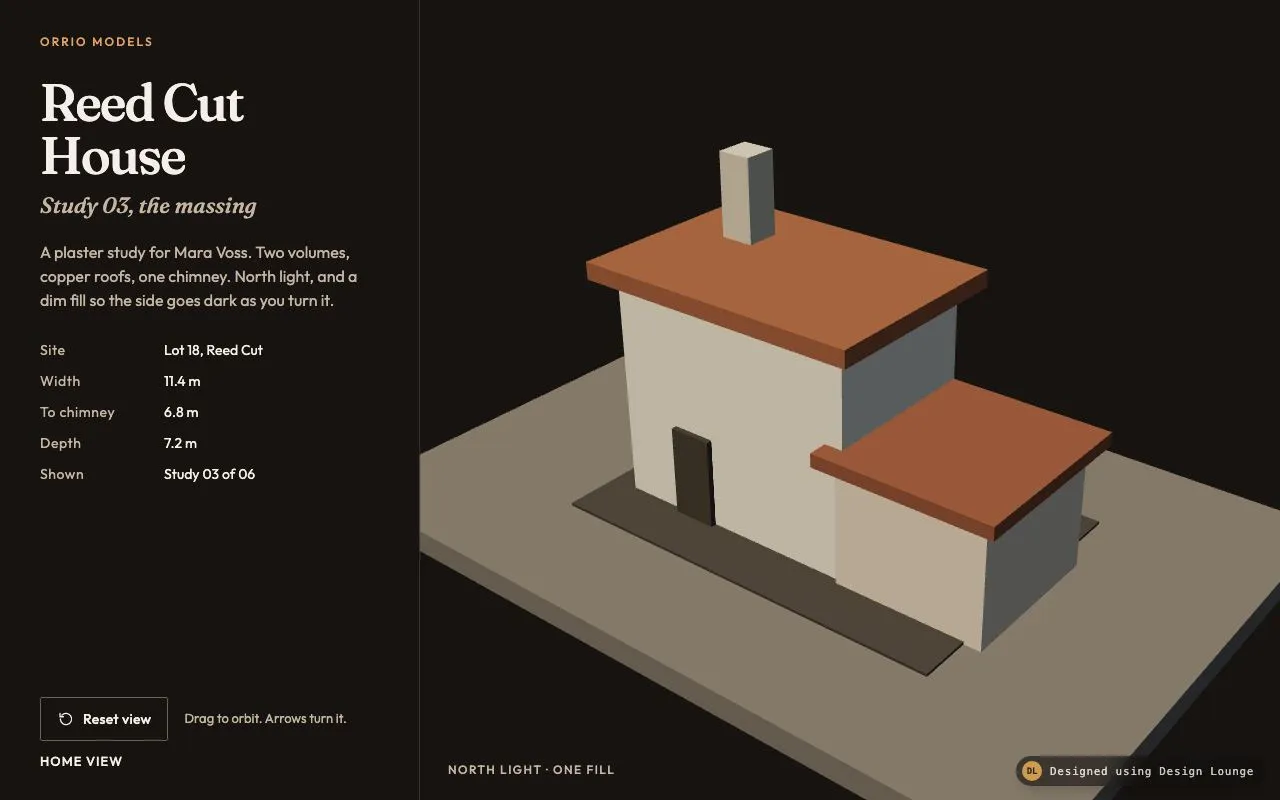
Drag orbits a plaster massing on a quiet stage, with one key light and a dim fill so a face goes dark as it turns.
Preview
Use it
Free to use · credit appreciated1 Once, in your project
npx skills add SusanAcharya/Design-Lounge 2 Then ask
Using the Design Lounge skill, build "Lit study on a quiet stage" (piece three-orbit-object) in my stack. Match its brief; restyle it onto my product's theme.
No skill? Paste the brief instead. It carries the numbers, tokens and behaviour.
<!-- Design Lounge Nº 494 · "Lit study on a quiet stage" · www.designlounge.live -->

# Lit study on a quiet stage

> **Build brief for a coding agent.** Rebuild this piece in the reader's stack. If they haven't said which stack, ask once, then default to semantic HTML + CSS + a little vanilla JS. Match the numbers below; don't "improve" them.

The page chrome is HTML and CSS. The model is a Three.js scene. Build it from the scene graph in Implementation notes. The Lounge demo is raw WebGL so it stays one file. Do not rebuild the massing as CSS boxes, and do not put a Three.js script in the demo file.

## What it is

The study viewer on Orrio Models' site, for Reed Cut House, study 03, commissioned by Mara Voss. A plaster massing of two volumes, copper roofs, a chimney and a door sits on a stone pad in a near-black void. The visitor drags to orbit. The orbit has inertia, then settles. One warm key light and a dim cool fill light the model, so the face that turns away from the key goes dark. The first frame is already that lit, slightly turned view: not a flat elevation, and not an empty stage.

## Reference behaviour

1. First frame, before any input: the camera is at `(2.905, 3.047, 3.588)`, looking at `(0.12, 0.62, 0)`. Field of view is 32°. The main volume shows its front and its right side. The front plaster is lit. The right side is visibly darker. The readout says "Home view".
2. Press on the canvas and drag. Horizontal drag changes azimuth by `0.008` radians per pixel (drag right decreases azimuth, so the model turns with the pointer). Vertical drag changes polar angle by `0.005` radians per pixel. Polar angle is clamped from `0.52` to `1.32` radians (about 30° to 76° from vertical). The cursor is `grabbing`. Distance stays `5.15`. There is no pan and no zoom.
3. While dragging, the readout updates every frame: "Home view" when the azimuth is within 1° of the start, otherwise "N° off home", with N wrapped to ±180.
4. Release. If motion is allowed, the last drag delta becomes velocity. Each frame, azimuth and polar angle add that velocity, then velocity is multiplied by `0.92`. Polar angle stays inside the clamp, and polar velocity zeroes if it hits the clamp. The loop stops when both speeds are under `0.00012` radians per frame.
5. With `prefers-reduced-motion: reduce`, release sets velocity to 0. The model stays where the pointer left it. Dragging still tracks the pointer 1:1.
6. "Reset view" springs azimuth back to `0.66` and polar angle back to `1.08`, 14% of the remaining gap per frame (about 400ms). Velocity is cleared. With reduced motion, reset snaps in one frame. The polite live region says "Home view" when it arrives.
7. Focus the canvas and press Left or Right: azimuth steps `0.09` radians, and (unless reduced motion) a small coast of `0.35` times that step is applied. Up and Down change polar angle by `0.054` radians and do not coast. Home runs the same reset as the button. Keys do not scroll the page while the canvas is focused.
8. The lights stay fixed in the world. Orbiting is what makes a face go dark. The key is not parented to the camera.
9. The model is eight boxes built in code. No loaded model, no image texture.

## Structure

```
1280 × 800
┌──────────────────────────┬────────────────────────────────────────┐
│ ORRIO MODELS             │                                        │
│ Reed Cut House           │                                        │
│ Study 03, the massing    │           plaster massing              │
│ A plaster study for …    │           on a stone pad               │
│ Site        Lot 18, …    │           canvas, drag to orbit        │
│ Width       11.4 m       │                                        │
│ To chimney  6.8 m        │                                        │
│ Depth       7.2 m        │                                        │
│ Shown       Study 03/06  │                                        │
│ [Reset view]  Drag to…   │  NORTH LIGHT · ONE FILL                │
│ HOME VIEW                │                                        │

… 244 more lines. Copy or download for the full brief. Loading the source…Brief
284 linesBuild brief for a coding agent. Rebuild this piece in the reader’s stack. If they haven’t said which stack, ask once, then default to semantic HTML + CSS + a little vanilla JS. Match the numbers below; don’t “improve” them.
The page chrome is HTML and CSS. The model is a Three.js scene. Build it from the scene graph in Implementation notes. The Lounge demo is raw WebGL so it stays one file. Do not rebuild the massing as CSS boxes, and do not put a Three.js script in the demo file.
What it is
The study viewer on Orrio Models’ site, for Reed Cut House, study 03, commissioned by Mara Voss. A plaster massing of two volumes, copper roofs, a chimney and a door sits on a stone pad in a near-black void. The visitor drags to orbit. The orbit has inertia, then settles. One warm key light and a dim cool fill light the model, so the face that turns away from the key goes dark. The first frame is already that lit, slightly turned view: not a flat elevation, and not an empty stage.
Reference behaviour
- First frame, before any input: the camera is at
(2.905, 3.047, 3.588), looking at(0.12, 0.62, 0). Field of view is 32°. The main volume shows its front and its right side. The front plaster is lit. The right side is visibly darker. The readout says “Home view”. - Press on the canvas and drag. Horizontal drag changes azimuth by
0.008radians per pixel (drag right decreases azimuth, so the model turns with the pointer). Vertical drag changes polar angle by0.005radians per pixel. Polar angle is clamped from0.52to1.32radians (about 30° to 76° from vertical). The cursor isgrabbing. Distance stays5.15. There is no pan and no zoom. - While dragging, the readout updates every frame: “Home view” when the azimuth is within 1° of the start, otherwise “N° off home”, with N wrapped to ±180.
- Release. If motion is allowed, the last drag delta becomes velocity. Each frame, azimuth and polar angle add that velocity, then velocity is multiplied by
0.92. Polar angle stays inside the clamp, and polar velocity zeroes if it hits the clamp. The loop stops when both speeds are under0.00012radians per frame. - With
prefers-reduced-motion: reduce, release sets velocity to 0. The model stays where the pointer left it. Dragging still tracks the pointer 1:1. - “Reset view” springs azimuth back to
0.66and polar angle back to1.08, 14% of the remaining gap per frame (about 400ms). Velocity is cleared. With reduced motion, reset snaps in one frame. The polite live region says “Home view” when it arrives. - Focus the canvas and press Left or Right: azimuth steps
0.09radians, and (unless reduced motion) a small coast of0.35times that step is applied. Up and Down change polar angle by0.054radians and do not coast. Home runs the same reset as the button. Keys do not scroll the page while the canvas is focused. - The lights stay fixed in the world. Orbiting is what makes a face go dark. The key is not parented to the camera.
- The model is eight boxes built in code. No loaded model, no image texture.
Structure
1280 × 800
┌──────────────────────────┬────────────────────────────────────────┐
│ ORRIO MODELS             │                                        │
│ Reed Cut House           │                                        │
│ Study 03, the massing    │           plaster massing              │
│ A plaster study for …    │           on a stone pad               │
│ Site        Lot 18, …    │           canvas, drag to orbit        │
│ Width       11.4 m       │                                        │
│ To chimney  6.8 m        │                                        │
│ Depth       7.2 m        │                                        │
│ Shown       Study 03/06  │                                        │
│ [Reset view]  Drag to…   │  NORTH LIGHT · ONE FILL                │
│ HOME VIEW                │                                        │
└──────────────────────────┴────────────────────────────────────────┘
420px panel canvas fills the restsection.panellabelled by theh1: brandp, the onlyh1(“Reed Cut House”), study line, lede, adlof five facts, the resetbutton, the hintp, the bearingp, and a visually hidden polite live region.div.stage: thecanvas(tabindex 0, labelled “Orbit the Reed Cut House study. Drag, or use the arrow keys.”), the captionp(“North light · one fill”,pointer-events: none), and an errorphidden until WebGL fails.- The canvas is the only pointer target for orbit. The panel does not orbit.
Scene units are metres of the study model on the table, not the 11.4 m building. The dl quotes the building. The mesh list below is the model.
| Mesh | Box (w, h, d) | Position (x, y, z) | Colour | Metal | Rough |
|---|---|---|---|---|---|
| Pad | 3.2, 0.10, 2.15 | 0, 0.05, 0 | #5C564F | 0.02 | 0.92 |
| Contact shadow | 1.7, 0.012, 1.15 | 0.05, 0.106, 0.02 | #2A241E | 0 | 1 |
| Main volume | 1.05, 0.92, 0.68 | -0.16, 0.56, 0.02 | #E7DCCB | 0.02 | 0.78 |
| Wing | 0.62, 0.50, 0.64 | 0.66, 0.35, 0.06 | #D4C4AE | 0.02 | 0.82 |
| Main roof | 1.20, 0.07, 0.84 | -0.16, 1.055, 0.02 | #A85A38 | 0.45 | 0.38 |
| Wing roof | 0.74, 0.055, 0.76 | 0.66, 0.628, 0.06 | #8E4A30 | 0.40 | 0.42 |
| Chimney | 0.14, 0.34, 0.14 | -0.46, 1.26, -0.12 | #C8BBA8 | 0.04 | 0.70 |
| Door | 0.18, 0.38, 0.025 | -0.34, 0.29, 0.372 | #2C261F | 0.05 | 0.60 |
Tokens
:root {
  --void: #161311;          /* page, panel, canvas clear */
  --stage: #5C564F;         /* stone pad */
  --shadow: #2A241E;        /* contact slab */
  --plaster: #E7DCCB;       /* main volume */
  --wing: #D4C4AE;          /* side volume */
  --copper: #A85A38;        /* main roof */
  --copper-deep: #8E4A30;   /* wing roof */
  --chimney: #C8BBA8;
  --door: #2C261F;
  --ink: #F4EFE8;           /* text on void */
  --muted: #C4B5A4;         /* secondary text */
  --line: rgba(244, 239, 232, 0.16);
  --accent: #E0A06A;        /* brand and hover */
  --focus: #F0C9A0;
  --btn-line: #6E6256;
  --serif: "Fraunces", Georgia, serif;
  --sans: "Outfit", system-ui, sans-serif;
  --text: 16px;
  --ease: cubic-bezier(0.2, 0.7, 0.2, 1);
  --fast: 160ms;
  --space-1: 8px;
  --space-2: 16px;
  --space-3: 22px;
  --space-4: 28px;
  --space-5: 36px;
  --radius: 2px;
}
Clear colour of the renderer is #161311 (sRGB). Do not clear to pure black.
Typography
| Role | Family | Size | Weight | Line-height | Tracking | Case |
|---|---|---|---|---|---|---|
| Brand | Outfit | 12px | 500 | 1 | 0.18em | uppercase |
| Title | Fraunces | 52px | 500 | 1.02 | -0.03em | sentence |
| Study line | Fraunces italic | 22px | 500 | 1.2 | 0 | sentence |
| Lede | Outfit | 16px | 400 | 1.5 | 0 | sentence, max 34ch |
| Fact label | Outfit | 14px | 400 | 1.4 | 0.04em | sentence |
| Fact value | Outfit | 14px | 400 | 1.4 | 0 | sentence |
| Button | Outfit | 14px | 500 | 1 | 0.02em | sentence |
| Hint | Outfit | 13px | 400 | 1.4 | 0 | sentence |
| Bearing | Outfit | 13px | 500 | 1 | 0.08em | uppercase |
| Canvas caption | Outfit | 12px | 500 | 1 | 0.12em | uppercase |
At 1024px and under, the title is 40px. At 768px and under it stays 40px.
Motion
| Thing | Trigger | Property | From → to | Duration | Easing | Reduced motion |
|---|---|---|---|---|---|---|
| Orbit coast | pointerup, or arrow key | azimuth, polar | release velocity, ×0.92 each frame | until speed < 0.00012 rad | exponential decay | no coast, velocity stays 0 |
| Reset | button, or Home | azimuth, polar | current → 0.66, 1.08 | 14% of the gap per frame | exponential | one-frame snap |
| Button | hover | border-color, color | #6E6256 / #F4EFE8 → #E0A06A | 160ms | cubic-bezier(0.2, 0.7, 0.2, 1) | no transition |
| Button | active | background | transparent → rgba(224, 160, 106, 0.08) | 160ms | same | no transition |
The render loop runs only while dragging, coasting, or resetting. A settled model is one frame, not a perpetual loop. Nothing else on the page animates.
States
- Canvas idle: cursor
grab. Dragging: cursorgrabbing. - Reset hover: border and label turn
#E0A06A. Active: an 8% accent wash. - Reset and canvas focus-visible: 2px solid
#F0C9A0, 3px offset. - Bearing is “Home view” at rest and “N° off home” once the turn passes 1°.
- WebGL missing or a shader failing: the error line is shown in
#E0A06A. The panel copy stays. - No disabled state. No empty state. The model is always there.
Accessibility
- One
h1: “Reed Cut House”. - The canvas has an accessible name and
aria-describedbypointing at the hint: “Drag to orbit. Arrows turn it.” - Tab order: reset button, then canvas. The caption is not focusable.
- Left, Right, Up, Down, and Home work only when the canvas is focused, and they call
preventDefaultso the page does not scroll. - A visually hidden
aria-live="polite"region updates on pointerup, on a key, and when reset finishes. It does not update on every drag frame. The visible bearing may. - Reset is a
buttonwith visible text, 44px tall, and an inline SVG that isaria-hidden. - Body text
#C4B5A4on#161311stays above 4.5:1. The title#F4EFE8on#161311is higher. - Hit target for reset is 44px. The canvas is the drag surface and is far larger.
Responsive rules
- At 1280 and above: panel 420px, canvas the rest, title 52px, panel padding 36px 40px 32px. The page does not scroll.
- At 1024: panel 320px, padding 28px 24px, title 40px. The model stays fully in the canvas.
- At 768 and below, including under 640: the grid becomes one column. The panel is on top with a bottom hairline instead of a right hairline. The flexible spacer in the panel is hidden so the canvas keeps at least 280px. Orbit, reset, and keys behave the same. No horizontal scroll.
Acceptance checklist
Always
- The scene is a perspective camera, one key light, one dim fill, and an ambient light. Meshes use a standard material. No loaded model.
- First frame shows the object already lit and slightly turned, with one face darker than the face toward the key.
- Drag orbits. Distance does not change. Polar angle is clamped. Release coasts, then stops.
- Reset returns to the home azimuth and polar angle.
- Reduced motion removes the coast and makes reset instant. Drag still tracks the pointer.
- Arrow keys orbit when the canvas is focused. Home resets.
- Focus rings are visible on the button and the canvas.
- No horizontal overflow at 1280 or at 768.
- The render loop stops when the model is still.
This demo
- The
h1reads “Reed Cut House”. The study line reads “Study 03, the massing”. The brand reads “Orrio models”. - Facts read: Lot 18, Reed Cut; 11.4 m; 6.8 m; 7.2 m; Study 03 of 06.
- Home camera is
(2.905, 3.047, 3.588)looking at(0.12, 0.62, 0), fov 32°, distance 5.15. - Key light colour
#FFF1DCintensity 3.4 from(-2.2, 5.4, 2.6). Fill#9BB0C4intensity 0.38 from(4.2, 1.4, -1.2). - The eight boxes use the colours in the mesh table, including plaster
#E7DCCBand copper#A85A38. - The bearing reads “Home view” on the first frame. The caption reads “North light · one fill”.
Implementation notes
The Lounge demo is raw WebGL so it stays one file. Build the product from this scene graph in Three.js. Do not add Three.js to the demo file. Do not replace the boxes with CSS faces.
1. Scene graph
Lift this as the scene. width and height are the canvas CSS size in pixels.
import * as THREE from 'three';
import { OrbitControls } from 'three/addons/controls/OrbitControls.js';

const scene = new THREE.Scene();
scene.background = new THREE.Color('#161311');

const camera = new THREE.PerspectiveCamera(32, width / height, 0.08, 40);
camera.position.set(2.905, 3.047, 3.588);

const renderer = new THREE.WebGLRenderer({ antialias: true });
renderer.setPixelRatio(Math.min(devicePixelRatio, 2));
renderer.toneMapping = THREE.ACESFilmicToneMapping;
renderer.toneMappingExposure = 1.1;

const key = new THREE.DirectionalLight('#FFF1DC', 3.4);
key.position.set(-2.2, 5.4, 2.6);
scene.add(key);
const fill = new THREE.DirectionalLight('#9BB0C4', 0.38);
fill.position.set(4.2, 1.4, -1.2);
scene.add(fill);
scene.add(new THREE.AmbientLight('#3A332C', 0.55));

function solid(w, h, d, color, metal, rough, x, y, z) {
  const mesh = new THREE.Mesh(
    new THREE.BoxGeometry(w, h, d),
    new THREE.MeshStandardMaterial({ color, metalness: metal, roughness: rough })
  );
  mesh.position.set(x, y, z);
  scene.add(mesh);
}

solid(3.2, 0.1, 2.15, '#5C564F', 0.02, 0.92, 0, 0.05, 0);
solid(1.7, 0.012, 1.15, '#2A241E', 0, 1, 0.05, 0.106, 0.02);
solid(1.05, 0.92, 0.68, '#E7DCCB', 0.02, 0.78, -0.16, 0.56, 0.02);
solid(0.62, 0.5, 0.64, '#D4C4AE', 0.02, 0.82, 0.66, 0.35, 0.06);
solid(1.2, 0.07, 0.84, '#A85A38', 0.45, 0.38, -0.16, 1.055, 0.02);
solid(0.74, 0.055, 0.76, '#8E4A30', 0.4, 0.42, 0.66, 0.628, 0.06);
solid(0.14, 0.34, 0.14, '#C8BBA8', 0.04, 0.7, -0.46, 1.26, -0.12);
solid(0.18, 0.38, 0.025, '#2C261F', 0.05, 0.6, -0.34, 0.29, 0.372);

const controls = new OrbitControls(camera, renderer.domElement);
controls.target.set(0.12, 0.62, 0);
controls.enableDamping = true;
controls.dampingFactor = 0.08;
controls.enablePan = false;
controls.enableZoom = false;
controls.minPolarAngle = 0.52;
controls.maxPolarAngle = 1.32;
controls.update();
OrbitControls is the control. Damping is the inertia. The home position above is the first frame: azimuth 0.66 radians, polar 1.08 radians, radius 5.15. Reset writes the camera back to (2.905, 3.047, 3.588) and the target back to (0.12, 0.62, 0), then calls controls.update(). With reduced motion, assign those values in one frame. Otherwise lerp 14% of the gap per frame.
The key is about nine times the fill. If you raise the fill to match the key, the side face stops going dark and the piece fails.
2. Reset and the bearing
const HOME = new THREE.Vector3(2.905, 3.047, 3.588);
const TARGET = new THREE.Vector3(0.12, 0.62, 0);
let resetting = false;
function reset() {
  resetting = true;
  controls.enabled = false;
}
function frame() {
  if (resetting) {
    if (reduce) {
      camera.position.copy(HOME);
      resetting = false;
    } else {
      camera.position.lerp(HOME, 0.14);
      if (camera.position.distanceTo(HOME) < 0.002) {
        camera.position.copy(HOME);
        resetting = false;
      }
    }
    controls.target.copy(TARGET);
    controls.update();
    if (!resetting) controls.enabled = true;
  } else {
    controls.update();
  }
  renderer.render(scene, camera);
}
Wrap the azimuth delta to ±180 before writing the bearing. “Home view” when the absolute delta is under 1°. Otherwise “N° off home”.
3. Common mistakes
- Parenting the key light to the camera. Then every face stays equally lit and the turn does nothing.
- Loading a glTF. This object is eight
BoxGeometrymeshes. - Enabling zoom or pan. The radius stays 5.15.
- Leaving
requestAnimationFramerunning after the coast ends. - Replacing the stage with a stack of CSS boxes. The product scene is the graph above.
- Adding a Three.js
<script src>to the Lounge demo. That file is raw WebGL on purpose.
Details
- Palette
- Type
- Fraunces · Outfit
- Motion
- Rich motion
- Build
- Multi-step
- Tags
Studied
Icon MuseumLet the icons be the only colour. Give each one a shelf, a lift on hover, and a quiet label.
All sourcesOn the shelves