Nº 027 of 520
Large title collapse on scroll
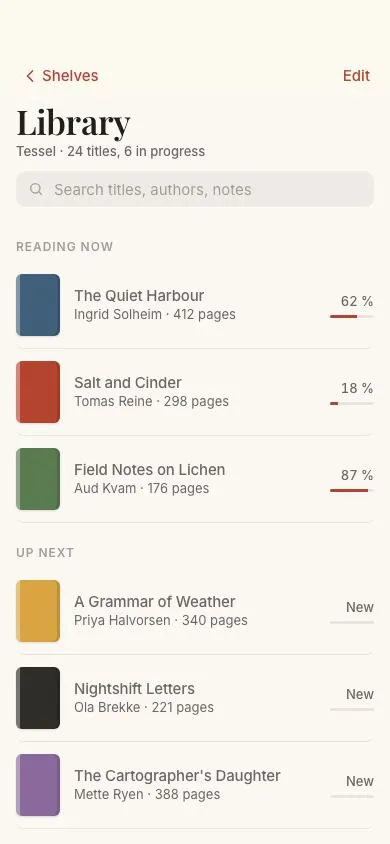
A 34px serif large title shrinks and fades into a 17px centred toolbar title as the list scrolls; the glass toolbar's fill, blur and hairline scale with scroll and the search field collapses.
Preview
Use it
Free to use · credit appreciated1 Once, in your project
npx skills add SusanAcharya/Design-Lounge 2 Then ask
Using the Design Lounge skill, build "Large title collapse on scroll" (piece ios-large-title-collapse) in my stack. Match its brief; restyle it onto my product's theme.
No skill? Paste the brief instead. It carries the numbers, tokens and behaviour.
<!-- Design Lounge Nº 027 · "Large title collapse on scroll" · www.designlounge.live -->

# Large title collapse on scroll

> **Build brief for a coding agent.** Rebuild this piece in the reader's stack. If they haven't said which stack, ask once, then default to semantic HTML + CSS + a little vanilla JS. Match the numbers below; don't "improve" them.

## What it is

The "Library" screen of "Tessel", a reading app, showing the iOS large-title navigation pattern. At rest the toolbar is transparent and the 34px Playfair Display title sits in the content with a subtitle and a 36px search field under it. Over the first 52px of scroll, a single custom property `--p` (0 → 1) drives everything: the large title scales to 82% and fades out, the 17px centred Inter title rises 6px and fades in during the last 45% of the range, the toolbar gains a 78%-opaque paper fill, 20px blur and a hairline, and the search field's height, margin and opacity collapse to 0. There is no JS animation; JS writes one number per frame and CSS does the rest, which is why it stays in sync with the finger.

## Reference behaviour

1. Initial state (`scrollTop 0`, `--p: 0`): toolbar shows "‹ Shelves" (left) and "Edit" (right) in the terracotta accent on a transparent bar; large "Library" title with "Tessel · 24 titles, 6 in progress" under it; search field visible; book list below in three sections.
2. Scroll down 0 → 52px: `--p` rises linearly (`scrollTop / 52`, clamped). The large title scales from 1 to 0.82 around its bottom-left corner, moves up 4px and fades (opacity `1 − 1.4p`, so it is gone by p ≈ 0.71). The search field height goes 36 → 0px, top margin 12 → 0, opacity `1 − 1.6p`, scale 1 → 0.94.
3. From p = 0.55 to 1 the centred small title fades in (`clamp(0, (p − .55)/.45, 1)`) while rising from 6px to 0.
4. The toolbar's background alpha is `.78p`, its `backdrop-filter` blur is `20px × p`, its bottom hairline alpha `.08p` and its inner top highlight `.6p`. At p = 1 it is fully glass; the list scrolls under it.
5. Scroll back up: everything reverses continuously; there is no snapping and no hysteresis.
6. Scrolling beyond 52px changes nothing further in the toolbar.
7. Tapping "Shelves" or "Edit" has no navigation in the demo; they show focus rings and press states.
8. Tapping the search field focuses the input (2px accent ring); it stays focusable only while `--p < 1` in practice, because its height is 0 when collapsed.

## Structure

```
390 × 844
┌────────────────────────────────────────┐
│ (54 status)                            │
│ 54 ‹ Shelves        [Library]     Edit │  .bar 44 tall (fixed), mid title hidden at p=0
│────────────────────────────────────────│  hairline alpha .08·p
│ 98  Library (Playfair 34/600)          │  .head, in the scroller
│     Tessel · 24 titles, 6 in progress  │
│    ┌──────────────────────────────┐    │  .search 36, r10
│    │ ⌕ Search titles, authors…    │    │
│    └──────────────────────────────┘    │
│  READING NOW                           │  12/600 uppercase
│  ▮ The Quiet Harbour            62 %   │  row 86: cover 44×62, title, author, progress bar 44×3
│    Ingrid Solheim · 412 pages   ───    │
│  ▮ Salt and Cinder              18 %   │
│  …                                     │
│  UP NEXT                               │

… 158 more lines. Copy or download for the full brief. Loading the source…Brief
198 linesBuild brief for a coding agent. Rebuild this piece in the reader’s stack. If they haven’t said which stack, ask once, then default to semantic HTML + CSS + a little vanilla JS. Match the numbers below; don’t “improve” them.
What it is
The “Library” screen of “Tessel”, a reading app, showing the iOS large-title navigation pattern. At rest the toolbar is transparent and the 34px Playfair Display title sits in the content with a subtitle and a 36px search field under it. Over the first 52px of scroll, a single custom property --p (0 → 1) drives everything: the large title scales to 82% and fades out, the 17px centred Inter title rises 6px and fades in during the last 45% of the range, the toolbar gains a 78%-opaque paper fill, 20px blur and a hairline, and the search field’s height, margin and opacity collapse to 0. There is no JS animation; JS writes one number per frame and CSS does the rest, which is why it stays in sync with the finger.
Reference behaviour
- Initial state (
scrollTop 0,--p: 0): toolbar shows ”‹ Shelves” (left) and “Edit” (right) in the terracotta accent on a transparent bar; large “Library” title with “Tessel · 24 titles, 6 in progress” under it; search field visible; book list below in three sections. - Scroll down 0 → 52px:
--prises linearly (scrollTop / 52, clamped). The large title scales from 1 to 0.82 around its bottom-left corner, moves up 4px and fades (opacity1 − 1.4p, so it is gone by p ≈ 0.71). The search field height goes 36 → 0px, top margin 12 → 0, opacity1 − 1.6p, scale 1 → 0.94. - From p = 0.55 to 1 the centred small title fades in (
clamp(0, (p − .55)/.45, 1)) while rising from 6px to 0. - The toolbar’s background alpha is
.78p, itsbackdrop-filterblur is20px × p, its bottom hairline alpha.08pand its inner top highlight.6p. At p = 1 it is fully glass; the list scrolls under it. - Scroll back up: everything reverses continuously; there is no snapping and no hysteresis.
- Scrolling beyond 52px changes nothing further in the toolbar.
- Tapping “Shelves” or “Edit” has no navigation in the demo; they show focus rings and press states.
- Tapping the search field focuses the input (2px accent ring); it stays focusable only while
--p < 1in practice, because its height is 0 when collapsed.
Structure
390 × 844
┌────────────────────────────────────────┐
│ (54 status)                            │
│ 54 ‹ Shelves        [Library]     Edit │  .bar 44 tall (fixed), mid title hidden at p=0
│────────────────────────────────────────│  hairline alpha .08·p
│ 98  Library (Playfair 34/600)          │  .head, in the scroller
│     Tessel · 24 titles, 6 in progress  │
│    ┌──────────────────────────────┐    │  .search 36, r10
│    │ ⌕ Search titles, authors…    │    │
│    └──────────────────────────────┘    │
│  READING NOW                           │  12/600 uppercase
│  ▮ The Quiet Harbour            62 %   │  row 86: cover 44×62, title, author, progress bar 44×3
│    Ingrid Solheim · 412 pages   ───    │
│  ▮ Salt and Cinder              18 %   │
│  …                                     │
│  UP NEXT                               │
│  …                                     │
│  FINISHED THIS YEAR                    │
└────────────────────────────────────────┘
        after 52px of scroll:
┌────────────────────────────────────────┐
│ ‹ Shelves        Library          Edit │  glass toolbar, 17/600 centred title
│────────────────────────────────────────│
│  READING NOW …                         │
<header class="bar">: fixed,height: 54 + 44px,padding-top:54px, flex row with two<button>s and an absolutely positioned.midtitle (aria-hidden, because the<h1>remains the accessible title).<main>: the scroller,padding-top: 98px..headholds<h1>(with a<small>subtitle) and.search(<label>wrapping an<input type="search">)..secuppercase labels;<a class="book">rows: grid44px 1fr auto—.cover(solid colour with a 4px spine highlight and an inset right shadow), title + author,.pctwith a 44×3 progress bar.
Tokens
:root {
  /* colour — warm paper, ink-brown text, terracotta accent */
  --bg: #fbf8f3;
  --surface: #ffffff;
  --ink: #221f1b;
  --ink-2: #6d675e;         /* subtitle, author */
  --ink-3: #a39c91;         /* section labels, placeholder, percentages */
  --line: #e9e3d8;          /* row hairlines, progress track */
  --accent: #b5442f;        /* toolbar buttons, progress fill, focus */
  --accent-soft: #f6e6e1;
  --glass-rgb: 251, 248, 243;                 /* toolbar fill, alpha = .78·p */
  --glass-line: rgba(34,31,27,.08);           /* alpha scaled by p */
  --search-bg: rgba(34,31,27,.06);
  --covers: #3f5f7a #b5442f #5a7a4f #d9a441 #2f2d2a #8a6a9c #c97c5d #4f6f8a;

  /* type */
  --serif: "Playfair Display", Georgia, serif;
  --sans: "Inter", system-ui, -apple-system, sans-serif;

  /* geometry */
  --status: 54px;  --bar-h: 44px;  --content-top: 98px;
  --title-lg: 34px;  --title-sm: 17px;  --title-scale: .82;  --title-lift: 4px;
  --search-h: 36px;  --search-gap: 12px;
  --range: 52px;                              /* scroll distance for p: 0 → 1 */
  --mid-start: .55;                           /* p where the small title begins */
  --blur-max: 20px;  --fill-max: .78;
  --cover-w: 44px;  --cover-h: 62px;  --r-cover: 6px;  --r-search: 10px;
  --bar-w: 44px;  --bar-hh: 3px;              /* progress bar */

  /* motion — none by duration; everything is scroll-linked */
  --t-micro: 160ms;
  --ease: cubic-bezier(.2, .7, .2, 1);
}
Typography
| Role | Family | Size | Weight | Line-height | Tracking | Case |
|---|---|---|---|---|---|---|
| Large title | Playfair Display | 34px | 600 | 1.15 | −0.01em | sentence |
| Subtitle | Inter | 13px | 500 | 1.4 | 0 | sentence |
| Toolbar title | Inter | 17px | 600 | 1 | −0.01em | sentence |
| Toolbar buttons | Inter | 15px | 500 | 1 | 0 | sentence, --accent |
| Search | Inter | 15px | 400 | 1 | 0 | placeholder --ink-3 |
| Section label | Inter | 12px | 600 | 1.3 | +0.08em | UPPERCASE |
| Book title | Inter | 15px | 500 | 1.3 | −0.01em | sentence |
| Author / pages | Inter | 13px | 400 | 1.45 | 0 | sentence |
| Percent | Inter | 12px | 500 | 1.3 | 0 | tabular-nums |
Motion
All values are functions of --p = clamp(scrollTop / 52, 0, 1), written once per animation frame. No durations except the micro states.
| Element | Property | At p = 0 | At p = 1 | Formula |
|---|---|---|---|---|
h1 | opacity | 1 | 0 (from p ≈ .71) | 1 − 1.4p |
h1 | transform | scale 1 | scale .82, up 4px | scale(1 − .18p) translateY(−4p px), origin left bottom |
.search | height | 36px | 0 | 36px × (1 − p) |
.search | margin-top | 12px | 0 | 12px × (1 − p) |
.search | opacity / scale | 1 / 1 | 0 (from p ≈ .63) / .94 | 1 − 1.6p, 1 − .06p |
.bar | background | transparent | rgba(251,248,243,.78) | alpha .78p |
.bar | backdrop-filter | blur 0 | blur 20px | blur(20px × p) saturate(160%) |
.bar | border-bottom | alpha 0 | alpha .08 | .08p |
.bar .mid | opacity | 0 | 1 (from p = .55) | clamp(0, (p − .55)/.45, 1) |
.bar .mid | transform | down 6px | 0 | translateY(6px × (1 − p)) |
| toolbar button | :active | — | — | opacity .6, 160ms --ease |
Reduced motion: nothing to reduce; scroll-linked values are not animations. Optionally make the small title appear at p ≥ .55 without the 6px rise.
States
- Rest:
--p: 0;.bartransparent;.midhidden. - Collapsed:
--p: 1; also.bar.collapsedis set at p ≥ .55 for hooks (e.g., switching the status-bar style). - Toolbar button focus-visible: 2px
--accentoutline, 2px offset, 8px radius. Active: opacity .6. - Search focus-visible: 2px
--accentbox-shadow on the input. - Book row focus-visible: 2px
--accentbox-shadow, 8px radius. - Progress:
.pctbar fill width =--w(62%, 18%, 87%); “New” rows 0%, “Done” rows 100%.
Accessibility
- The
<h1>in the content is the accessible page title at all times; the toolbar’s.midcopy isaria-hiddenso the title is not announced twice. - Toolbar buttons are real
<button>s with text labels (“Shelves” has a chevron icon plus text). - The search input has
aria-label="Search library"and a visible placeholder. When collapsed it is still in the DOM; if your platform requires, settabindex="-1"while--p ≥ 1. - Book rows are
<a>elements with the title and author as the accessible name; progress is visible text (“62 %”) plus a decorative bar. - Contrast:
--ink-2on--bg5.9:1;--accenton--bg5.2:1;--ink-3only at 12px labels beside stronger text. - The scroll listener is
passive: trueand throttled withrequestAnimationFrame.
Responsive rules
- 360 wide: large title 30px, everything else unchanged; the collapse range stays 52px.
- ≥ 430 wide: content column
max-width: 430pxcentred; the toolbar’s buttons and title share the same column. - Tablet: keep the large title but do not collapse the search field (there is room); toolbar still gains the glass fill.
- If the list is shorter than the viewport + 52px, the collapse can never complete; pad the scroller’s bottom so
scrollHeight − clientHeight ≥ 52 + 8.
Acceptance checklist
-
--pequalsclamp(scrollTop / 52, 0, 1)and is updated insiderequestAnimationFramefrom a passive scroll listener. - Large title is Playfair Display 34/600 at rest and reaches
scale(.82)with opacity 0 by the end of the range, scaling around its bottom-left. - The centred toolbar title is Inter 17/600, invisible until p = .55 and fully visible at p = 1, rising 6px as it appears.
- Toolbar fill is
rgba(251,248,243,.78)at p = 1 withblur(20px) saturate(160%), a 1pxrgba(34,31,27,.08)hairline and an inset white highlight; all four scale with p. - The search field’s height, margin, opacity and scale collapse with p; at p = 1 it occupies 0px.
- Scrolling back restores every value continuously; no thresholds except the small title’s start.
- The toolbar is fixed and 98px tall including the 54px status area; content starts at 98px.
- Book rows use a 44×62 cover with a 6px radius, 4px spine highlight and a 44×3 progress bar filled to
--w. - All interactive elements (2 toolbar buttons, search input, 12 rows) show a visible focus ring.
- No JS-driven animation loops; the only script is the scroll →
--pbridge (about 6 lines).
Implementation notes
One number, many properties. Write --p on <body> and let each rule derive from it with calc(); alpha channels and blur radii accept calc:
body { --p: 0; }
.bar { background: rgba(var(--glass-rgb), calc(.78 * var(--p)));
  backdrop-filter: blur(calc(20px * var(--p))) saturate(160%);
  border-bottom: 1px solid rgba(34,31,27, calc(.08 * var(--p))); }
h1 { transform-origin: left bottom; opacity: calc(1 - var(--p) * 1.4);
  transform: scale(calc(1 - .18 * var(--p))) translateY(calc(-4px * var(--p))); }
.bar .mid { opacity: clamp(0, calc((var(--p) - .55) / .45), 1);
  transform: translateY(calc(6px * (1 - var(--p)))); }
.search { height: calc(36px * (1 - var(--p))); margin-top: calc(12px * (1 - var(--p)));
  opacity: calc(1 - var(--p) * 1.6); overflow: hidden; }
const main = document.getElementById('main'); let ticking = false;
function update() { ticking = false;
const p = Math.min(1, Math.max(0, main.scrollTop / 52));
document.body.style.setProperty('--p', p.toFixed(3)); }
main.addEventListener('scroll', () => { if (!ticking) { ticking = true; requestAnimationFrame(update); } }, { passive: true });
update();Collapsing the search field shrinks the content, so the section below it moves up faster than the finger during the first 52px. That is the platform behaviour; do not “fix” it by animating a spacer. Do make sure there is enough content below so scrollTop can reach 52 without the shrinking height clamping it (otherwise --p oscillates).
Common mistakes: putting the large title inside the fixed bar and animating font-size (layout thrash, and it no longer scrolls with content); using transition on the scroll-linked properties (adds lag); forgetting -webkit-backdrop-filter; giving .mid a role or leaving it in the accessibility tree; listening for scroll on window when the scroller is <main>.
Details
- Palette
- Type
- Playfair Display · Inter
- Motion
- Subtle motion
- Build
- One session
- Tags
Studied
Susan AcharyaDraw one scene and let it move a little. The words stay calm on top.
All sourcesOn the shelves