Nº 017 of 520
Floating glass tab bar
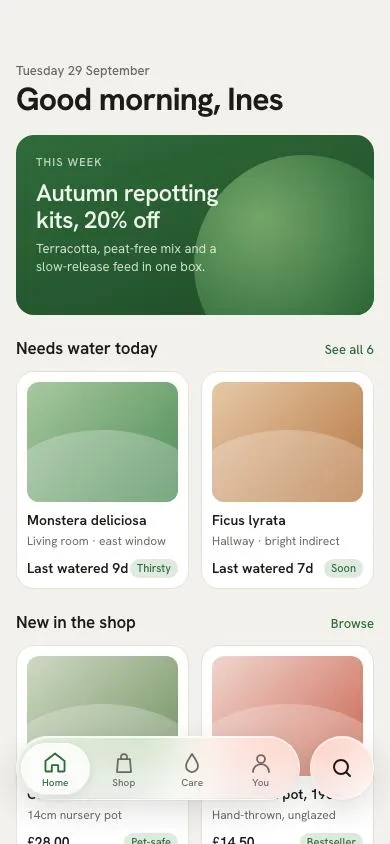
An inset Liquid-glass tab capsule with four tabs and a separate round search island; a glass lens squashes and slides between tabs while content scrolls under it.
Preview
Use it
Free to use · credit appreciated1 Once, in your project
npx skills add SusanAcharya/Design-Lounge 2 Then ask
Using the Design Lounge skill, build "Floating glass tab bar" (piece ios-glass-tab-bar) in my stack. Match its brief; restyle it onto my product's theme.
No skill? Paste the brief instead. It carries the numbers, tokens and behaviour.
<!-- Design Lounge Nº 017 · "Floating glass tab bar" · www.designlounge.live -->

# Floating glass tab bar

> **Build brief for a coding agent.** Rebuild this piece in the reader's stack. If they haven't said which stack, ask once, then default to semantic HTML + CSS + a little vanilla JS. Match the numbers below; don't "improve" them.

## What it is

The bottom navigation of "Loam", a plant-care and shop app, in an iOS 26-style Liquid-glass language. A 64px tall capsule floats 16px from each side and 44px from the bottom; it holds four tabs and a translucent "lens" that slides to the selected tab. A separate 64px circular island to its right opens search. Both are blurred glass, so the product cards scrolling under them smear into soft colour; that under-scroll is the whole point of the piece and must be visible in the first frame. The lens does not just translate: it squashes horizontally for the first third of its move, which is what makes it read as liquid.

## Reference behaviour

1. Initial state: "Home" tab selected, lens sits over it. The page is a scrollable list (greeting, a dark green hero card, two product grids, two tip rows) with 140px of bottom padding so the last row can scroll clear of the dock.
2. Scroll the list: cards pass underneath the capsule and island; the glass blurs them (24px blur, 180% saturation). Nothing in the dock moves on scroll.
3. Tap "Shop": the lens translates from column 1 to column 2 over 420ms with `cubic-bezier(.32,.72,0,1)`. During the same 420ms it runs a squash keyframe: `scale(1,1)` → `scale(1.22,.9)` at 35% → `scale(1,1)`. The Shop icon and label turn `--accent` and the icon lifts 1px and scales to 1.06; the previously selected tab returns to `--ink-2`.
4. Tap the same tab again: no movement, but the squash keyframe still replays (feedback).
5. Press-and-hold any tab: it scales to 0.94 over 160ms (`:active`) and returns on release.
6. Tap the search island: it fills with `--accent` and white icon (`aria-pressed="true"`); a 48px white search field slides up from 12px below to sit 120px from the bottom, fading in over 160ms and springing over 420ms; the input receives focus after 60ms. Tap again or press Escape in the field: the field drops away and clears.
7. Keyboard: with focus in the tab list, ArrowLeft/ArrowRight move selection (wrapping) and focus follows; only the selected tab is in the Tab order (roving tabindex).

## Structure

```
390 × 844
┌────────────────────────────────────────┐
│ (54px status area, Lounge draws it)    │
│ 62  Tuesday 29 September (13/500)      │
│     Good morning, Ines (32/700)        │
│ ┌────────────────────────────────────┐ │
│ │ hero card 180 min, dark green      │ │
│ └────────────────────────────────────┘ │
│  Needs water today            See all  │
│ ┌───────────────┐ ┌───────────────┐    │
│ │ thumb 120     │ │ thumb 120     │    │
│ │ name / meta   │ │ name / meta   │    │
│ └───────────────┘ └───────────────┘    │
│  New in the shop               Browse  │
│ ┌───────────────┐ ┌───────────────┐    │ ← scrolls under the dock
│ ...                                    │
│    ┌ search field 48, hidden ─────┐    │  bottom 120

… 166 more lines. Copy or download for the full brief. Loading the source…Brief
206 linesBuild brief for a coding agent. Rebuild this piece in the reader’s stack. If they haven’t said which stack, ask once, then default to semantic HTML + CSS + a little vanilla JS. Match the numbers below; don’t “improve” them.
What it is
The bottom navigation of “Loam”, a plant-care and shop app, in an iOS 26-style Liquid-glass language. A 64px tall capsule floats 16px from each side and 44px from the bottom; it holds four tabs and a translucent “lens” that slides to the selected tab. A separate 64px circular island to its right opens search. Both are blurred glass, so the product cards scrolling under them smear into soft colour; that under-scroll is the whole point of the piece and must be visible in the first frame. The lens does not just translate: it squashes horizontally for the first third of its move, which is what makes it read as liquid.
Reference behaviour
- Initial state: “Home” tab selected, lens sits over it. The page is a scrollable list (greeting, a dark green hero card, two product grids, two tip rows) with 140px of bottom padding so the last row can scroll clear of the dock.
- Scroll the list: cards pass underneath the capsule and island; the glass blurs them (24px blur, 180% saturation). Nothing in the dock moves on scroll.
- Tap “Shop”: the lens translates from column 1 to column 2 over 420ms with
cubic-bezier(.32,.72,0,1). During the same 420ms it runs a squash keyframe:scale(1,1)→scale(1.22,.9)at 35% →scale(1,1). The Shop icon and label turn--accentand the icon lifts 1px and scales to 1.06; the previously selected tab returns to--ink-2. - Tap the same tab again: no movement, but the squash keyframe still replays (feedback).
- Press-and-hold any tab: it scales to 0.94 over 160ms (
:active) and returns on release. - Tap the search island: it fills with
--accentand white icon (aria-pressed="true"); a 48px white search field slides up from 12px below to sit 120px from the bottom, fading in over 160ms and springing over 420ms; the input receives focus after 60ms. Tap again or press Escape in the field: the field drops away and clears. - Keyboard: with focus in the tab list, ArrowLeft/ArrowRight move selection (wrapping) and focus follows; only the selected tab is in the Tab order (roving tabindex).
Structure
390 × 844
┌────────────────────────────────────────┐
│ (54px status area, Lounge draws it)    │
│ 62  Tuesday 29 September (13/500)      │
│     Good morning, Ines (32/700)        │
│ ┌────────────────────────────────────┐ │
│ │ hero card 180 min, dark green      │ │
│ └────────────────────────────────────┘ │
│  Needs water today            See all  │
│ ┌───────────────┐ ┌───────────────┐    │
│ │ thumb 120     │ │ thumb 120     │    │
│ │ name / meta   │ │ name / meta   │    │
│ └───────────────┘ └───────────────┘    │
│  New in the shop               Browse  │
│ ┌───────────────┐ ┌───────────────┐    │ ← scrolls under the dock
│ ...                                    │
│    ┌ search field 48, hidden ─────┐    │  bottom 120
│ ┌──────────────────────────┐ ┌────┐    │
│ │ ◉Home  Shop  Care  You   │ │ ⌕  │    │  bottom 44, height 64
│ └──────────────────────────┘ └────┘    │
│ 16 ──── capsule flex 1 ──── 10 ─ 64 16 │
└────────────────────────────────────────┘<main>: the only scroll container (height:100%; overflow-y:auto; padding:62px 16px 140px).bodyhasoverflow:hidden.<nav class="dock" aria-label="Primary">:position:fixed; left:16px; right:16px; bottom:44px; display:flex; gap:10px..bar[role=tablist]: flex 1, 64px,display:grid; grid-template-columns:repeat(4,1fr); padding:0 4px. Contains.lens(absolute) and four<button role="tab">..island: 64×64<button aria-pressed aria-controls="search">.
.search: fixed,left/right:16px; bottom:120px; height:48px, contains an<input type="search">.
Tokens
:root {
  /* colour — warm off-white, one leaf-green accent */
  --bg: #f3f1ec;              /* page */
  --card: #ffffff;            /* product cards, search field */
  --ink: #1c1b18;             /* primary text */
  --ink-2: #6b6862;           /* secondary text, inactive tabs */
  --ink-3: #9c988f;           /* placeholder */
  --line: #e4e1da;            /* card hairline */
  --accent: #2f6b3a;          /* selected tab, links, island pressed */
  --accent-soft: #dfeadf;     /* badge chip */
  --hero-a: #2f6b3a;  --hero-b: #1f4a28;  --hero-glow: #7cae6f;

  /* glass */
  --glass: rgba(255,255,255,.58);
  --glass-line: rgba(255,255,255,.75);
  --glass-blur: blur(24px) saturate(180%);
  --glass-shadow: 0 10px 30px rgba(28,27,24,.14), 0 1px 2px rgba(28,27,24,.06);
  --glass-highlight: inset 0 1px 0 rgba(255,255,255,.85), inset 0 -1px 0 rgba(28,27,24,.04);
  --lens: rgba(255,255,255,.78);
  --lens-shadow: inset 0 1px 0 rgba(255,255,255,.95), inset 0 -1px 0 rgba(28,27,24,.05), 0 2px 10px rgba(28,27,24,.10);

  /* type */
  --font: "Hanken Grotesk", system-ui, -apple-system, sans-serif;

  /* layout */
  --dock-h: 64px;  --dock-inset: 16px;  --dock-bottom: 44px;  --dock-gap: 10px;
  --lens-h: 52px;  --lens-pad: 4px;
  --r-card: 18px;  --r-thumb: 12px;  --r-bar: 32px;  --r-lens: 26px;

  /* motion */
  --t-micro: 160ms;
  --t-move: 420ms;
  --spring: cubic-bezier(.32, .72, 0, 1);
  --ease: cubic-bezier(.2, .7, .2, 1);
}
Typography
| Role | Family | Size | Weight | Line-height | Tracking | Case |
|---|---|---|---|---|---|---|
| Body | Hanken Grotesk | 15px | 400 | 1.4 | 0 | sentence |
| Eyebrow date | Hanken Grotesk | 13px | 500 | 1.4 | 0 | sentence |
| Page title | Hanken Grotesk | 32px | 700 | 1.1 | −0.025em | sentence |
| Hero tag | Hanken Grotesk | 11px | 600 | 1.2 | +0.10em | UPPERCASE |
| Hero heading | Hanken Grotesk | 24px | 600 | 1.15 | −0.02em | sentence |
| Section heading | Hanken Grotesk | 17px | 600 | 1.3 | −0.01em | sentence |
| Card name | Hanken Grotesk | 14px | 600 | 1.25 | 0 | sentence |
| Card meta | Hanken Grotesk | 12px | 400 | 1.4 | 0 | sentence |
| Chip | Hanken Grotesk | 11px | 500 | 1.4 | 0 | sentence |
| Tab label | Hanken Grotesk | 10px | 500 | 1 | +0.01em | sentence |
Motion
| Element | Trigger | Property | From → To | Duration | Easing | Notes |
|---|---|---|---|---|---|---|
.lens | tab select | transform | translateX(i·100%) | 420ms | --spring | --i set on the tablist |
.lens | tab select | scale (keyframe) | 1,1 → 1.22,.9 @35% → 1,1 | 420ms | --spring | class moving re-added with a reflow so it replays |
.tab | select | color | --ink-2 → --accent | 160ms | --ease | |
.tab svg | select | transform | none → translateY(-1px) scale(1.06) | 420ms | --spring | |
.tab | :active | transform | 1 → scale(.94) | 160ms | --ease | |
.island | :active | transform | 1 → scale(.92) | 160ms | --ease | |
.island | pressed | background, color | glass → --accent, ink → white | 160ms | --ease | |
.search | island pressed | opacity / transform | 0, translateY(12px) scale(.96) → 1, none | 160 / 420ms | --ease / --spring | pointer-events:none when hidden |
Reduced motion: every transition and animation duration becomes 1ms; the lens jumps, the squash is skipped, scroll-behavior is auto.
States
- Selected tab:
aria-selected="true", colour--accent, icon lifted; lens underneath. - Inactive tab: colour
--ink-2,tabindex="-1". - Tab focus-visible: 2px
--accentoutline,outline-offset:-4px(inside the capsule so it is not clipped). - Island pressed:
aria-pressed="true", fill--accent, border--accent, icon white. - Island focus-visible: 2px
--accentoutline, 3px offset. - Search open:
.search.open, input focused, placeholder “Search plants, pots, care” in--ink-3. - Chips: “Thirsty”, “Soon”, “Pet-safe” etc. in
--accenton--accent-soft.
Accessibility
- The capsule is
role="tablist"; each tab is a<button role="tab" aria-selected>. Roving tabindex: the selected tab hastabindex="0", the rest-1. ArrowLeft / ArrowRight change selection and move focus; wrap at both ends. - Search island:
<button aria-label="Search" aria-pressed aria-controls="search">. Escape inside the field closes it and returns state to unpressed. - Labels are visible text under the icons (10px); do not rely on icons alone.
- Contrast:
--ink-2on the glass over the lightest content is ≥ 4.6:1;--accenton white is 6.9:1; white on--accentis 6.9:1. - Hit targets: each tab column is ≥ 70×64px; the island is 64×64.
<main aria-label="Home">is the scroll region; the dock is a<nav aria-label="Primary">sibling, not inside the scroller.
Responsive rules
- 390 wide (target): capsule = 390 − 16·2 − 64 − 10 = 268px, so each tab column is 65px and the lens is 65px wide.
- 360 wide: same insets; capsule 238px, tab columns 57.5px. Labels stay; reduce icon to 22px.
- ≥ 430 wide: clamp the dock to
max-width: 398px; margin: 0 autoso tab columns never exceed ~80px. - Tablet (if ever shown): centre the dock at 398px; the content grid goes to 3 columns.
- Landscape / short viewports (< 600px tall): reduce
bottomfrom 44px to 20px.
Acceptance checklist
- Dock is
position:fixed, 16px from each side, 44px from the bottom; capsule and island are both 64px tall. - Capsule and island use
backdrop-filter: blur(24px) saturate(180%)with a 1pxrgba(255,255,255,.75)border and an inset 1px white top highlight. - Scrolling the content visibly blurs cards under the dock; the dock itself never moves on scroll.
- The lens moves with
transform: translateX(calc(var(--i)*100%))over 420mscubic-bezier(.32,.72,0,1)and runs the 1.22×0.9 squash keyframe on every tab press, including re-pressing the selected tab. - Selected tab colour is
#2f6b3a; inactive is#6b6862; the selected icon is lifted 1px and scaled 1.06. - Only the selected tab is reachable by Tab; ArrowLeft/ArrowRight cycle with wrap.
- Search island toggles
aria-pressed, fills with the accent, and reveals a 48px field 120px from the bottom that receives focus. - Escape in the search field closes it and clears the value.
- Focus rings are visible on all four tabs, the island and the input.
-
<main>has 140px bottom padding so the last card can scroll above the dock. - With
prefers-reduced-motion: reduce, the lens jumps instantly and no squash plays. - No status bar, notch or home indicator is drawn by the piece.
Implementation notes
The lens position is one custom property on the tablist, so the CSS owns the motion and the JS only sets an integer. Replaying the squash requires removing the class, forcing a reflow, and re-adding it:
.bar { position: relative; display: grid; grid-template-columns: repeat(4, 1fr); padding: 0 4px; }
.lens { position: absolute; top: 6px; left: 4px; width: calc((100% - 8px) / 4); height: 52px;
        border-radius: 26px; transform: translateX(calc(var(--i, 0) * 100%));
        transition: transform var(--t-move) var(--spring); pointer-events: none; }
.lens.moving { animation: squash var(--t-move) var(--spring); }
@keyframes squash { 0% { scale: 1 1 } 35% { scale: 1.22 .9 } 100% { scale: 1 1 } }
function select(i, focus) {
tabs.forEach((t, k) => { t.setAttribute('aria-selected', String(k === i)); t.tabIndex = k === i ? 0 : -1; });
bar.style.setProperty('--i', i);
lens.classList.remove('moving'); void lens.offsetWidth; lens.classList.add('moving');
if (focus) tabs[i].focus();
}Note the keyframe uses the standalone scale property, so it composes with the transform: translateX(...) transition instead of overwriting it. If you must support browsers without scale, put the lens inside a wrapper: translate the wrapper, scale the inner.
Glass that actually shows the content. backdrop-filter only blurs what is rendered behind the element in the same stacking context, so the dock must be a sibling of the scroller, not a child of it, and the scroller must not have will-change or contain: paint:
body { overflow: hidden; }
main { height: 100%; overflow-y: auto; padding: 62px 16px 140px; }
.bar, .island { background: rgba(255,255,255,.58);
  -webkit-backdrop-filter: blur(24px) saturate(180%); backdrop-filter: blur(24px) saturate(180%);
  border: 1px solid rgba(255,255,255,.75);
  box-shadow: 0 10px 30px rgba(28,27,24,.14), inset 0 1px 0 rgba(255,255,255,.85); }
Common mistakes: putting the dock inside <main> so it scrolls away; using bottom:0 (the Lounge draws the home indicator there; keep 34px + 10px); animating left instead of transform; forgetting pointer-events:none on the lens so it eats clicks; display:none on the hidden search field, which kills the exit transition.
Details
- Palette
- Type
- Hanken Grotesk
- Motion
- Subtle motion
- Build
- One session
- Tags
On the shelves