Nº 513 of 520
Phone rating prompt
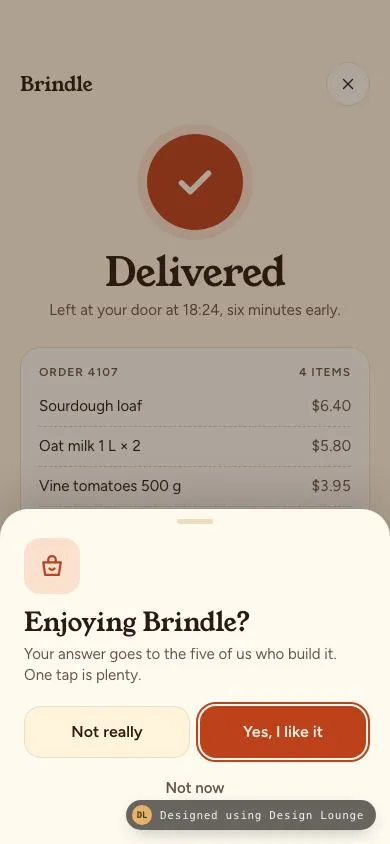
An 'Enjoying Brindle?' sheet after a delivered order. Yes hands off to a generic five-star system review alert; Not really opens a private feedback form; Not now backs off.
Preview
Use it
Free to use · credit appreciated1 Once, in your project
npx skills add SusanAcharya/Design-Lounge 2 Then ask
Using the Design Lounge skill, build "Phone rating prompt" (piece phone-rating-prompt) in my stack. Match its brief; restyle it onto my product's theme.
No skill? Paste the brief instead. It carries the numbers, tokens and behaviour.
<!-- Design Lounge Nº 513 · "Phone rating prompt" · www.designlounge.live -->

# Phone rating prompt

> **Build brief for a coding agent.** Rebuild this piece in the reader's stack. If they haven't said which stack, ask once, then default to semantic HTML + CSS + a little vanilla JS. Match the numbers below; don't "improve" them.

## What it is

An in-app rating prompt for "Brindle", an invented grocery delivery app, shown right after a success moment: the order-delivered screen. A warm bottom sheet asks "Enjoying Brindle?" with two equal choices and a quiet "Not now". **Yes** hands off to the platform's own review prompt (mocked here as a generic five-star system alert, clearly tagged as drawn by the phone, with no store branding). **Not really** never reaches the store; the same sheet turns into a short private feedback form with reason chips and an optional note. iOS 26-ish language: grabber sheet, 28px top radii, spring-ish motion, butter and cocoa neutrals with persimmon as the one accent. The detail worth copying is the routing: happy people get one tap to the store, unhappy people get heard by the team, and nobody gets asked twice in a row.

## Reference behaviour

1. Initial state (hero): the delivered screen sits behind a cocoa scrim at 38%. The sheet is up: basket mascot tile, "Enjoying Brindle?", "Your answer goes to the five of us who build it. One tap is plenty.", buttons "Not really" (secondary) and "Yes, I like it" (primary, focused), and "Not now" below.
2. Behind the sheet: "Brindle" wordmark, a close button, a 96px persimmon badge whose check draws in over 700ms (200ms delay), "Delivered", "Left at your door at 18:24, six minutes early.", and a receipt card for Order 4107 with four items and "Paid $20.40".
3. **Not now**, a scrim tap, or Esc: the sheet drops (280ms), a toast says "Got it. We will not ask again for a while.", and a "Show the prompt again" link fades in under the receipt (demo replay only).
4. **Yes, I like it**: the sheet and scrim leave; a darker system scrim (56%) fades in (220ms) and a 270px system-style alert scales from 1.12 to 1 (320ms). A small pill above it reads "System prompt, drawn by the phone". Alert: app icon, "Enjoying Brindle?", "Tap a star to rate it in the store.", five outline stars, "Not Now". Focus lands on star 1.
5. Hover (mouse) previews a fill up to the hovered star; leaving restores the chosen rating. Tap or arrow keys choose a rating: stars fill blue with a 40ms stagger and a small overshoot pop. Choosing any rating reveals a bold "Submit" above "Not Now".
6. Submit: everything closes; toast "Thanks for the 4 stars" with a star icon. Not Now in the alert closes silently (the OS decides; the app does not comment).
7. **Not really**: the sheet stays up and swaps content (320ms fade and 8px rise) to "Sorry it was not great / Tell us what got in the way. This goes to the team, not to a public review." Six reason chips (Missing items, Late delivery, Bruised produce, App is slow, Hard to find things, Something else), a textarea "Anything else?" with a live "0 / 280" counter, and "Skip" / "Send". Focus moves to the first chip.
8. Send is `aria-disabled` until at least one chip is pressed or the note has text. Pressing it while disabled shakes it 4px and does nothing else.
9. Send (enabled): the sheet swaps to "Thanks, Mira / Sent to the team. We read every one, and we will not ask you again for a while." with a full-width "Back to my order". Skip closes with the "not ask again" toast.
10. Rate limiting is policy, not UI (see Implementation notes): never on first launch, never after an error or a failed order, at most three times in 365 days, never again after a rating or a feedback send, and a minimum gap after Not now.

## Structure

```
390 × 844
┌──────────────────────────────────────┐
│ (62px top padding, 54px clearance)   │
│ Brindle                         (×)  │ serif 20 · 44px close
│              ( ✓ )                   │ badge 96px + 10px halo
│            Delivered                 │ serif 40
│  Left at your door at 18:24, six …   │
│ ┌──────────────────────────────────┐ │
│ │ ORDER 4107              4 ITEMS  │ │ receipt, dashed rules
│ │ Sourdough loaf            $6.40  │ │
│ │ …                                │ │
│ │ Paid                     $20.40  │ │
│ └──────────────────────────────────┘ │
│       Show the prompt again          │ replay link, after dismiss

… 212 more lines. Copy or download for the full brief. Loading the source…Brief
252 linesBuild brief for a coding agent. Rebuild this piece in the reader’s stack. If they haven’t said which stack, ask once, then default to semantic HTML + CSS + a little vanilla JS. Match the numbers below; don’t “improve” them.
What it is
An in-app rating prompt for “Brindle”, an invented grocery delivery app, shown right after a success moment: the order-delivered screen. A warm bottom sheet asks “Enjoying Brindle?” with two equal choices and a quiet “Not now”. Yes hands off to the platform’s own review prompt (mocked here as a generic five-star system alert, clearly tagged as drawn by the phone, with no store branding). Not really never reaches the store; the same sheet turns into a short private feedback form with reason chips and an optional note. iOS 26-ish language: grabber sheet, 28px top radii, spring-ish motion, butter and cocoa neutrals with persimmon as the one accent. The detail worth copying is the routing: happy people get one tap to the store, unhappy people get heard by the team, and nobody gets asked twice in a row.
Reference behaviour
- Initial state (hero): the delivered screen sits behind a cocoa scrim at 38%. The sheet is up: basket mascot tile, “Enjoying Brindle?”, “Your answer goes to the five of us who build it. One tap is plenty.”, buttons “Not really” (secondary) and “Yes, I like it” (primary, focused), and “Not now” below.
- Behind the sheet: “Brindle” wordmark, a close button, a 96px persimmon badge whose check draws in over 700ms (200ms delay), “Delivered”, “Left at your door at 18:24, six minutes early.”, and a receipt card for Order 4107 with four items and “Paid $20.40”.
- Not now, a scrim tap, or Esc: the sheet drops (280ms), a toast says “Got it. We will not ask again for a while.”, and a “Show the prompt again” link fades in under the receipt (demo replay only).
- Yes, I like it: the sheet and scrim leave; a darker system scrim (56%) fades in (220ms) and a 270px system-style alert scales from 1.12 to 1 (320ms). A small pill above it reads “System prompt, drawn by the phone”. Alert: app icon, “Enjoying Brindle?”, “Tap a star to rate it in the store.”, five outline stars, “Not Now”. Focus lands on star 1.
- Hover (mouse) previews a fill up to the hovered star; leaving restores the chosen rating. Tap or arrow keys choose a rating: stars fill blue with a 40ms stagger and a small overshoot pop. Choosing any rating reveals a bold “Submit” above “Not Now”.
- Submit: everything closes; toast “Thanks for the 4 stars” with a star icon. Not Now in the alert closes silently (the OS decides; the app does not comment).
- Not really: the sheet stays up and swaps content (320ms fade and 8px rise) to “Sorry it was not great / Tell us what got in the way. This goes to the team, not to a public review.” Six reason chips (Missing items, Late delivery, Bruised produce, App is slow, Hard to find things, Something else), a textarea “Anything else?” with a live “0 / 280” counter, and “Skip” / “Send”. Focus moves to the first chip.
- Send is
aria-disableduntil at least one chip is pressed or the note has text. Pressing it while disabled shakes it 4px and does nothing else. - Send (enabled): the sheet swaps to “Thanks, Mira / Sent to the team. We read every one, and we will not ask you again for a while.” with a full-width “Back to my order”. Skip closes with the “not ask again” toast.
- Rate limiting is policy, not UI (see Implementation notes): never on first launch, never after an error or a failed order, at most three times in 365 days, never again after a rating or a feedback send, and a minimum gap after Not now.
Structure
390 × 844
┌──────────────────────────────────────┐
│ (62px top padding, 54px clearance)   │
│ Brindle                         (×)  │ serif 20 · 44px close
│              ( ✓ )                   │ badge 96px + 10px halo
│            Delivered                 │ serif 40
│  Left at your door at 18:24, six …   │
│ ┌──────────────────────────────────┐ │
│ │ ORDER 4107              4 ITEMS  │ │ receipt, dashed rules
│ │ Sourdough loaf            $6.40  │ │
│ │ …                                │ │
│ │ Paid                     $20.40  │ │
│ └──────────────────────────────────┘ │
│       Show the prompt again          │ replay link, after dismiss
│ ░░░░░░░░░░ scrim 38% ░░░░░░░░░░░░░░░ │
│ ╭──────────────────────────────────╮ │ sheet, 28px top radii
│ │              ────                │ │ grabber 36×5
│ │ [bag]                            │ │ mascot 56px, 16px radius
│ │ Enjoying Brindle?                │ │ serif 26
│ │ Your answer goes to the five …   │ │
│ │ [ Not really ] [ Yes, I like it ]│ │ 52px, 10px gap, equal widths
│ │            Not now               │ │ 44px text button
│ │ (34px home clearance)            │ │
│ ╰──────────────────────────────────╯ │
└──────────────────────────────────────┘
 Yes →  centred 270px system alert over a 56% scrim
        [ SYSTEM PROMPT, DRAWN BY THE PHONE ]
        ┌────────────────────┐
        │      [icon]        │ 56px, 13px radius
        │ Enjoying Brindle?  │ 17/600 system font
        │ Tap a star to …    │ 13px
        │  ☆  ☆  ☆  ☆  ☆     │ 44px targets, 30px glyphs
        │──────────────────── │
        │      Submit        │ appears after a rating
        │      Not Now       │
└────────────────────┘mainholds the success screen; it isinertwhile any prompt is open..sheetissection role="dialog" aria-modal="true"; itsaria-labelledbypoints at the visible pane’s heading (ask, feedback, or thanks).- Panes:
#pAsk(div),#pFb(form novalidatewith afieldset/legendofaria-pressedchips and a labelledtextarea),#pDone(div,tabindex="-1", receives focus). - System mock:
.sysoverlay with anaria-hiddentag pill anddiv role="alertdialog" aria-modal="true"; stars are arole="radiogroup"of fiverole="radio"buttons with rovingtabindex. - Toast:
div role="status",pointer-events: none.
Tokens
:root {
  /* warm neutrals */
  --bg: #fff3dc;           /* page, chip and textarea fill */
  --paper: #fffaf0;        /* receipt, sheet */
  --ink: #2a1a12;          /* cocoa text, pressed chip, toast */
  --ink-2: #6b5244;        /* secondary text */
  --ink-3: #a08878;        /* placeholder only */
  --line: #efdcbc;         /* borders, grabber */
  --dash: #e3caa2;         /* receipt dashed rules */

  /* accent */
  --accent: #bd421c;       /* persimmon: primary button, badge, focus ring */
  --accent-ink: #fff6ec;
  --accent-soft: #fbe0cf;  /* badge halo, mascot tile */
  --star: #f0a92e;         /* toast star */

  /* system mock (deliberately not the app palette) */
  --sys: #f4f1ec; --sys-line: #dcd6cd; --sys-blue: #2463c7;

  --scrim: rgba(42, 26, 18, .38);
  --sys-scrim: rgba(20, 14, 10, .56);

  --serif: "Young Serif", Georgia, serif;
  --sans: "Figtree", system-ui, sans-serif;

  --r-sheet: 28px; --r-card: 20px; --r-btn: 16px; --r-chip: 12px; --r-alert: 14px;
  --sheet-x: 24px; --home: 34px;

  --t-micro: 160ms; --t-layout: 320ms; --t-sheet: 480ms; --t-exit: 280ms; --t-toast: 2800ms;
  --ease: cubic-bezier(.2, .7, .2, 1);
  --spring: cubic-bezier(.32, .72, 0, 1);
  --pop: cubic-bezier(.34, 1.56, .64, 1);
  --exit: cubic-bezier(.4, 0, 1, 1);
}
Typography
| Role | Family | Size | Weight | Line-height | Tracking | Notes |
|---|---|---|---|---|---|---|
| Success title | Young Serif | 40px | 400 | 1.05 | -0.02em | |
| Wordmark | Young Serif | 20px | 400 | 1 | -0.01em | |
| Sheet title | Young Serif | 26px | 400 | 1.15 | -0.01em | |
| Sheet sub | Figtree | 15px | 400 | 1.4 | 0 | --ink-2 |
| Buttons | Figtree | 16px | 600 | 1 | 0 | |
| Not now, Skip | Figtree | 15px / 16px | 600 | 1 | 0 | --ink-2 / ink |
| Chips | Figtree | 15px | 500 | 1 | 0 | |
| Legend, label | Figtree | 15px | 600 | 1.4 | 0 | |
| Counter | Figtree | 13px | 400 | 1 | 0 | tabular numerals |
| Textarea | Figtree | 16px | 400 | 1.4 | 0 | 16px avoids iOS zoom |
| Receipt header | Figtree | 12px | 600 | 1 | 0.08em | uppercase |
| Receipt rows | Figtree | 15px | 400, total 700 | 1.4 | 0 | prices tabular |
| System alert | platform system font | 17px / 13px | 600 / 400 | 1.35 | 0 | do not use the app fonts |
| Tag pill | Figtree | 10px | 600 | 1 | 0.1em | uppercase |
Motion
| Element | Trigger | Property | From → To | Duration | Easing | Delay |
|---|---|---|---|---|---|---|
| Badge check | load | stroke-dashoffset | 30 → 0 | 700ms | --ease | 200ms |
| Sheet | open | translateY | 110% → 0 | 480ms | --spring | 0 |
| Sheet | close | translateY | 0 → 110% | 280ms | --exit | 0 |
| Scrim | open / close | opacity | 0 ↔ 1 | 480ms | --ease | 0 |
| Pane swap | Not really / Send | opacity, translateY | 0, 8px → 1, 0 | 320ms | --ease | 0 |
| System scrim | Yes | opacity | 0 → 1 | 220ms | --ease | 0 |
| System alert | Yes | scale | 1.12 → 1 | 320ms | --spring | 0 |
| Stars | rate / hover | fill, scale | outline, 1 → filled, 1.1 | 220ms | --pop | 40ms × index |
| Chip, button | :active | scale | 1 → .96 / .97 | 160ms | --ease | 0 |
| Send (disabled) | submit attempt | translateX | -4, 4, 0 | 260ms | --ease | 0 |
| Toast | show / hide | translateY, opacity | 24px, 0 ↔ 0, 1 | 260ms | --spring | hides after 2800ms |
| Replay link | after close | opacity | 0 → 1 | 320ms | --ease | 300ms |
Reduced motion: all transitions 1ms, check draw, pane fade, star stagger and shake removed. Focus moves happen immediately instead of after the sheet settles.
States
- Ask:
body.ask. Primary focused. Both answers equal width so neither is a dark pattern. - Feedback:
body.fb. Send disabled (40% opacity,aria-disabled="true") until a chip or text exists. - Chip pressed: cocoa fill, paper text, check icon shown. Unpressed:
--bgfill, 1.5px--lineborder. - Textarea focus: 2.5px persimmon outline, offset 0. Counter updates on every input; hard stop at 280 via
maxlength. - Thanks: pane with check tile and one full-width button.
- System alert, no rating: outline stars, only “Not Now”. Rated: stars filled to the rating, “Submit” visible and bold.
- Dismissed: success screen interactive, replay link visible, toast for 2800ms.
- Error: the prompt is never shown on an error or a failed delivery screen. If sending feedback fails, keep the form filled, show “Could not send. Try again.” under the buttons, and keep Send enabled.
- Focus-visible: 2.5px
--accentring, 2px offset, 12px radius; system stars use a 2px blue ring inset 4px.
Accessibility
- The sheet is a modal dialog;
mainisinertbehind it. Tab cycles inside the sheet or the alert. Esc dismisses (counts as Not now). - Initial focus: “Yes, I like it” on ask, the first chip on feedback, the thanks pane itself, star 1 in the alert. Focus returns to the replay link after closing.
- Answer buttons are plain words. No smiley-only buttons.
- Chips are
aria-pressedtoggles inside afieldsetwithlegend“What went wrong?”. The textarea has a reallabel; the counter isaria-live="polite". - Send uses
aria-disabledrather thandisabledso it stays focusable and the shake explains itself. - Stars:
role="radiogroup"labelled “Rating”; each starrole="radio"witharia-label="3 stars",aria-checked, rovingtabindex. Arrow keys move and select, Home/End jump to 1 and 5. - Toast is
role="status"and click-through. - Contrast:
--inkon--paper16.1:1;--ink-2on--paper6.9:1;--accent-inkon--accent5.0:1 (16px/600 buttons);--inkon--bg15.2:1; system blue on the alert 5.1:1. Do not lighten the persimmon: at#c9471fthe button text drops to 4.5:1. - Hit targets: answer buttons 52px, chips, Not now, close and stars 44px.
Responsive rules
- 390 × 844 frame. The sheet hugs the bottom with 34px home clearance; content starts 62px from the top (54px clearance plus 8px).
- 360 wide: chips wrap to three rows; answer buttons stay side by side (“Yes, I like it” fits at 16px in 151px).
- Largest text size: rows grow, never clip. The two answer buttons stack, primary first; “Not now” stays below. Chips wrap to more rows. The sheet gets
max-height: calc(100% - 54px)and scrolls its content while the buttons stay pinned at the bottom. - Tablet: the sheet becomes a centred 420px card with all corners rounded. The system prompt is whatever the OS draws.
- Do not draw the status bar or the home indicator.
Acceptance checklist
Always
- The prompt only follows a success moment, never first launch, never after an error.
- Two equal-width answers plus a separate “Not now”; no pre-checked stars, no incentive copy.
- Yes calls the platform review API; the app never draws its own fake store stars in production. The mock is tagged as system UI.
- Not really routes to a private form, not the store; Send needs a reason or text.
- Any dismissal, rating or send records a timestamp and suppresses the prompt per the rate rules below.
- Modal focus management: initial focus, trap, Esc, focus return.
- All targets at least 44px; stars are a keyboard-operable radiogroup.
- Reduced motion keeps every path complete.
This demo
- Sheet title “Enjoying Brindle?” in Young Serif 26px on
#FFFAF0, primary#BD421C. - Background: “Delivered”, “Left at your door at 18:24, six minutes early.”, Order 4107, Paid $20.40.
- System alert 270px wide, “Tap a star to rate it in the store.”, Submit appears after a rating.
- Six reason chips in the order listed; counter “0 / 280”.
- Toasts: “Got it. We will not ask again for a while.” and “Thanks for the 4 stars”.
Implementation notes
Rate limiting lives in one gate function. Check it at the success moment; if it says no, show nothing and do not log an impression.
const DAY = 864e5;
function shouldAsk(s, now = Date.now()) {
  if (s.launches < 3 || s.completedOrders < 2) return false;      // never on first launch
  if (s.errorThisSession || s.lastOrderFailed) return false;      // never after an error
  if (s.rated || s.feedbackSent) return false;                    // never after an answer
  const year = s.asks.filter(t => now - t < 365 * DAY);
  if (year.length >= 3) return false;                             // at most 3 per year
  if (s.lastDismiss && now - s.lastDismiss < 60 * DAY) return false; // gap after Not now
  if (s.appVersionAsked === s.appVersion) return false;           // once per version
  return true;
}
The platform review API applies its own cap on top (iOS shows the system prompt at most three times in 365 days and may show nothing at all). Never assume the system alert appeared; do not show a “thanks for rating” message unless your own UI collected the rating. In this demo the Submit toast exists because the mock collects the star count.
Roving tabindex for the stars.
function rate(n, focus) {
  stars.forEach((s, i) => {
    s.setAttribute('aria-checked', i === n - 1);
    s.tabIndex = i === n - 1 ? 0 : -1;
    s.classList.toggle('on', i < n);
  });
  if (focus) stars[n - 1].focus();
  submit.hidden = false;
}
group.addEventListener('keydown', e => {
  const d = { ArrowRight: 1, ArrowUp: 1, ArrowLeft: -1, ArrowDown: -1 }[e.key];
  if (d) { e.preventDefault(); rate(Math.max(1, Math.min(5, (rating || 0) + d || 1)), true); }
});
One sheet, three panes. Keep the sheet mounted and swap panes so the scrim never flickers between ask and feedback; update the dialog’s aria-labelledby on each swap and move focus into the new pane.
Common mistakes:
- Asking for stars in the app first and only sending 4 and 5 star people to the store. Store rules forbid gating reviews on sentiment; the yes/no question routes the conversation, it does not filter ratings.
- Showing the prompt on launch, on the checkout screen, or after a refund.
- A close ”×” that is tiny and grey next to a huge Yes. Not now is a real 44px button.
- Drawing store logos or the store’s name in the mock.
- Toast or overlay elements that still capture taps after they fade out.
Details
- Palette
- Type
- Young Serif · Figtree
- Motion
- Subtle motion
- Build
- One session
- Tags
On the shelves