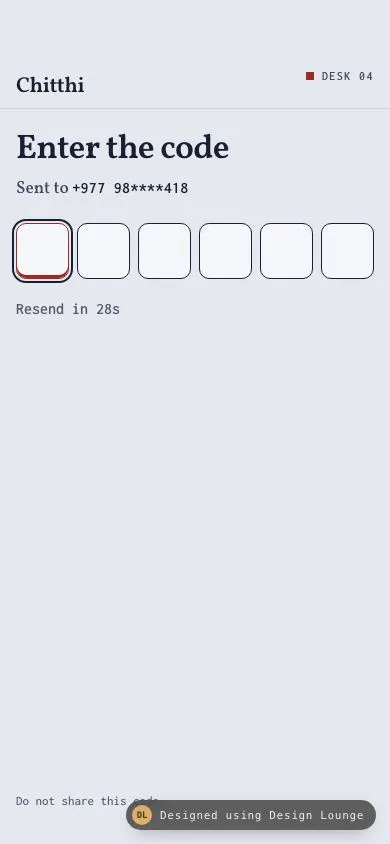
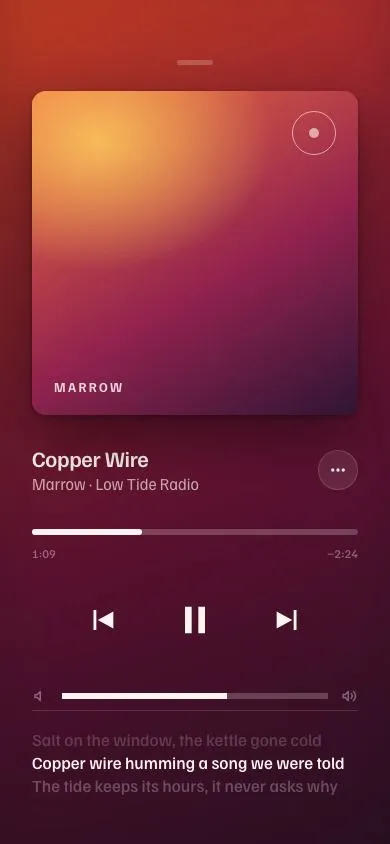
Nº 484 of 520
Coffer drawer lock
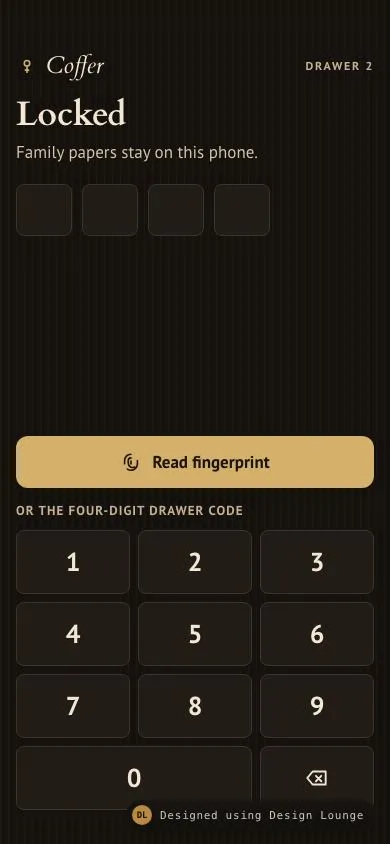
An in-app drawer lock with a fingerprint beat, a square keypad, and one home row after it opens.
Preview
Use it
Free to use · credit appreciated1 Once, in your project
npx skills add SusanAcharya/Design-Lounge 2 Then ask
Using the Design Lounge skill, build "Coffer drawer lock" (piece phone-app-lock) in my stack. Match its brief; restyle it onto my product's theme.
No skill? Paste the brief instead. It carries the numbers, tokens and behaviour.
<!-- Design Lounge Nº 484 · "Coffer drawer lock" · www.designlounge.live -->

# Coffer drawer lock

> **Build brief for a coding agent.** Rebuild this piece in the reader's stack. If they haven't said which stack, ask once, then default to semantic HTML + CSS + a little vanilla JS. Match the numbers below; don't "improve" them. When a kit is locked, map colours onto the kit tokens. This is the app's own lock, in an iOS-sized phone frame: large title, 44px targets, bottom safe area. It is not the system passcode screen.

## What it is

The lock in front of Coffer, a fictional drawer for family papers kept on the phone. The first frame is locked. A brass fingerprint control reads the print and opens the drawer after a short beat. A square keypad is the fallback. Four digits, left aligned, not a centred row of round dots. A wrong code shakes. The right code, or a finished print, shows one line, "Drawer open.", and then reveals a single home row so the unlock changes the screen. The look is walnut and brass: ground `#14110e`, card `#221c16`, type in Cardo and PT Sans. Do not draw an Apple wordmark, a fake home indicator, circular keys, or letter groups under the numbers.

## Reference behaviour

1. First frame. Phase is locked. Title "Locked". Dek "Family papers stay on this phone." Four empty slots. No error. The brass button reads "Read fingerprint". Under it, the label "Or the four-digit drawer code", then the keypad. "Drawer open." is hidden. The home row is hidden.
2. The keypad is 1 to 9, a wide 0 that spans two columns, and a delete key. Keys are square, radius 8px, not circles. There is no ABC DEF caption under a number.
3. Pressing a digit appends it and shows the numeral in the next empty slot, in brass Cardo. The group label becomes "Entered N of 4 digits".
4. Delete, or Backspace on the keyboard, removes the last digit. Number keys on the keyboard also append, while the phase is locked.
5. The first digit after an error clears the error text and the bad border.
6. Four digits equal to `2741` open the drawer. Any other four digits shake the slot row for 420ms, set the alert to "That code does not open the drawer.", and clear the four numerals after 420ms. The alert stays until the next digit.
7. Shake values: translateX 0, -8px, 8px, -5px, 4px, 0. Remove the class on animationend, and force reflow before adding it again.
8. "Read fingerprint" while locked sets phase to reading, `aria-busy="true"`, and the label "Reading the print". Keypad presses do nothing during the beat. Any wrong-code alert is cleared when the print starts to succeed, so the error never sits next to "Drawer open." After 800ms the busy state clears and the drawer opens. Reduced motion uses 0ms instead of 800ms.
9. Opening shows the line "Drawer open." immediately and hides the dek. Status says "Drawer open." The slots, keypad, and fingerprint button stay for 700ms so the line can be read, then they hide. The slot borders return to the resting line colour.
10. After that 700ms the title becomes "Drawer open." and the separate line hides, because the title is that line. Focus moves to the title. One row appears: "House papers" with "Revised 12 March 2026". A "Lock again" control sits under the row. Reduced motion uses 0ms, so the line and the row appear together.
11. The row is a button. Pressing it toggles `aria-expanded` and the note "Kept on this phone."
12. "Lock again" restores the first frame: title "Locked", empty slots, fingerprint label "Read fingerprint", keypad visible, line and row hidden. Status says "Coffer is locked."
13. Do not draw a status bar, a notch, a home indicator, or the system passcode chrome.

## Structure

```
390 x 844
padding inline 16px, top safe 54px, bottom safe 34px
+--------------------------------------+
| (key) Coffer              DRAWER 2   |  nav under the safe area
| Locked                               |  34px Cardo
| Family papers stay on this phone.    |  17px PT Sans
| [ ] [ ] [ ] [ ]                      |  4 slots, 56 by 52, left aligned
|                                      |
| [ Read fingerprint                 ] |  brass, 52px, full inset width
| OR THE FOUR-DIGIT DRAWER CODE        |  13px, tracking 0.08em
| [ 1 ] [ 2 ] [ 3 ]                    |  min-height 64px, radius 8px

… 207 more lines. Copy or download for the full brief. Loading the source…Brief
247 linesBuild brief for a coding agent. Rebuild this piece in the reader’s stack. If they haven’t said which stack, ask once, then default to semantic HTML + CSS + a little vanilla JS. Match the numbers below; don’t “improve” them. When a kit is locked, map colours onto the kit tokens. This is the app’s own lock, in an iOS-sized phone frame: large title, 44px targets, bottom safe area. It is not the system passcode screen.
What it is
The lock in front of Coffer, a fictional drawer for family papers kept on the phone. The first frame is locked. A brass fingerprint control reads the print and opens the drawer after a short beat. A square keypad is the fallback. Four digits, left aligned, not a centred row of round dots. A wrong code shakes. The right code, or a finished print, shows one line, “Drawer open.”, and then reveals a single home row so the unlock changes the screen. The look is walnut and brass: ground #14110e, card #221c16, type in Cardo and PT Sans. Do not draw an Apple wordmark, a fake home indicator, circular keys, or letter groups under the numbers.
Reference behaviour
- First frame. Phase is locked. Title “Locked”. Dek “Family papers stay on this phone.” Four empty slots. No error. The brass button reads “Read fingerprint”. Under it, the label “Or the four-digit drawer code”, then the keypad. “Drawer open.” is hidden. The home row is hidden.
- The keypad is 1 to 9, a wide 0 that spans two columns, and a delete key. Keys are square, radius 8px, not circles. There is no ABC DEF caption under a number.
- Pressing a digit appends it and shows the numeral in the next empty slot, in brass Cardo. The group label becomes “Entered N of 4 digits”.
- Delete, or Backspace on the keyboard, removes the last digit. Number keys on the keyboard also append, while the phase is locked.
- The first digit after an error clears the error text and the bad border.
- Four digits equal to
2741open the drawer. Any other four digits shake the slot row for 420ms, set the alert to “That code does not open the drawer.”, and clear the four numerals after 420ms. The alert stays until the next digit. - Shake values: translateX 0, -8px, 8px, -5px, 4px, 0. Remove the class on animationend, and force reflow before adding it again.
- “Read fingerprint” while locked sets phase to reading,
aria-busy="true", and the label “Reading the print”. Keypad presses do nothing during the beat. Any wrong-code alert is cleared when the print starts to succeed, so the error never sits next to “Drawer open.” After 800ms the busy state clears and the drawer opens. Reduced motion uses 0ms instead of 800ms. - Opening shows the line “Drawer open.” immediately and hides the dek. Status says “Drawer open.” The slots, keypad, and fingerprint button stay for 700ms so the line can be read, then they hide. The slot borders return to the resting line colour.
- After that 700ms the title becomes “Drawer open.” and the separate line hides, because the title is that line. Focus moves to the title. One row appears: “House papers” with “Revised 12 March 2026”. A “Lock again” control sits under the row. Reduced motion uses 0ms, so the line and the row appear together.
- The row is a button. Pressing it toggles
aria-expandedand the note “Kept on this phone.” - “Lock again” restores the first frame: title “Locked”, empty slots, fingerprint label “Read fingerprint”, keypad visible, line and row hidden. Status says “Coffer is locked.”
- Do not draw a status bar, a notch, a home indicator, or the system passcode chrome.
Structure
390 x 844
padding inline 16px, top safe 54px, bottom safe 34px
+--------------------------------------+
| (key) Coffer              DRAWER 2   |  nav under the safe area
| Locked                               |  34px Cardo
| Family papers stay on this phone.    |  17px PT Sans
| [ ] [ ] [ ] [ ]                      |  4 slots, 56 by 52, left aligned
|                                      |
| [ Read fingerprint                 ] |  brass, 52px, full inset width
| OR THE FOUR-DIGIT DRAWER CODE        |  13px, tracking 0.08em
| [ 1 ] [ 2 ] [ 3 ]                    |  min-height 64px, radius 8px
| [ 4 ] [ 5 ] [ 6 ]                    |
| [ 7 ] [ 8 ] [ 9 ]                    |
| [ 0             ] [ del ]            |  0 spans 2 columns
+--------------------------------------+

After the beat or the right code:
| Drawer open.                         |  title takes the line, 34px Cardo
| +----------------------------------+ |
| | House papers                     | |
| | Revised 12 March 2026            | |
| +----------------------------------+ |
| Lock again |header.navholds the wordmark (keyhole SVG,aria-hidden) and “DRAWER 2”.mainis a column,flex: 1. The lock block is alsoflex: 1, with a spacer so the fingerprint button and the keypad sit toward the bottom.- Slots are spans inside
role="group". They are not inputs. The keypad is the control. - The error
pisrole="alert"anddisplay: nonewhile empty. - The open line is a
p, hidden on the first frame. - The home block is hidden until the reveal timeout. Inside it, one
button.doccontrols the note witharia-expandedandaria-controls. - A visually hidden
role="status"speaks the miss, the print, the open line, and the relock. The visible line is also in the document, so do not duplicate it in a second live node after the title focus move. This demo’s status node is enough for the beat, because the visible label also changes.
Tokens
:root {
  --bg: #14110e;
  --surface: #221c16;
  --ink: #f3e7d4;
  --ink-2: #d5c4a8;
  --ink-3: #c4b296;
  --line: #3d342b;
  --brass: #d4b06a;
  --brass-ink: #1a140c;
  --error: #f0b2a4;
  --focus: #d4b06a;
  --serif: "Cardo", Georgia, serif;
  --sans: "PT Sans", system-ui, sans-serif;
  --ease: cubic-bezier(0.2, 0.7, 0.2, 1);
  --fast: 160ms;
  --mid: 280ms;
  --shake: 420ms;
  --radius: 12px;
}
A hairline walnut grain sits on the page only: repeating linear gradient, 90deg, brass at 3.5% opacity, 1px every 8px. Keys and the home card are flat --surface. Do not put the grain on the brass button.
Typography
| Role | Family | Size | Weight | Line height | Tracking | Case |
|---|---|---|---|---|---|---|
| Wordmark | Cardo italic | 24px | 400 | 1 | 0 | sentence |
| Drawer label | PT Sans | 12px | 700 | 1 | 0.14em | upper |
| Large title | Cardo | 34px | 700 | 1.1 | -0.01em | sentence |
| Dek | PT Sans | 17px | 400 | 1.35 | 0 | sentence |
| Open line | Cardo | 21.6px | 400 | 1.2 | 0 | sentence |
| Slot numeral | Cardo | 28px | 400 | 1 | 0 | numeric |
| Error | PT Sans | 15px | 700 | 1.35 | 0 | sentence |
| Fingerprint | PT Sans | 17px | 700 | 1 | 0 | sentence |
| Keypad label | PT Sans | 13px | 700 | 1 | 0.08em | upper |
| Key numeral | PT Sans | 26px | 700 | 1 | 0 | numeric |
| Row title | PT Sans | 17px | 700 | 1.2 | 0 | sentence |
| Row meta, note | PT Sans | 14px meta, 15px note | 400 | 1.35 | 0 | sentence |
| Lock again | PT Sans | 16px | 700 | 1 | 0 | sentence |
Cardo has 400 and 700 only. Do not ask it for 500 or 600. The keypad numerals are PT Sans, not Cardo, so the keys do not pretend to be a system face.
Motion
| Thing | Trigger | Property | From | To | Duration | Easing | Reduced motion |
|---|---|---|---|---|---|---|---|
| Wrong code | four wrong digits | translateX | 0 | -8, 8, -5, 4, 0 | 420ms | cubic-bezier(0.2, 0.7, 0.2, 1) | 1ms, digits still clear at 420ms |
| Fingerprint | press | label, aria-busy | “Read fingerprint”, false | “Reading the print”, true, then open | 800ms | none | 0ms |
| Reveal | open | visibility of keypad and row | line visible, keypad still up | keypad hidden, one row visible | 700ms after the line | none | 0ms, line and row together |
| Key press | active | background | #221c16 | #3a3128 | instant | none | same |
No loop. The grain does not animate.
States
- Locked: title “Locked”, four empty slots, fingerprint idle, keypad visible, home hidden.
- Slot empty: 1.5px
--lineborder, radius 8px, surface fill, 56 by 52px. - Slot filled: brass numeral, Cardo 28px.
- Slot row wrong: borders
--error, alert under the row. - Fingerprint idle: fill
--brass, label--brass-ink, min-height 52px, radius 12px. - Fingerprint reading:
aria-busy="true", opacity 0.7, label “Reading the print”. Keypad ignored. - Fingerprint active: translateY 1px.
- Key resting: surface, 1px
--line, min-height 64px, radius 8px. - Key active: background
#3a3128. Hover, fine pointer only: background#2c261f. - Open line: brass Cardo, shown before the row.
- Home: one card, one row, chevron. Expanded note “Kept on this phone.”
- Focus: 2px
--brassoutline, offset 2px, on:focus-visible.
Accessibility
- The slot group exposes “Entered N of 4 digits”. Update it on every press and delete.
- Keys are
buttonelements witharia-labelequal to the digit. Delete is “Delete digit”. The SVG isaria-hidden. - The fingerprint control is one button, not an icon sitting in the keypad’s empty cell.
role="alert"for a wrong code.role="status"for “Reading the print.”, “Drawer open.”, “That code does not open the drawer.”, and “Coffer is locked.”- Keyboard:
0to9append while locked. Backspace deletes. Do not append while reading or after open. - The home row uses
aria-expandedandaria-controls="note". - Hit targets: fingerprint is 52px tall and full width. Keys are 64px tall. Delete is one full cell. Lock again and the row are at least 44px. The row is 72px.
- Contrast:
#f3e7d4on#14110eclears 4.5:1.#c4b296on#14110eclears 4.5:1.#1a140con#d4b06aclears 4.5:1.#f0b2a4on#14110eclears 4.5:1. - Do not use the words Face ID or Touch ID. Those name a platform control this piece is not copying.
Responsive rules
- The frame is 390 by 844. Inline padding 16px. Top
max(54px, env(safe-area-inset-top))on the nav. Bottommax(34px, env(safe-area-inset-bottom))on the body. - At 360 wide, the three keypad columns stay
minmax(0, 1fr)with gap 8px. The wide 0 still spans two columns. Slots are 3.5rem and wrap (flex-wrap: wrap) if four of them no longer fit, so they become two rows of two instead of scrolling sideways. - At a 32px root, the title wraps, the fingerprint label wraps inside the 3.25rem-plus button, keys grow from 4rem min-height, and the page scrolls vertically. The keypad never becomes a horizontal scroller. The home row stacks its text under the icon by wrapping the text block (
min-width: 0on the text if you add it). This screen’s only multi-part row is that home row: the icon stays, the two text lines wrap, the chevron stays at the end. touch-action: pan-yso a back swipe is not captured by the keys.- At tablet width, centre the phone column. Do not scale the keypad to 1180px.
- Do not draw a home indicator to fill the 34px. The padding is the clearance.
Acceptance checklist
Always
- The first frame is the locked state, before any success line.
- A biometric control succeeds after a short beat, and a numeric keypad is the fallback on the same screen.
- A wrong code shakes and shows an error, then clears the entered digits.
- Success shows one line, then reveals exactly one home row.
- The chrome is the app’s own. No system passcode dots, no round keypad, no letter groups, no platform wordmark, no drawn home indicator.
- Targets are at least 44px. Safe areas are 54px top and 34px bottom.
- Reduced motion drops the beat and the reveal delay to 0ms and shortens the shake to 1ms.
- The unlock has a consequence: the keypad leaves and one real row is left.
This demo
- Brand is Coffer. Nav meta is “DRAWER 2”. First title is “Locked”.
- Dek is “Family papers stay on this phone.” Fingerprint idle copy is “Read fingerprint”. Reading copy is “Reading the print”.
- The beat is 800ms. The line “Drawer open.” shows, then the title becomes that line and the row appears 700ms later.
- The only accepted code is
2741. Other four-digit codes use “That code does not open the drawer.” - The 0 key spans two columns. Delete is the remaining cell.
- The one row is “House papers”, meta “Revised 12 March 2026”. The note is “Kept on this phone.”
- “Lock again” returns to the locked first frame.
- Ground
#14110e, surface#221c16, ink#f3e7d4, brass#d4b06a, error#f0b2a4. Fonts are Cardo and PT Sans.
Implementation notes
Ignore the keypad while the print is reading or the drawer is open. One phase string is enough:
function press(n) {
  if (phase !== 'locked' || code.length >= 4) return;
  code += String(n);
  render();
  if (code.length === 4) judge();
}
function readPrint() {
  if (phase !== 'locked') return;
  phase = 'reading';
  setTimeout(openDrawer, reduce ? 0 : 800);
}
Show the line first, then the row, so the beat and the reveal are two timers rather than one cross-fade:
function openDrawer() {
  phase = 'done';
  dek.hidden = true;
  openline.hidden = false;
  setTimeout(function () {
    lockonly.hidden = true;
    home.hidden = false;
    title.textContent = 'Drawer open.';
    openline.hidden = true;
    title.focus();
  }, reduce ? 0 : 700);
}
Replay the shake the same way as a code row: remove the class, read offsetWidth, add it again.
Common mistakes:
- Copying the system passcode screen: centred dots, round keys, a glyph in the keypad where a digit would be, “Emergency” at the lower left.
- Drawing a home indicator pill. The Lounge already draws device chrome. The 34px is padding.
- Opening straight to the home row and skipping the line.
- Revealing a list of many files. One row is the consequence.
- Using Face ID or Touch ID as the label.
- Putting the correct code on screen as a hint.
2741lives in the judge, and in this brief, not in the UI. - A timer faster than 16ms. 420, 700, and 800 are the only delays.
- Letting number keys keep appending after the drawer is open.
Where it sits:
- It is the first screen of Coffer until the drawer opens. It is not a setting inside the app.
- The home row is the start of the real app. Other papers are not in this piece.
- “Lock again” is how a gallery viewer returns to the first frame. A product would lock on background instead.
Rebuild order:
- Walnut page, 54px top, 34px bottom, wordmark and DRAWER 2.
- Left-aligned title, dek, and four slots.
- Brass fingerprint button, then the square keypad with a wide 0.
- Wire digits, delete, keyboard, and the
2741check with a 420ms shake. - Wire the 800ms print, the “Drawer open.” line, and the 700ms reveal of one row.
- Wire the note and Lock again.
- Add reduced motion and the grain.
Details
- Palette
- Type
- Cardo · PT Sans
- Motion
- Subtle motion
- Build
- One session
- Tags
On the shelves