Nº 507 of 520
New note composer
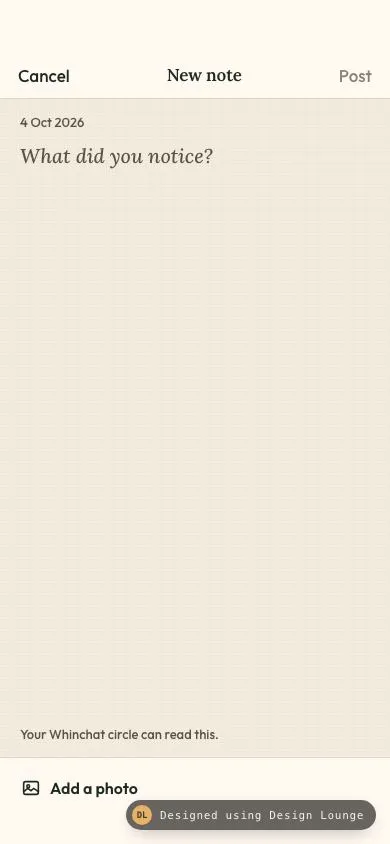
Whinchat's new-note screen. Post stays off until the body has text, four drawn thumbs appear on request, and Cancel opens a discard sheet on a dirty draft.
Preview
Use it
Free to use · credit appreciated1 Once, in your project
npx skills add SusanAcharya/Design-Lounge 2 Then ask
Using the Design Lounge skill, build "New note composer" (piece phone-composer) in my stack. Match its brief; restyle it onto my product's theme.
No skill? Paste the brief instead. It carries the numbers, tokens and behaviour.
<!-- Design Lounge Nº 507 · "New note composer" · www.designlounge.live -->

# New note composer

> **Build brief for a coding agent.** Rebuild this piece in the reader's stack. If they haven't said which stack, ask once, then default to semantic HTML + CSS + a little vanilla JS. Match the numbers below; don't "improve" them. When a kit is locked, map colours onto the kit tokens. This is an iOS note composer: inline title, paper field, 44px targets, and a confirmation sheet. Do not draw a status bar.

## What it is

The new-note screen of Whinchat, an invented walking-notes app. One person writes a short note for a small circle. The top bar is Cancel, the title "New note", and Post. Post stays a muted brown until the body has non-space text, then it turns berry and bold. The field is a serif textarea on a grained paper ground, with the date above it and one line of hint below. "Add a photo" reveals four already-drawn thumbs. They are buttons, not a file picker. If the body is dirty, Cancel opens a bottom sheet that asks to discard. Keep editing returns to the same draft. The detail worth copying is the quiet empty frame: Post is visibly off, the prompt is set in italic serif, and nothing else competes with the paper.

This is not a chat composer. A thread with replies is `phone-comments-sheet`. A system photo grid is `phone-photo-picker`. This screen only composes one note.

## Reference behaviour

1. First frame: the field is empty. Placeholder reads "What did you notice?" The date reads "4 Oct 2026". The hint reads "Your Whinchat circle can read this." Post has `aria-disabled="true"` and the off colour. The photo strip is hidden. The sheet is hidden. Nothing is focused, so no focus ring shows.
2. Typing only spaces or line breaks does not enable Post. `trim()` length must be at least 1.
3. The first non-space character adds class `ready` on Post, sets `aria-disabled` to `"false"`, and turns the label berry at weight 700.
4. Clearing the field back to empty removes `ready` and sets `aria-disabled` back to `"true"`.
5. "Add a photo" toggles the strip. `aria-expanded` flips between `"false"` and `"true"`. `aria-controls` points at the strip. The strip holds four 72px buttons.
6. Each thumb toggles `aria-pressed`. A pressed thumb gets a 2px inset berry ring and a 20px check. Several thumbs may be pressed at once. Pressing a thumb does not enable Post.
7. Post, when ready, clears the field, clears every thumb, hides the strip, disables Post, and replaces the hint with "Posted to your circle." in berry for 1800ms. A polite live region says the same sentence. After 1800ms the hint returns to "Your Whinchat circle can read this."
8. Activating Post while it is off does not post. The live region says "Write a note before posting."
9. Cancel while the trimmed body is empty does not open the sheet. It clears thumb presses, hides the strip, and the live region says "Nothing to discard."
10. Cancel while the trimmed body has text opens the sheet. The app behind it is `inert`. Focus moves to "Keep editing". The title is "Discard this note?" The body is "The words you wrote will be cleared."
11. Discard clears the field, the thumbs, and the strip, closes the sheet, removes `inert`, says "Note discarded.", and focuses the field. Post is off.
12. Keep editing, Escape, or a click on the scrim closes the sheet without clearing the field. The live region says "Back to the note." Focus returns to the field. Pressed thumbs stay pressed. The strip stays as it was.
13. Tab inside the open sheet cycles only Discard and Keep editing.
14. Selected photos alone are not a dirty body. They do not open the sheet and they do not enable Post.

## Structure

```
390 by 844, column flex, overflow clip
nav, surface, 1px bottom rule
padding-top max(54px, safe-area-inset-top)
[ Cancel 44 ] [ New note ] [ Post 44 ]

main, paper plus grain, flex 1
  4 Oct 2026                 13px, pad 14 20 0
  textarea, serif 20px, flex 1, min-height 120

… 200 more lines. Copy or download for the full brief. Loading the source…Brief
240 linesBuild brief for a coding agent. Rebuild this piece in the reader’s stack. If they haven’t said which stack, ask once, then default to semantic HTML + CSS + a little vanilla JS. Match the numbers below; don’t “improve” them. When a kit is locked, map colours onto the kit tokens. This is an iOS note composer: inline title, paper field, 44px targets, and a confirmation sheet. Do not draw a status bar.
What it is
The new-note screen of Whinchat, an invented walking-notes app. One person writes a short note for a small circle. The top bar is Cancel, the title “New note”, and Post. Post stays a muted brown until the body has non-space text, then it turns berry and bold. The field is a serif textarea on a grained paper ground, with the date above it and one line of hint below. “Add a photo” reveals four already-drawn thumbs. They are buttons, not a file picker. If the body is dirty, Cancel opens a bottom sheet that asks to discard. Keep editing returns to the same draft. The detail worth copying is the quiet empty frame: Post is visibly off, the prompt is set in italic serif, and nothing else competes with the paper.
This is not a chat composer. A thread with replies is phone-comments-sheet. A system photo grid is phone-photo-picker. This screen only composes one note.
Reference behaviour
- First frame: the field is empty. Placeholder reads “What did you notice?” The date reads “4 Oct 2026”. The hint reads “Your Whinchat circle can read this.” Post has
aria-disabled="true"and the off colour. The photo strip is hidden. The sheet is hidden. Nothing is focused, so no focus ring shows. - Typing only spaces or line breaks does not enable Post.
trim()length must be at least 1. - The first non-space character adds class
readyon Post, setsaria-disabledto"false", and turns the label berry at weight 700. - Clearing the field back to empty removes
readyand setsaria-disabledback to"true". - “Add a photo” toggles the strip.
aria-expandedflips between"false"and"true".aria-controlspoints at the strip. The strip holds four 72px buttons. - Each thumb toggles
aria-pressed. A pressed thumb gets a 2px inset berry ring and a 20px check. Several thumbs may be pressed at once. Pressing a thumb does not enable Post. - Post, when ready, clears the field, clears every thumb, hides the strip, disables Post, and replaces the hint with “Posted to your circle.” in berry for 1800ms. A polite live region says the same sentence. After 1800ms the hint returns to “Your Whinchat circle can read this.”
- Activating Post while it is off does not post. The live region says “Write a note before posting.”
- Cancel while the trimmed body is empty does not open the sheet. It clears thumb presses, hides the strip, and the live region says “Nothing to discard.”
- Cancel while the trimmed body has text opens the sheet. The app behind it is
inert. Focus moves to “Keep editing”. The title is “Discard this note?” The body is “The words you wrote will be cleared.” - Discard clears the field, the thumbs, and the strip, closes the sheet, removes
inert, says “Note discarded.”, and focuses the field. Post is off. - Keep editing, Escape, or a click on the scrim closes the sheet without clearing the field. The live region says “Back to the note.” Focus returns to the field. Pressed thumbs stay pressed. The strip stays as it was.
- Tab inside the open sheet cycles only Discard and Keep editing.
- Selected photos alone are not a dirty body. They do not open the sheet and they do not enable Post.
Structure
390 by 844, column flex, overflow clip
nav, surface, 1px bottom rule
padding-top max(54px, safe-area-inset-top)
[ Cancel 44 ] [ New note ] [ Post 44 ]

main, paper plus grain, flex 1
  4 Oct 2026                 13px, pad 14 20 0
  textarea, serif 20px, flex 1, min-height 120
  hint                       13px, pad 0 20 14

dock, surface, 1px top rule
  strip, hidden until Add a photo
  [ 72 ] [ 72 ] [ 72 ] [ 72 ]
  [ icon Add a photo ]       min-height 44
  padding-bottom max(34px, safe-area-inset-bottom)

sheet, fixed bottom, radius 20 20 0 0, hidden until dirty Cancel
  Discard this note?
  The words you wrote will be cleared.
  [ Discard ]                48px, berry fill
  [ Keep editing ]           48px, 1px rule
padding-bottom max(34px, safe-area-inset-bottom)- The page is one column:
header,main, dock. They share the viewport height. The textarea scrolls insidemainif the text is long. The page itself does not scroll. - The title is the only
h1. - The textarea’s accessible name is “Note” via
aria-label. The placeholder is not the name. - The strip is a group of four
buttonelements. There is noinput type="file". - The sheet is
role="dialog"aria-modal="true", labelled by the heading and described by the sentence. - The scrim is a div behind the sheet,
aria-hidden="true". It is not a second button. - A visually hidden paragraph with
aria-live="polite"sits outside the inert app.
Thumb drawings, each an inline SVG at viewBox 0 0 72 72, aria-hidden, with these accessible names:
- “Hedge above a stone wall”. Sky
#b7c7a4on the top 30px, path#d9cbb6for 14px, wall#8f8b7cfor the rest, two stone lines, three hedge circles#3f6b45,#2f5a38,#4e7a52. - “A round pond and reeds”. Field
#d5c4a2, pond ellipse#6d90a0, highlight#d5e3ea, three reed strokes#234433. - “A red gate in a field”. Field
#e4d3b0, ground#c4b48afrom y 48, two posts and two rails in#9c3b2e. - “A wooden footbridge”. Sky
#d8e0dc, water#6e8f86from y 36, rail and posts#4a3428, deck#6a4a34, planks#7d5a42.
Tokens
:root {
  --bg: #f3ebdd;          /* paper field */
  --surface: #fff9f1;     /* nav, dock, sheet */
  --ink: #1c2b22;         /* body, Cancel, title */
  --ink-2: #4a433c;       /* sheet sentence */
  --muted: #5c5148;       /* date, placeholder, hint */
  --line: #e4d5c3;        /* hairlines, keep-editing rule */
  --accent: #9c3b2e;      /* ready Post, Discard, focus, selected thumb */
  --accent-2: #7d2e24;    /* pressed berry */
  --off: #8d8072;         /* Post while off */
  --serif: "Lora", Georgia, serif;
  --sans: "Outfit", system-ui, sans-serif;
  --ease: cubic-bezier(.2, .7, .2, 1);
  --sheet: cubic-bezier(.32, .72, 0, 1);
  --fast: 160ms;
  --sheet-ms: 340ms;
}
Grain on main only: radial-gradient(rgba(28,43,34,.05) .65px, transparent .7px) at 3px 3px. The nav and the dock are flat surface, so the grain stops at the hairlines.
Typography
| Role | Family | Size | Weight | Line height | Tracking | Colour |
|---|---|---|---|---|---|---|
| Cancel, Post | Outfit | 17px | 500, Post ready 700 | 1 | 0 | ink, off, or accent |
| Title | Lora | 17px | 600 | 1 | -0.01em | ink |
| Date, hint | Outfit | 13px | 500, sent hint 700 | 1.4 | 0 | muted, sent hint accent |
| Note | Lora | 20px | 500 | 1.45 | 0 | ink, placeholder italic muted |
| Add a photo | Outfit | 16px | 600 | 1 | 0 | ink |
| Sheet title | Lora | 22px | 600 | 1.2 | -0.02em | ink |
| Sheet body | Outfit | 15px | 400 | 1.4 | 0 | ink-2 |
| Sheet buttons | Outfit | 17px | 600 | 1 | 0 | surface on Discard, ink on Keep |
The note is the only serif block in the field. Chrome stays in Outfit. Do not set Post in Lora.
Motion
| Thing | Trigger | Property | From | To | Duration | Easing | Reduced motion |
|---|---|---|---|---|---|---|---|
| Scrim | sheet opens or closes | opacity | 0 | 1 | 340ms | standard ease | none, state snaps |
| Sheet | sheet opens or closes | transform | translateY(110%) | none | 340ms | sheet ease | none, sheet appears in place |
| Posted hint | successful Post | text and colour | circle hint | “Posted to your circle.” | holds 1800ms, then restores | none | same hold, no slide |
The sheet starts hidden. Removing hidden and adding .on on the next frame lets the transition run. Closing removes .on, waits 340ms, then sets hidden and lifts inert. Under reduced motion both steps are synchronous.
There is no animation on the thumb strip. It appears and disappears with the hidden attribute.
States
- Post off: colour
#8d8072, weight 500,aria-disabled="true". It stays in the tab order. - Post ready: colour
#9c3b2e, weight 700. Hover colour#7d2e24. - Post hover and active while off: the nav button wash,
rgba(28,43,34,.05)then.09. - Thumb resting: no ring, check hidden,
aria-pressed="false". - Thumb pressed: inset
0 0 0 2pxaccent, check shown,aria-pressed="true". - Add a photo expanded:
aria-expanded="true", strip visible. Hover wash same as nav. - Sheet closed:
hidden, off screen attranslateY(110%)when shown without.on. - Sheet open: scrim opacity 1, sheet in place, app
inert. - Focus-visible: 2px accent outline, offset 2px, on every button and on the textarea.
- Empty: the first frame. Placeholder, date, hint, Post off, strip hidden.
- Error: activating Post while the body is empty announces “Write a note before posting.” There is no network failure on this screen.
- Sent: hint swaps for 1800ms, then the empty frame returns.
Accessibility
- Cancel, Post, Add a photo, each thumb, Discard, and Keep editing are
button type="button". Hit targets are at least 44px. Sheet actions are at least 48px tall and full width of the sheet padding. - Post uses
aria-disabled, not thedisabledattribute, so it can take focus and explain itself. - The dialog traps Tab between its two buttons. Escape calls Keep editing. Focus on open is Keep editing, not Discard, so the destructive action is not the default.
- Opening the sheet sets
inerton the app. The live region stays outside that subtree. - The live region is visually hidden and
aria-live="polite". It starts empty so the first frame does not announce. - Contrast:
#1c2b22on#fff9f1and on#f3ebddclears 4.5.#5c5148on#f3ebddis the muted text.#fff9f1on#9c3b2eis the Discard label. The off Post colour is a disabled control and may sit under 4.5. - Icons are inline SVG, 24px grid, stroke 1.75,
currentColor,aria-hidden. No emoji. No external image. - Do not use
alert,localStorage, or a file input.
Responsive rules
- The frame is 390 by 844. Top clearance is
max(54px, env(safe-area-inset-top))on the nav. Bottom clearance ismax(34px, env(safe-area-inset-bottom))on the dock and on the sheet. Do not draw a clock, a notch, or a home indicator. - At 360 wide, the four thumbs switch to
repeat(4, 1fr)with an 8px gap andaspect-ratio: 1. Labels do not drop. - At tablet width, do not stretch this composer across 1180px. It is a phone sheet. A tablet uses a centred column near 420px, with the same stack.
- At a 200 percent text size, the nav stays one row (
auto 1fr auto). The title may shrink. The date, hint, and sheet sentence wrap. The textarea scrolls inside the column. Sheet buttons grow past 48px and may wrap to two lines. Thumbs stay a fixed picture size at 390 and do not cause sideways overflow. overflow-wrapis not required for these short labels. The page usesoverflow: clipso a wide thumb row cannot create a horizontal scrollbar.
Acceptance checklist
Always
- Post is off until the trimmed body has text, and it turns off again when that text is cleared.
- Photos do not enable Post and do not, by themselves, open the discard sheet.
- The photo control reveals buttons. It is not a file input.
- Dirty Cancel opens one sheet with Discard and Keep editing. Keep editing, Escape, and the scrim return without clearing the body.
- Discard clears the body and the photo selection.
- Every control is at least 44px. Sheet actions are at least 48px.
- Top clearance is 54px. Bottom clearance is 34px. No status bar is drawn.
- Focus is a 2px ring. The open sheet traps Tab and marks the app inert.
- Reduced motion removes the sheet slide and the scrim fade.
This demo
- The brand is Whinchat. The title is “New note”. The date is “4 Oct 2026”.
- The placeholder is “What did you notice?” in italic Lora 20px.
- The first frame has Post off, the strip hidden, and the sheet hidden.
- The hint is “Your Whinchat circle can read this.” After a successful post it reads “Posted to your circle.” for 1800ms.
- The four thumb names are hedge and stone wall, round pond and reeds, red gate, wooden footbridge.
- The sheet title is “Discard this note?” and the sentence is “The words you wrote will be cleared.”
- Empty activation says “Write a note before posting.” A clean Cancel says “Nothing to discard.”
- Paper is
#f3ebdd, surface is#fff9f1, berry is#9c3b2e, off Post is#8d8072. - Fonts are Lora and Outfit. The field is Lora. The chrome is Outfit.
Implementation notes
Dirty is the trimmed field, not the photo selection:
const dirty = () => note.value.trim().length > 0;
function sync() {
  const on = dirty();
  post.classList.toggle('ready', on);
  post.setAttribute('aria-disabled', on ? 'false' : 'true');
}
Open the sheet on the next frame so the transform can run. Under reduced motion, skip that frame.
function openSheet() {
  scrim.hidden = false;
  sheet.hidden = false;
  app.setAttribute('inert', '');
  const show = () => {
    scrim.classList.add('on');
    sheet.classList.add('on');
    keep.focus();
  };
  if (reduce) show();
  else requestAnimationFrame(show);
}
Common mistakes:
- A file input, a camera roll, or an upload progress state. The four drawings are already here.
- Enabling Post because a thumb is pressed while the field is empty.
- Using the
disabledattribute on Post, which removes it from the tab order. - Focusing Discard when the sheet opens.
- A grabber that does not drag. This sheet has no drag handle.
- Drawing the status bar, or letting the nav sit under it.
- A second navigation bar. Cancel and Post are the only chrome actions.
- Placeholder text as the only accessible name. Set
aria-label="Note". - Animating the sheet from
display: nonein the same frame, which skips the slide.
Where it sits:
- It is the compose screen of a phone notes app, presented as a full screen, not a small card.
- A successful post returns to the empty frame. A real app would dismiss to the circle. This demo stays so the empty frame can be reached again.
- The photo strip is a choice of four drawings. It is not
phone-photo-picker. - Map
--accentto the locked primary and--bgto the locked paper if a kit is on. Keep Post off visually distinct from Cancel. - One serif, one sans. Do not add a third family for the date.
- The posted hint is not a toast that covers the field. It replaces the sentence already under the textarea, then restores it.
- Thumb checks are 20px circles at the top right of the 72px button, 4px inset, with a 14px stroke check in the surface colour.
- The nav grid is
auto 1fr autoso the title stays centred when Cancel and Post have different weights. - Grain stops at the hairline. Do not paint the grain on the surface bars or the sheet.
Details
- Palette
- Type
- Lora · Outfit
- Motion
- Subtle motion
- Build
- One session
- Tags
On the shelves