Nº 523 of 528
Toolbar that swaps with the selection
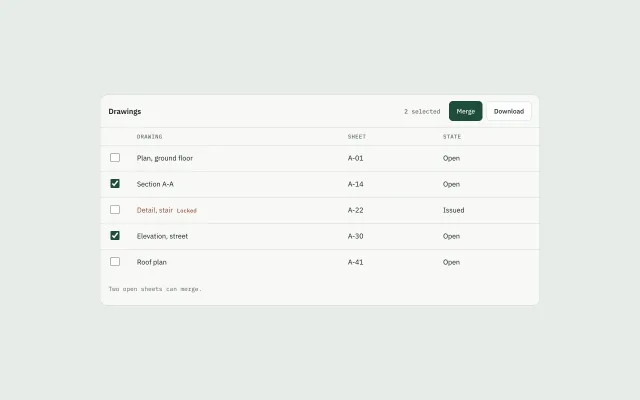
Zero rows shows Filter. One row shows Open, Rename, Download. Two open rows show Merge. A locked row leaves only Download.
Preview
Use it
Free to use · credit appreciated1 Once, in your project
npx skills add SusanAcharya/Design-Lounge 2 Then ask
Using the Design Lounge skill, build "Toolbar that swaps with the selection" (piece toolbar-selection-swap) in my stack. Match its brief; restyle it onto my product's theme.
No skill? Paste the brief instead. It carries the numbers, tokens and behaviour.
<!-- Design Lounge Nº 523 · "Toolbar that swaps with the selection" · www.designlounge.live -->

# Toolbar that swaps with the selection

> **Build brief for a coding agent.** Rebuild this piece in the reader's stack. If they haven't said which stack, ask once, then default to semantic HTML + CSS + a little vanilla JS. Match the numbers below; don't "improve" them. When a kit is locked, map the colours onto that kit. The rule is which buttons exist, not the paint.

## What it is

A drawing register for a yard office. Five sheets. Section A-A and Elevation, street start checked, so the toolbar already shows Merge and Download. The point is that the buttons change with the selection. `selection-bar` is the bottom bar whose actions stay Clear, Export, and Archive no matter what you check. This piece is the top toolbar that swaps. Use it on a dashboard or a web app when a table has checks.

## Reference behaviour

1. First frame: two checks. The count reads "2 selected". Visible actions are Merge (filled green) and Download. The status reads "Two open sheets can merge."
2. Uncheck until one row remains, and that row is not locked. The count reads "1 selected". Actions become Open, Rename, and Download. Merge hides. Status: "One sheet: open it, rename it, or download it."
3. Uncheck everything. The count reads "None selected". The only action is Filter. Status: "Select a drawing."
4. Check "Detail, stair", alone or with others. That row is locked. Every action hides except Download. Status: "A locked sheet can only be downloaded."
5. Check two or more rows that are all open. Merge and Download return.
6. Clicking a visible action rewrites the status as "{Action} · {n} drawing(s)." Filter writes "Filter stays on the page. Nothing is selected."
7. Hidden buttons are `hidden`, not faded. They are not in the tab order.

## Structure

```
880 sheet
toolbar 64px
  title "Drawings"
  count, mono
  actions: Filter, Open, Rename, Merge, Download
table
  checkbox · drawing · sheet · state
  5 rows, 52px
status 12px mono
```

- The toolbar is a `div.bar`. The actions sit in `div[role=toolbar]`.
- The table has a real `thead`. Each checkbox has an `aria-label` naming the drawing.
- The locked row carries `data-locked="1"` on its checkbox and the word "Locked" beside the name.
- The status is `p#foot[role=status]`.

## Tokens

… 116 more lines. Copy or download for the full brief. Loading the source…Brief
156 linesBuild brief for a coding agent. Rebuild this piece in the reader’s stack. If they haven’t said which stack, ask once, then default to semantic HTML + CSS + a little vanilla JS. Match the numbers below; don’t “improve” them. When a kit is locked, map the colours onto that kit. The rule is which buttons exist, not the paint.
What it is
A drawing register for a yard office. Five sheets. Section A-A and Elevation, street start checked, so the toolbar already shows Merge and Download. The point is that the buttons change with the selection. selection-bar is the bottom bar whose actions stay Clear, Export, and Archive no matter what you check. This piece is the top toolbar that swaps. Use it on a dashboard or a web app when a table has checks.
Reference behaviour
- First frame: two checks. The count reads “2 selected”. Visible actions are Merge (filled green) and Download. The status reads “Two open sheets can merge.”
- Uncheck until one row remains, and that row is not locked. The count reads “1 selected”. Actions become Open, Rename, and Download. Merge hides. Status: “One sheet: open it, rename it, or download it.”
- Uncheck everything. The count reads “None selected”. The only action is Filter. Status: “Select a drawing.”
- Check “Detail, stair”, alone or with others. That row is locked. Every action hides except Download. Status: “A locked sheet can only be downloaded.”
- Check two or more rows that are all open. Merge and Download return.
- Clicking a visible action rewrites the status as “{Action} · {n} drawing(s).” Filter writes “Filter stays on the page. Nothing is selected.”
- Hidden buttons are
hidden, not faded. They are not in the tab order.
Structure
880 sheet
toolbar 64px
  title "Drawings"
  count, mono
  actions: Filter, Open, Rename, Merge, Download
table
  checkbox · drawing · sheet · state
  5 rows, 52px
status 12px mono- The toolbar is a
div.bar. The actions sit indiv[role=toolbar]. - The table has a real
thead. Each checkbox has anaria-labelnaming the drawing. - The locked row carries
data-locked="1"on its checkbox and the word “Locked” beside the name. - The status is
p#foot[role=status].
Tokens
:root {
  --bg: #e7ece9;
  --card: #f7f8f6;
  --ink: #17211c;
  --muted: #5e6b64;
  --line: #d5ddd8;
  --green: #1f4d3a;
  --green-ink: #f3f7f4;
  --lock: #8a4b32;
  --sans: "IBM Plex Sans", system-ui, sans-serif;
  --mono: "IBM Plex Mono", ui-monospace, monospace;
}
Radius on the sheet is 14px. Action buttons are 8px. There is no shadow.
Typography
| Role | Family | Size | Weight | Line | Tracking |
|---|---|---|---|---|---|
| Title | IBM Plex Sans | 15px | 600 | 1.2 | 0 |
| Count, status, lock | IBM Plex Mono | 12px | 500 | 1.3 | 0 |
| Column head | IBM Plex Mono | 11px | 500 | 1 | 0.06em, uppercase |
| Cell | IBM Plex Sans | 14px | 400 | 1.4 | 0 |
| Action | IBM Plex Sans | 13px | 500 | 1 | 0 |
Motion
No motion. Buttons appear and disappear with the hidden attribute. Do not fade them. Reduced motion has nothing to shorten.
States
- 0 selected: Filter only. Title stays “Drawings”.
- 1 selected, not locked: Open, Rename, Download. Download is not the filled button. Open is not filled either. Only Merge uses the green fill, and Merge is hidden in this state.
- 2 or more, none locked: Merge (background
#1f4d3a, text#f3f7f4) and Download. - Any locked box checked: Download only, even if open sheets are also checked.
- Hover on a visible action: border becomes
#17211c. - Focus-visible: 2px
#1f4d3aoutline, offset 2px. - Locked name:
#8a4b32, with the mono word “Locked”. - Checkbox: 18×18px,
accent-color: #1f4d3a.
Accessibility
- The action group is
role="toolbar"witharia-label="Selection actions". - Buttons that do not apply are
hidden, so a screen reader does not announce Merge when one row is selected. - Each checkbox label names the drawing: “Select Section A-A”.
- The status line is
role="status"and updates when the selection or an action changes. - Focus order: the visible actions, then the five checkboxes.
- Do not use a click on the row to toggle the check. The checkbox is the control. The row is 52px, the box is 18px inside it, and the cell padding makes the row easy to hit.
- Contrast:
#17211con#f7f8f6, and#f3f7f4on#1f4d3a.
Responsive rules
- ≥1280: the sheet is 880px.
- 1024: the sheet is
width: calc(100% - 48px). Columns stay in one row. - 768: the sheet number column may wrap under the name. Actions stay on one line; if they overflow, the toolbar wraps, it does not become a bottom sheet.
- <640: this desktop register is the wrong piece. A phone uses a list and
ios-swipe-row-actions.
Acceptance checklist
Always
- 0 selected shows only Filter.
- 1 unlocked row shows Open, Rename, and Download, and hides Merge.
- 2 or more unlocked rows show Merge and Download.
- Any locked row in the selection leaves only Download.
- Hidden actions use the
hiddenattribute. - Merge is the only filled button,
#1f4d3awith#f3f7f4text. - The count string is “None selected”, “1 selected”, or “N selected”.
- This is not
selection-bar. That bar does not swap its verbs.
This demo
- Title is “Drawings”.
- Section A-A and Elevation, street start checked.
- Locked row is “Detail, stair”, sheet A-22, state Issued.
- First status is “Two open sheets can merge.”
- Locked status is “A locked sheet can only be downloaded.”
Implementation notes
Decide the mode from the checked set, then set hidden in one place:
const on = boxes.filter(b => b.checked);
const locked = on.some(b => b.dataset.locked === '1');
if (on.length === 0) mode = 'none';
else if (locked) mode = 'locked';
else if (on.length === 1) mode = 'one';
else mode = 'many';
Common mistakes:
- Showing every button and disabling the ones that do not fit. A disabled Merge still looks like an action. Hide it.
- Replacing
selection-baron a page that only needs Clear and Archive. Use that piece when the verbs never change. - Letting a locked row merge because other checked rows are open. One lock blocks Merge, Open, and Rename.
- Animating the toolbar height. The bar is at least 64px either way.
Where it sits:
- Put it above the table, in the same sheet, not as a second floating bar.
dense-data-tableis the table. This is only the toolbar. Do not rebuild the dense table here.- If the product’s verbs never change, use
selection-barand skip this piece. - The locked rule is data: a row the person cannot edit. Do not invent a lock to decorate the demo.
- Filter does not open a panel in this piece. It is the resting action so the toolbar is not empty.
- Download of one row and download of many share one button. Do not add a second download.
- The green fill is only Merge. Open, Rename, Download, and Filter stay outlined.
- The count is not a heading. The heading stays “Drawings” in this demo, or the table’s name in the product.
Details
- Palette
- Type
- IBM Plex Sans · IBM Plex Mono
- Motion
- Static
- Build
- One session
- Tags
Similar
Selection bar
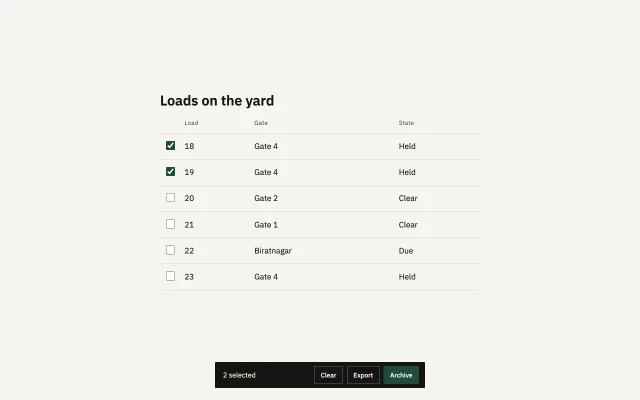
Checking loads raises a dark bar: the count, Clear, Export, and Archive. Zero checks hides it.
Dense data table
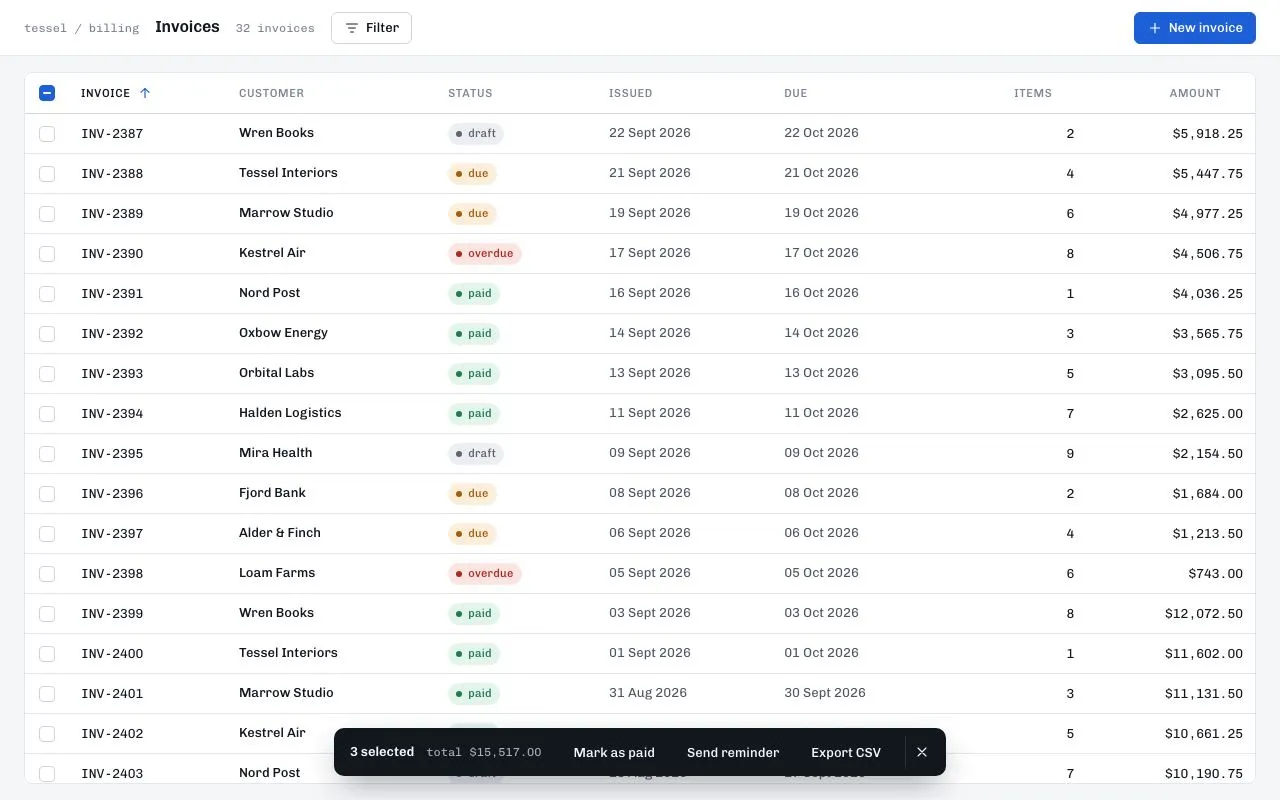
A 40px-row invoice table with a sticky header, tri-state select-all, shift-click ranges, sortable columns and a dark action bar that slides up when rows are selected.
Design-tool transform box
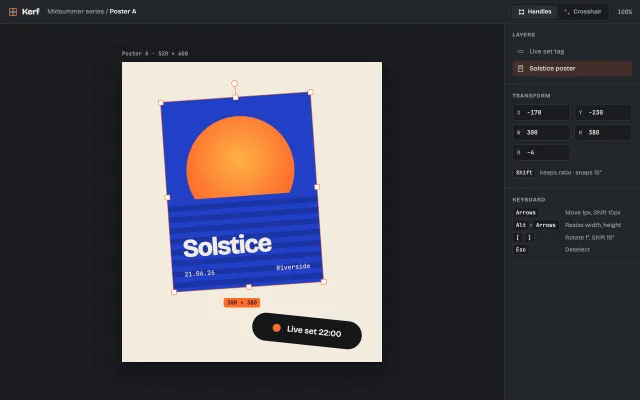
A canvas selection box with eight resize handles, a rotate handle and a live size badge. Drag to move, resize and rotate; Shift keeps ratio and snaps 15°.