Nº 509 of 520
Phone checkout
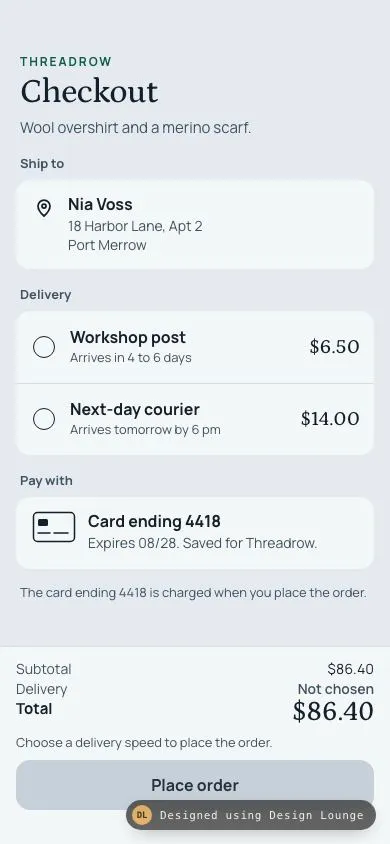
Threadrow phone checkout with an address, two priced deliveries, and a saved card, where Place order stays off until a speed is picked.
Preview
Use it
Free to use · credit appreciated1 Once, in your project
npx skills add SusanAcharya/Design-Lounge 2 Then ask
Using the Design Lounge skill, build "Phone checkout" (piece phone-checkout) in my stack. Match its brief; restyle it onto my product's theme.
No skill? Paste the brief instead. It carries the numbers, tokens and behaviour.
<!-- Design Lounge Nº 509 · "Phone checkout" · www.designlounge.live -->

# Phone checkout

> **Build brief for a coding agent.** Rebuild this piece in the reader's stack. If they haven't said which stack, ask once, then default to semantic HTML + CSS + a little vanilla JS. Match the numbers below; don't "improve" them. When a kit is locked, map colours onto the kit tokens. This is an iOS checkout summary. It is not an address form and it is not a bag of line items.

## What it is

The checkout screen of Threadrow, an invented wool-clothing label, on a phone. The language is iOS: large title, inset groups on a cool mist ground, native radios, 44px targets, and a bar pinned to the bottom. The Lounge draws the status bar. Do not draw one.

The scroll region holds a ship-to summary, two delivery choices with real prices, and one saved card row (last four digits only). The bar holds the arithmetic and Place order. Subtotal is the sum of two cent amounts. Delivery contributes 0 cents until a speed is chosen, then that speed's cents. The total is always subtotal plus delivery, formatted from the integer. Place order is a disabled button until a delivery is chosen.

After a valid tap, the button reads "Placing order" for a short wait, the form dims, and the same screen swaps to a confirmation: an order number and one next action. There is no second page and no map.

## Reference behaviour

1. First frame is the form before a delivery is chosen. No radio is checked. Ship to reads Nia Voss, 18 Harbor Lane, Apt 2, Port Merrow. The lede reads "Wool overshirt and a merino scarf."
2. Subtotal is 6800 + 1840 = 8640 cents, shown as $86.40. Those two amounts are the overshirt and the scarf. They are not separate rows. This screen does not repeat the bag.
3. Delivery row in the bar reads "Not chosen". Total reads $86.40, which is 8640 + 0. The hint reads "Choose a delivery speed to place the order." Place order is `disabled`.
4. The two speeds, with prices written by the same money function: Workshop post, "Arrives in 4 to 6 days", 650 cents, shown as $6.50. Next-day courier, "Arrives tomorrow by 6 pm", 1400 cents, shown as $14.00.
5. Choosing Workshop post checks that radio, fills the row with `#e4f2ec`, fills the 22px radio pine with an 8px light dot, sets Delivery to $6.50, sets the hint to the arrival sentence, enables Place order, and sets Total to $92.90 (8640 + 650).
6. Choosing Next-day courier instead sets Delivery to $14.00 and Total to $100.40 (8640 + 1400). Only one radio is checked. Arrow keys move inside the native radio group.
7. Tapping Place order while it is disabled does nothing. The click does not fire, because the control is actually `disabled`, not only grey.
8. Tapping Place order when a speed is chosen: the fieldset becomes `disabled` (radios at 50% opacity), the button becomes `disabled` with `aria-busy="true"` and the label "Placing order", the form opacity falls to 0.48 over 200ms, and a polite live region says "Placing order."
9. After 720ms (160ms when `prefers-reduced-motion: reduce`), the form and the bar hide. The confirmation shows. Order number TR-20481. Kicker "Order placed". Body: "{speed label} to Nia Voss in Port Merrow. {eta}." A check mark draws in 420ms. Focus moves to the order number heading.
10. The confirmation has one button, "Back to the shop". It clears the radios, sets delivery back to not chosen, restores Total to $86.40, disables Place order, hides the confirmation, and focuses the Checkout heading. The order number does not change. It is always TR-20481.
11. The card row is not a control. It reads "Card ending 4418" and "Expires 08/28. Saved for Threadrow." A note under it says the card is charged when the order is placed. There is no card form and no second payment method.
12. The address is a summary. It has no edit field on this screen.

## Structure

```
390 x 844, body column, overflow hidden
+--------------------------------------+
| padding-top max(54px, safe-area)    |
| THREADROW          12px tracked pine |
| Checkout           Petrona 34px      |
| Wool overshirt and a merino scarf.   |
| Ship to                              |
| [pin] Nia Voss                       |

… 209 more lines. Copy or download for the full brief. Loading the source…Brief
249 linesBuild brief for a coding agent. Rebuild this piece in the reader’s stack. If they haven’t said which stack, ask once, then default to semantic HTML + CSS + a little vanilla JS. Match the numbers below; don’t “improve” them. When a kit is locked, map colours onto the kit tokens. This is an iOS checkout summary. It is not an address form and it is not a bag of line items.
What it is
The checkout screen of Threadrow, an invented wool-clothing label, on a phone. The language is iOS: large title, inset groups on a cool mist ground, native radios, 44px targets, and a bar pinned to the bottom. The Lounge draws the status bar. Do not draw one.
The scroll region holds a ship-to summary, two delivery choices with real prices, and one saved card row (last four digits only). The bar holds the arithmetic and Place order. Subtotal is the sum of two cent amounts. Delivery contributes 0 cents until a speed is chosen, then that speed’s cents. The total is always subtotal plus delivery, formatted from the integer. Place order is a disabled button until a delivery is chosen.
After a valid tap, the button reads “Placing order” for a short wait, the form dims, and the same screen swaps to a confirmation: an order number and one next action. There is no second page and no map.
Reference behaviour
- First frame is the form before a delivery is chosen. No radio is checked. Ship to reads Nia Voss, 18 Harbor Lane, Apt 2, Port Merrow. The lede reads “Wool overshirt and a merino scarf.”
- Subtotal is 6800 + 1840 = 8640 cents, shown as $86.40. Those two amounts are the overshirt and the scarf. They are not separate rows. This screen does not repeat the bag.
- Delivery row in the bar reads “Not chosen”. Total reads $86.40, which is 8640 + 0. The hint reads “Choose a delivery speed to place the order.” Place order is
disabled. - The two speeds, with prices written by the same money function: Workshop post, “Arrives in 4 to 6 days”, 650 cents, shown as $6.50. Next-day courier, “Arrives tomorrow by 6 pm”, 1400 cents, shown as $14.00.
- Choosing Workshop post checks that radio, fills the row with
#e4f2ec, fills the 22px radio pine with an 8px light dot, sets Delivery to $6.50, sets the hint to the arrival sentence, enables Place order, and sets Total to $92.90 (8640 + 650). - Choosing Next-day courier instead sets Delivery to $14.00 and Total to $100.40 (8640 + 1400). Only one radio is checked. Arrow keys move inside the native radio group.
- Tapping Place order while it is disabled does nothing. The click does not fire, because the control is actually
disabled, not only grey. - Tapping Place order when a speed is chosen: the fieldset becomes
disabled(radios at 50% opacity), the button becomesdisabledwitharia-busy="true"and the label “Placing order”, the form opacity falls to 0.48 over 200ms, and a polite live region says “Placing order.” - After 720ms (160ms when
prefers-reduced-motion: reduce), the form and the bar hide. The confirmation shows. Order number TR-20481. Kicker “Order placed”. Body: “{speed label} to Nia Voss in Port Merrow. {eta}.” A check mark draws in 420ms. Focus moves to the order number heading. - The confirmation has one button, “Back to the shop”. It clears the radios, sets delivery back to not chosen, restores Total to $86.40, disables Place order, hides the confirmation, and focuses the Checkout heading. The order number does not change. It is always TR-20481.
- The card row is not a control. It reads “Card ending 4418” and “Expires 08/28. Saved for Threadrow.” A note under it says the card is charged when the order is placed. There is no card form and no second payment method.
- The address is a summary. It has no edit field on this screen.
Structure
390 x 844, body column, overflow hidden
+--------------------------------------+
| padding-top max(54px, safe-area)    |
| THREADROW          12px tracked pine |
| Checkout           Petrona 34px      |
| Wool overshirt and a merino scarf.   |
| Ship to                              |
| [pin] Nia Voss                       |
|       18 Harbor Lane, Apt 2          |
|       Port Merrow                    |
| Delivery                             |
| ( ) Workshop post            $6.50   |  row min-height 72
|     Arrives in 4 to 6 days           |
| ( ) Next-day courier        $14.00   |
|     Arrives tomorrow by 6 pm         |
| Pay with                             |
| [card] Card ending 4418              |
|        Expires 08/28. Saved for...   |
| The card ending 4418 is charged...   |
+--------------------------------------+
| Subtotal                    $86.40   |
| Delivery                  Not chosen |
| Total                       $86.40   |  Petrona 28px
| Choose a delivery speed...           |
| [ Place order ]               50px   |  disabled, grey
| padding-bottom max(34px, safe-area) |
+--------------------------------------+
Confirmation replaces both the form and the bar, vertically centered:
|            (check in a 64px disc)    |
| ORDER PLACED                         |
| TR-20481              Petrona 40px   |
| Workshop post to Nia Voss in Port    |
| Merrow. Arrives in 4 to 6 days.      |
| [ Back to the shop ] 50px |main#flowscrolls.footer.baris a flex sibling pinned to the bottom.- Ship-to and pay-with are
sectionelements labelled by the paragraph above them. - Delivery is a
fieldsetwith a visiblelegend. The two choices arelabelelements wrapping native radios nameddelivery. - The radio input covers the row (absolute, opacity 0) so the whole row is the hit target. A drawn 22px circle is
aria-hidden. - The bar’s math is a group labelled “Order total”: Subtotal, Delivery, Total. One hint paragraph. One button.
- Confirmation is
section#done,hiddenon the first frame. Itsh1is the order number and istabindex="-1"so it can take focus. The formh1is alsotabindex="-1". - The card glyph and the map pin are inline SVG, 24px grid, stroke 1.5 to 1.75,
currentColor. No card network logo. No emoji.
Tokens
:root {
  --bg: #e4eaf0;
  --surface: #f4f7f8;
  --ink: #13202b;
  --ink-2: #3e5160;
  --line: #d3dde5;
  --pine: #0c5c48;
  --pine-soft: #e4f2ec;
  --pine-ink: #f3fbf7;
  --disabled: #c5d0d8;
  --disabled-ink: #243240;
  --focus: #0c5c48;
  --serif: "Petrona", Georgia, serif;
  --sans: "Manrope", system-ui, sans-serif;
  --ease: cubic-bezier(.2, .7, .2, 1);
}
Group radius 14px. Button radius 14px. Radio is a 22px circle with a 1.5px ink stroke, or a pine fill when checked. Hairlines are 1px --line. No drop shadow. Pine is the only accent: brand, selected radio, enabled button, confirmation kicker.
Typography
| Role | Family | Size | Weight | Line height | Tracking | Colour |
|---|---|---|---|---|---|---|
| Brand | Manrope | 12px | 700 | 1.4 | 0.16em | --pine, uppercase |
| Title | Petrona | 34px | 500 | 1 | -0.02em | --ink |
| Lede, body | Manrope | 15px | 400 | 1.4 to 1.45 | 0 | --ink-2 |
| Section label, legend | Manrope | 13px | 700 | 1.4 | 0 | --ink-2 |
| Name, speed | Manrope | 16px | 700 | 1.25 to 1.3 | 0 | --ink |
| Address, eta | Manrope | 13px to 14px | 400 | 1.3 to 1.35 | 0 | --ink-2 |
| Speed price | Petrona | 20px | 500 | 1 | 0 | --ink |
| Math label | Manrope | 14px | 400 | 1.4 | 0 | --ink-2 |
| Total label | Manrope | 15px | 700 | 1 | 0 | --ink |
| Total figure | Petrona | 28px | 500 | 1 | 0 | --ink |
| Hint | Manrope | 13px | 400 | 1.35 | 0 | --ink-2 |
| Place order | Manrope | 16px | 700 | 1 | 0 | --pine-ink or --disabled-ink |
| Kicker | Manrope | 13px | 700 | 1.4 | 0.12em | --pine, uppercase |
| Order number | Petrona | 40px | 500 | 1 | -0.02em | --ink |
| Confirm body | Manrope | 15px | 400 | 1.45 | 0 | --ink-2 |
Manrope is the UI. Petrona is the title, the speed prices, the bar total, and the order number. Do not set the button in Petrona.
Motion
| Thing | Trigger | Property | From | To | Duration | Easing | Reduced motion |
|---|---|---|---|---|---|---|---|
| Selected row | radio change | background | transparent | --pine-soft | 160ms | cubic-bezier(.2,.7,.2,1) | instant |
| Placing dim | Place order | opacity on #flow | 1 | 0.48 | 200ms | same curve | instant |
| Check mark | confirmation shown | stroke-dashoffset | 32 | 0 | 420ms | cubic-bezier(.16,1,.3,1) | drawn immediately |
| Button press | active, when enabled | transform | scale(1) | scale(0.98) | browser active | n/a | no scale |
| Placing wait | Place order | label and view | form | confirmation | 720ms | n/a | 160ms |
The wait is a setTimeout, not a loop, and never faster than 16ms. Restarting the check animation: remove the class, read offsetWidth, add the class again. The spinner is not used. The label change is the placing state.
States
- Radio resting: 22px circle, 1.5px
--inkstroke, row min-height 72px, surface background. - Radio checked: row background
--pine-soft, circle fill--pine, 8px--pine-inkdot.input:checkedis the state. Do not also setaria-pressed. - Radio focus-visible: 2px outline
--focuson the label, offset -2px, via:has(input:focus-visible). The opacity-0 input itself has no outline. - Fieldset disabled (during placing): choices at opacity 0.5. Radios cannot change.
- Place order off:
disabled, background#c5d0d8, text#243240, cursor not-allowed. This is the first frame. - Place order on: background
#0c5c48, text#f3fbf7. Hover on a fine pointer darkens to#0a4e3d. - Placing:
disabledstays true so a second tap does not start another timer,aria-busy="true", label “Placing order”, background stays pine (the busy rule comes after the disabled rule). Form at opacity 0.48 andpointer-events: none. - Confirmed: form and bar
hidden. One button. Check disc 64px, fill--pine-soft, stroke--pine. - No field error. The address and the card are already saved. The only gate is the missing delivery, and that gate is the disabled button plus the hint.
- Empty is not used. This screen always has an address and a card.
Accessibility
- One
h1visible at a time. Checkout on the form. TR-20481 on the confirmation. Both aretabindex="-1". - Ship to and Pay with label their sections with
aria-labelledby. Delivery is a reallegendinside afieldset. - Radios share
name="delivery". Values arepostandcourier. The visible name, the arrival sentence, and the price are inside the label, so the accessible name includes all three. - The drawn radio is
aria-hidden. The native input covers the row and is in tab order. - Place order is
disableduntil a speed is chosen, so it is skipped in tab order while it cannot run. Do not rely on a click handler alone. - During placing,
aria-busy="true"on the button. The live region says “Placing order.” Then “Order TR-20481 placed.” - On confirm, focus the order number. On “Back to the shop”, focus the Checkout heading.
- The card row is static text. Do not make it a button. Last four digits are 4418, in the text, not only in the icon.
- Hit targets: each delivery row is at least 72px tall and full width. Place order is 50px tall and full width of the bar’s content box. Back to the shop is at least 50px tall.
- Contrast:
#13202bon#f4f7f8is about 15.4:1.#3e5160on#f4f7f8is about 7.7:1.#f3fbf7on#0c5c48is about 7.6:1.#243240on#c5d0d8is about 8.3:1.#0c5c48on#e4f2ecis about 6.9:1. The selected row is not colour alone: the radio fills and the hint repeats the speed. - Focus ring is 2px
--focus, offset 2px, on buttons. The radio row uses the inset outline above.
Responsive rules
- The frame is 390x844. Header padding-top is
max(54px, env(safe-area-inset-top)). Bar padding-bottom ismax(34px, env(safe-area-inset-bottom)). - At 360 wide, section margin stays 16px. Speed names wrap inside the middle grid column (
minmax(0, 1fr)). The price stays in the auto column. The hint wraps. Nothing scrolls sideways. - At the largest text size, rows grow. Math rows are
flex-wrapwith the label atflex: 1 1 8emand the amount atmargin-left: auto, so a long label and the figure stack instead of overflowing. The delivery grid keeps a 44px radio column and lets the copy wrap. The bar grows taller and the form scrolls above it. The bar does not cover the card. - The confirmation centers in the viewport and scrolls if the body plus the button exceed the height. Padding top is still at least 54px and padding bottom at least 34px.
- At tablet width, stay one column. Do not open a two-pane checkout. This screen is a phone.
- Do not draw a status bar.
Acceptance checklist
Always
- Place order is actually
disableduntil a delivery is chosen. A tap does not start the order. - Two delivery choices, each with a price in cents. Choosing one enables the button and adds that price.
- The total is subtotal cents plus delivery cents. Delivery is 0 cents when nothing is chosen.
- After Place order, a short placing state, then a confirmation on the same screen with an order number and exactly one next action.
- The address is a summary. The card row shows the last four digits and is not a form.
- Delivery rows are at least 72px tall. The action button is at least 50px tall.
- Top clearance 54px. Bottom clearance 34px. No status bar is drawn.
- Radios are a real fieldset. Focus is visible. One polite live region. No
alert. - Reduced motion shortens the wait to 160ms and skips the check-draw and the dim transition.
This demo
- Brand Threadrow.
h1Checkout. Lede “Wool overshirt and a merino scarf.” - Ship to Nia Voss, 18 Harbor Lane, Apt 2, Port Merrow.
- First frame: Delivery “Not chosen”, Total $86.40, Place order disabled.
- Workshop post is $6.50 and makes the total $92.90. Next-day courier is $14.00 and makes the total $100.40.
- Subtotal is $86.40 from 6800 + 1840 cents.
- Card row reads “Card ending 4418” and “Expires 08/28. Saved for Threadrow.”
- Placing label is “Placing order” for 720ms, then the heading is TR-20481.
- The only confirmation button is “Back to the shop”, and it returns the form to the first frame.
- Selected row background is
#e4f2ec. Enabled button is#0c5c48. Page background is#e4eaf0.
Implementation notes
Keep the three cent constants next to each other so the total cannot drift from a typed dollar string:
const OVERSHIRT = 6800;
const SCARF = 1840;
const SUB = OVERSHIRT + SCARF;
const SPEEDS = {
  post: { label: 'Workshop post', eta: 'Arrives in 4 to 6 days', cents: 650 },
  courier: { label: 'Next-day courier', eta: 'Arrives tomorrow by 6 pm', cents: 1400 }
};
function totalCents() { return SUB + (speed ? SPEEDS[speed].cents : 0); }
Write every price, including the $6.50 and $14.00 on the rows, from money(cents) on startup. The row text and the bar then share one function.
The disabled button must be the disabled attribute, and the placing style has to win over it:
.place:disabled { background: var(--disabled); color: var(--disabled-ink); }
.place[aria-busy="true"] { background: var(--pine); color: var(--pine-ink); }
Guard the timer so a second schedule cannot start:
if (placeBtn.disabled || timer || !speed) return;
placeBtn.disabled = true;
placeBtn.setAttribute('aria-busy', 'true');
placeBtn.textContent = 'Placing order';
timer = setTimeout(showDone, reduce ? 160 : 720);
showDone hides #flow and #bar, unhides #done, and focuses the order heading. The back button reverses that and calls paint() with speed set to null.
Common mistakes:
- Enabling Place order on first paint. The first frame has no radio checked.
- Hardcoding $92.90 in the bar. Add 8640 and 650.
- Building a street-address form here. The address is already a summary.
- Adding a card number field. The saved row shows four digits.
- Navigating to another document for the confirmation. It is the same file, with the form hidden.
- Using a trademarked card network name or logo. Say “Card ending 4418”.
- Drawing a status bar.
Details
- Palette
- Type
- Petrona · Manrope
- Motion
- Subtle motion
- Build
- One session
- Tags
On the shelves