Nº 078 of 520
Two-column tablet reader
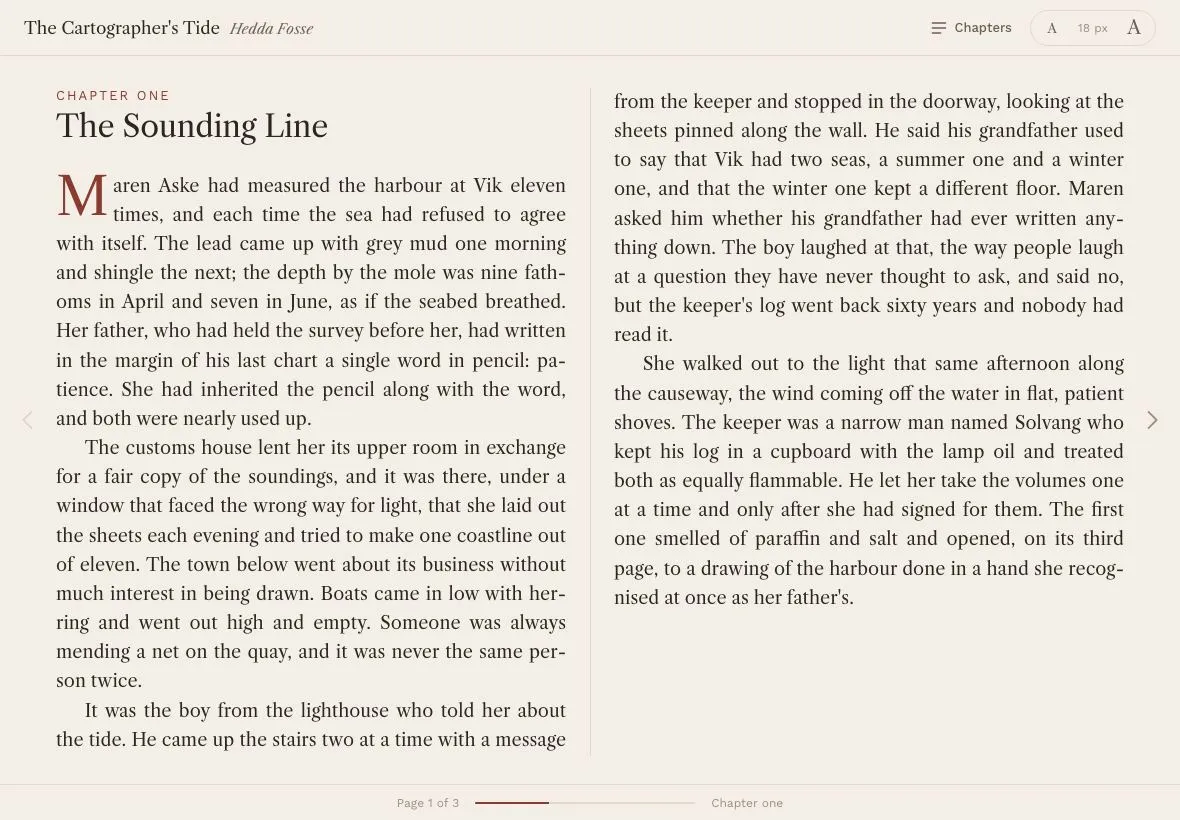
A 1180×820 book reader that flows a chapter into two CSS columns, turns pages by sliding the column container, with a chapter overlay, a 16–22px size stepper and Libre Caslon body text.
Preview
Use it
Free to use · credit appreciated1 Once, in your project
npx skills add SusanAcharya/Design-Lounge 2 Then ask
Using the Design Lounge skill, build "Two-column tablet reader" (piece tablet-two-column-reader) in my stack. Match its brief; restyle it onto my product's theme.
No skill? Paste the brief instead. It carries the numbers, tokens and behaviour.
<!-- Design Lounge Nº 078 · "Two-column tablet reader" · www.designlounge.live -->

# Two-column tablet reader

> **Build brief for a coding agent.** Rebuild this piece in the reader's stack. If they haven't said which stack, ask once, then default to semantic HTML + CSS + a little vanilla JS. Match the numbers below; don't "improve" them.

## What it is

A landscape-tablet reading screen for a novel (three short chapters of a fictional book, "The Cartographer's Tide"). The text is one long flow laid out by CSS multi-column into two columns of a fixed height; whatever does not fit spills into further columns to the right, hidden by an overflow container. A "page" is one pair of columns, and turning the page is a 420ms `translateX` of the column container by exactly one page width plus the gap. There is a hairline gutter rule between the columns, a drop cap in the accent colour at each chapter start, justified hyphenated text, a chapter overlay and a four-step text-size control that re-paginates. No JavaScript measures lines; the browser does the typesetting.

## Reference behaviour

1. Initial state: header shows the book title (Libre Caslon 17px) and author (italic), a "Chapters" button and the size stepper reading "18 px". The book shows page 1 of N (N depends on font metrics; 3 at 18px in the reference): chapter one's eyebrow, title, drop-cap paragraph and running text across two justified columns with a 1px rule between them. Footer shows "Page 1 of 3", a 220px progress bar and the current chapter name. The left page-turn arrow is disabled.
2. Click the right arrow, press ArrowRight, PageDown or Space: the column container slides left by (book width + 48px) over 420ms; the footer text and progress bar update; the chapter label changes when a chapter's first column is at or before the page's midpoint.
3. Click the left arrow, ArrowLeft or PageUp: slide back. On the last page the right arrow is disabled.
4. Click "Chapters": a 40% scrim fades over 320ms and a 520px card scales from .98 to 1 and rises 4% into the centre of the stage; it lists the three chapters with their eyebrow labels; the current chapter is in the accent colour. Focus lands on the current chapter row.
5. Click a chapter: the page containing that chapter's first column is shown (with the slide) and the overlay closes. Escape or scrim click closes it and returns focus to the "Chapters" button.
6. Click the large "A": `--fs` steps 18 → 20 → 22px; the flow re-paginates, the page count changes and the reader stays on the same page index (clamped). The small "A" steps down to 16px. Each end disables its button. The output reads the current size and is a polite live region.
7. Resizing the window re-paginates.

## Structure

```
1180 × 820
┌──────────────────────────────────────────────────────────────────────────────┐
│ The Cartographer's Tide  Hedda Fosse                 [≡ Chapters] ( A 18 px A ) │ 56
├────┬─────────────────────────────────────────────────────────────────────┬────┤
│    │ CHAPTER ONE                    │ text continues in column two …     │    │
│    │ The Sounding Line              │                                    │    │
│  < │ M aren Aske had measured the   │                                    │ >  │ 56px turn
│    │ harbour at Vik eleven times…   │                                    │    │ gutters
│    │ …                              │                                    │    │
│    │ (column 1, ~510px)             │ (column 2)                         │    │
│    │                                │ 1px rule at 50%                    │    │
├────┴─────────────────────────────────────────────────────────────────────┴────┤
│                 Page 1 of 3   ▬▬▬▬▬▬░░░░░░░░░░░░   Chapter one                  │ 36
└──────────────────────────────────────────────────────────────────────────────┘
book: margin 32px top / 28px bottom, overflow hidden · flow: columns 2, gap 48, column-fill auto
```

… 171 more lines. Copy or download for the full brief. Loading the source…Brief
211 linesBuild brief for a coding agent. Rebuild this piece in the reader’s stack. If they haven’t said which stack, ask once, then default to semantic HTML + CSS + a little vanilla JS. Match the numbers below; don’t “improve” them.
What it is
A landscape-tablet reading screen for a novel (three short chapters of a fictional book, “The Cartographer’s Tide”). The text is one long flow laid out by CSS multi-column into two columns of a fixed height; whatever does not fit spills into further columns to the right, hidden by an overflow container. A “page” is one pair of columns, and turning the page is a 420ms translateX of the column container by exactly one page width plus the gap. There is a hairline gutter rule between the columns, a drop cap in the accent colour at each chapter start, justified hyphenated text, a chapter overlay and a four-step text-size control that re-paginates. No JavaScript measures lines; the browser does the typesetting.
Reference behaviour
- Initial state: header shows the book title (Libre Caslon 17px) and author (italic), a “Chapters” button and the size stepper reading “18 px”. The book shows page 1 of N (N depends on font metrics; 3 at 18px in the reference): chapter one’s eyebrow, title, drop-cap paragraph and running text across two justified columns with a 1px rule between them. Footer shows “Page 1 of 3”, a 220px progress bar and the current chapter name. The left page-turn arrow is disabled.
- Click the right arrow, press ArrowRight, PageDown or Space: the column container slides left by (book width + 48px) over 420ms; the footer text and progress bar update; the chapter label changes when a chapter’s first column is at or before the page’s midpoint.
- Click the left arrow, ArrowLeft or PageUp: slide back. On the last page the right arrow is disabled.
- Click “Chapters”: a 40% scrim fades over 320ms and a 520px card scales from .98 to 1 and rises 4% into the centre of the stage; it lists the three chapters with their eyebrow labels; the current chapter is in the accent colour. Focus lands on the current chapter row.
- Click a chapter: the page containing that chapter’s first column is shown (with the slide) and the overlay closes. Escape or scrim click closes it and returns focus to the “Chapters” button.
- Click the large “A”:
--fssteps 18 → 20 → 22px; the flow re-paginates, the page count changes and the reader stays on the same page index (clamped). The small “A” steps down to 16px. Each end disables its button. The output reads the current size and is a polite live region. - Resizing the window re-paginates.
Structure
1180 × 820
┌──────────────────────────────────────────────────────────────────────────────┐
│ The Cartographer's Tide  Hedda Fosse                 [≡ Chapters] ( A 18 px A ) │ 56
├────┬─────────────────────────────────────────────────────────────────────┬────┤
│    │ CHAPTER ONE                    │ text continues in column two …     │    │
│    │ The Sounding Line              │                                    │    │
│  < │ M aren Aske had measured the   │                                    │ >  │ 56px turn
│    │ harbour at Vik eleven times…   │                                    │    │ gutters
│    │ …                              │                                    │    │
│    │ (column 1, ~510px)             │ (column 2)                         │    │
│    │                                │ 1px rule at 50%                    │    │
├────┴─────────────────────────────────────────────────────────────────────┴────┤
│                 Page 1 of 3   ▬▬▬▬▬▬░░░░░░░░░░░░   Chapter one                  │ 36
└──────────────────────────────────────────────────────────────────────────────┘
book: margin 32px top / 28px bottom, overflow hidden · flow: columns 2, gap 48, column-fill auto
<header class="bar">—.title(<b>title,<span>author),<button class="ib" aria-haspopup="dialog" aria-expanded>Chapters,.size[role=group]with two buttons and an<output>..stage— flex row:<button class="turn" id="prev">,.book(overflow hidden,::aftercentre rule),<button class="turn" id="next">, plus.scrimand.sheet[role=dialog]absolutely positioned inside the stage..flow— the multi-column container; children are<section class="sec">per chapter, each with<h2>eyebrow,<h3>title and<p>s.<footer class="foot">— page label,.prog > i, chapter label.
Content
- Title “The Cartographer’s Tide”, author “Hedda Fosse”.
- Chapters (eyebrow / title / paragraphs): “Chapter one” / “The Sounding Line” / 4 paragraphs (≈ 2,300 characters) about a surveyor, Maren Aske, re-measuring the harbour at Vik and finding her father’s drawing in the lighthouse log; “Chapter two” / “Winter Floor” / 4 paragraphs (≈ 2,200 characters) about sixty years of dusk water heights, a nine-year pattern and a gravel bar the keeper’s grandfather called “the doorstep”; “Chapter three” / “Fair Copy” / 3 paragraphs (≈ 1,700 characters) about the two-harbour chart, the office’s reply addressed to her father, and a skipper’s letter.
- Use prose of that length and tone (plain, past tense, one character per chapter, no dialogue marks) so pagination lands at 3 pages at 18px; any equivalent text of ≈ 6,200 characters will do.
- Footer initial text: “Page 1 of 3”, chapter label “Chapter one”. Size output: “18 px”.
Tokens
:root {
  /* colour — warm paper, dark brown ink, oxblood accent */
  --bg: #f4efe6;            /* page */
  --paper: #faf6ee;         /* chapter sheet */
  --line: #e2d9c8;          /* rules, borders, progress track */
  --line-strong: #c8bca4;
  --ink: #2a2620;
  --ink-2: #6b6256;         /* header buttons, title meta */
  --ink-3: #9a9080;         /* footer, turn arrows, output */
  --accent: #8b3a2f;        /* eyebrows, drop cap, progress, current chapter */
  --accent-ink: #faf6ee;
  --scrim: rgba(42, 38, 32, .4);

  /* type */
  --serif: "Libre Caslon Text", Georgia, serif;
  --sans: "Work Sans", system-ui, sans-serif;
  --fs: 18px;               /* body size; stepper sets 16 / 18 / 20 / 22 */
  --lh: 1.62;

  /* layout */
  --h-bar: 56px;
  --h-foot: 36px;
  --gutter: 56px;           /* turn button width each side */
  --col-gap: 48px;
  --book-mt: 32px;
  --book-mb: 28px;
  --sheet-w: 520px;
  --prog-w: 220px;
  --r: 10px;
  --r-sheet: 14px;
  --r-pill: 999px;
  --shadow-sheet: 0 24px 60px rgba(42, 38, 32, .25);

  /* motion */
  --t-fast: 160ms;
  --t-turn: 420ms;
  --t-sheet: 320ms;
  --ease: cubic-bezier(.2, .7, .2, 1);
  --ease-out: cubic-bezier(.16, 1, .3, 1);
  --ease-sheet: cubic-bezier(.32, .72, 0, 1);
}
Typography
| Role | Family | Size | Weight | Line-height | Tracking | Notes |
|---|---|---|---|---|---|---|
| Body text | Libre Caslon Text | --fs (18px) | 400 | 1.62 | 0 | justified, hyphens: auto, indent 1.6em, widows/orphans 2 |
| Chapter title h3 | Libre Caslon Text | --fs × 1.7 (30.6px) | 400 | 1.15 | −0.01em | break-after: avoid |
| Chapter eyebrow h2 | Work Sans | 13px | 400 | 1.3 | +0.16em | UPPERCASE, --accent |
| Drop cap | Libre Caslon Text | 2.9em of body | 400 | .85 | 0 | float left, --accent, first paragraph after h3 only |
| Book title | Libre Caslon Text | 17px | 400 | 1.3 | −0.005em | |
| Author | Libre Caslon Text | 14px italic | 400 | 1.3 | 0 | --ink-2 |
| Header buttons | Work Sans | 13px | 500 | 1 | 0 | |
| Size glyphs | Libre Caslon Text | 13px / 19px | 400 | 1 | 0 | “A” |
| Size output, footer | Work Sans | 12px | 400 | 1 | 0 | --ink-3 |
| Sheet title | Libre Caslon Text | 20px | 400 | 1.3 | 0 | |
| Chapter row | Libre Caslon Text | --fs | 400 | 1.4 | 0 | eyebrow small in Work Sans 12px |
Motion
| Element | Trigger | Property | From → To | Duration | Easing | Notes |
|---|---|---|---|---|---|---|
.flow | page turn | transform | translateX(−page × step) | 420ms | --ease | step = book width + 48px |
.prog i | page turn | width | old % → new % | 420ms | --ease | |
.scrim | overlay open | opacity | 0 → 1 | 320ms | --ease | |
.sheet | overlay open | opacity, transform | 0, translate(-50%,-46%) scale(.98) → 1, translate(-50%,-50%) scale(1) | 320ms | --ease-sheet | visibility delayed on close |
.ib, .turn | hover | background/color | → --line / --accent | 0 | — | instant |
| re-pagination | size change | — | instant reflow, then go(page) slides if the index changed | 420ms | --ease |
Reduced motion: every transition 1ms; page turns are cuts.
States
- Turn button disabled: first page (prev) / last page (next): opacity .25, cursor default.
- Turn hover: icon colour
--accent. - Header button hover: background
--line, colour--ink. Chapters expanded:aria-expanded="true". - Size button disabled: at 16px (small A) or 22px (large A): opacity .35.
- Overlay open:
.stage.open; sheet visible andaria-hidden="false"; scrim accepts pointer events. - Chapter row current:
aria-current="true", text--accent. Row hover: background--bg. - Focus-visible (all buttons, rows): 2px
--accentoutline, 2px offset (1px on size buttons).
Accessibility
- Turn buttons are
<button aria-label="Previous page" / "Next page">; keyboard ArrowLeft/Right, PageUp/PageDown and Space (next) work globally except while the overlay is open, where only Escape is handled. - The size control is
role="group" aria-label="Text size"with an<output aria-live="polite">so the new size is announced. - The chapter sheet is
role="dialog" aria-modal="true" aria-labelledby; focus moves to the current chapter row on open and returns to the Chapters button on close. - The text flow remains a normal DOM; screen readers read it linearly regardless of columns. Do not set
aria-hiddenon off-page columns. - Footer page label is plain text updated on each turn (not live; it changes as a result of the user’s own action).
- Contrast:
--inkon--bg12.6:1;--ink-25.7:1;--ink-3on--bg3.3:1 used only for 12px footer meta and disabled arrows;--accenton--bg6.8:1. - Hit targets: turn buttons 56px wide × full stage height; header buttons 36px; size buttons 38×30 inside a 36px pill; chapter rows ≥ 48px.
Responsive rules
- 1180 (reference): columns ≈ 510px each at 18px (≈ 62 characters per line).
- 1024:
--col-gap: 40px, gutters 48px; columns ≈ 444px. - 768 (portrait tablet): single column (
columns: 1), the centre rule is removed, page step = book width + gap; turn buttons shrink to 44px. - < 640: single column, turn buttons become a bottom row under the footer; size stepper collapses to an icon button that opens the same group in a sheet.
Acceptance checklist
- Body text is Libre Caslon Text at
--fs18px / 1.62, justified, hyphenated, with a 1.6em indent on all but the first paragraph of a chapter. - Text flows via
columns: 2; column-gap: 48px; column-fill: autoin a fixed-height container; overflow columns are clipped by the.bookwrapper. - A page turn translates
.flowby exactlybookWidth + 48pxper page over 420mscubic-bezier(.2,.7,.2,1). - Page count equals
round(flow.scrollWidth / step)and is recomputed on size change, font load and resize. - A 1px
--linerule sits at 50% of the book width for the full column height. - Each chapter starts in a new column with an accent eyebrow, a title at 1.7× body size and a 2.9em accent drop cap.
- Prev is disabled on page 1 and Next on the last page; ArrowLeft/Right, PageUp/Down and Space turn pages.
- The footer shows “Page n of N”, a 220px progress bar whose fill is (n / N) wide, and the current chapter label.
- Chapters overlay is a modal dialog with scrim; selecting a chapter jumps to its page; Escape closes and restores focus.
- Size stepper offers exactly 16 / 18 / 20 / 22px, disables at each end, announces the value, and keeps the current page index after re-pagination.
- Reduced motion makes turns and the overlay instantaneous.
Implementation notes
Paginate with CSS columns, not JS line measurement. The trick is a fixed-height multicol container with column-fill: auto; overflow creates more columns to the right:
.book { flex: 1; min-width: 0; overflow: hidden; position: relative; }
.flow { height: 100%; columns: 2; column-gap: var(--col-gap); column-fill: auto;
        transition: transform var(--t-turn) var(--ease); will-change: transform; }
.flow .sec { break-before: column; }
.flow .sec:first-child { break-before: auto; }
Page step and count. One page is the book’s visible width plus one gap (the gap after the second column):
const step = () => book.clientWidth + parseFloat(getComputedStyle(flow).columnGap);
function layout() {
  pages = Math.max(1, Math.round(flow.scrollWidth / step()));
  page = Math.min(page, pages - 1);
  go(page);
}
function go(p) {
  page = Math.max(0, Math.min(pages - 1, p));
  flow.style.transform = `translateX(${-page * step()}px)`;
  prev.disabled = page === 0; next.disabled = page === pages - 1;
}
document.fonts ? document.fonts.ready.then(layout) : layout();
addEventListener('resize', layout);
Locate a chapter’s page from its bounding rect relative to the flow (the transform cancels out because both rects move together):
const left = el => el.getBoundingClientRect().left - flow.getBoundingClientRect().left;
chapterButton.addEventListener('click', () => go(Math.floor((left(section) + 8) / step())));
Common mistakes: measuring before web fonts load (wrong page count; wait on document.fonts.ready); forgetting column-fill: auto (the browser balances columns and never overflows); using offsetLeft for elements in later columns (returns the first-column position in some engines); putting overflow: hidden on .flow itself (kills the overflow columns).
Details
- Palette
- Type
- Libre Caslon Text · Work Sans
- Motion
- Subtle motion
- Build
- One session
- Tags
On the shelves