Nº 530 of 531
Playable product hero
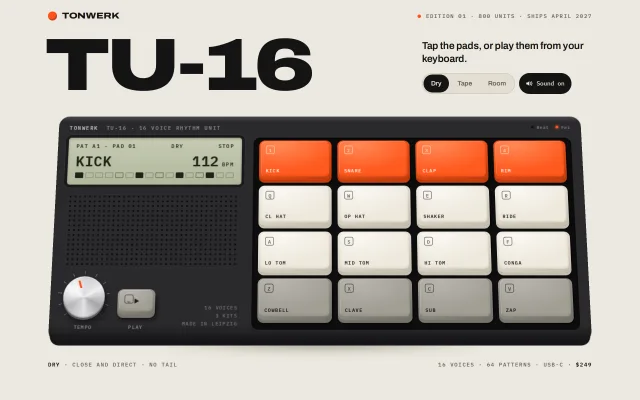
A hero where the product is the demo: a pocket drum machine in HTML/CSS with rubber pad depth, key-mapped pads, an LCD echo, a tempo knob and synthesized drums.
Preview
Use it
Free to use · credit appreciated1 Once, in your project · Node 22.20+
npx skills add SusanAcharya/Design-Lounge 2 Then ask
Using the Design Lounge skill, build "Playable product hero" (piece playable-product-hero) in my stack. Match its brief; restyle it onto my product's theme.
No skill? Paste the brief instead. It carries the numbers, tokens and behaviour.
<!-- Design Lounge Nº 530 · "Playable product hero" · www.designlounge.live -->

# Playable product hero

> **Build brief for a coding agent.** Rebuild this piece in the reader's stack. If they haven't said which stack, ask once, then default to semantic HTML + CSS + a little vanilla JS. Match the numbers below; don't "improve" them. Draw the product in HTML/CSS only. No images, no audio files, no 3D libraries.

## What it is

The top of a launch page for TU-16, a fictional pocket drum machine by the studio Tonwerk. Under a giant expanded wordmark sits the whole device, drawn in HTML and CSS: a charcoal body, a pale green LCD, an aluminium tempo knob, a speaker grille and sixteen rubbery pads in a 4 × 4 grid (orange, cream, cream, grey by row). The visitor taps the pads or plays them from their own computer keyboard. Each pad sinks 3px, its wall and shadow shrink, the LCD names the voice, and WebAudio plays a synthesized drum. Space starts a 16-step pattern that lights the pads it plays. The detail worth copying is that the product is the hero and you can use it: nobody reads about the sound, they hear it.

Use this pattern for any launch where the product can be touched on the page: a synth, a camera dial, a watch crown, a lamp switch, a game controller, a keyboard. Reach for it when the person says "let people play with it".

## Reference behaviour

1. First frame at 1280 × 800: bone background `#ECE8DF`. A 64px top bar with an 18px orange dot and "TONWERK" on the left, and "Edition 01 · 800 units · Ships April 2027" in mono with a 7px orange dot on the right. Below it, the 148px wordmark "TU-16" on the left. On the right, a 340px column with the line "Tap the pads, or play them from your keyboard." (20px, 600), then a three-way Kit selector (Dry selected) and a "Sound on" pill.
2. The device sits 26px under the heading row, 1088px wide, about 464px tall, tilted back `rotateX(10deg)` from its bottom edge, with a blurred floor shadow. Its 46px top strip reads "TONWERK TU-16 · 16 voice rhythm unit" in mono on the left and two LEDs on the right: Beat (dark) and Pwr (lit orange).
3. The left panel (360px) holds the LCD, a dotted speaker grille that fills the remaining height, and a bottom row with the tempo knob, the Play button and a three-line engraving "16 voices / 3 kits / Made in Leipzig". The LCD reads "PAT A1 · PAD 01", "DRY", "STOP" on line one, "KICK" and "112 BPM" large on line two, and a row of 16 step cells showing the kick's pattern.
4. The right panel is the pad well: a dark inset tray with a 4 × 4 grid of 84px-tall pads and 12px gaps. Row 1 is orange (Kick, Snare, Clap, Rim), rows 2 and 3 are cream (Cl hat, Op hat, Shaker, Ride; Lo tom, Mid tom, Hi tom, Conga), row 4 is grey (Cowbell, Clave, Sub, Zap). Each pad shows its key legend in a small outlined box top-left (1 2 3 4, Q W E R, A S D F, Z X C V) and the voice name bottom-left.
5. A footer row 40px under the device reads "**Dry** · close and direct · no tail" on the left and "16 voices · 64 patterns · USB-C · **$249**" on the right.
6. Idle invitation: until the first interaction, one pad dips for 140ms every 480ms in a kick, hat, snare, hat order (pads 1, Q, 2, Q). It is silent and does not touch the LCD. It stops forever after the first press, tap, Play or kit change. It never runs with reduced motion.
7. Press a mapped physical key. The matching pad (by `KeyboardEvent.code`) sinks 3px in 28ms, its wall shortens by the same amount, and its drop shadow tightens. On keyup it springs back in 100ms. Holding a key keeps it down. Auto-repeat is ignored. Keys with Cmd, Ctrl or Alt held are ignored.
8. Each press updates the LCD: "PAD 07" and the voice name ("SHAKER"), and the step row redraws to show that voice's steps in the pattern.
9. Press a pad with the mouse, pen or finger. It goes down on `pointerdown` and up on `pointerup`. Keep the pointer down and slide across the pads: each new pad under the pointer plays and the previous one releases, like a finger roll. Several fingers can hold several pads.
10. Sound: no `AudioContext` exists until the first user gesture. On the first press, tap, Play or kit change, the context starts. Every press plays its voice once, with ±6% random level and ±2% random pitch so repeats don't sound like a machine gun.
11. Press Space (or click Play). The Play icon turns into a stop square, the LCD shows "▶ PLAY", and a 16-step pattern loops at the knob's tempo. Each step it plays flashes its pad brighter for 70ms (no travel). The Beat LED blinks for 60ms on every quarter note. The LCD step row shows a playhead cell. Pads still play live on top. Space again stops and clears the playhead.
12. Drag the tempo knob up or down (0.6 BPM per pixel), scroll on it (1 BPM per notch), or focus it and use the arrows. Range 60 to 180 BPM, default 112. The indicator turns through 270° (−135° to +135°). The LCD BPM updates live and the running pattern follows at once.
13. Click Dry, Tape or Room. The selector pill moves, the LCD kit name and the footer line change, the master chain changes (filter, saturation, reverb), the pad feel changes (Tape is softer and slower, Room is in between), and, if the pattern is stopped, a short fill plays (Kick, Hat, Snare, Hat, Kick, Clap, 120ms apart) so the new kit is heard at once.
14. Click "Sound on". It turns into an outlined "Sound off" pill with a crossed speaker. Presses and the pattern still animate, silently. Click again to turn sound back on.
15. Reduced motion: no idle dips, no transitions. Pads still jump between up and down and still light, so feedback is kept.

## Structure

```
1280 × 800
┌──────────────────────────────────────────────────────────────────────┐
│  ● TONWERK                   ● EDITION 01 · 800 UNITS · SHIPS APRIL…  │ bar 64
│                                                                      │
│  TU-16  (Archivo 900, wdth 125, 148px)     Tap the pads, or play …   │ head
│                                            [Dry|Tape|Room] (Sound on) │ side 340
│                                                                      │ gap 26

… 258 more lines. Copy or download for the full brief. Loading the source…Brief
298 linesBuild brief for a coding agent. Rebuild this piece in the reader’s stack. If they haven’t said which stack, ask once, then default to semantic HTML + CSS + a little vanilla JS. Match the numbers below; don’t “improve” them. Draw the product in HTML/CSS only. No images, no audio files, no 3D libraries.
What it is
The top of a launch page for TU-16, a fictional pocket drum machine by the studio Tonwerk. Under a giant expanded wordmark sits the whole device, drawn in HTML and CSS: a charcoal body, a pale green LCD, an aluminium tempo knob, a speaker grille and sixteen rubbery pads in a 4 × 4 grid (orange, cream, cream, grey by row). The visitor taps the pads or plays them from their own computer keyboard. Each pad sinks 3px, its wall and shadow shrink, the LCD names the voice, and WebAudio plays a synthesized drum. Space starts a 16-step pattern that lights the pads it plays. The detail worth copying is that the product is the hero and you can use it: nobody reads about the sound, they hear it.
Use this pattern for any launch where the product can be touched on the page: a synth, a camera dial, a watch crown, a lamp switch, a game controller, a keyboard. Reach for it when the person says “let people play with it”.
Reference behaviour
- First frame at 1280 × 800: bone background
#ECE8DF. A 64px top bar with an 18px orange dot and “TONWERK” on the left, and “Edition 01 · 800 units · Ships April 2027” in mono with a 7px orange dot on the right. Below it, the 148px wordmark “TU-16” on the left. On the right, a 340px column with the line “Tap the pads, or play them from your keyboard.” (20px, 600), then a three-way Kit selector (Dry selected) and a “Sound on” pill. - The device sits 26px under the heading row, 1088px wide, about 464px tall, tilted back
rotateX(10deg)from its bottom edge, with a blurred floor shadow. Its 46px top strip reads “TONWERK TU-16 · 16 voice rhythm unit” in mono on the left and two LEDs on the right: Beat (dark) and Pwr (lit orange). - The left panel (360px) holds the LCD, a dotted speaker grille that fills the remaining height, and a bottom row with the tempo knob, the Play button and a three-line engraving “16 voices / 3 kits / Made in Leipzig”. The LCD reads “PAT A1 · PAD 01”, “DRY”, “STOP” on line one, “KICK” and “112 BPM” large on line two, and a row of 16 step cells showing the kick’s pattern.
- The right panel is the pad well: a dark inset tray with a 4 × 4 grid of 84px-tall pads and 12px gaps. Row 1 is orange (Kick, Snare, Clap, Rim), rows 2 and 3 are cream (Cl hat, Op hat, Shaker, Ride; Lo tom, Mid tom, Hi tom, Conga), row 4 is grey (Cowbell, Clave, Sub, Zap). Each pad shows its key legend in a small outlined box top-left (1 2 3 4, Q W E R, A S D F, Z X C V) and the voice name bottom-left.
- A footer row 40px under the device reads “Dry · close and direct · no tail” on the left and “16 voices · 64 patterns · USB-C · $249” on the right.
- Idle invitation: until the first interaction, one pad dips for 140ms every 480ms in a kick, hat, snare, hat order (pads 1, Q, 2, Q). It is silent and does not touch the LCD. It stops forever after the first press, tap, Play or kit change. It never runs with reduced motion.
- Press a mapped physical key. The matching pad (by
KeyboardEvent.code) sinks 3px in 28ms, its wall shortens by the same amount, and its drop shadow tightens. On keyup it springs back in 100ms. Holding a key keeps it down. Auto-repeat is ignored. Keys with Cmd, Ctrl or Alt held are ignored. - Each press updates the LCD: “PAD 07” and the voice name (“SHAKER”), and the step row redraws to show that voice’s steps in the pattern.
- Press a pad with the mouse, pen or finger. It goes down on
pointerdownand up onpointerup. Keep the pointer down and slide across the pads: each new pad under the pointer plays and the previous one releases, like a finger roll. Several fingers can hold several pads. - Sound: no
AudioContextexists until the first user gesture. On the first press, tap, Play or kit change, the context starts. Every press plays its voice once, with ±6% random level and ±2% random pitch so repeats don’t sound like a machine gun. - Press Space (or click Play). The Play icon turns into a stop square, the LCD shows ”▶ PLAY”, and a 16-step pattern loops at the knob’s tempo. Each step it plays flashes its pad brighter for 70ms (no travel). The Beat LED blinks for 60ms on every quarter note. The LCD step row shows a playhead cell. Pads still play live on top. Space again stops and clears the playhead.
- Drag the tempo knob up or down (0.6 BPM per pixel), scroll on it (1 BPM per notch), or focus it and use the arrows. Range 60 to 180 BPM, default 112. The indicator turns through 270° (−135° to +135°). The LCD BPM updates live and the running pattern follows at once.
- Click Dry, Tape or Room. The selector pill moves, the LCD kit name and the footer line change, the master chain changes (filter, saturation, reverb), the pad feel changes (Tape is softer and slower, Room is in between), and, if the pattern is stopped, a short fill plays (Kick, Hat, Snare, Hat, Kick, Clap, 120ms apart) so the new kit is heard at once.
- Click “Sound on”. It turns into an outlined “Sound off” pill with a crossed speaker. Presses and the pattern still animate, silently. Click again to turn sound back on.
- Reduced motion: no idle dips, no transitions. Pads still jump between up and down and still light, so feedback is kept.
Structure
1280 × 800
┌──────────────────────────────────────────────────────────────────────┐
│  ● TONWERK                   ● EDITION 01 · 800 UNITS · SHIPS APRIL…  │ bar 64
│                                                                      │
│  TU-16  (Archivo 900, wdth 125, 148px)     Tap the pads, or play …   │ head
│                                            [Dry|Tape|Room] (Sound on) │ side 340
│                                                                      │ gap 26
│  ┌──────────────────────── device 1088 × ~464 ─────────────────────┐ │
│  │ TONWERK TU-16 · 16 VOICE RHYTHM UNIT                 ● Beat ● Pwr│ │ dtop 46
│  │ ┌─ panel 360 ──────────┐   ┌─ pad well (1fr) ──────────────────┐ │ │
│  │ │ ┌ LCD ─────────────┐ │   │ [1 KICK ][2 SNARE][3 CLAP ][4 RIM]│ │ │ orange
│  │ │ │PAT A1·PAD 01 DRY STOP│ │ [Q CL HAT][W OP HAT][E SHAKER][R RIDE]│ cream
│  │ │ │KICK        112 BPM│ │   │ [A LO TOM][S MID TOM][D HI TOM][F CONGA]│ cream
│  │ │ │▢▢▢▢▢▢▢▢▢▢▢▢▢▢▢▢  │ │   │ [Z COWBELL][X CLAVE][C SUB][V ZAP] │ │ │ grey
│  │ │ └──────────────────┘ │   │  pads 84 tall, gap 12, tray pad 12 │ │ │
│  │ │ ::::: grille ::::::: │   │                                    │ │ │
│  │ │ (knob) [▶]   16 VOICES│  │                                    │ │ │
│  │ └──────────────────────┘   └────────────────────────────────────┘ │ │
│  └──────────────────────────────────────────────────────────────────┘ │ rotateX 10°
│                         (blurred floor shadow)                       │
│  DRY · CLOSE AND DIRECT · NO TAIL      16 VOICES · … · USB-C · $249   │ foot, +40
└──────────────────────────────────────────────────────────────────────┘
content column: min(1088px, 100% − 64px), centred.page: a centred flex column,width:min(1088px, calc(100% - 64px)), full height. The body hasoverflow:hiddenat desktop sizes.<header class="bar">: brand (a decorative 18px orange dot plus text) and a<p class="meta">.<section class="head" aria-labelledby="t">:<h1 id="t">and.side(lede<p>,.controls)..segisrole="radiogroup"witharia-label="Kit"and three<button role="radio">..sndis a<button aria-pressed>with an inline SVG speaker and a text label.
.stageholds the perspective (1800px)..boardholds the tilt;.board::afteris the floor shadow..dev(the body) holdsdata-kitand two rows:.dtop(badge, LEDsaria-hidden) and.dbody(a two-column grid,360px 1fr, gap 24px)..panel:.lcd(aria-hidden),.grille(aria-hidden),.ctl(knob, Play button, engraving).- The knob is
<div role="slider" tabindex="0" aria-label="Tempo">witharia-valuemin/max/now/valuetext. - Play is
<button aria-pressed aria-label="Play pattern">drawn as a small grey rubber pad, 76 × 52px. .padsisrole="group",tabindex="0", with anaria-labelthat names the key map, andaria-describedbypointing at the footer kit line.- Each pad is
<button type="button" tabindex="-1" aria-label="Kick, key 1">holdingspan.cap > span.top > span.k + span.v.
<footer class="foot">: two mono spans. The left one (#ki) is rewritten when the kit changes.
Tokens
:root {
  /* page */
  --bg: #ECE8DF;        /* warm bone */
  --bg-2: #E3DED2;      /* selector track */
  --ink: #141414;
  --muted: #66615A;     /* meta, footer, inactive labels */
  --line: #CCC5B6;
  --accent: #FF4F1A;    /* signal orange: brand dot, knob indicator, focus, LEDs */

  /* pads: face, highlight, side wall, legend */
  --or: #FF5A1F;  --or-hi: #FF8A57;  --or-side: #C23D0E;  --or-ink: #FFF3EC;
  --cr: #EEE9DD;  --cr-hi: #FBF8F2;  --cr-side: #C6BFAF;  --cr-ink: #2A2925;
  --gr: #A29E95;  --gr-hi: #B9B5AD;  --gr-side: #77736B;  --gr-ink: #1E1D1B;

  /* body and readout */
  --body: #2A2A2D;  --body-hi: #4A4A50;  --body-lo: #161618;
  --well: #0F0F10;                         /* pad tray */
  --lcd-a: #C6CBB2;  --lcd-b: #B2B89D;  --lcd-ink: #1E2318;
  --engrave: #8A8A90;                      /* badge, knob and Play labels */

  /* type */
  --display: "Archivo", system-ui, sans-serif;
  --mono: "IBM Plex Mono", ui-monospace, monospace;

  /* pad geometry and feel */
  --pad-h: 84px;        /* 72px under 720px tall and on phones */
  --pad-r: 12px;
  --wall: 6px;          /* side wall height at rest */
  --travel: 3px;        /* Tape 3.5px */
  --t-down: 28ms;       /* Tape 60ms, Room 40ms */
  --t-up: 100ms;        /* Tape 170ms, Room 130ms */
  --t-ui: 200ms;
  --ease: cubic-bezier(.2, .7, .2, 1);

  /* spacing */
  --s-1: 4px; --s-2: 8px; --s-3: 12px; --s-4: 16px; --s-5: 24px; --s-6: 40px;
}
Typography
| Role | Family | Size | Weight | Line-height | Tracking | Case |
|---|---|---|---|---|---|---|
| Wordmark h1 | Archivo, font-stretch:125% | 148px | 900 | 0.8 | −0.045em | as typed, non-breaking hyphen |
| Brand | Archivo, 125% | 17px | 800 | 1 | −0.01em | upper |
| Lede | Archivo | 20px | 600 | 1.3 | −0.01em | sentence |
| Kit selector | Archivo | 13px | 600 | 1 | 0 | title |
| Sound pill | IBM Plex Mono | 12px | 500 | 1 | 0 | sentence |
| Meta, footer | IBM Plex Mono | 11px | 500 | 1 | +0.1em | upper |
| Device badge | IBM Plex Mono | 11px | 600 | 1 | +0.14em | upper, #8A8A90, brand in #C9C9CE |
| LCD small line | IBM Plex Mono | 11px | 500 | 1 | +0.12em | upper |
| LCD voice and BPM | IBM Plex Mono | 30px | 600 | 1 | +0.02em | upper |
| Pad key legend | IBM Plex Mono | 10px in an 18px outlined box | 600 | 18px | 0 | upper, 70% opacity |
| Pad voice name | IBM Plex Mono | 10px | 600 | 1 | +0.12em | upper |
| Control labels, engraving | IBM Plex Mono | 10px | 600 | 1 / 1.6 | +0.14em | upper |
Load both families in one <link>: family=Archivo:wdth,wght@100..125,400..900&family=IBM+Plex+Mono:wght@400;500;600. The wordmark only works with the wdth axis loaded; without it, font-stretch:125% does nothing.
Motion
| Element | Trigger | Property | From → To | Duration | Easing | Notes |
|---|---|---|---|---|---|---|
| Pad | press | transform translateY | −wall → travel − wall | --t-down (28 / 60 / 40ms) | --ease | box-shadow shrinks in the same transition |
| Pad | release | same | back | --t-up (100 / 170 / 130ms) | --ease | |
| Pad top face | press | filter | none → brightness(.95) | 120ms | n/a | reads as the face leaving the light |
| Pad light | sequencer step | filter | brightness(1.12), then none | 70ms hold, instant on | n/a | no travel: machine plays, finger presses |
| Play button | Space or click | same as pad | same | uses :active and a .down class for Space | ||
| Idle dip | every 480ms until first touch | .down class | on → off | 140ms hold | pad easing | silent, stops for good |
| Kit fill | kit change, stopped | .down on 6 pads | 120ms stagger, 70ms hold | 670ms total | n/a | with sound |
| Beat LED | each quarter while playing | background, glow | #111 → #FF5A24 + 6px glow | 60ms | 120ms colour fade | |
| Knob indicator | drag, wheel, keys | transform rotate | −135° → +135° | instant | n/a | follows the pointer, no lag |
| Selector, sound pill | click | background, colour | → ink fill | 200ms | --ease |
Reduced motion: animation:none and transition-duration:0s on everything, and the idle interval is never started (check matchMedia in JS too). The .down and .lit states still apply, so taps and keys still give an instant visual answer.
States
- Pad up: lifted by
--wall(6px) with a full side wall in the side colour, a 1px dark contact edge and a3px 11px 12px rgba(0,0,0,.45)shadow down and to the right. - Pad down: lowered by
--travel. The wall shrinks towall − travel(3px on Dry). The shadow tightens to1px 3px 4px. The top face dims 5%. - Pad lit (pattern): top face 12% brighter for 70ms, no movement.
- Pad variants: orange row 1, cream rows 2 and 3, grey row 4. One rule draws all three by swapping
--c,--hi,--sd,--ink. - Kit selected: ink pill with bone text. Unselected: muted text, ink on hover.
- Playing: Play shows a stop square, LCD ”▶ PLAY”, a playhead cell in the step row, Beat LED blinking. Stopped: a play triangle, “STOP”, no playhead.
- LCD step cell: empty is a 1.5px outline at 28% (50% on beats 1, 5, 9, 13); a set step is filled ink; the playhead is a 40% fill with a full outline; a set step under the playhead gets a 2px halo.
- Sound on: filled ink pill with a speaker and two waves. Sound off: transparent with a 1.5px ink ring and a speaker with an X.
- Focus-visible: 2px
--accentoutline. 3px offset on controls, 5px around the pad tray, 14px around the knob so it clears the tick ring.
Accessibility
- Tab order: Dry radio (roving, only the checked radio has
tabindex=0), Sound pill, tempo knob, Play button, the pad tray. The 16 pads aretabindex="-1"so Tab reaches the device as one stop, not sixteen. - Each pad is a real
<button>with anaria-labelof voice and key: “Kick, key 1”, “Closed hat, key Q”, “Cowbell, key Z”. Screen-reader activation (aclickwithdetail === 0) plays the pad for 80ms. - The tray’s
aria-labelspells out the map: “TU-16 pads, 16 voices. Press 1 to 4, Q to R, A to F and Z to V, or tap a pad. Space plays the pattern.” - When focus is anywhere on the page except a button or the slider, mapped keys play pads and Space toggles the pattern. On a focused button, Space and Enter keep their native meaning. Tab is never
preventDefaulted, so focus can always leave the device. - Left and Right arrows in the radiogroup move the selection and focus.
- The knob is
role="slider": ArrowUp/Right +1, ArrowDown/Left −1, PageUp/PageDown ±10, Home 60, End 180.aria-valuetextis “112 BPM”. Stop propagation on those keys. - The LCD is
aria-hidden. Announcing every hit would drown a screen reader, and the visitor already knows what they pressed. - Sound never starts before a gesture and can be turned off with a labelled toggle (
aria-pressed, label “Sound on” or “Sound off”). - Contrast: ink on bone 15:1. Muted
#66615Ais 5:1 on bone. Cream pad legends#2A2925on#EEE9DD12:1. Grey pad legends#1E1D1Bon#A29E956.3:1. Orange pad legends#FFF3ECon#FF5A1Fare 2.9:1: they are labels printed on a picture of a product, and every pad also has a full accessible name. - Pads are about 150 × 84px at 1280 and 75 × 72px on a phone. Selector buttons are 36px tall in a 42px track; the sound pill is 42px.
Responsive rules
- ≥ 1280: as specified. The content column caps at 1088px and centres.
- 1024 to 1279: the column is
100% − 64px; the pad columns are1frso they narrow with it. Below 1100px the wordmark drops to 112px, the side column to 300px and the left panel to 300px. - Viewport height under 720px: wordmark 108px, stage gap 18px, pads 72px tall, footer gap 28px, so the bottom row stays above the fold.
- 761 to 1023: keep the side-by-side device; the panel is 300px and the pads are about 100px wide.
- ≤ 760: the page scrolls. Hide the top-bar meta and the badge suffix. Stack the head (wordmark at
min(22vw,112px), lede 18px, controls in one row). Drop the tilt. Stack the device: LCD, then the knob (60px) and Play row with the engraving, then the 4 × 4 pads at 72px tall with 8px gaps. Hide the grille. Stack the footer. Keeptouch-action:noneon the pad tray and knob only.
Acceptance checklist
Always
- The product is drawn in HTML/CSS with no images, and it sits above the fold at 1280 × 800.
- Every playable part of the object is a
<button>with anaria-label. The pad grid as a whole is one Tab stop. - Physical input maps to the drawn object by
KeyboardEvent.code(layout independent). Pointer and touch also work, including slide-to-play and multi-touch. - Press feedback has three channels: the part moves (≈3px travel, shadow shrinks), a readout updates, and a sound plays.
- Light comes from the top-left everywhere: highlight on the top-left of each face, darker walls to the right and bottom, shadows cast down-right.
- No
AudioContextexists before the first user gesture. A visible toggle turns sound on and off. - Auto-repeat is ignored. Window blur releases every held part.
- A mode selector changes both the sound and the press feel.
- Reduced motion removes idle motion and transitions but keeps the down state.
- Tab can always leave the object. Space and Enter still work on regular controls.
- No
localStorage, no audio files, no console output.
This demo
- Wordmark “TU-16” in Archivo 900 at
font-stretch:125%, 148px, with a non-breaking hyphen; brand “Tonwerk”; lede “Tap the pads, or play them from your keyboard.” - 16 pads in a 4 × 4 grid, 84px tall, 12px gaps: orange Kick/Snare/Clap/Rim, cream hats/shaker/ride and toms/conga, grey Cowbell/Clave/Sub/Zap.
- Keys 1–4, Q–R, A–F, Z–V play the pads in reading order; legends are drawn on each pad.
- LCD reads “PAT A1 · PAD nn”, the kit, Play/Stop, the voice name, the BPM and a 16-cell step row for the last voice.
- Space or Play loops the pattern at 60–180 BPM (default 112), lights the pads it plays and blinks the Beat LED on quarters.
- The tempo knob turns 270° by drag, wheel or arrows, and the pattern follows at once.
- Dry, Tape and Room change the filter, saturation and reverb, the travel (3 / 3.5 / 3px) and the down speed (28 / 60 / 40ms), the footer line, and play a short fill.
- The idle invitation dips 1, Q, 2, Q silently every 480ms until the first touch.
Implementation notes
Pad depth. Three layers per pad. The button is the grid cell and hit target. .cap is the whole rubber body: its gradient is the side walls, and its box-shadows are the bottom wall, the contact edge and the drop shadow. .top is the face, inset more on the right and bottom than the left and top, so you see more wall on the far sides. Pressing moves the cap down and shrinks the wall shadow by the same amount, so the face sinks while the base stays put.
.pads { display: grid; grid-template-columns: repeat(4, 1fr);
  grid-auto-rows: var(--pad-h); gap: 12px; padding: 12px 12px 14px;
  border-radius: 14px; background: var(--well); box-shadow: inset 0 3px 8px rgba(0,0,0,.7); }
.cap { position: absolute; inset: 0; border-radius: 12px;
  background: linear-gradient(160deg, var(--c) 10%, var(--sd) 95%);
  box-shadow: 0 var(--wall) 0 0 var(--sd),               /* bottom wall */
    1px var(--wall) 0 1px rgba(0,0,0,.5),                /* contact edge */
    3px 11px 12px rgba(0,0,0,.45);                       /* drop shadow */
  transform: translateY(calc(var(--wall) * -1));
  transition: transform var(--t-up) var(--ease), box-shadow var(--t-up) var(--ease); }
.top { position: absolute; left: 4px; right: 5px; top: 2px; bottom: 7px; border-radius: 9px;
  background: radial-gradient(120% 110% at 28% 8%, var(--hi), var(--c) 70%);
  box-shadow: inset 1px 1px 0 rgba(255,255,255,.35), inset 0 -2px 4px rgba(0,0,0,.12); }
.pad.down .cap { transform: translateY(calc(var(--travel) - var(--wall)));
  box-shadow: 0 calc(var(--wall) - var(--travel)) 0 0 var(--sd),
    1px calc(var(--wall) - var(--travel)) 0 1px rgba(0,0,0,.5), 1px 3px 4px rgba(0,0,0,.45);
  transition-duration: var(--t-down); }
.dev[data-kit=tape] { --travel: 3.5px; --t-down: 60ms; --t-up: 170ms; }
.dev[data-kit=room] { --t-down: 40ms; --t-up: 130ms; }
Set --c, --hi, --sd and --ink per row (.o .cap, .g .cap; cream is the default) so one rule draws every colour. The Play button reuses the same classes at 76 × 52px.
Key map. One array of KeyboardEvent.code values in pad order. The legend is the last character of the code. code means AZERTY and Dvorak users still press the pad in the same physical spot.
const CODES = ["Digit1","Digit2","Digit3","Digit4","KeyQ","KeyW","KeyE","KeyR",
               "KeyA","KeyS","KeyD","KeyF","KeyZ","KeyX","KeyC","KeyV"];
addEventListener("keydown", e => {
  if (e.metaKey || e.ctrlKey || e.altKey) return;
  if (e.code === "Space") {
    if (e.target.closest?.("button,[role=slider]")) return;   // native button behaviour
    e.preventDefault(); if (!e.repeat) togglePlay(); return;
  }
  const i = CODES.indexOf(e.code); if (i < 0) return;
  e.preventDefault(); if (!e.repeat) press(i);
});
addEventListener("keyup", e => { const i = CODES.indexOf(e.code); if (i >= 0) release(i); });
addEventListener("blur", releaseAll);
For pointers, call setPointerCapture on the tray in pointerdown, keep a Map of pointerId → pad, and on pointermove use document.elementFromPoint(x, y).closest(".pad") to find the pad under the finger. With capture, e.target stays the tray, so don’t read it.
Drum synthesis. No samples. Make a 1s white-noise buffer once. Every voice is one or two of two primitives through a shared bus: o() is an oscillator with an exponential pitch drop and an exponential gain envelope; n() is the noise buffer through one biquad filter with the same envelope.
const V = [
  (t,p) => { o(t,"sine",160*p,48*p,.09,1,.42); n(t,"highpass",2500,.7,.22,.008) },  // kick
  (t,p) => { o(t,"triangle",230*p,175*p,.05,.45,.11); n(t,"highpass",1300*p,.7,.6,.17) }, // snare
  (t,p) => { [0,.011,.022].forEach(d => n(t+d,"bandpass",1150*p,1.3,.6,.012));
             n(t+.03,"bandpass",1150*p,1.3,.5,.16) },                                 // clap
  (t,p) => { o(t,"triangle",820*p,780*p,.02,.4,.03); n(t,"bandpass",3200*p,4,.35,.02) }, // rim
  (t,p) => n(t,"highpass",7500*p,.8,.32,.045),                                       // closed hat
  (t,p) => n(t,"highpass",7000*p,.8,.26,.32),                                        // open hat
  (t,p) => n(t,"bandpass",6200*p,1.4,.3,.09,.025),                                   // shaker, slow attack
  // ride: hp noise .9s + faint square; toms: sine 120→82, 170→118, 240→168; conga 340→310;
  // cowbell: squares 545 + 815Hz .28s; clave sine 2450 .05s; sub sine 58→42 1.1s; zap sine 1900→85
];
function o(t, type, f0, f1, pd, g, dec) {
  const s = ac.createOscillator(), e = ac.createGain(); s.type = type;
  s.frequency.setValueAtTime(f0, t); s.frequency.exponentialRampToValueAtTime(f1, t + pd);
  e.gain.setValueAtTime(.0001, t); e.gain.exponentialRampToValueAtTime(g * vel, t + .002);
  e.gain.exponentialRampToValueAtTime(.0001, t + dec);
  s.connect(e).connect(bus); s.start(t); s.stop(t + dec + .03);
}
The bus runs bus → WaveShaper → lowpass → compressor, with a send lowpass → Convolver → wet gain → compressor. The impulse is 1.6s of stereo noise shaped by (1 − i/n)^3.2. Kits only move four numbers: Dry {drive:0, lp:18000, wet:0, pitch:1}, Tape {drive:3, lp:5200, wet:.06, pitch:.94} (curve tanh(3x)/tanh(3)), Room {drive:0, lp:12000, wet:.42, pitch:1}. Use setTargetAtTime for the filter and wet gain so a kit change during playback doesn’t click. Never ramp a gain to 0 with exponentialRampToValueAtTime: it throws. Use .0001.
Sequencer. A chained setTimeout (never under 16ms) that compares performance.now() with the next step time and plays every step that is due; one step is 60000 / bpm / 4 ms. If the tab was hidden and the clock fell more than 200ms behind, reset next = now instead of firing a burst. The pattern is 16 strings of 16 characters ("x.....x...x..x.." for the kick).
Re-skinning for another object. The pattern has three parts. Keep all three.
- Draw the object with real light. Pick one light direction (top-left here) and give every moving part a top face, a visible wall on the far sides, and a shadow cast away from the light. The moving part travels a few pixels, and its wall and shadow shrink by the same amount.
- Map real input to it. Pads map by
code. A camera dial or watch crown maps towheeland ArrowUp/ArrowDown, turning in detents (for example 15° each). A lamp toggle maps to Space and a tap. A synth maps the home row to notes. A game controller maps WASD and the arrows to the D-pad and J/K to the face buttons, plus the Gamepad API if you want. - Give feedback with sound and a small readout. Synthesize the sound from filtered noise for the contact and a short falling tone for the body: lower and longer for big parts, higher and shorter for small ones. Echo the state on a tiny screen drawn on the object: the voice, the f-stop, the time, “ON”. Add one mode selector that changes both the sound and the press feel.
Common mistakes: playing sound before a gesture (browsers block it and log a warning), making all 16 pads Tab stops, mapping by e.key (breaks for non-QWERTY layouts and when Shift is held), calling preventDefault on Tab (traps focus), stealing Space from a focused button, animating top instead of transform, driving the sequencer with setInterval at a fixed delay (it drifts), and forgetting to release held pads on window blur, which leaves pads stuck down after Cmd+Tab.
Details
- Palette
- Type
- Archivo · IBM Plex Mono
- Motion
- Subtle motion
- Build
- Multi-step
- Tags
Studied
WickretLet the big words move. Letters can break apart and come back as new words.
All sourcesSimilar
Product window tilt hero
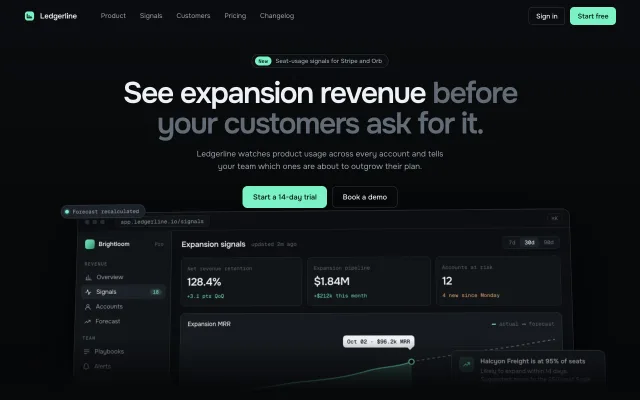
A dark SaaS hero whose div-built app window tilts up to 8° toward the cursor, with sidebar, chart, chip and toast parallaxing at four translateZ depths.
Kraft box 3D turntable
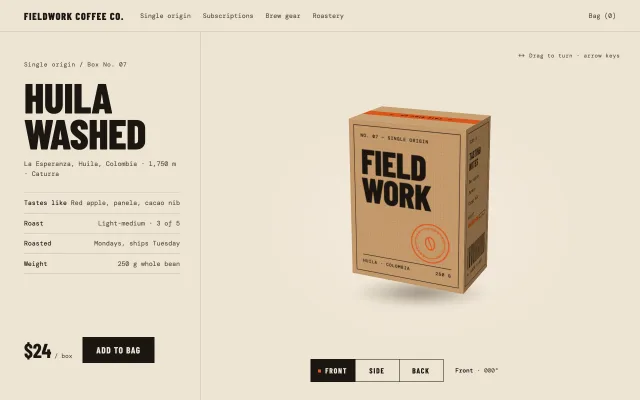
A CSS 3D coffee box with six printed kraft faces: drag to spin with inertia, snap to Front, Side or Back, arrow keys turn 90°, and a contact shadow follows tilt.
Scroll-scrubbed product teardown
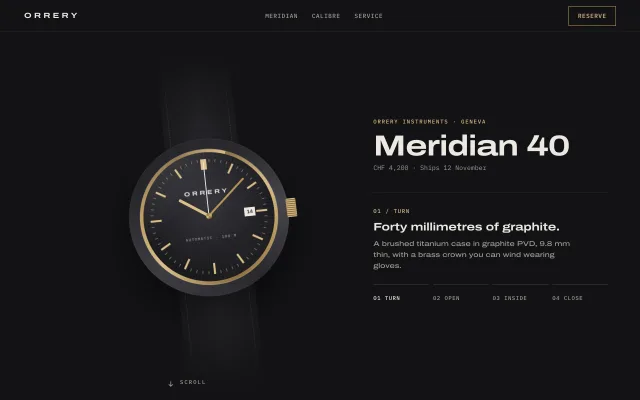
A pinned 400vh section where scroll turns a CSS wristwatch, explodes it into four labelled parts, and closes it again, with stepped captions and a rail.