Nº 525 of 528
Agent tool chip
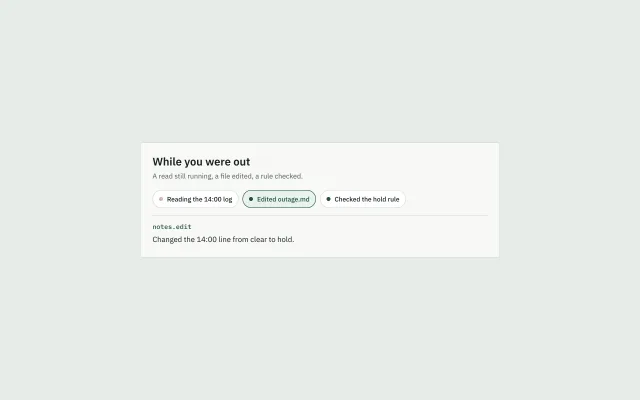
Three chips for a read, an edit, and a rule. Opening one shows a single line. The list does not expand.
Preview
Use it
Free to use · credit appreciated1 Once, in your project
npx skills add SusanAcharya/Design-Lounge 2 Then ask
Using the Design Lounge skill, build "Agent tool chip" (piece agent-tool-chip) in my stack. Match its brief; restyle it onto my product's theme.
No skill? Paste the brief instead. It carries the numbers, tokens and behaviour.
<!-- Design Lounge Nº 525 · "Agent tool chip" · www.designlounge.live -->

# Agent tool chip

> **Build brief for a coding agent.** Rebuild this piece in the reader's stack. If they haven't said which stack, ask once, then default to semantic HTML + CSS + a little vanilla JS. Match the numbers below; don't "improve" them. When a kit is locked, the pressed chip uses `--primary` and `--primary-soft`. The running dot may use the kit's warm accent. This demo uses the numbers below.

## What it is

A short row on Pylon, an outage desk. Three things happened while the person was away: a log is still being read, a file was edited, a hold rule was checked. Each is a pill, 36px tall, with an 8px dot. The running dot is `#8a4b32` and pulses. The finished dots are `#1f4d3a` and still. The edited chip starts pressed, and one line under the row names the tool and what changed. Opening another chip replaces that line. Opening the pressed chip clears the line. This is not a trace you expand row by row. That trace is `agent-step-trace`. A yes before a send is `agent-approval-card`. A source attached to a question is `prompt-source-model`.

## Reference behaviour

1. The heading is "While you were out". The lede is "A read still running, a file edited, a rule checked."
2. Three chips, in order: "Reading the 14:00 log", "Edited outage.md", "Checked the hold rule".
3. The middle chip is `aria-pressed="true"`. The tool line is `notes.edit`. The result is "Changed the 14:00 line from clear to hold."
4. The first chip's dot pulses. Its tool, when opened, is `logs.read`, and the result is "Still reading. Nothing is written yet."
5. The third chip's tool is `rules.hold`. The result is "Older than six hours. A person must sign."
6. Clicking an unpressed chip presses only that chip and replaces the tool and the result.
7. Clicking the pressed chip sets every chip to not pressed and clears both lines.
8. At most one chip is pressed.

## Structure

```
720px sheet, padding 24px
h1
p.lede
div.row role=group "Tool calls"
  button.chip × 3, height 36px, pill
div.panel, border-top, margin-top 14px
  p.tool    mono, 13px
  p.result  15px, role=status
```

- One dot per chip, 8px, `aria-hidden`.
- The panel is always in the layout, min-height 48px, so clearing the line does not jump the sheet.
- Chips wrap. They do not become a vertical accordion.

## Tokens

… 116 more lines. Copy or download for the full brief. Loading the source…Brief
156 linesBuild brief for a coding agent. Rebuild this piece in the reader’s stack. If they haven’t said which stack, ask once, then default to semantic HTML + CSS + a little vanilla JS. Match the numbers below; don’t “improve” them. When a kit is locked, the pressed chip uses
--primaryand--primary-soft. The running dot may use the kit’s warm accent. This demo uses the numbers below.
What it is
A short row on Pylon, an outage desk. Three things happened while the person was away: a log is still being read, a file was edited, a hold rule was checked. Each is a pill, 36px tall, with an 8px dot. The running dot is #8a4b32 and pulses. The finished dots are #1f4d3a and still. The edited chip starts pressed, and one line under the row names the tool and what changed. Opening another chip replaces that line. Opening the pressed chip clears the line. This is not a trace you expand row by row. That trace is agent-step-trace. A yes before a send is agent-approval-card. A source attached to a question is prompt-source-model.
Reference behaviour
- The heading is “While you were out”. The lede is “A read still running, a file edited, a rule checked.”
- Three chips, in order: “Reading the 14:00 log”, “Edited outage.md”, “Checked the hold rule”.
- The middle chip is
aria-pressed="true". The tool line isnotes.edit. The result is “Changed the 14:00 line from clear to hold.” - The first chip’s dot pulses. Its tool, when opened, is
logs.read, and the result is “Still reading. Nothing is written yet.” - The third chip’s tool is
rules.hold. The result is “Older than six hours. A person must sign.” - Clicking an unpressed chip presses only that chip and replaces the tool and the result.
- Clicking the pressed chip sets every chip to not pressed and clears both lines.
- At most one chip is pressed.
Structure
720px sheet, padding 24px
h1
p.lede
div.row role=group "Tool calls"
  button.chip × 3, height 36px, pill
div.panel, border-top, margin-top 14px
  p.tool    mono, 13px
p.result 15px, role=status- One dot per chip, 8px,
aria-hidden. - The panel is always in the layout, min-height 48px, so clearing the line does not jump the sheet.
- Chips wrap. They do not become a vertical accordion.
Tokens
:root {
  --bg: #e7ece9;
  --surface: #f7f8f6;
  --ink: #17211c;
  --ink-2: #4e5b54;
  --line: #d3dbd6;
  --run: #8a4b32;
  --done: #1f4d3a;
  --soft: #e7f2ec;
  --chip: #ffffff;
  --sans: "IBM Plex Sans", system-ui, sans-serif;
  --mono: "IBM Plex Mono", ui-monospace, monospace;
}
The chip radius is 999px. The sheet radius is 2px. A locked family may change the sheet. Leave the chips as pills.
Typography
| Role | Family | Size | Weight | Line | Tracking |
|---|---|---|---|---|---|
| Heading | IBM Plex Sans | 22px | 600 | 1.2 | 0 |
| Lede | IBM Plex Sans | 14px | 400 | 1.45 | 0 |
| Chip | IBM Plex Sans | 13px | 500 | 1 | 0 |
| Tool | IBM Plex Mono | 13px | 500 | 1 | 0 |
| Result | IBM Plex Sans | 15px | 400 | 1.45 | 0 |
Motion
| Thing | Trigger | Property | From → to | Duration | Easing | Reduced motion |
|---|---|---|---|---|---|---|
| Running dot | always, while that chip is a read in progress | opacity | 1 → 0.35 → 1 | 1400ms, loop | ease-in-out | opacity stays 1 |
Finished dots do not move. The panel text swaps with no transition.
States
- Resting chip: white fill, border
#d3dbd6, ink#17211c. - Pressed chip: fill
#e7f2ec, border and text#1f4d3a. - Running: the label stays in the present tense. The dot is
#8a4b32. - Done: the label is past tense. The dot is
#1f4d3a. - Empty panel: both lines are empty strings. The border and the min-height remain.
- Focus-visible: 2px
#1f4d3aoutline, offset 3px.
Accessibility
- The row is
role="group"with the name “Tool calls”. - Each chip is a
buttonwitharia-pressed. - The result paragraph is
role="status". The tool name is not a live region. One announcement is enough. - Dots are
aria-hidden. The label carries the state (“Reading” against “Edited”). - Keyboard: Tab moves across the three chips, then stops. Enter or Space presses the focused chip.
- Contrast:
#17211con white,#1f4d3aon#e7f2ec. The running brown#8a4b32is a dot, not text. - Hit target: each chip is 36px tall with horizontal padding 12px. On a phone, make them 44px. Do not shrink the dot.
Responsive rules
- ≥1280: the sheet stays 720px, centred.
- 768: same sheet, page padding 24px. Chips may wrap to two lines. The panel stays full width.
- <640: the sheet is
width: calc(100% - 32px). Heading stays 22px. Chips wrap. Do not turn them into full-width rows. A full-width row isagent-step-trace. - If a product has more than five calls, show the latest five and a count. Do not scroll the chip row inside this sheet.
Acceptance checklist
Always
- Calls are pills in a row, not an accordion.
- One pressed chip at a time, or none.
- The open chip shows a tool name and one result sentence.
- Pressing the open chip clears both lines.
- A call still in progress has a warm dot. A finished call has a still green dot.
- Reduced motion leaves the running dot at full opacity.
- The sheet does not jump when the line clears.
This demo
- Heading is “While you were out”.
- The first frame has “Edited outage.md” pressed and the result about clear to hold.
- Tools are
logs.read,notes.edit, andrules.hold, in that chip order. - The read result says nothing is written yet.
- The rule result says a person must sign.
Implementation notes
Store the three results beside the buttons. The pressed state is the only source of what the panel shows:
chip.addEventListener('click', () => {
  const on = chip.getAttribute('aria-pressed') === 'true';
  chips.forEach((c) => c.setAttribute('aria-pressed', 'false'));
  if (on) { tool.textContent = ''; result.textContent = ''; return; }
  chip.setAttribute('aria-pressed', 'true');
  tool.textContent = item.tool;
  result.textContent = item.result;
});
The pulse is on the dot, not the chip, so the label does not fade:
.dot.run { background: #8a4b32; animation: pulse 1.4s ease-in-out infinite; }
@keyframes pulse { 50% { opacity: .35 } }
@media (prefers-reduced-motion: reduce) { .dot.run { animation: none } }
Common mistakes:
- Building
agent-step-traceand calling the rows chips. A chip is one line tall and does not contain a body. - Showing every result at once. One line, for the pressed chip.
- A spinner in the panel. The running state is the dot on the chip.
- Disabling the running chip. The person can open it and read that nothing is written yet.
Details
- Palette
- Type
- IBM Plex Sans · IBM Plex Mono
- Motion
- Subtle motion
- Build
- Quick build
- Tags
Similar
Agent step trace
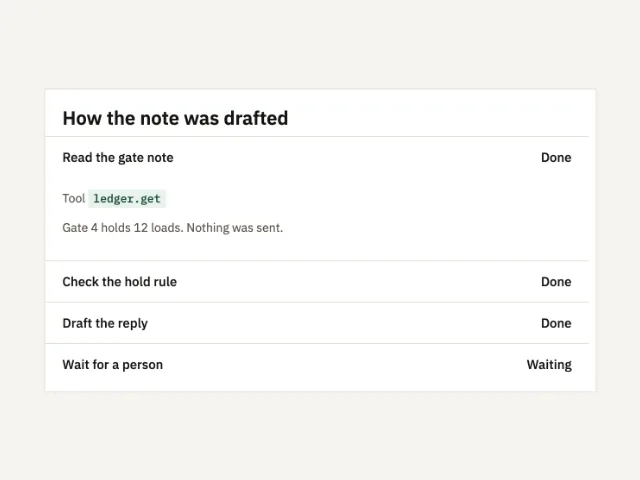
Four steps of a drafted note. The first is open. Opening another closes it. The last step is waiting.
Agent approval card
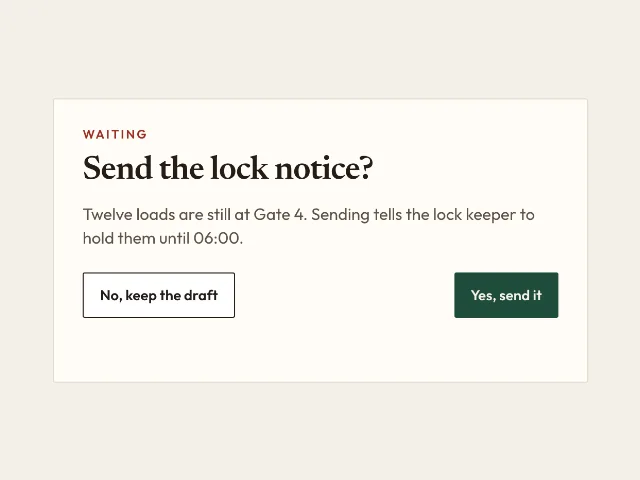
A notice stays a draft until Yes. No keeps it. The card says which, and nothing sends itself.
Ask with a source and a model
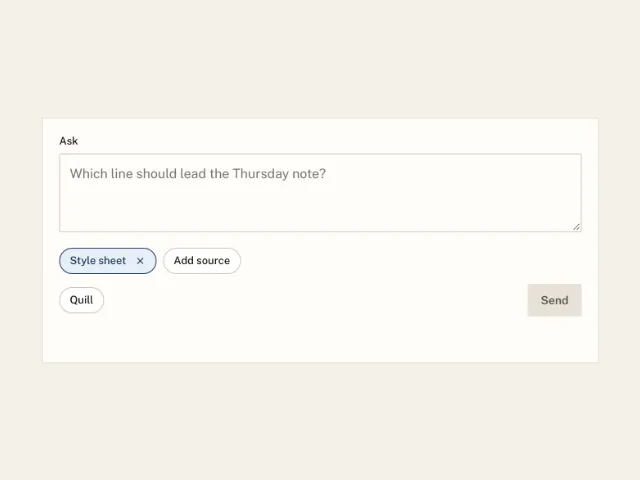
Style sheet starts attached. Add source offers two more. Quill or Quill small. Send reports the model, the sources, and the count.