Nº 531 of 531
Scroll-driven space voyage
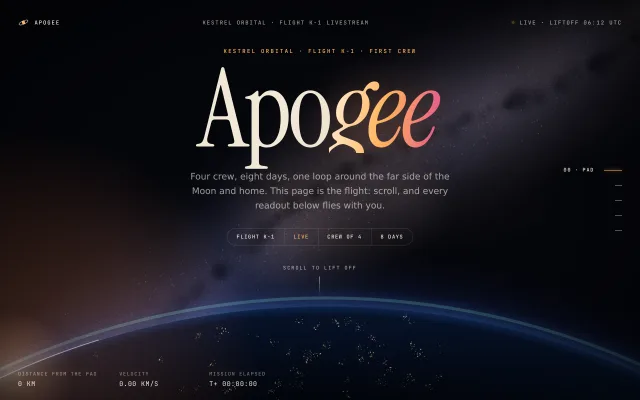
A canvas flight from Earth's night limb, out past a shrinking Earth and the Moon, to a deep field. Scroll is the throttle; a HUD counts distance, velocity and mission time.
Preview
Use it
Free to use · credit appreciated1 Once, in your project · Node 22.20+
npx skills add SusanAcharya/Design-Lounge 2 Then ask
Using the Design Lounge skill, build "Scroll-driven space voyage" (piece scroll-space-voyage) in my stack. Match its brief; restyle it onto my product's theme.
No skill? Paste the brief instead. It carries the numbers, tokens and behaviour.
<!-- Design Lounge Nº 531 · "Scroll-driven space voyage" · www.designlounge.live -->

# Scroll-driven space voyage

> **Build brief for a coding agent.** Rebuild this piece in the reader's stack. If they haven't said which stack, ask once, then default to semantic HTML + CSS + a little vanilla JS. Match the numbers below; don't "improve" them.

The world is one full-viewport 2D canvas, redrawn every frame. The copy is HTML on top of it. There is no WebGL and no image file. Every body (Earth's limb, the Earth disc, the Moon, the deep field, the Milky Way) is painted once into an offscreen canvas at load, then drawn with perspective each frame.

## What it is

The opening of Apogee, the public livestream page for Flight K-1, the first crewed flight of the fictional launch company Kestrel Orbital. The page is the flight and the scroll is the throttle. You start just above the pad, looking at the night side of Earth from altitude: a curved blue limb with airglow, cities like embers, and dawn on the left edge. A giant serif title, "Apogee", sits above it with the syllable "gee" lit by an amber-to-rose gradient. Each scroll moves a camera forward through a starfield. Orbit insertion comes first, then the translunar coast with Earth shrinking behind the capsule, then the Moon flyby, then the deep field from behind the Moon. A chapter index sits on the right edge. Three readouts at the bottom (distance from the pad, velocity, mission elapsed time) are computed from the scroll position.

Use it for a launch, an event or a product whose world is a journey: space, ocean depth, a mountain ascent, a city at night. Reach for it when the person asks for spectacle ("go wild", "unforgettable", "Awwwards"). Do not use it for a product page that needs to sell features fast. The detail worth copying is that one scroll value drives the camera, the copy fade, the chapter index and the HUD numbers together, so the whole page reads as one vehicle.

## Reference behaviour

1. First frame, `scrollY` 0: hero state. Earth's limb crosses the lower quarter (top of the arc at 76% of the viewport height). The title, kicker, lede, a four-cell badge and "Scroll to lift off" are centred above it. The index marks "00 · Pad". HUD reads "0 km", "0.00 km/s", "T+ 00:00:00".
2. Intro, first 2.6s: a warm launch flare at the bottom of the screen fades from opacity 0.95 to 0. Stars brighten from 15% to 100% as it fades. "Apo" rises in over 1.4s, "gee" 180ms later.
3. Scroll: the displayed scroll value `sy` eases toward `scrollY` by 8.5% per frame. The camera depth is `camZ = sy * 1000 / innerHeight`. Stars stream toward you. Fast scrolling stretches each star into a streak whose length is `clamp(vel * 5, -500, 1100)` depth units.
4. The hero copy fades out over the first 65% of a viewport while drifting up at 0.25 times the scroll speed and scaling to 0.94.
5. Chapter 01 Orbit (scroll 1 to 3 viewports): Earth's limb slides right by 20% of the width, sinks and shrinks to 70%, then fades out between 2.1 and 2.9 viewports. Copy on the left: "Eight minutes, then the ground lets go."
6. Chapter 02 Coast: as the limb fades, a full Earth disc (oceans, landmasses, cloud swirls, lit from the upper left) appears large on the left and shrinks as the camera moves away from it. It is 156px in radius at the chapter's midpoint, then fades out with distance. Copy is right-aligned.
7. Chapter 03 Moon: a cratered Moon, lit from the upper left, grows from a point on the right side while the Earth disc is still shrinking. It reaches 171px radius at the chapter's midpoint, then passes the camera and fades. Copy on the left.
8. Chapter 04 Deep field: a fixed plate of about 900 galaxies and 9 six-spike stars fades in, zooming 6% per viewport. The Milky Way band dims from 0.5 to 0.2 opacity between the Moon and the deep field. A "Back to the pad" button scrolls to the top.
9. Each chapter's copy is sticky for one viewport. Its opacity is `clamp(min((lp + 0.22) / 0.32, (1.22 - lp) / 0.32), 0, 1)`, where `lp` is progress through the chapter (0 to 1). It drifts from +18px to -18px.
10. HUD: each section carries `data-km`, `data-v` and `data-met`. Between chapter midpoints, distance and mission time interpolate on a log scale (0, 185 km, 92,000 km, 377,700 km, 406,800 km; T+ 0, 00:08:52, 1d 02:40, 4d 06:10, 4d 06:52). Velocity interpolates linearly (0, 7.79, 2.83, 2.31, 1.12 km/s). The first segment from 0 is quadratic. The readouts are a function of scroll, so they stand still when the reader stops.
11. Index: the chapter whose top has crossed the middle of the viewport is current. Clicking a row scrolls smoothly to the middle of that chapter. A polite live region says "Chapter 3: Moon" when the current chapter changes.
12. Pointer: the camera drifts up to 40px sideways and 26px vertically toward the pointer, eased 4% per frame. Far layers move less (Milky Way 0.4, deep field 0.15).
13. Reduced motion: no intro fade, no title rise, no easing (`sy = scrollY`), no streaks, no drift, no twinkle, no parallax, no grain jitter. The canvas redraws once per scroll event. Every chapter is still a complete still frame, and the HUD reads the same values as with motion.

## Structure

```
1280 × 800 viewport, document 7200px tall (hero 100vh + 4 chapters × 200vh)
┌──────────────────────────────────────────────────────────────────────┐
│ (o) APOGEE    KESTREL ORBITAL · FLIGHT K-1 LIVESTREAM   • LIVE · 06:12│ header, padding 26 36
│                                                                      │
│              KESTREL ORBITAL · FLIGHT K-1 · FIRST CREW               │
│                   Apogee   (217px serif, "gee" gradient)       00 ── │ rail, right 36
│                    lede 18px, 540px max                           ─  │ rows 44 × 28

… 235 more lines. Copy or download for the full brief. Loading the source…Brief
275 linesBuild brief for a coding agent. Rebuild this piece in the reader’s stack. If they haven’t said which stack, ask once, then default to semantic HTML + CSS + a little vanilla JS. Match the numbers below; don’t “improve” them.
The world is one full-viewport 2D canvas, redrawn every frame. The copy is HTML on top of it. There is no WebGL and no image file. Every body (Earth’s limb, the Earth disc, the Moon, the deep field, the Milky Way) is painted once into an offscreen canvas at load, then drawn with perspective each frame.
What it is
The opening of Apogee, the public livestream page for Flight K-1, the first crewed flight of the fictional launch company Kestrel Orbital. The page is the flight and the scroll is the throttle. You start just above the pad, looking at the night side of Earth from altitude: a curved blue limb with airglow, cities like embers, and dawn on the left edge. A giant serif title, “Apogee”, sits above it with the syllable “gee” lit by an amber-to-rose gradient. Each scroll moves a camera forward through a starfield. Orbit insertion comes first, then the translunar coast with Earth shrinking behind the capsule, then the Moon flyby, then the deep field from behind the Moon. A chapter index sits on the right edge. Three readouts at the bottom (distance from the pad, velocity, mission elapsed time) are computed from the scroll position.
Use it for a launch, an event or a product whose world is a journey: space, ocean depth, a mountain ascent, a city at night. Reach for it when the person asks for spectacle (“go wild”, “unforgettable”, “Awwwards”). Do not use it for a product page that needs to sell features fast. The detail worth copying is that one scroll value drives the camera, the copy fade, the chapter index and the HUD numbers together, so the whole page reads as one vehicle.
Reference behaviour
- First frame,
scrollY0: hero state. Earth’s limb crosses the lower quarter (top of the arc at 76% of the viewport height). The title, kicker, lede, a four-cell badge and “Scroll to lift off” are centred above it. The index marks “00 · Pad”. HUD reads “0 km”, “0.00 km/s”, “T+ 00:00:00”. - Intro, first 2.6s: a warm launch flare at the bottom of the screen fades from opacity 0.95 to 0. Stars brighten from 15% to 100% as it fades. “Apo” rises in over 1.4s, “gee” 180ms later.
- Scroll: the displayed scroll value
syeases towardscrollYby 8.5% per frame. The camera depth iscamZ = sy * 1000 / innerHeight. Stars stream toward you. Fast scrolling stretches each star into a streak whose length isclamp(vel * 5, -500, 1100)depth units. - The hero copy fades out over the first 65% of a viewport while drifting up at 0.25 times the scroll speed and scaling to 0.94.
- Chapter 01 Orbit (scroll 1 to 3 viewports): Earth’s limb slides right by 20% of the width, sinks and shrinks to 70%, then fades out between 2.1 and 2.9 viewports. Copy on the left: “Eight minutes, then the ground lets go.”
- Chapter 02 Coast: as the limb fades, a full Earth disc (oceans, landmasses, cloud swirls, lit from the upper left) appears large on the left and shrinks as the camera moves away from it. It is 156px in radius at the chapter’s midpoint, then fades out with distance. Copy is right-aligned.
- Chapter 03 Moon: a cratered Moon, lit from the upper left, grows from a point on the right side while the Earth disc is still shrinking. It reaches 171px radius at the chapter’s midpoint, then passes the camera and fades. Copy on the left.
- Chapter 04 Deep field: a fixed plate of about 900 galaxies and 9 six-spike stars fades in, zooming 6% per viewport. The Milky Way band dims from 0.5 to 0.2 opacity between the Moon and the deep field. A “Back to the pad” button scrolls to the top.
- Each chapter’s copy is sticky for one viewport. Its opacity is
clamp(min((lp + 0.22) / 0.32, (1.22 - lp) / 0.32), 0, 1), wherelpis progress through the chapter (0 to 1). It drifts from +18px to -18px. - HUD: each section carries
data-km,data-vanddata-met. Between chapter midpoints, distance and mission time interpolate on a log scale (0, 185 km, 92,000 km, 377,700 km, 406,800 km; T+ 0, 00:08:52, 1d 02:40, 4d 06:10, 4d 06:52). Velocity interpolates linearly (0, 7.79, 2.83, 2.31, 1.12 km/s). The first segment from 0 is quadratic. The readouts are a function of scroll, so they stand still when the reader stops. - Index: the chapter whose top has crossed the middle of the viewport is current. Clicking a row scrolls smoothly to the middle of that chapter. A polite live region says “Chapter 3: Moon” when the current chapter changes.
- Pointer: the camera drifts up to 40px sideways and 26px vertically toward the pointer, eased 4% per frame. Far layers move less (Milky Way 0.4, deep field 0.15).
- Reduced motion: no intro fade, no title rise, no easing (
sy = scrollY), no streaks, no drift, no twinkle, no parallax, no grain jitter. The canvas redraws once per scroll event. Every chapter is still a complete still frame, and the HUD reads the same values as with motion.
Structure
1280 × 800 viewport, document 7200px tall (hero 100vh + 4 chapters × 200vh)
┌──────────────────────────────────────────────────────────────────────┐
│ (o) APOGEE    KESTREL ORBITAL · FLIGHT K-1 LIVESTREAM   • LIVE · 06:12│ header, padding 26 36
│                                                                      │
│              KESTREL ORBITAL · FLIGHT K-1 · FIRST CREW               │
│                   Apogee   (217px serif, "gee" gradient)       00 ── │ rail, right 36
│                    lede 18px, 540px max                           ─  │ rows 44 × 28
│              [FLIGHT K-1 | LIVE | CREW OF 4 | 8 DAYS]             ─  │
│                         SCROLL TO LIFT OFF                        ─  │
│      ╭──────────────── Earth limb, airglow ────────────────╮         │
│ DISTANCE FROM THE PAD   VELOCITY     MISSION ELAPSED                 │ HUD, padding 26 36
│ 0 KM                    0.00 KM/S    T+ 00:00:00                     │
└──────────────────────────────────────────────────────────────────────┘
layers, back to front: canvas (fixed) · launch flare · vignette · grain · main copy · HUD · railcanvas#space:position: fixed; inset: 0,aria-hidden="true". Backing store isinnerWidth × DPRbyinnerHeight × DPR, DPR capped at 2.- Three
div.fxoverlays, fixed,pointer-events: none,aria-hidden: the launch flare, the vignette, and the grain (inset -50%). header.hud.top: a linkhref="#top"labelled “Apogee, back to the pad” (22px ring mark plus wordmark), the feed span, and the live span with a 6px pulsing dot.aside.hud.botlabelled “Flight readouts”: threediv.ro, each a 10px labelspanand a 13px valuebwith tabular figures.nav.raillabelled “Chapters”: anolof fivebuttons built from the sections, each holding a label span (“03 · Moon”) and a 1px linei.p.srwitharia-live="polite".mainholds fivesection.chelements withdata-label,data-km,data-v,data-met, and an optionaldata-obj(earth,moon). Each has a stickydiv.in(100vh) holding the copy.- The hero holds the only
h1, split into two word spans (“Apo”, “gee”) with no gap between them. Chapters each have anh2andaria-labelledbypointing to it. Facts are adl.
Chapter content:
| # | Label | Meta | Heading (italic part in accent) | Accent | Facts |
|---|---|---|---|---|---|
| 00 | Pad | Kestrel Orbital · Flight K-1 · first crew | Apogee | gradient | Flight K-1 · Live · Crew of 4 · 8 days |
| 01 | Orbit | T+ 00:08:52 · Orbit insertion | Eight minutes, then the ground lets go. | #9edcff | Altitude 185 km · Velocity 7.79 km/s · One lap 88 min |
| 02 | Coast | T+ 1d 02:40 · Translunar coast | One burn, and Earth starts to shrink. | #7fb8ff | Injection burn 6 min 12 s · Coast 3 days · Crew 4 |
| 03 | Moon | T+ 4d 06:10 · Closest approach | The Moon, close enough to count the craters. | #e9e2d2 | Closest 130 km · Radio silence 41 min · Night side −173°C |
| 04 | Deep field | T+ 4d 06:52 · Behind the Moon | Looking back, the whole sky. | #ffb35e | button “Back to the pad” |
Tokens
:root {
  --ink: #04050a;                         /* canvas clear and page */
  --star: #f1e8d6;                        /* headings, HUD values */
  --dim: rgba(241, 232, 214, .66);        /* body copy, labels */
  --faint: rgba(241, 232, 214, .16);      /* hairlines, badge borders */
  --amber: #ffb35e;                       /* active index, kicker, button */
  --rose: #e2568d;                        /* end of the title gradient */
  --ice: #9edcff;                         /* Orbit accent, airglow family */
  --accent: var(--amber);                 /* overridden per chapter */
  --title-grad: linear-gradient(100deg, #fff0d8 4%, #ffd39c 26%, #ffb35e 50%, #f48774 74%, #e2568d 96%);
  --serif: "Instrument Serif", "Times New Roman", serif;
  --sans: ui-sans-serif, system-ui, -apple-system, "Segoe UI", Roboto, sans-serif;
  --mono: "JetBrains Mono", ui-monospace, monospace;
  --space-1: 8px; --space-2: 14px; --space-3: 28px; --space-4: 38px; --edge: 36px;
  --radius-pill: 999px;
  --ease: cubic-bezier(.2, .7, .2, 1);
  --expo: cubic-bezier(.16, 1, .3, 1);
  --cam-ease: .085;                       /* sy += (scrollY - sy) * 0.085 */
}
Canvas constants: star depth DEPTH = 2600, depth per viewport ZVH = 1000, focal length F = 0.9 × min(W, H).
Typography
| Role | Family | Size | Weight | Line-height | Tracking | Case |
|---|---|---|---|---|---|---|
| Title | Instrument Serif, “gee” italic | clamp(88px, 17vw, 232px) | 400 | 0.8 | -0.035em | sentence |
| Chapter h2 | Instrument Serif, accent words italic | clamp(44px, 6.2vw, 96px) | 400 | 0.94 | -0.012em | sentence, text-wrap: balance |
| Kicker | JetBrains Mono | 11px | 500 | 1 | 0.22em | uppercase, amber |
| Chapter meta | JetBrains Mono | 11px | 500 | 1 | 0.18em | uppercase, accent; number in --dim |
| Lede | system sans | 18px | 400 | 1.6 | 0 | sentence, max 540px |
| Body | system sans | 17px | 400 | 1.65 | 0 | sentence, max 470px |
| Fact value | Instrument Serif | 27px | 400 | 1 | 0 | as written |
| Fact label | JetBrains Mono | 10px | 500 | 1 | 0.16em | uppercase |
| HUD label | JetBrains Mono | 10px | 500 | 1 | 0.14em | uppercase, 75% of --dim |
| HUD value | JetBrains Mono | 13px | 400 | 1 | 0.06em | uppercase, tabular, min 17ch |
| Header and index | JetBrains Mono | 11px / 10px | 500 | 1 | 0.14em / 0.16em | uppercase |
The title is one word split at the syllable: “Apo” in --star roman, “gee” in the gradient italic, with no gap so it still reads as a single word. Copy text carries text-shadow: 0 2px 30px rgba(0,0,0,.7). Each sticky chapter also has a radial scrim behind its copy: radial-gradient(55% 60% at 26% 50%, rgba(4,5,10,.6), transparent 72%), mirrored to 70% for right-aligned chapters.
Motion
| Thing | Trigger | Property | From → to | Duration / rate | Easing | Reduced motion |
|---|---|---|---|---|---|---|
| Camera | scroll | camZ | follows sy | 8.5% of the gap per frame | exponential | sy = scrollY |
| Star streak | scroll speed | line length | 0 → 1100 depth units | per frame | vel lerp 0.35 | off |
| Star twinkle | time | alpha | 0.44 → 1.0 | 0.5 to 3 rad/s per star | sine | fixed 0.86 |
| Star drift | time | depth | +10 units/s | constant | linear | off |
| Launch flare | load | opacity | 0.95 → 0 | 0.3s → 2.6s | smoothstep | starts at 0 |
| Title syllables | load | opacity, Y, blur | 0, +0.3em, 16px → 1, 0, 0 | 1400ms, “gee” +180ms | --expo | no animation |
| Hero copy | scroll | opacity, Y, scale | 1, 0, 1 → 0, -0.25 × sy, 0.94 | over 0.65 viewport | linear in scroll | opacity only |
| Chapter copy | scroll | opacity, Y | 0 → 1 → 0, +18 → -18px | across 200vh | linear in scroll | opacity only |
| Earth limb | scroll 0 to 2.9 vh | x, top, radius, alpha | centre → +20% W, R → 0.7R | per scroll | smoothstep | same, no glide |
| Earth disc | scroll | perspective size, alpha | large → 156px → gone (receding) | per frame | smoothstep | same, no glide |
| Moon | scroll | perspective size, alpha | far fade 3.2 → 1.9 × view distance | per frame | smoothstep | same, no glide |
| City lights | time | alpha | 0.7 → 1.0 | 3 rad/s | sine | fixed 1 |
| Grain | time | translate | ±3% | 1s, steps(5), infinite | steps | off |
| Index line | chapter change | width | 14 → 36px | 500ms | --expo | instant |
| Index label | hover, focus, current | opacity, X | 0, 6px → 1, 0 | 400ms | --ease | instant |
| HUD values | scroll | number | follows sy | per frame | smoothstep between chapters | follows scrollY |
States
- Index row, idle: 14px × 1px line in
--dim, label hidden. - Index row, hover or focus-visible: label slides in from 6px to 0 at 400ms.
- Index row, current:
aria-current="true", label in--star, line 36px in amber withbox-shadow: 0 0 8px #ffb35e. - Focus-visible everywhere: 1px solid amber outline, 4px offset.
- “Back to the pad”: 44px tall pill, 1px amber border, amber text. Hover fills amber with
--inktext in 200ms. - Live dot: 6px amber with a 10px glow, opacity pulse to 0.25 every 2.4s.
- Mission elapsed: “T+ hh:mm:ss” under a day, “T+ 4d 06:10:00” after.
- Chapters out of range:
visibility: hiddenonce opacity is below 0.01, so hidden buttons cannot take focus.
Accessibility
- One
h1(“Apogee”), fourh2. Each chaptersectionhasaria-labelledbypointing to its heading. - The canvas and the three overlays are
aria-hidden="true". The words live in the HTML, never only in the canvas. - The index is a
navwitharia-label="Chapters". Its buttons are labelled “Chapter 3: Moon” and are 44 × 28px. Enter and Space activate them. - The live region is polite and only speaks when the current chapter changes.
- The HUD is not a live region. It changes every frame and would flood a screen reader. The same numbers appear in each chapter’s meta line and facts.
- Body copy
rgba(241,232,214,.66)on#04050ais about 9:1. The scrim and text shadow keep it at 4.5:1 or better when a bright body passes behind. - Focus order: home link, the copy and the “Back to the pad” button, then the five index buttons.
- The page is a normal document scroll. Keyboard scrolling (Space, Page Down, arrow keys) drives the flight with no extra code.
Responsive rules
- At 1280 and above: as specified. Title is 17vw, capped at 232px. The rail sits at the right edge, 36px in.
- At 1024: unchanged. The title scales with 17vw and copy max width is
min(600px, 46vw). - At 900 and under: hide the feed text and the rail. Scroll still drives everything.
- At 760 and under: HUD padding 18px 20px, hide the mission-elapsed readout, values 11.5px. Chapter copy sits at the bottom left with 22px side padding and 18vh bottom padding. The title is 25vw. Facts gap is 22px, values 21px.
- Below 640 high: hide the scroll cue.
- Stars scale with area:
clamp(round(w × h / 650), 700, 2000). Re-seed and re-measure chapter positions on resize, debounced 120ms. Rebuild the Milky Way sprite only if the diagonal changes by more than 200px.
Acceptance checklist
Always
- One fixed full-viewport canvas renders the world. HTML copy scrolls above it.
- A single eased scroll value drives the camera depth, the copy opacity, the index and the HUD.
- Sections are 200vh with a sticky 100vh inner. The hero is 100vh. The first frame is the hero.
- Bodies are placed so they reach their framed size exactly at their chapter’s midpoint.
- Glow layers use
globalCompositeOperation = 'lighter'. The page has a vignette and grain. - The index has one button per chapter, sets
aria-current, and scrolls smoothly to the chapter middle. - HUD values use tabular figures, a min width of 17ch, and only touch the DOM when the string changes.
- Reduced motion: no glide, streaks, twinkle, drift, intro or grain. Every chapter is still a full still frame.
- Focus is visible on the link, the index buttons and the button.
- No horizontal overflow at 1280, 1024 or 390.
This demo
- Title “Apogee” with “gee” in the amber-to-rose gradient
#fff0d8 → #ffb35e → #e2568d, set tight to “Apo” with no word gap. - Five sections: Pad, Orbit, Coast, Moon, Deep field, numbered 00 to 04. Document height 7200px at 1280 × 800.
- HUD at the Coast midpoint reads “92,000 km”, “2.83 km/s”, “T+ 1d 02:40:00”. At the Moon midpoint, “377,700 km”, “2.31 km/s”, “T+ 4d 06:10:00”.
- Earth’s limb top sits at 76% of the viewport on the first frame, with a blue atmosphere, a faint green airglow ring and an amber dawn at the upper left.
- The Earth disc recedes (shrinks) through the Coast chapter, about 156px radius at its midpoint. The Moon radius at its midpoint is about 171px at 1280 × 800.
- Header feed “Kestrel Orbital · Flight K-1 livestream”, live span “Live · liftoff 06:12 UTC”. Badge “Flight K-1 | Live | Crew of 4 | 8 days”.
Implementation notes
1. Scroll to camera, and bodies placed by chapter
Scroll position becomes depth. Each body is put at the depth where it is r × k units in front of the camera when that chapter’s middle is on screen. Its projected radius there is F / k × mul, whatever the page length. A receding body (back: true) mirrors its depth around that point, so it starts large and shrinks as the camera moves forward.
const ZVH = 1000;                                   // depth units per viewport
let sy = scrollY;
function layout() {
  for (const c of chapters) {
    c.ctr = c.top + c.h / 2 - innerHeight / 2;      // scrollY at the chapter's middle
    const o = objs[c.el.dataset.obj]; if (!o) continue;
    o.vd = o.r * o.k;                               // viewing distance at the middle
    o.z = c.ctr * ZVH / innerHeight + o.vd;
    o.x = o.side * (o.off || .24) * W * o.vd / F;   // screen offset baked into world x
    o.y = (o.side > 0 ? -.03 : .03) * H * o.vd / F;
  }
}
function frame() {
  sy = reduce ? scrollY : sy + (scrollY - sy) * .085;
  const camZ = sy * ZVH / innerHeight;
  const o = objs.moon;
  const dz = o.back ? 2 * o.vd - (o.z - camZ) : o.z - camZ, k = F / dz;
  const x = CX + (o.x - camX) * k, y = CY + (o.y - camY) * k, R = o.r * k * o.mul;
  const nc = (o.near || .08) * o.vd;
  const a = smooth(o.vd * 3.2, o.vd * 1.9, dz) * smooth(nc * .3, nc * 1.6, dz);
  // drawImage(sprite, x - R, y - R, 2R, 2R) with globalAlpha a
}
Objects: Moon r 150, k 4.2, mul 1, side 1. Earth disc r 150, k 4.6, mul 1, side -1, off .28, back, near .2. With these numbers the Earth disc fades in just as the limb finishes fading (2.9 viewports), and the Moon starts growing on the right before the Earth disc has gone. Stars wrap: dz = ((s.z - camZ) % 2600 + 2600) % 2600. Draw each star as a round-capped line from its position at dz + streak to its position at dz, width (0.8 + near² × 2.8) × size × DPR.
2. HUD counters
Every readout is a pure function of the eased scroll value. Distance and mission time are log-interpolated between chapter middles, so each leg of the flight feels the same length even though the numbers jump by orders of magnitude. Velocity is linear because it rises and then falls.
function at(s, key) {
  const L = chapters.length - 1;
  if (s <= chapters[0].ctr) return chapters[0][key];
  for (let i = 0; i < L; i++) {
    const a = chapters[i], b = chapters[i + 1];
    if (s < b.ctr) {
      const t = smooth(a.ctr, b.ctr, s), A = a[key], B = b[key];
      return A <= 0 ? B * t * t : key === 'v' ? lerp(A, B, t) : Math.exp(lerp(Math.log(A), Math.log(B), t));
    }
  }
  return chapters[L][key];
}
put(0, fmtDist(at(sy, 'km')));   // "185 km", "92,000 km", "377,700 km"
put(1, fmtVel(at(sy, 'v')));     // "7.79 km/s"
put(2, fmtMet(at(sy, 'met')));   // "T+ 00:08:52", "T+ 4d 06:10:00"
// put() writes textContent only when the string differs from the last one
Formats: distance in whole km with thousands separators. Velocity to two decimals. Mission time rounded to the second, hh:mm:ss zero-padded, with a Nd prefix after the first day.
3. Drawing light
- Layered radial gradients. Every glow is a
createRadialGradientfrom an alpha colour to the same colour at 0, filled as a square. Build bodies from many of these. The Earth disc uses five random-walk landmasses of 50 to 140 soft blobs each, then 44 short cloud swirls of 24 blobs each, a sun glint and a blue limb haze. - Additive glow. Set
globalCompositeOperation = 'lighter'for stars, Milky Way, deep field, city lights and halos. Overlaps then brighten toward white like real light. Usedestination-outblobs to carve dust lanes in the Milky Way. - Limb with atmosphere. Earth radius
max(W, H) × 1.2, so only an arc is visible. Paint, in order: an atmosphere ring gradient from0.985Rto1.08R(rgba(150,215,255,.85)→rgba(70,140,255,.38)at 12% → 0), a 0.4%Rrgba(140,255,170,.16)airglow stroke at1.011R, the body gradient#02040a → #061127 → #0d2448at the rim, about 700 city dots on the lit cap, a dawn glow at angle-π/2 - 0.42, and a 1.5pxrgba(255,214,170,.55)rim highlight ±0.12 rad around it. - Lit spheres. After the surface, overlay a terminator gradient from the light side (transparent) to
rgba(2,3,8,.98)on the far side. The Moon and the Earth disc share the same terminator, so they read as lit by one Sun. - Twinkle and grain. Star alpha is
min(1, .15 + near × 1.9) × (.72 + .28 sin(t × tw + ph)) × brightness. Add a CSS grain layer (SVGfeTurbulence, 0.85 frequency, opacity 0.08,mix-blend-mode: overlay) and a vignette from transparent at 50% torgba(0,0,0,.6).
4. Re-skin the journey for another world
Keep the scroll-to-camera mapping, the sticky 200vh chapters, the copy fade, the index and the HUD. Replace three things:
- Chapters. Swap the copy and the
data-*values for the new scale: metres of depth for an ocean dive (0, 200, 1,000, 4,000, 10,935 m), altitude for a climb, or kilometres across a city at night. - Bodies. Replace the sprite functions: a jellyfish glow and a whale silhouette for the ocean, ridge lines and a summit flag for a mountain, lit windows and a bridge of lights for a city. Keep each as a pre-rendered offscreen canvas with an
r,kandside, and usebackfor anything you are leaving behind. - Opening and end plates. The Earth limb becomes the sea surface or the valley floor. The deep field becomes the trench floor or the summit sky. Keep three HUD readouts but rename them (“Depth below the surface”, “Pressure”, “Dive time”).
5. Common mistakes
- Drawing sprites every frame. Paint them once at load into offscreen canvases, then only
drawImagethem. - Driving the camera from raw
scrollYwith motion allowed. It judders. Easesyand read it everywhere. - Putting the HUD in an
aria-liveregion. It changes at 60fps. - Rainbow text. The gradient runs one direction, cream to amber to rose, on one syllable only.
- Forgetting reduced motion. Stop the rAF loop and draw once per scroll. Never leave the canvas blank.
- Writing HUD text every frame. Compare strings first or layout thrashes.
Details
- Palette
- Type
- Instrument Serif · JetBrains Mono
- Motion
- Rich motion
- Build
- Multi-step
- Tags
Studied
Haunted Boulder CityPin the screen and let scroll turn the pages. Only the line you are on gets to shout.
All sourcesSimilar
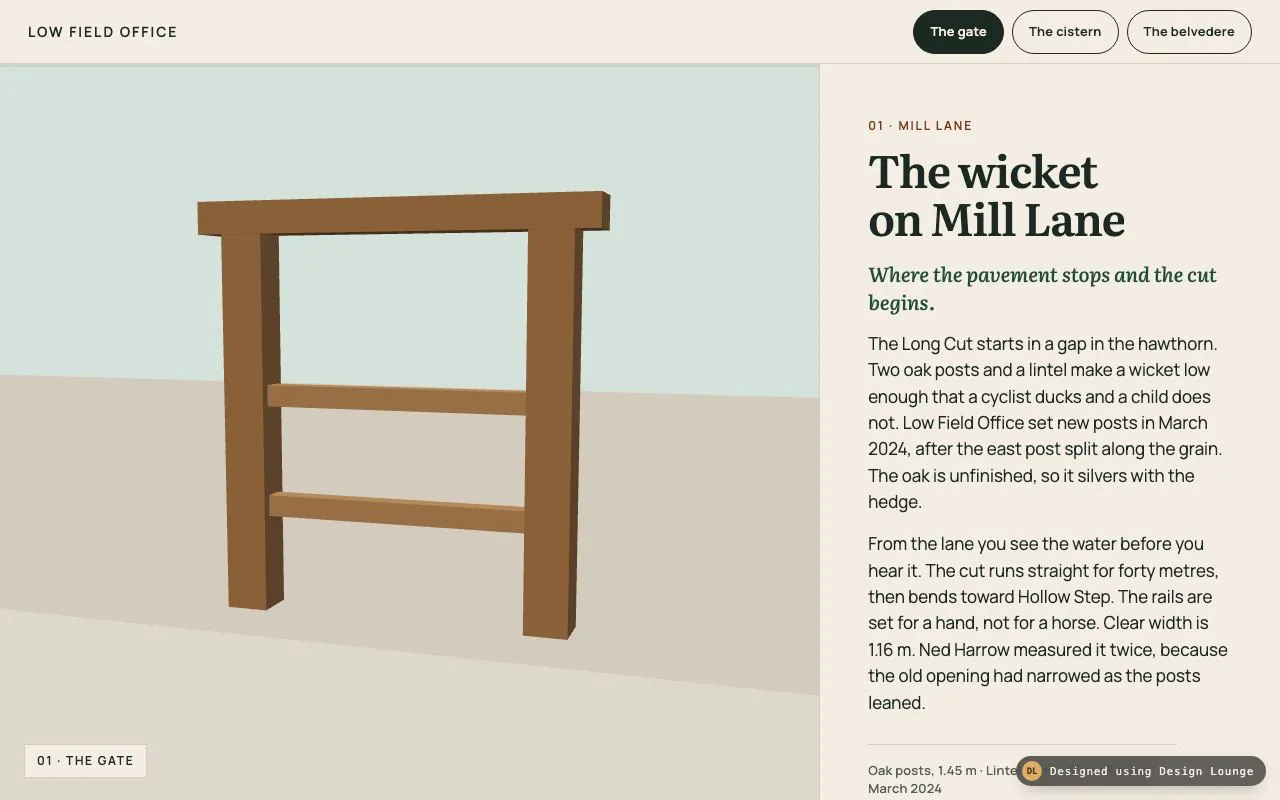
Scroll past three path models
Three chapters beside a canvas. Scroll moves the camera past a gate, a cistern, and a belvedere. Buttons jump.
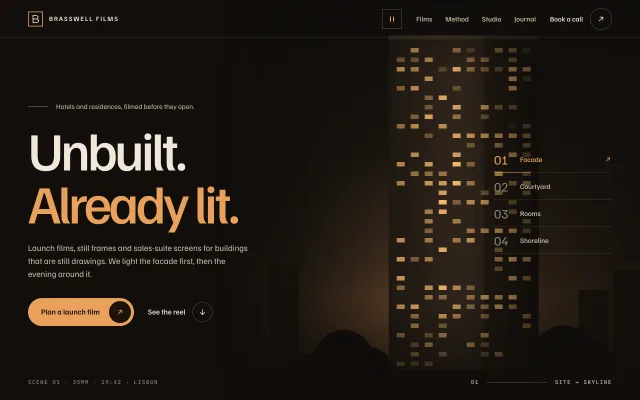
Chaptered cinema hero
A dark film-studio hero: fixed headline on the left, four night scenes crossfading on the right, and a numbered chapter index whose hairline fills as each scene plays.

WebGL shader hero
A hero whose background is a raw WebGL fragment shader: slow domain-warped noise in navy, glacier blue and ice, nudged by the pointer, with a CSS fallback.