Nº 520 of 520
Solander password reset
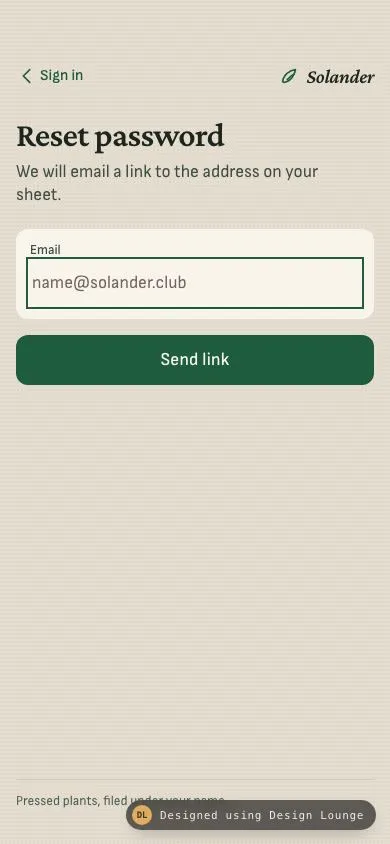
A grouped phone screen that emails a reset link, then shows that address with Resend held for 30 seconds.
Preview
Use it
Free to use · credit appreciated1 Once, in your project
npx skills add SusanAcharya/Design-Lounge 2 Then ask
Using the Design Lounge skill, build "Solander password reset" (piece phone-forgot-password) in my stack. Match its brief; restyle it onto my product's theme.
No skill? Paste the brief instead. It carries the numbers, tokens and behaviour.
<!-- Design Lounge Nº 520 · "Solander password reset" · www.designlounge.live -->

# Solander password reset

> **Build brief for a coding agent.** Rebuild this piece in the reader's stack. If they haven't said which stack, ask once, then default to semantic HTML + CSS + a little vanilla JS. Match the numbers below; don't "improve" them. When a kit is locked, map colours onto the kit tokens. This is an iOS-style grouped screen: inset surface, large title, 44px targets. It is not a website form stretched to 390px.

## What it is

The password reset screen of Solander, a fictional specimen club that files pressed plants under each member's name. The member asks for a link, the same screen becomes "Check your email", and Resend stays quiet for 30 seconds. A Sign in control in the nav leaves this flow. The feeling is a paper index card: warm stone ground, cream group, forest button, Crimson Pro for the title and Sofia Sans for the form. The detail worth copying is that the sent state reuses the same title slot and the same inset group, with the address they actually typed, instead of routing to a second page.

## Reference behaviour

1. First frame. The email field is empty, placeholder `name@solander.club`, and it is focused so it is ready to type. The large title is "Reset password". The dek is "We will email a link to the address on your sheet." No error is visible. The button reads "Send link".
2. Blur the field while it is empty. Do not show an error. Tabbing past is not a mistake.
3. Type `mira@` and blur. The error "Use an address like name@solander.club." appears under the field in `#8c2a24`. The group gains a 1.5px inset error stroke. `aria-invalid="true"` is set on the input.
4. Edit the field until the value matches `local@domain.tld` with a top-level label of at least two characters. The error clears on that input event.
5. Submit with an empty field. The error is "Enter the email on your sheet." Focus returns to the email field. The screen does not change.
6. Submit `mira@solander.club` (or any other valid address). The title becomes "Check your email". The dek becomes "We sent a reset link to this address." The form hides. A cream group shows the caption "Link sent to" and the exact trimmed address. A note reads "Open the message on this phone. The link works for one hour."
7. The sent panel rises 8px and fades in over 240ms. Reduced motion plays that in 1ms.
8. Resend starts at "Resend in 30s" with `aria-disabled="true"`. It counts down once a second: 29, 28, and so on, in one-second steps. At 0 the label is "Resend link", `aria-disabled` is false, and a status region says "You can resend the link."
9. A press while seconds remain does not send. The status region says "Wait N seconds to resend."
10. A press at 0 sets the status to "Link sent again." and restarts the 30 second wait.
11. The nav control "Sign in" is present on the reset form and on the sent state. Pressing it shows the sign-in view on this same screen: title "Sign in", dek "Use the password on your sheet.", email and password fields. If an address was typed, the sign-in email is prefilled with it. The password placeholder is "At least 8 characters."
12. On the sign-in view the nav Sign in control hides. "Forgot password" returns to the empty-or-kept reset form and the title "Reset password".
13. The eye control toggles the password between `password` and `text`. `aria-pressed` and the label switch between "Show password" and "Hide password".
14. Sign-in submit with an empty email uses "Enter the email on your sheet." A bad shape uses the same format sentence as reset. A password under 8 characters uses "Use at least 8 characters."
15. A valid sign-in hides the form, sets the title to "Signed in", the dek to "Welcome back.", and shows the address plus "3 pressed sheets are waiting at the club."
16. Focus moves to the title when the view changes. The title is `tabindex="-1"`.

## Structure

```
390 x 844
padding inline 16px, top safe 54px, bottom safe 34px
+--------------------------------------+
| < Sign in              (leaf) Solander|  nav, 44px row under the safe area
| Reset password                       |  34px Crimson Pro
| We will email a link to the address |  17px Sofia Sans, 34ch
| on your sheet.                       |
| +----------------------------------+ |

… 200 more lines. Copy or download for the full brief. Loading the source…Brief
240 linesBuild brief for a coding agent. Rebuild this piece in the reader’s stack. If they haven’t said which stack, ask once, then default to semantic HTML + CSS + a little vanilla JS. Match the numbers below; don’t “improve” them. When a kit is locked, map colours onto the kit tokens. This is an iOS-style grouped screen: inset surface, large title, 44px targets. It is not a website form stretched to 390px.
What it is
The password reset screen of Solander, a fictional specimen club that files pressed plants under each member’s name. The member asks for a link, the same screen becomes “Check your email”, and Resend stays quiet for 30 seconds. A Sign in control in the nav leaves this flow. The feeling is a paper index card: warm stone ground, cream group, forest button, Crimson Pro for the title and Sofia Sans for the form. The detail worth copying is that the sent state reuses the same title slot and the same inset group, with the address they actually typed, instead of routing to a second page.
Reference behaviour
- First frame. The email field is empty, placeholder
name@solander.club, and it is focused so it is ready to type. The large title is “Reset password”. The dek is “We will email a link to the address on your sheet.” No error is visible. The button reads “Send link”. - Blur the field while it is empty. Do not show an error. Tabbing past is not a mistake.
- Type
mira@and blur. The error “Use an address like name@solander.club.” appears under the field in#8c2a24. The group gains a 1.5px inset error stroke.aria-invalid="true"is set on the input. - Edit the field until the value matches
local@domain.tldwith a top-level label of at least two characters. The error clears on that input event. - Submit with an empty field. The error is “Enter the email on your sheet.” Focus returns to the email field. The screen does not change.
- Submit
mira@solander.club(or any other valid address). The title becomes “Check your email”. The dek becomes “We sent a reset link to this address.” The form hides. A cream group shows the caption “Link sent to” and the exact trimmed address. A note reads “Open the message on this phone. The link works for one hour.” - The sent panel rises 8px and fades in over 240ms. Reduced motion plays that in 1ms.
- Resend starts at “Resend in 30s” with
aria-disabled="true". It counts down once a second: 29, 28, and so on, in one-second steps. At 0 the label is “Resend link”,aria-disabledis false, and a status region says “You can resend the link.” - A press while seconds remain does not send. The status region says “Wait N seconds to resend.”
- A press at 0 sets the status to “Link sent again.” and restarts the 30 second wait.
- The nav control “Sign in” is present on the reset form and on the sent state. Pressing it shows the sign-in view on this same screen: title “Sign in”, dek “Use the password on your sheet.”, email and password fields. If an address was typed, the sign-in email is prefilled with it. The password placeholder is “At least 8 characters.”
- On the sign-in view the nav Sign in control hides. “Forgot password” returns to the empty-or-kept reset form and the title “Reset password”.
- The eye control toggles the password between
passwordandtext.aria-pressedand the label switch between “Show password” and “Hide password”. - Sign-in submit with an empty email uses “Enter the email on your sheet.” A bad shape uses the same format sentence as reset. A password under 8 characters uses “Use at least 8 characters.”
- A valid sign-in hides the form, sets the title to “Signed in”, the dek to “Welcome back.”, and shows the address plus “3 pressed sheets are waiting at the club.”
- Focus moves to the title when the view changes. The title is
tabindex="-1".
Structure
390 x 844
padding inline 16px, top safe 54px, bottom safe 34px
+--------------------------------------+
| < Sign in              (leaf) Solander|  nav, 44px row under the safe area
| Reset password                       |  34px Crimson Pro
| We will email a link to the address |  17px Sofia Sans, 34ch
| on your sheet.                       |
| +----------------------------------+ |
| | Email                            | |  cream group, radius 12
| | name@solander.club               | |  input min-height 44px
| +----------------------------------+ |
| [ Send link                        ] |  50px, forest, radius 12
|                                      |
| Pressed plants, filed under your name|  foot, 1px rule above
+--------------------------------------+

Sent state, same frame, form replaced:
| Check your email                     |
| We sent a reset link to this address.|
| +----------------------------------+ |
| | Link sent to                     | |
| | mira@solander.club               | |
| +----------------------------------+ |
| Open the message on this phone.      |
| The link works for one hour.         |
| [ Resend in 30s ] | quiet until 0, then forestheader.navholds the Sign in button and the Solander wordmark. The leaf SVG isaria-hidden.mainholds oneh1, one dekp, the resetform, the sentsection, the sign-inform, and the signed sheet.- The reset form is
novalidate. The emailinputistype="email",inputmode="email",autocomplete="username",autofocus. - The error
pisrole="alert"and stays in the group. It isdisplay: nonewhile empty. - The sent section and the sign-in form use the
hiddenattribute until their view is current. - A visually hidden
pwithrole="status"speaks send, resend, and sign-in results. It does not speak every countdown tick. - The foot is a
paftermain.mainisflex: 1, so the foot sits on the bottom safe area.
Tokens
:root {
  --bg: #e4ddd0;
  --surface: #f8f4ec;
  --ink: #1c261f;
  --ink-2: #3e4c44;
  --ink-3: #4e5b53;
  --line: #d2c8b6;
  --accent: #1f5c3e;
  --on-accent: #f8f4ec;
  --error: #8c2a24;
  --focus: #1f5c3e;
  --serif: "Crimson Pro", Georgia, serif;
  --sans: "Sofia Sans", system-ui, sans-serif;
  --ease: cubic-bezier(0.2, 0.7, 0.2, 1);
  --fast: 160ms;
  --mid: 240ms;
  --radius: 12px;
}
Page ground is --bg plus a 4px dot grain at 4.5% ink. Groups, the resend resting face, and the signed sheet are --surface. Do not paint the button with the grain. The grain is on the page only.
Typography
| Role | Family | Size | Weight | Line height | Tracking | Case |
|---|---|---|---|---|---|---|
| Wordmark | Crimson Pro italic | 20px | 600 | 1 | -0.02em | sentence |
| Large title | Crimson Pro | 34px | 600 | 1.1 | -0.02em | sentence |
| Dek, address, button | Sofia Sans | 17px | 400 dek, 600 address and button | 1.35 dek, 1.3 address | 0.01em on the button | sentence |
| Field label, error, foot | Sofia Sans | 13px | 600 label and error, 400 foot | 1.35 | 0 | sentence |
| Note, sign-in link | Sofia Sans | 15px note, 16px link | 400 note, 600 link | 1.4 | 0 | sentence |
| Signed meta | Sofia Sans | 14px | 400 | 1.35 | 0 | sentence |
The title is the only display size. Do not set the button or the email in Crimson Pro. Placeholder colour is #6f675c on #f8f4ec.
Motion
| Thing | Trigger | Property | From | To | Duration | Easing | Reduced motion |
|---|---|---|---|---|---|---|---|
| Sent panel | valid submit | opacity, translateY | 0, 8px | 1, 0 | 240ms | cubic-bezier(0.2, 0.7, 0.2, 1) | 1ms |
| Button press | active | translateY | 0 | 1px | 160ms | same | 1ms |
| Resend label | each second | text | “Resend in 30s” | “Resend in 0s”, then “Resend link” | 1000ms step | none | the countdown still runs |
No looping motion. The grain does not move.
States
- Email resting: cream group, no error, empty alert hidden.
- Email focus: the input drops the generic outline and shows a 2px inset accent bar, so the cream group stays one container. Buttons keep the 2px outline, offset 2px.
- Email format error: alert text,
aria-invalid="true", groupbox-shadow: inset 0 0 0 1.5px var(--error). - Send resting: fill
--accent, label--on-accent, min-height 50px, radius 12px. - Send hover, fine pointer only: fill
#184a32. - Send active: translateY 1px.
- Resend waiting: surface fill, 1.5px
--lineinset stroke, label--ink-3,aria-disabled="true". - Resend ready: forest fill,
--on-accentlabel,aria-disabled="false". - Sign-in password hidden: eye label “Show password”,
aria-pressed="false". - Sign-in password visible: label “Hide password”,
aria-pressed="true". - Signed: form hidden, sheet visible, title “Signed in”.
Accessibility
- One
h1. View changes rewrite its text and move focus to it. - Sign in is a
button, not a link that leaves the document. Forgot password is abutton. - The email error is
role="alert"and the input points at it witharia-describedby. - The countdown is button text, not a live region. Only the moment it hits zero, a resend, and a blocked early press go to
role="status". - Hit targets: nav Sign in, inputs, eye, Send, Resend, and Forgot password are at least 44px on the short side. Send and Resend are 50px tall and full width of the 16px inset.
- Contrast:
#1c261fand#4e5b53on#f8f4ecclear 4.5:1.#f8f4econ#1f5c3eclears 4.5:1.#8c2a24on#f8f4ecclears 4.5:1. - The leaf icon is
aria-hidden="true". - Do not trap focus. The order is Sign in, title, email, Send, then on the sent view title and Resend.
Responsive rules
- The frame is 390 by 844. Top clearance is
max(54px, env(safe-area-inset-top))on the nav. Bottom clearance ismax(34px, env(safe-area-inset-bottom))on the body. - At 360 wide, the 16px inset remains. The address wraps with
overflow-wrap: anywhere. The button stays full width. Nothing scrolls sideways. - At a 32px root (about 200% text), the title wraps to two lines, the dek wraps, the button grows from its 3.125rem min-height and vertical padding, and the nav may wrap the Sign in control under the wordmark. The page scrolls on the y axis. There is no two-column row to stack except the password line, which already stacks the label above the input inside a horizontal eye row. If that row overflows, the input is
min-width: 0and the eye stays 44px. - At tablet width, do not stretch this into a 1180px page. Keep the column at phone width, centred. This piece is a phone.
- Do not draw a status bar, a notch, or a home indicator. The Lounge draws device chrome.
Acceptance checklist
Always
- One email field, one inline format error, one send control, then the same screen becomes a check-email state.
- The check-email state shows the address the person typed, not a hard-coded example.
- Resend waits 30 seconds, counts down in 1 second steps, and only then accepts a press.
- A control returns to sign in from both the form and the sent state.
- Empty blur does not show an error. Empty submit does.
- Targets are at least 44px. Top safe area 54px. Bottom safe area 34px.
- No status bar, notch, or home indicator is drawn.
-
prefers-reduced-motion: reduceshortens the rise to 1ms. The countdown still runs.
This demo
- Brand is Solander. First frame title is “Reset password”. The field is empty and focused.
- Placeholder is
name@solander.club. Valid examplemira@solander.clubreaches “Check your email” and prints that address. - Format error copy is “Use an address like name@solander.club.” Empty submit copy is “Enter the email on your sheet.”
- Resend waiting copy is “Resend in 30s”. Ready copy is “Resend link”. Repeat copy in the status region is “Link sent again.”
- Note copy is “Open the message on this phone. The link works for one hour.”
- Sign in success title is “Signed in” and the sheet says “3 pressed sheets are waiting at the club.”
- Ground
#e4ddd0, group#f8f4ec, ink#1c261f, button#1f5c3e, error#8c2a24. - Fonts are Crimson Pro and Sofia Sans. Radius is 12px. Button min-height is 50px.
Implementation notes
Validate without the browser bubble. novalidate on the form, then:
var email = /^[^\s@]+@[^\s@]+\.[^\s@]{2,}$/;
function validEmail(value, emptyMsg) {
  if (!value) return emptyMsg;
  if (!email.test(value)) return 'Use an address like name@solander.club.';
  return '';
}
Hold Resend with a 1000ms interval. Do not use a timer faster than 16ms. Clear the interval when it reaches 0, and clear it again when a new wait starts:
function startWait() {
  left = 30;
  paint();
  clearInterval(timer);
  timer = setInterval(function () {
    left -= 1;
    paint();
    if (left <= 0) clearInterval(timer);
  }, 1000);
}
aria-disabled keeps the control focusable so the wait can be explained. A disabled attribute would drop it from the tab order while the countdown is the whole point.
Common mistakes:
- Navigating to a second URL for “Check your email”. This piece swaps regions in the same document.
- Starting the 30 second wait on first paint. It starts when a valid send succeeds.
- Putting the sample address in the sent group instead of
input.value.trim(). - Scolding an empty blur.
- A pill that spans the screen edge. The button lines up with the 16px inset, radius 12px, same as the group.
- Drawing the clock, the battery, or a home indicator bar.
- Using a purple gradient, Inter, or a second type family beyond Crimson Pro and Sofia Sans.
- Announcing every second in an
aria-liveregion.
Where it sits:
- It is the screen behind “Forgot password” on a Solander sign-in. The sign-in view in this demo is only the return path.
- After the real product accepts the link, the next screen is a new-password form. That form is not in this piece.
- The foot line is the club, not a legal dump.
Rebuild order:
- Set the phone paddings, 54px top on the nav, 34px bottom on the body, 16px inline.
- Place the Sign in button and the Solander wordmark.
- Place the 34px title, the dek, the cream email group, and the forest Send link button.
- Wire empty and format errors. Keep the first frame empty and focused.
- On a valid submit, swap to Check your email and start the 30 second resend.
- Wire Sign in, Forgot password, the eye, and the signed sheet.
- Add the rise, then the reduced-motion override.
- Read the address back from the input at send time. Do not keep a second copy that can drift.
- Keep the foot on the page ground, under a 1px
--linerule, so the 844px frame has a finish under the button. - The signed sheet is one block, not a list. It names the address and the three waiting sheets.
- Grain is a 4px radial dot at low ink. It does not animate and it does not cover the cream group.
- The password placeholder is “At least 8 characters.” The eye sits in the same row as that input, 44px square, aligned with the email text.
- Sign in keeps the wordmark on the right. The back control is hidden on that view, and Forgot password brings the reset form back.
Details
- Palette
- Type
- Crimson Pro · Sofia Sans
- Motion
- Subtle motion
- Build
- One session
- Tags
On the shelves