Nº 522 of 528
One bar split into shares
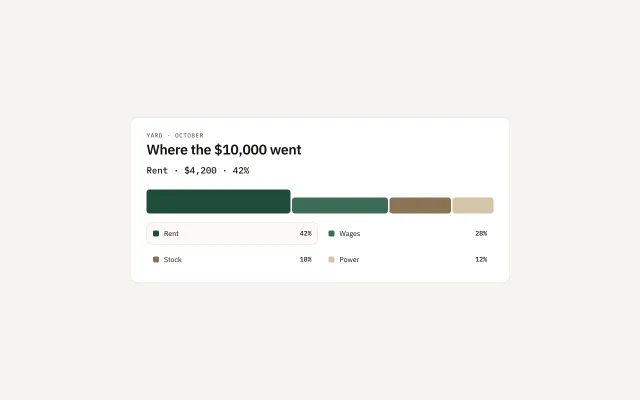
A single bar in four shares of one total. The selected share grows to 48px. The readout names the amount. There is no ring.
Preview
Use it
Free to use · credit appreciated1 Once, in your project
npx skills add SusanAcharya/Design-Lounge 2 Then ask
Using the Design Lounge skill, build "One bar split into shares" (piece chart-share-bar) in my stack. Match its brief; restyle it onto my product's theme.
No skill? Paste the brief instead. It carries the numbers, tokens and behaviour.
<!-- Design Lounge Nº 522 · "One bar split into shares" · www.designlounge.live -->

# One bar split into shares

> **Build brief for a coding agent.** Rebuild this piece in the reader's stack. If they haven't said which stack, ask once, then default to semantic HTML + CSS + a little vanilla JS. Match the numbers below; don't "improve" them. When a kit is locked, map the four fills onto that kit's ink, a darker tint, a warm mid, and a light tint. Do not introduce a fifth colour.

## What it is

October spend for a yard, $10,000, drawn as one horizontal bar. Rent is 42%, wages 28%, stock 18%, power 12%. Rent starts selected: that segment is 48px tall and the readout is "Rent · $4,200 · 42%". The other segments stay 32px. This is how a total splits into parts. `chart-rank-spend` is the ranked list, and it is the right piece when the point is which row is longest. This piece is the right one when the point is that the parts add up to one bar. Do not draw a donut or a pie. The ranked list already refused that shape.

## Reference behaviour

1. First frame: Rent is `aria-pressed="true"` on both its segment and its legend row. The readout is "Rent · $4,200 · 42%".
2. Click a segment or its legend row. That share becomes the only pressed one. Its height becomes 48px. The others return to 32px. The readout becomes "{Name} · {money} · {percent}".
3. Arrow keys on a legend button move to the next or previous share, update the readout, and move focus with the selection.
4. The four flex-grow values are 42, 28, 18, and 12, with a 3px gap. They sum to 100.
5. The height change takes 240ms, `cubic-bezier(.2,.7,.2,1)`, and runs once per selection. It does not loop.
6. Reduced motion: the height changes with no transition.
7. There is no tooltip. The readout is the value.

## Structure

```
760 card, padding 28 32 24
kicker, mono uppercase
h1
readout, mono 18
track, height 56, align end
  4 segment buttons
legend, 2 columns
  4 rows, 44px: swatch, name, percent
```

- `section.card` is labelled by the `h1`.
- The track is a flex row. Each segment is a `button.seg`.
- The legend is a `ul` of buttons. The swatch is an `i`, `aria` is on the button via the visible name.
- The readout is `p#read[role=status]`.

## Tokens

… 122 more lines. Copy or download for the full brief. Loading the source…Brief
162 linesBuild brief for a coding agent. Rebuild this piece in the reader’s stack. If they haven’t said which stack, ask once, then default to semantic HTML + CSS + a little vanilla JS. Match the numbers below; don’t “improve” them. When a kit is locked, map the four fills onto that kit’s ink, a darker tint, a warm mid, and a light tint. Do not introduce a fifth colour.
What it is
October spend for a yard, $10,000, drawn as one horizontal bar. Rent is 42%, wages 28%, stock 18%, power 12%. Rent starts selected: that segment is 48px tall and the readout is “Rent · $4,200 · 42%”. The other segments stay 32px. This is how a total splits into parts. chart-rank-spend is the ranked list, and it is the right piece when the point is which row is longest. This piece is the right one when the point is that the parts add up to one bar. Do not draw a donut or a pie. The ranked list already refused that shape.
Reference behaviour
- First frame: Rent is
aria-pressed="true"on both its segment and its legend row. The readout is “Rent · $4,200 · 42%”. - Click a segment or its legend row. That share becomes the only pressed one. Its height becomes 48px. The others return to 32px. The readout becomes “{Name} · {money} · {percent}”.
- Arrow keys on a legend button move to the next or previous share, update the readout, and move focus with the selection.
- The four flex-grow values are 42, 28, 18, and 12, with a 3px gap. They sum to 100.
- The height change takes 240ms,
cubic-bezier(.2,.7,.2,1), and runs once per selection. It does not loop. - Reduced motion: the height changes with no transition.
- There is no tooltip. The readout is the value.
Structure
760 card, padding 28 32 24
kicker, mono uppercase
h1
readout, mono 18
track, height 56, align end
  4 segment buttons
legend, 2 columns
4 rows, 44px: swatch, name, percentsection.cardis labelled by theh1.- The track is a flex row. Each segment is a
button.seg. - The legend is a
ulof buttons. The swatch is ani,ariais on the button via the visible name. - The readout is
p#read[role=status].
Tokens
:root {
  --bg: #f6f4ef;
  --card: #ffffff;
  --ink: #161513;
  --muted: #6b645c;
  --line: #e6e1d8;
  --a: #1f4d3a; /* rent */
  --b: #3d6b56; /* wages */
  --c: #8a7355; /* stock */
  --d: #d4c4a8; /* power */
  --sans: "IBM Plex Sans", system-ui, sans-serif;
  --mono: "IBM Plex Mono", ui-monospace, monospace;
  --ease: cubic-bezier(.2, .7, .2, 1);
  --seg: 32px;
  --seg-on: 48px;
}
Card radius 16px. Segment radius 6px. No shadow. No gridlines.
Typography
| Role | Family | Size | Weight | Line | Tracking |
|---|---|---|---|---|---|
| Kicker | IBM Plex Mono | 12px | 500 | 1 | 0.08em, uppercase |
| Title | IBM Plex Sans | 28px | 600 | 1.1 | -0.02em |
| Readout, percent | IBM Plex Mono | 18px / 13px | 500 | 1.2 | 0 |
| Legend | IBM Plex Sans | 14px | 400 | 1 | 0 |
Motion
| Thing | Trigger | Property | From → to | Duration | Easing | Reduced motion |
|---|---|---|---|---|---|---|
| Selected segment | press | height | 32px → 48px | 240ms | cubic-bezier(.2,.7,.2,1) | no transition |
| Other segments | press | height | 48px → 32px | 240ms | same | no transition |
The bar does not draw itself on load. Rent is already tall in the first frame.
States
- Selected segment: height 48px,
aria-pressed="true". - Resting segment: height 32px.
- Selected legend row: 1px
#e6e1d8border, background#fbfaf7. - Resting legend row: transparent border, so the row does not jump when selected.
- Focus-visible on a segment: 2px
#161513outline, offset 3px. - Focus-visible on a legend button: 2px
#161513outline, offset 2px. - Fills stay the four tokens. Selection changes height, not colour.
Accessibility
- Each segment button has an
aria-labelwith the name and the percent: “Rent, 42 percent”. - Legend buttons expose the same choice in text, so the swatch
iis decorative. - The readout is
role="status". - Arrow keys on the legend move selection. The segments are also clickable, and they are in tab order because they are buttons.
- Do not rely on colour alone. The selected share is the tall one, and its name is in the readout.
- Contrast:
#161513on white.#d4c4a8is a large shape, not text. The percent for Power is#161513text beside the swatch, not type set on the sand fill. - Legend rows are 44px tall.
Responsive rules
- ≥1280: the card is 760px.
- 1024: the card is
width: calc(100% - 48px), legend stays two columns. - 768: legend becomes one column. The track stays one row.
- <640: the title wraps. Segments stay in one bar. Do not turn this into four stacked bars. A phone finance screen that needs a ranking uses
chart-rank-spend.
Acceptance checklist
Always
- One horizontal bar, four segments, flex-grow equal to the percents, 3px gap.
- Selected segment is 48px tall. The others are 32px.
- The readout is “{Name} · {money} · {percent}” and updates with the selection.
- Arrow keys on the legend move the selection.
- Height eases in 240ms. Reduced motion removes the transition.
- No donut, no pie, no second series, no tooltip.
- Four fills only:
#1f4d3a,#3d6b56,#8a7355,#d4c4a8.
This demo
- Kicker is “Yard · October”. Title is “Where the $10,000 went”.
- Shares are Rent $4,200 42%, Wages $2,800 28%, Stock $1,800 18%, Power $1,200 12%.
- Rent starts selected.
- The percents sum to 100.
Implementation notes
Drive both the segment and the legend from one index:
function select(i) {
  segs.forEach((s, n) => s.setAttribute('aria-pressed', String(n === i)));
  rows.forEach((s, n) => s.setAttribute('aria-pressed', String(n === i)));
  read.textContent = parts[i].name + ' · ' + parts[i].money + ' · ' + parts[i].pct;
}
The tall state is CSS: .seg[aria-pressed="true"] { height: 48px }. The track is align-items: flex-end and height: 56px, so the tall segment grows upward and the baseline stays put.
Common mistakes:
- A donut with a number in the hole.
chart-rank-spendrefused that, and this piece is the other legal way to show a split. - Painting the selected slice a new hue. Height is the selection.
- A legend that does not match the segment order.
- Animating flex-grow from zero on load. The first frame is the finished split.
- Using this for a week of separate days. That is
chart-bar-week.
Where it sits:
- Under a single total, when the question is how that total splits.
- Beside
chart-rank-spendonly if one screen asks both “what is longest” and “do the parts add up”. Otherwise pick one. - The four fills stay in one family: green, a lighter green, a warm brown, a sand. Do not add blue.
- Percents in the product must sum to 100. If they do not, fix the data before drawing the bar.
- Money in the readout uses the product’s currency. This demo uses dollars.
- The kicker names the period. It is not a second title.
- Do not put a number inside a circle. The readout is a line under the title.
- Selection stays after the pointer leaves. Hover does not change the pressed share.
Details
- Palette
- Type
- IBM Plex Sans · IBM Plex Mono
- Motion
- Subtle motion
- Build
- Quick build
- Tags
Similar
Ranked spend
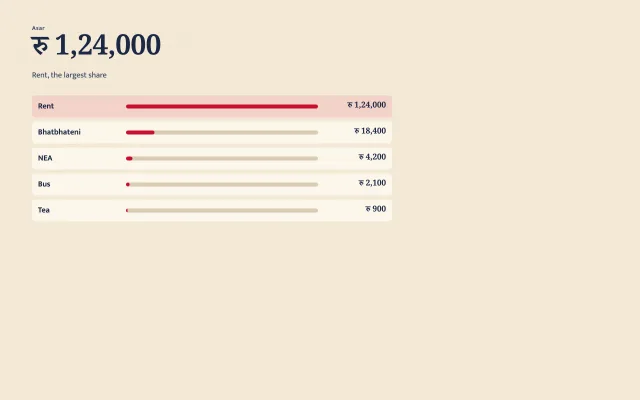
Where the money went: one amount at display size, then five horizontal bars ranked by size. No pie, no legend, no second series.
Weekly bar chart
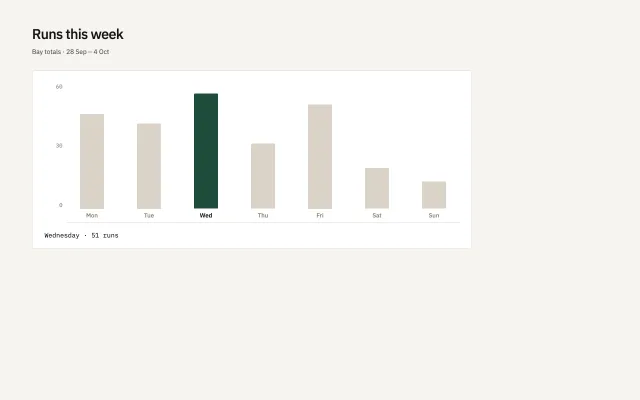
Seven bars for a yard week. One series, one selected day, and a mono readout. No legend, no second colour, no chart theme.
KPI row with sparklines
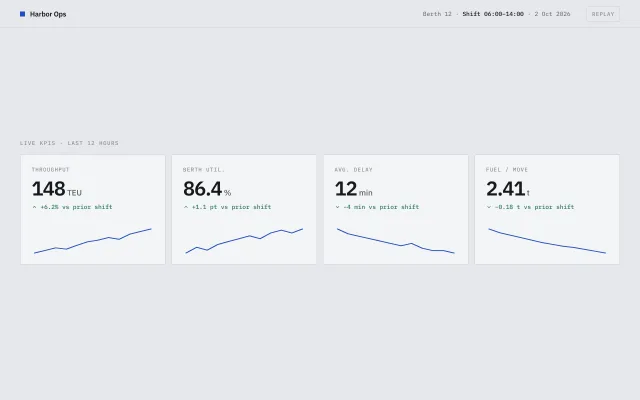
Four Harbor Ops KPI cards: label, large number, signed delta, and an SVG sparkline that draws on load and highlights the nearest point on hover.