Nº 514 of 520
Phone shopping bag
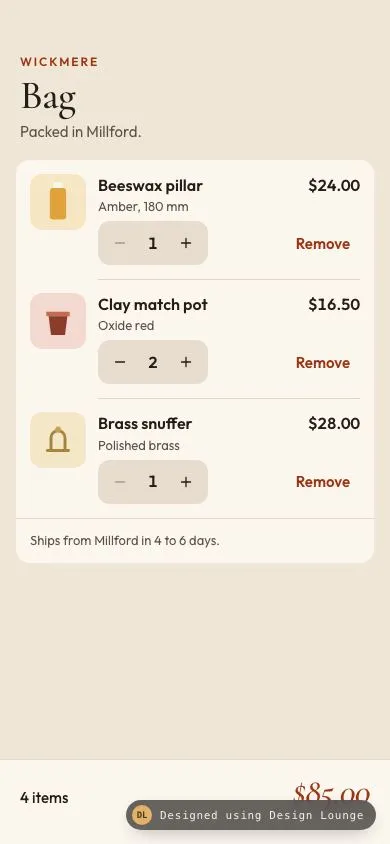
An iOS bag for Wickmere with three swatched lines, steppers, a cents total pinned to the bar, and one button when the bag is empty.
Preview
Use it
Free to use · credit appreciated1 Once, in your project
npx skills add SusanAcharya/Design-Lounge 2 Then ask
Using the Design Lounge skill, build "Phone shopping bag" (piece phone-cart) in my stack. Match its brief; restyle it onto my product's theme.
No skill? Paste the brief instead. It carries the numbers, tokens and behaviour.
<!-- Design Lounge Nº 514 · "Phone shopping bag" · www.designlounge.live -->

# Phone shopping bag

> **Build brief for a coding agent.** Rebuild this piece in the reader's stack. If they haven't said which stack, ask once, then default to semantic HTML + CSS + a little vanilla JS. Match the numbers below; don't "improve" them. When a kit is locked, map colours onto the kit tokens. This is an iOS bag. It is not a web cart and it is not checkout.

## What it is

The bag screen of Wickmere, an invented candle workshop, on a phone. The language is iOS: a large title, one inset group on warm plaster, 44px controls, and a bar pinned to the bottom of the viewport. The Lounge draws the status bar. Do not draw a status bar, a notch, or a home indicator glyph.

Three lines start in the group. Each line has an inline SVG swatch, a name, a variant, a unit price, and a stepper, plus a Remove control. The unit price is the price of one. The pinned bar shows the item count and the total. Both are computed in integer cents from quantity times unit price. Nothing on the bar is a hardcoded dollar string.

The detail worth copying is that split. The row keeps saying $16.50 when the quantity is 2. The bar is the only place that multiplies. Removing the last line hides the group and the bar and shows an empty state with exactly one button.

## Reference behaviour

1. First frame is the filled bag. Lines, in order: Beeswax pillar, Amber, 180 mm, 2400 cents, quantity 1. Clay match pot, Oxide red, 1650 cents, quantity 2. Brass snuffer, Polished brass, 2800 cents, quantity 1. The bar reads "4 items" and "$85.00". That is 1+2+1 items and (2400 + 1650*2 + 2800) cents.
2. The unit price on each row stays the price of one. It does not become the line extension.
3. Plus adds 1 to that line, up to 9. Minus subtracts 1, but does nothing at quantity 1. At 1, minus has `aria-disabled="true"` and opacity 0.35. Remove is how a line leaves the bag, at any quantity.
4. After every change, the bar rewrites the count and the total from the lines. Plus on the pillar (2400 cents) moves the first frame from 4 items / $85.00 to 5 items / $109.00.
5. Plus at 9 does nothing. Minus at 1 does nothing.
6. Remove deletes that line. Focus moves to the next line's Remove, or the previous line's Remove if it was the last row, or to the empty button if no lines remain.
7. When the lines array is empty, the group (including the shipping note) and the bar get the `hidden` attribute. The empty state shows. Its only button is "Add the beeswax pillar".
8. That button inserts the beeswax pillar at quantity 1. The group and the bar return. The bar reads "1 item" and "$24.00". Focus moves to that line's plus button.
9. A polite live region announces the change: the product and quantity, then the count and total. When the bag is empty it says the bag is empty. It does not use `alert`.
10. The shipping note, "Ships from Millford in 4 to 6 days.", sits in the group under the lines. It is not a second total and it is not tappable.
11. There is no promo field, no shipping selector, and no checkout button. Checkout is a different screen.

## Structure

```
390 x 844, body is a column, overflow hidden
+--------------------------------------+
| padding-top max(54px, safe-area)    |
| WICKMERE          12px tracked       |
| Bag               Cormorant 40px     |
| Packed in Millford.                  |
|                                      |
| inset group, margin 18px 16px 0      |
| radius 14, surface                   |

… 207 more lines. Copy or download for the full brief. Loading the source…Brief
247 linesBuild brief for a coding agent. Rebuild this piece in the reader’s stack. If they haven’t said which stack, ask once, then default to semantic HTML + CSS + a little vanilla JS. Match the numbers below; don’t “improve” them. When a kit is locked, map colours onto the kit tokens. This is an iOS bag. It is not a web cart and it is not checkout.
What it is
The bag screen of Wickmere, an invented candle workshop, on a phone. The language is iOS: a large title, one inset group on warm plaster, 44px controls, and a bar pinned to the bottom of the viewport. The Lounge draws the status bar. Do not draw a status bar, a notch, or a home indicator glyph.
Three lines start in the group. Each line has an inline SVG swatch, a name, a variant, a unit price, and a stepper, plus a Remove control. The unit price is the price of one. The pinned bar shows the item count and the total. Both are computed in integer cents from quantity times unit price. Nothing on the bar is a hardcoded dollar string.
The detail worth copying is that split. The row keeps saying $16.50 when the quantity is 2. The bar is the only place that multiplies. Removing the last line hides the group and the bar and shows an empty state with exactly one button.
Reference behaviour
- First frame is the filled bag. Lines, in order: Beeswax pillar, Amber, 180 mm, 2400 cents, quantity 1. Clay match pot, Oxide red, 1650 cents, quantity 2. Brass snuffer, Polished brass, 2800 cents, quantity 1. The bar reads “4 items” and “$85.00”. That is 1+2+1 items and (2400 + 1650*2 + 2800) cents.
- The unit price on each row stays the price of one. It does not become the line extension.
- Plus adds 1 to that line, up to 9. Minus subtracts 1, but does nothing at quantity 1. At 1, minus has
aria-disabled="true"and opacity 0.35. Remove is how a line leaves the bag, at any quantity. - After every change, the bar rewrites the count and the total from the lines. Plus on the pillar (2400 cents) moves the first frame from 4 items / $85.00 to 5 items / $109.00.
- Plus at 9 does nothing. Minus at 1 does nothing.
- Remove deletes that line. Focus moves to the next line’s Remove, or the previous line’s Remove if it was the last row, or to the empty button if no lines remain.
- When the lines array is empty, the group (including the shipping note) and the bar get the
hiddenattribute. The empty state shows. Its only button is “Add the beeswax pillar”. - That button inserts the beeswax pillar at quantity 1. The group and the bar return. The bar reads “1 item” and “$24.00”. Focus moves to that line’s plus button.
- A polite live region announces the change: the product and quantity, then the count and total. When the bag is empty it says the bag is empty. It does not use
alert. - The shipping note, “Ships from Millford in 4 to 6 days.”, sits in the group under the lines. It is not a second total and it is not tappable.
- There is no promo field, no shipping selector, and no checkout button. Checkout is a different screen.
Structure
390 x 844, body is a column, overflow hidden
+--------------------------------------+
| padding-top max(54px, safe-area)    |
| WICKMERE          12px tracked       |
| Bag               Cormorant 40px     |
| Packed in Millford.                  |
|                                      |
| inset group, margin 18px 16px 0      |
| radius 14, surface                   |
| [swatch 56] Name            unit $   |
|             variant                  |
|             [stepper]        Remove  |
|  -- hairline inset from 82px ------ |
|  (three lines)                       |
|  -- hairline ------------------------ |
|  Ships from Millford in 4 to 6 days. |
+--------------------------------------+
| plaster fills the rest               |
+--------------------------------------+
| 4 items                    $85.00    |  pinned bar
| padding-bottom max(34px, safe-area) |
+--------------------------------------+
Empty, same header, no group, no bar:
| Your bag is empty.     italic 32px  |
| The beeswax pillar is still...      |
| [ Add the beeswax pillar ] 50px |mainscrolls.footer.baris a flex sibling, not inside the scroller, so it stays at the bottom while the list scrolls.- The group is a
uloflirows inside adiv.sheet. The shipping note is apin that sheet, under the list. - Each row is a grid: 56px swatch, then a column with the name and unit price, the variant, and the actions.
- The stepper is a
divwithrole="group"and an accessible name “Quantity for {name}”. Minus, the quantity text, plus. - Remove is a separate button. Its accessible name is “Remove {name}”. The visible word is Remove.
- The empty state is a
divwith onebutton. It ishiddenon the first frame. - One
h1: Bag. The empty sentence is a paragraph, not a secondh1. - Swatches are inline SVG, 48 viewBox drawn at 56px. No
img, no photos, no emoji.
Tokens
:root {
  --bg: #efe6d8;
  --surface: #fbf6ee;
  --ink: #241c16;
  --ink-2: #5c5146;
  --line: #e4d5c3;
  --chip: #e7dcce;
  --accent: #9c3412;
  --accent-ink: #fff6f1;
  --focus: #9c3412;
  --serif: "Cormorant Garamond", Georgia, serif;
  --sans: "Outfit", system-ui, sans-serif;
  --ease: cubic-bezier(.2, .7, .2, 1);
}
Spacing: 4, 6, 8, 12, 14, 16, 18, 20. Group radius 14px. Swatch radius 12px. Stepper radius 12px. Empty button radius 14px. Hairline is 1px --line. No drop shadow.
Typography
| Role | Family | Size | Weight | Line height | Tracking | Colour |
|---|---|---|---|---|---|---|
| Brand | Outfit | 12px | 600 | 1.4 | 0.16em | --accent, uppercase |
| Title | Cormorant Garamond | 40px | 500 | 1 | -0.02em | --ink |
| Lede | Outfit | 15px | 400 | 1.4 | 0 | --ink-2 |
| Name | Outfit | 16px | 600 | 1.25 | 0 | --ink |
| Unit price | Outfit | 16px | 600 | 1.4 | 0 | --ink, tabular nums |
| Variant | Outfit | 13px | 400 | 1.3 | 0 | --ink-2 |
| Quantity | Outfit | 16px | 600 | 1.4 | 0 | --ink, tabular nums |
| Remove | Outfit | 15px | 600 | 1.4 | 0 | --accent |
| Shipping note | Outfit | 13px | 400 | 1.4 | 0 | --ink-2 |
| Bar count | Outfit | 15px | 500 | 1.4 | 0 | --ink |
| Bar total | Cormorant Garamond italic | 36px | 500 | 1 | -0.02em | --accent |
| Empty title | Cormorant Garamond italic | 32px | 500 | 1.05 | 0 | --ink |
| Empty copy | Outfit | 15px | 400 | 1.4 | 0 | --ink-2 |
| Empty button | Outfit | 16px | 600 | 1.4 | 0 | --accent-ink |
Cormorant is only the title, the empty title, and the bar total. Outfit carries every control. Do not set the stepper in the serif.
Motion
| Thing | Trigger | Property | From | To | Duration | Easing | Reduced motion |
|---|---|---|---|---|---|---|---|
| Button press | active | transform | scale(1) | scale(0.98) | browser active | n/a | no scale |
| Stepper hover | hover, fine pointer | background | transparent | rgba(36,28,22,.06) | instant | n/a | unchanged |
| Remove hover | hover, fine pointer | background | transparent | rgba(156,52,18,.08) | instant | n/a | unchanged |
| Empty button hover | hover, fine pointer | background | #9c3412 | #872c0f | instant | n/a | unchanged |
Quantity changes, removal, and the empty swap are instant so focus can move in the same turn. Do not animate the row height. Do not animate the total as a rolling number.
States
- Minus, quantity above 1: ink icon, 44px, chip background on the cluster.
- Minus, quantity 1:
aria-disabled="true", opacity 0.35, click ignored. The cluster stays visible. - Plus, quantity under 9: same as an active minus.
- Plus, quantity 9:
aria-disabled="true", opacity 0.35, click ignored. - Remove resting: accent text, min-height 44px, padding 0 10px.
- Remove hover (fine pointer): 8% accent wash.
- Focus-visible: 2px outline
--focus, offset 2px, on every button including the disabled-looking minus (it stays in tab order). - Empty button: fill
--accent, text--accent-ink, min-height 50px, radius 14px. - Bar: surface, 1px top rule
--line. Hidden when there are no lines. It is not a disabled checkout button. - Empty region:
hiddenwhile any line exists. One button only. - No error state. A bad tap at the cap or the floor is a no-op, not a toast.
- No loading state. The total updates in the same turn as the tap.
Accessibility
- The page
h1is Bag. Product names are paragraphs, not extra headings. - Stepper group name: “Quantity for Beeswax pillar” (and the same pattern for the other two).
- Minus name: “Remove one {name}”. Plus name: “Add one {name}”. The icons are
aria-hidden. - Remove name: “Remove {name}”, via
aria-label. Visible label stays Remove. - At quantity 1, minus is
aria-disabled="true"but notdisabled, so it remains tabbable and shows a focus ring. The click handler returns immediately. - At quantity 9, plus uses the same pattern.
- Live region: one polite region, visually hidden (
clip), notrole="alert". Example after plus: “Beeswax pillar, quantity 2. 5 items, total $109.00.” Example after the last remove: “Removed Brass snuffer. Your bag is empty.” - After remove, focus goes to a remaining Remove or to
#empty-btn. After the empty button, focus goes to#plus-pillar. - Hit targets: minus 44x44, plus 44x44, Remove at least 44px tall, empty button at least 50px tall.
- Contrast:
#241c16on#fbf6eeis about 15.6:1.#5c5146on#fbf6eeis about 7.2:1.#9c3412on#fbf6eeis about 6.7:1.#fff6f1on#9c3412is about 6.8:1. The variant is not the only signal for a swatch. The variant text names Amber, Oxide red, or Polished brass. - Do not use colour alone for the disabled stepper. Opacity and
aria-disabledgo together. - Swatches are decorative.
aria-hidden="true"on each SVG.
Responsive rules
- The frame is 390x844. Top clearance is
max(54px, env(safe-area-inset-top))on the header. Bottom clearance ismax(34px, env(safe-area-inset-bottom))inside the bar, under the count and the total. - At 360 wide, the group margin stays 16px. The name wraps. The unit price stays on the row until the name’s flex basis overflows, then the price drops to the next line (
flex: 1 1 8emon the name,margin-left: autoon the price). The stepper and Remove wrap as a pair (flex-wrapon.actions). Nothing scrolls sideways. - At the largest text size (about 200%), rows grow in height. The two-column name and price stack. The stepper stays 44px and does not shrink. The bar grows with the 36px total and the list scrolls in the region above it. The bar never covers a row, because it is a flex sibling, not an overlay.
- At tablet width, keep one column. Do not split the bag into a list and a summary pane. This screen is a phone.
- Do not draw a status bar. The 54px padding is the clearance.
Acceptance checklist
Always
- Unit price on the row is the price of one. The bar total is the sum of unit cents times quantity.
- The bar shows an item count (sum of quantities) and a total. Both are rewritten from the lines after every change.
- Minus does not go below 1. Plus does not go above 9. Remove deletes the line at any quantity.
- The last removal hides the lines and the bar and shows an empty state with exactly one button.
- That button puts one real product back. It does not navigate away.
- Stepper buttons are at least 44x44. Remove is at least 44px tall.
- Top clearance 54px. Bottom clearance 34px. No status bar is drawn.
- Swatches are inline SVG. No images, no emoji.
- Focus-visible is a 2px ring, offset 2px.
- One polite live region announces count and total. No
alert.
This demo
- The brand is Wickmere. The
h1is Bag. The lede is “Packed in Millford.” - First frame lines are Beeswax pillar at $24.00 quantity 1, Clay match pot at $16.50 quantity 2, Brass snuffer at $28.00 quantity 1.
- First frame bar is “4 items” and “$85.00”.
- Swatch grounds are
#F6E6C4,#F3D9D0, and#F4E7C8, with amber, oxide, and brass marks. - Plus on the pillar from the first frame yields “5 items” and “$109.00”.
- Removing all three lines shows “Your bag is empty.” and the button “Add the beeswax pillar”.
- That button restores one pillar: “1 item” and “$24.00”.
- The shipping note reads “Ships from Millford in 4 to 6 days.”
- The bar total is Cormorant Garamond italic 36px in
#9c3412. - Page background is
#efe6d8. The group is#fbf6ee.
Implementation notes
Keep money in integer cents. Format only at the edge:
function money(cents) {
  const n = Math.max(0, Math.round(cents));
  const whole = Math.floor(n / 100);
  const frac = String(n % 100).padStart(2, '0');
  const grouped = String(whole).replace(/\B(?=(\d{3})+(?!\d))/g, ',');
  return '$' + grouped + '.' + frac;
}
function totals(lines, goods) {
  let count = 0, cents = 0;
  for (const line of lines) {
    count += line.qty;
    cents += goods[line.id].cents * line.qty;
  }
  return { count, cents };
}
Pluralise the count: 1 item, otherwise {n} items.
The bar is a flex sibling so a short list does not leave the total mid-page, and a long list scrolls above it:
body { height: 100%; display: flex; flex-direction: column; overflow: hidden; }
main { flex: 1; min-height: 0; overflow-y: auto; }
.bar { flex: none; padding: 14px 20px max(34px, env(safe-area-inset-bottom)); }
.bar[hidden] { display: none; }
Name and price stack when text grows because the name wants 8em and may wrap:
.topline { display: flex; flex-wrap: wrap; align-items: baseline; column-gap: 12px; }
.name { flex: 1 1 8em; min-width: 0; }
.unit { margin-left: auto; }
Rebuild the list on each change, then move focus to a stable id (plus-pillar, remove-pot, empty-btn). Do not leave focus on a node you just removed.
Common mistakes:
- Writing
$85.00into the HTML and forgetting to recompute. The first paint must come from the cents function too. - Showing the line extension on the row and calling it the unit price. The row shows 1650 cents even when quantity is 2.
- Letting minus delete the row. Minus stops at 1. Remove deletes.
- Hiding the empty button behind the bar. The bar is
hiddenwhen the bag is empty, and the empty state has the only button. - Using a photo for the swatch. The swatch is a short inline SVG.
- Drawing a status bar to “make it look like a phone”. The Lounge already does that.
Details
- Palette
- Type
- Cormorant Garamond · Outfit
- Motion
- Subtle motion
- Build
- One session
- Tags
On the shelves