Nº 485 of 520
Delete account with a 30-day undo
A dark iOS delete-account flow: a concrete list of what goes, export first, a one-line grace period, type-your-email confirm, and a scheduled state with a live countdown and Undo.
Preview
Use it
Free to use · credit appreciated1 Once, in your project
npx skills add SusanAcharya/Design-Lounge 2 Then ask
Using the Design Lounge skill, build "Delete account with a 30-day undo" (piece phone-delete-account) in my stack. Match its brief; restyle it onto my product's theme.
No skill? Paste the brief instead. It carries the numbers, tokens and behaviour.
<!-- Design Lounge Nº 485 · "Delete account with a 30-day undo" · www.designlounge.live -->

# Delete account with a 30-day undo

> **Build brief for a coding agent.** Rebuild this piece in the reader's stack. If they haven't said which stack, ask once, then default to semantic HTML + CSS + a little vanilla JS. Match the numbers below; don't "improve" them.

## What it is

The delete-account flow of Brindle, an invented notes app, in a dark iOS 26-ish language: a translucent nav bar, a 34px large title, grouped dark cards, and a push transition between steps. It has three screens: what gets deleted, confirm, and scheduled. It should feel calm and factual, never scary and never sticky. The details worth copying: every loss is listed with a real number, export is offered before the user commits, the grace period is one sentence with a date, and red appears exactly once, on the final "Delete my account" button. Everything before that is the steel-blue accent.

## Reference behaviour

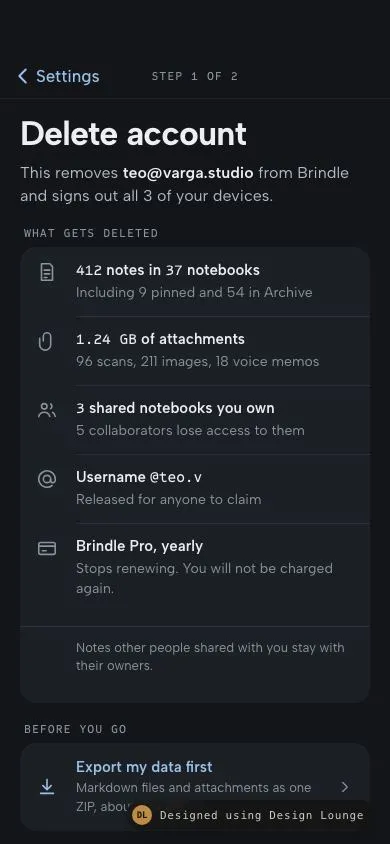
1. **Step 1, initial state.** The nav shows "< Settings" and a mono label "STEP 1 OF 2". The large title reads "Delete account". The lede reads "This removes **teo@varga.studio** from Brindle and signs out all 3 of your devices."
2. **What gets deleted.** A card with five rows, each a 22px stroke icon plus a bold line and a muted line. Counts are in the mono face:
   - "412 notes in 37 notebooks" / "Including 9 pinned and 54 in Archive"
   - "1.24 GB of attachments" / "96 scans, 211 images, 18 voice memos"
   - "3 shared notebooks you own" / "5 collaborators lose access to them"
   - "Username @teo.v" / "Released for anyone to claim"
   - "Brindle Pro, yearly" / "Stops renewing. You will not be charged again."
   - A footer line inside the card: "Notes other people shared with you stay with their owners."
3. **Export first.** Under "BEFORE YOU GO", one row button: "Export my data first", "Markdown files and attachments as one ZIP, about 1.24 GB", with a chevron. Tap it:
   - The title becomes "Preparing export", the line becomes "N% of 1.24 GB packed", and a 4px progress bar appears under the row. Progress rises by 3 to 9 points every 140ms (60ms with reduced motion), so the whole export takes about 3 to 4 seconds. The chevron hides and the row is `aria-disabled`.
   - At 100%: the icon becomes a check, the title "Export ready" turns green, the line reads "Download link sent to teo@varga.studio. It works for 7 days.", and a toast says "Export ready. Link sent to your email."
   - Export is optional. Continue works at any point, including mid-export.
4. **Grace period.** One outlined callout with a clock icon: "Nothing is erased for 30 days: sign in before **3 Nov 2026** and your account comes back exactly as it was." The date is today plus 30 days, formatted `en-GB` as "3 Nov 2026".
5. **Actions.** "Continue" is a full-width 52px steel-blue pill. "Keep my account" is a 48px text button under it. Keep my account clears any typed email, returns to step 1, and toasts "Nothing changed. Your account is active."
6. **Step 2, confirm.** Push in from the right (56px translateX plus fade, 380ms). The nav shows "< Back" and "STEP 2 OF 2". The title reads "Confirm it is you". The lede reads "Deletion is scheduled the moment you confirm. You can still undo it for 30 days."
   - The label reads "Type `teo@varga.studio` to confirm", with the email in a mono chip.
   - A 52px mono input. The match is case-insensitive and ignores spaces at either end.
   - While it doesn't match: hint "Letters must match. Capitals don't matter.", and the red button is grey `--raise` with `aria-disabled="true"`.
   - On match: the input ring turns 2px green, a check scales in, the hint turns green and reads "Email matches.", and "Delete my account" becomes solid red `#d83b3b`.
   - A recap list: "Account teo@varga.studio", "Export Not requested" (or "Sent to your email"), "Erased on 3 Nov 2026".
   - Enter in the input submits when it matches. Tapping the disabled button moves focus back to the input.
7. **Step 3, scheduled.** Push in. The nav label becomes "SCHEDULED" and back reads "Settings". A 64px rounded calendar tile, then the title "Scheduled for deletion" with "on 3 Nov 2026" on its own line in the 30px mono face. A dark tile shows a live countdown "29d 23:59:41 until it is erased", ticking every second from the exact moment of confirmation. Three facts: signed out on the other 2 devices, the date and an undo link were emailed, undo or sign in any time before then.
8. **Undo.** "Undo deletion" is the steel-blue primary. It returns to step 1 (push from the left), clears the input, and toasts "Deletion cancelled. Your account is active."
9. Back on step 2 returns to step 1. Back on step 1 or 3 would go to Settings. The demo toasts "Back to Settings", or on step 3 "Settings. Deletion stays scheduled."

## Structure

```

… 196 more lines. Copy or download for the full brief. Loading the source…Brief
236 linesBuild brief for a coding agent. Rebuild this piece in the reader’s stack. If they haven’t said which stack, ask once, then default to semantic HTML + CSS + a little vanilla JS. Match the numbers below; don’t “improve” them.
What it is
The delete-account flow of Brindle, an invented notes app, in a dark iOS 26-ish language: a translucent nav bar, a 34px large title, grouped dark cards, and a push transition between steps. It has three screens: what gets deleted, confirm, and scheduled. It should feel calm and factual, never scary and never sticky. The details worth copying: every loss is listed with a real number, export is offered before the user commits, the grace period is one sentence with a date, and red appears exactly once, on the final “Delete my account” button. Everything before that is the steel-blue accent.
Reference behaviour
- Step 1, initial state. The nav shows ”< Settings” and a mono label “STEP 1 OF 2”. The large title reads “Delete account”. The lede reads “This removes teo@varga.studio from Brindle and signs out all 3 of your devices.”
- What gets deleted. A card with five rows, each a 22px stroke icon plus a bold line and a muted line. Counts are in the mono face:
- “412 notes in 37 notebooks” / “Including 9 pinned and 54 in Archive”
- “1.24 GB of attachments” / “96 scans, 211 images, 18 voice memos”
- “3 shared notebooks you own” / “5 collaborators lose access to them”
- “Username @teo.v” / “Released for anyone to claim”
- “Brindle Pro, yearly” / “Stops renewing. You will not be charged again.”
- A footer line inside the card: “Notes other people shared with you stay with their owners.”
- Export first. Under “BEFORE YOU GO”, one row button: “Export my data first”, “Markdown files and attachments as one ZIP, about 1.24 GB”, with a chevron. Tap it:
- The title becomes “Preparing export”, the line becomes “N% of 1.24 GB packed”, and a 4px progress bar appears under the row. Progress rises by 3 to 9 points every 140ms (60ms with reduced motion), so the whole export takes about 3 to 4 seconds. The chevron hides and the row is
aria-disabled. - At 100%: the icon becomes a check, the title “Export ready” turns green, the line reads “Download link sent to teo@varga.studio. It works for 7 days.”, and a toast says “Export ready. Link sent to your email.”
- Export is optional. Continue works at any point, including mid-export.
- The title becomes “Preparing export”, the line becomes “N% of 1.24 GB packed”, and a 4px progress bar appears under the row. Progress rises by 3 to 9 points every 140ms (60ms with reduced motion), so the whole export takes about 3 to 4 seconds. The chevron hides and the row is
- Grace period. One outlined callout with a clock icon: “Nothing is erased for 30 days: sign in before 3 Nov 2026 and your account comes back exactly as it was.” The date is today plus 30 days, formatted
en-GBas “3 Nov 2026”. - Actions. “Continue” is a full-width 52px steel-blue pill. “Keep my account” is a 48px text button under it. Keep my account clears any typed email, returns to step 1, and toasts “Nothing changed. Your account is active.”
- Step 2, confirm. Push in from the right (56px translateX plus fade, 380ms). The nav shows ”< Back” and “STEP 2 OF 2”. The title reads “Confirm it is you”. The lede reads “Deletion is scheduled the moment you confirm. You can still undo it for 30 days.”
- The label reads “Type
teo@varga.studioto confirm”, with the email in a mono chip. - A 52px mono input. The match is case-insensitive and ignores spaces at either end.
- While it doesn’t match: hint “Letters must match. Capitals don’t matter.”, and the red button is grey
--raisewitharia-disabled="true". - On match: the input ring turns 2px green, a check scales in, the hint turns green and reads “Email matches.”, and “Delete my account” becomes solid red
#d83b3b. - A recap list: “Account teo@varga.studio”, “Export Not requested” (or “Sent to your email”), “Erased on 3 Nov 2026”.
- Enter in the input submits when it matches. Tapping the disabled button moves focus back to the input.
- The label reads “Type
- Step 3, scheduled. Push in. The nav label becomes “SCHEDULED” and back reads “Settings”. A 64px rounded calendar tile, then the title “Scheduled for deletion” with “on 3 Nov 2026” on its own line in the 30px mono face. A dark tile shows a live countdown “29d 23:59:41 until it is erased”, ticking every second from the exact moment of confirmation. Three facts: signed out on the other 2 devices, the date and an undo link were emailed, undo or sign in any time before then.
- Undo. “Undo deletion” is the steel-blue primary. It returns to step 1 (push from the left), clears the input, and toasts “Deletion cancelled. Your account is active.”
- Back on step 2 returns to step 1. Back on step 1 or 3 would go to Settings. The demo toasts “Back to Settings”, or on step 3 “Settings. Deletion stays scheduled.”
Structure
390 x 844, dark
+--------------------------------------------+  fixed glass nav, padding-top 54
| < Settings        STEP 1 OF 2              |  44px
+--------------------------------------------+
| Delete account                 34px/700    |  view padding 12 20
| This removes teo@varga.studio from ...     |  16px lede, 34ch
| WHAT GETS DELETED              12px mono   |
| +----------------------------------------+ |  card radius 16
| | [i] 412 notes in 37 notebooks          | |  row min 52, icon col 28
| |     Including 9 pinned and 54 ...      | |
| | ...  5 rows, separators inset 56px     | |
| |     Notes other people shared ...      | |  13px footer
| +----------------------------------------+ |
| BEFORE YOU GO                              |
| | [v] Export my data first           >   | |  row min 64
| |     ======-----  progress 4px          | |  (while running)
| ( clock ) Nothing is erased for 30 days... |  outlined callout
| [            Continue             ]        |  52px steel pill
|           Keep my account                  |  48px text
+--------------------------------------------+ padding-bottom 34+24header.nav: backbutton(label changes per step) and a decorative step label (aria-hidden; each view’sh1carries the meaning).- Three
section.viewelements, only one nothidden. Eachh1hastabindex="-1"and receives focus on step change. - The deletion list is a
ulinside arole="group"card labelled by “What gets deleted”. - The export control is a
buttonfollowed by adiv role="progressbar"witharia-valuenow. - The confirm field is a real
label+input type="email"witharia-describedbyon the live hint. - The toast is
role="status".
Tokens
:root {
  --bg: #131518;             /* graphite page */
  --surface: #1c1f24;        /* cards, input, clock tile */
  --raise: #252930;          /* hover, disabled danger, email chip */
  --ink: #eceef1;
  --ink-2: #b4bac4;          /* lede, body */
  --ink-3: #8c939e;          /* secondary lines, labels */
  --line: #2d3139;
  --accent: #9cc1e8;         /* steel blue: back, links, Continue, Undo, focus */
  --accent-press: #b6d2ef;
  --on-accent: #0e1a26;
  --ok: #7fd3a0;             /* export ready, email match */
  --danger: #d83b3b;         /* ONLY the final Delete button */
  --danger-press: #bf2f2f;
  --glass: rgba(19,21,24,.76);
  --sans: "Albert Sans", -apple-system, system-ui, sans-serif;
  --mono: "Sometype Mono", ui-monospace, monospace;
  --r-s: 10px; --r-m: 16px; --pill: 999px;
  --ease: cubic-bezier(.2,.7,.2,1);
  --push: cubic-bezier(.32,.72,0,1);
  --micro: 160ms; --layout: 380ms;
  --top: max(54px, env(safe-area-inset-top));
  --bottom: max(34px, env(safe-area-inset-bottom));
}
Typography
| Role | Family | Size | Weight | Line-height | Tracking | Case |
|---|---|---|---|---|---|---|
| Large title | Albert Sans | 34px | 700 | 1.08 | -0.025em | Sentence |
| Lede | Albert Sans | 16px | 400 (email 600) | 1.45 | 0 | Sentence |
| Section label, step label | Sometype Mono | 12px | 500 | 1 | 0.08em | Upper |
| Row title | Albert Sans | 15px | 600 | 1.45 | 0 | Sentence |
| Counts inside row titles | Sometype Mono | 15px | 500 | 1.45 | -0.01em | n/a |
| Row line | Albert Sans | 14px | 400 | 1.45 | 0 | Sentence |
| Confirm input | Sometype Mono | 16px | 400 | 1 | 0 | As typed |
| Scheduled date | Sometype Mono | 30px | 500 | 1.1 | -0.03em | n/a |
| Countdown | Sometype Mono | 22px | 500 | 1 | -0.02em | tabular nums |
| Buttons | Albert Sans | 17px | 600 | 1 | 0 | Sentence |
The mono face marks things the system knows for certain: counts, the email, the date, the countdown. Prose stays in Albert Sans.
Motion
| Thing | Trigger | Property | From → to | Duration | Easing | Reduced motion |
|---|---|---|---|---|---|---|
| Step forward | Continue, Delete | translateX, opacity | 56px, 0 → 0, 1 | 380ms | --push | instant swap |
| Step back | Back, Keep, Undo | translateX, opacity | -56px, 0 → 0, 1 | 380ms | --push | instant swap |
| Export bar | each tick | width | n% → n+3..9% | 200ms | --ease | instant, ticks at 60ms |
| Input ring | match | box-shadow | 1px line → 2px ok | 160ms | --ease | instant |
| Match check | match | opacity, scale | 0, 0.6 → 1, 1 | 160ms | --push | instant |
| Danger button | armed | background | --raise → --danger | 160ms | --ease | instant |
| Button press | :active | scale | 1 → 0.98 | 160ms | --ease | instant |
| Countdown | step 3 | text | every 1s | n/a | n/a | unchanged, it is information |
| Toast | message | translateY, opacity | 24px, 0 → 0, 1 | 380ms / 160ms | --push | instant, 2.8s |
States
- Export: idle (accent title, chevron), running (title “Preparing export”, percent line, bar, no chevron,
aria-disabled), done (green check and title, link line). There is no error simulated. In production show “Export failed. Try again” with the row back to idle and the bar hidden. - Confirm input: empty, typing (2px accent ring on focus), matched (2px green ring, check, green hint).
- Delete button: disabled (
--raise,--ink-3,cursor: not-allowed,aria-disabled), armed (--danger, white), hover--danger-press, press scale 0.98. - Primary (Continue, Undo):
--accentfill,--on-accenttext, hover--accent-press. - Focus-visible: 2px
--accentoutline, offset 2px, radius 8px. - Scheduled: countdown ticks. Step label “SCHEDULED”. Back points to Settings.
- Empty: a brand-new account with no notes still lists every row, with “0 notes” and “No attachments”. Never hide a row because it is zero.
Accessibility
- Each step’s
h1takes focus when the step changes, so screen readers announce “Delete account”, “Confirm it is you”, or “Scheduled for deletion on 3 Nov 2026”. - The back button’s
aria-labelis “Back to step 1” on step 2 and “Back to Settings” otherwise. - The delete button uses
aria-disabled, notdisabled, so it stays in the tab order. Activating it while disabled moves focus to the input. - The hint under the input is
aria-live="polite"and linked witharia-describedby. - The progress bar is
role="progressbar"witharia-valuenowupdated every tick. The toast announces completion. - The countdown is
aria-hidden. The heading already carries the date, and a per-second live region would be noise. - Targets: back 44px, Continue, Delete, and Undo 52px, Keep my account 48px, export row 64px.
- Contrast on
#1c1f24:#eceef1is 14.2:1,#b4bac4is 8.5:1,#8c939eis 5.3:1.#0e1a26on#9cc1e8is 9.4:1. White on#d83b3bis 4.56:1, so do not lighten the red.#7fd3a0on#131518is 10.2:1. - Red is never the only signal. The button text says “Delete my account”.
Responsive rules
- Designed at 390×844. Step 1 scrolls (about 1130px tall). Steps 2 and 3 fit in one frame.
- At 360 wide the rows keep their 28px icon column and the lines wrap. The large title stays 34px. “Scheduled for deletion” may wrap to two lines, and the date line stays on its own line.
- Largest text size: rows grow vertically, icons stay top-aligned. The recap rows (
flex-wrap: wrap) stack label above value when they no longer fit side by side. Buttons grow taller instead of truncating. The countdown tile wraps “until it is erased” under the numbers. - Tablet: show the flow in a centred column of max 560px, or a form sheet. Do not widen the cards to 1180px.
- Do not draw a status bar or home indicator.
Acceptance checklist
Always
- Every deleted item is listed with a concrete count or name. No “all your data”.
- Something that is not deleted (shared content owned by others) is stated.
- Export is offered before confirm, shows progress, and is optional.
- The grace period is one sentence that includes the exact end date.
- Confirm requires typing the account email, case-insensitive and trimmed.
- Red is used on exactly one element: the final delete button, only when armed.
- The scheduled state shows the date, a live countdown, and an Undo that is the primary button.
- A non-destructive way out (“Keep my account”) is present on steps 1 and 2 at the same width as the main action.
- Focus moves to the step heading on every step change.
- Every target is at least 44px. Reduced motion removes the push animation.
This demo
- Account “teo@varga.studio”, username “@teo.v”, 412 notes, 37 notebooks, 1.24 GB, 3 shared notebooks, 5 collaborators.
- Export packs for about 3 to 4 seconds and ends with “Download link sent to teo@varga.studio. It works for 7 days.”
- Erase date is today plus 30 days in
en-GBshort form, e.g. “3 Nov 2026” from 4 Oct 2026. - Graphite
#131518, steel#9cc1e8, red#d83b3b, Albert Sans with Sometype Mono.
Implementation notes
1. One date, computed once at confirm. The grace sentence, recap, heading, and countdown all read the same value. Recompute it when the user confirms so the countdown starts at 30 days.
const fmt = d => d.toLocaleDateString('en-GB', { day: 'numeric', month: 'short', year: 'numeric' });
let when = new Date(Date.now() + 30 * 864e5);
const paint = () => document.querySelectorAll('.d-date').forEach(n => n.textContent = fmt(when));
function draw() {
  let s = Math.max(0, Math.floor((when - Date.now()) / 1000));
  const d = Math.floor(s / 86400); s %= 86400;
  const p = n => String(n).padStart(2, '0');
  clock.textContent = `${d}d ${p(s / 3600 | 0)}:${p(s % 3600 / 60 | 0)}:${p(s % 60)}`;
}
2. The email gate. Compare normalised strings, and keep the button reachable.
function match() {
  const ok = email.value.trim().toLowerCase() === ACCOUNT_EMAIL;
  wrap.classList.toggle('match', ok);
  del.setAttribute('aria-disabled', String(!ok));
  hint.textContent = ok ? 'Email matches.' : "Letters must match. Capitals don't matter.";
  return ok;
}
del.onclick = () => match() ? schedule() : email.focus();
3. Step changes move focus. Without it, a screen reader user stays on a button that no longer exists.
function go(n, dir) {
  views.forEach((v, i) => v.hidden = i !== n - 1);
  const v = views[n - 1];
  v.classList.remove('in', 'back-in'); void v.offsetWidth;
  v.classList.add(dir < 0 ? 'back-in' : 'in');
  v.querySelector('h1').focus({ preventScroll: true });
}
Common mistakes:
- Making every button red. It trains users to ignore red. Red belongs to the one irreversible tap.
- Guilt-trip copy (“We’ll miss you”, sad illustrations) or a hidden, tiny “Delete” link. This flow is plain.
- Putting the export behind the confirm step, where it is too late to be useful.
- A countdown that starts from a hard-coded date instead of the moment of confirmation.
- Making Undo a quiet text link. It is the primary action on the scheduled screen.
- A case-sensitive email match that fails on “Teo@Varga.Studio”.
- Drawing a status bar or home indicator.
Details
- Palette
- Type
- Albert Sans · Sometype Mono
- Motion
- Subtle motion
- Build
- One session
- Tags
On the shelves