Nº 068 of 520
Swipe-to-reveal row actions
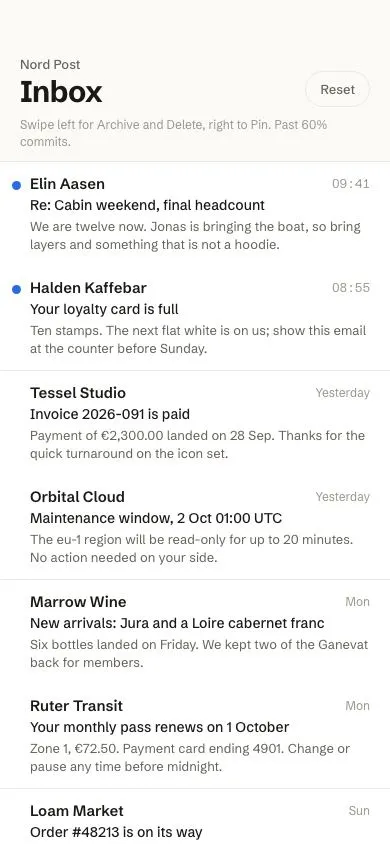
Mail rows that swipe left to reveal 80px Archive and Delete buttons with rubber-band overshoot, commit on a 60% full swipe with a nudge, and swipe right to pin.
Preview
Use it
Free to use · credit appreciated1 Once, in your project
npx skills add SusanAcharya/Design-Lounge 2 Then ask
Using the Design Lounge skill, build "Swipe-to-reveal row actions" (piece ios-swipe-row-actions) in my stack. Match its brief; restyle it onto my product's theme.
No skill? Paste the brief instead. It carries the numbers, tokens and behaviour.
<!-- Design Lounge Nº 068 · "Swipe-to-reveal row actions" · www.designlounge.live -->

# Swipe-to-reveal row actions

> **Build brief for a coding agent.** Rebuild this piece in the reader's stack. If they haven't said which stack, ask once, then default to semantic HTML + CSS + a little vanilla JS. Match the numbers below; don't "improve" them.

## What it is

The inbox of "Nord Post", a mail client, demonstrating the iOS swipe-actions pattern with pointer events. Dragging a row left uncovers two 80px buttons behind it (green Archive, red Delete); dragging right uncovers an orange Pin. Beyond the revealed width the row rubber-bands at 45% travel. Once the drag passes 60% of the row width the outermost action grows to fill the whole reveal and the row gives a 3px nudge, a visual stand-in for the haptic; releasing there commits (delete removes the row with a height collapse, pin moves it to the top). Only one row is open at a time; Reset rebuilds the list so the piece is replayable.

## Reference behaviour

1. Initial state: eight rows, the first two unread (9px blue dot at the left). All rows are closed; nothing is revealed.
2. Drag a row left by less than 40px and release: it springs back to 0 over 360ms `cubic-bezier(.32,.72,0,1)`.
3. Drag left more than 40px and release: it snaps open to −160px, showing Archive (80px) then Delete (80px) at the right. The action buttons become focusable (`tabindex` −1 → 0).
4. Keep dragging past −160px: travel is damped, `x = −160 − (|dx| − 160) × .45`.
5. Cross 60% of the row width (234px at 390 wide): the row gets class `commit`; Delete's width transitions to 100% over 200ms and Archive collapses to 0 and fades; the icon scales to 1.15; the row plays a 120ms nudge (3px further in the drag direction and back). Crossing back removes `commit` and nudges again.
6. Release past 60%: the row translates fully off-screen (−390px) over 360ms, then after 200ms its height collapses to 0 over 320ms while fading, and the element is removed.
7. Release between −40px and 60%: snaps to −160px open. Tapping Archive or Delete removes the row the same way; Archive's exit is green.
8. Drag right: Pin (80px) is revealed at the left; past 60% it fills the row. Release past 60% or tap Pin: the row closes, gets a pin glyph before the sender name and moves to the top of the list. Pinning a pinned row unpins it.
9. Starting a drag on another row closes the currently open row.
10. Tap (no movement) on a row focuses it. ArrowLeft opens Archive/Delete, ArrowRight opens Pin, Escape closes. Tab then reaches the revealed buttons.
11. When the list is empty, "Inbox zero. Nothing to swipe." shows; Reset restores all eight rows.

## Structure

```
390 × 844
┌────────────────────────────────────────┐
│ (54 status)                            │
│ 58 Nord Post (13/500)          [Reset] │
│    Inbox (30/700)                      │
│    Swipe left for Archive…  (hint 12)  │
│────────────────────────────────────────│ list top hairline
│ ● Elin Aasen                    09:41  │  row ≈ 92px
│   Re: Cabin weekend, final headcount   │
│   We are twelve now. Jonas is bringing │
│   the boat, so bring layers and…       │
│────────────────────────────────────────│
│ ● Halden Kaffebar               08:55  │

… 174 more lines. Copy or download for the full brief. Loading the source…Brief
214 linesBuild brief for a coding agent. Rebuild this piece in the reader’s stack. If they haven’t said which stack, ask once, then default to semantic HTML + CSS + a little vanilla JS. Match the numbers below; don’t “improve” them.
What it is
The inbox of “Nord Post”, a mail client, demonstrating the iOS swipe-actions pattern with pointer events. Dragging a row left uncovers two 80px buttons behind it (green Archive, red Delete); dragging right uncovers an orange Pin. Beyond the revealed width the row rubber-bands at 45% travel. Once the drag passes 60% of the row width the outermost action grows to fill the whole reveal and the row gives a 3px nudge, a visual stand-in for the haptic; releasing there commits (delete removes the row with a height collapse, pin moves it to the top). Only one row is open at a time; Reset rebuilds the list so the piece is replayable.
Reference behaviour
- Initial state: eight rows, the first two unread (9px blue dot at the left). All rows are closed; nothing is revealed.
- Drag a row left by less than 40px and release: it springs back to 0 over 360ms
cubic-bezier(.32,.72,0,1). - Drag left more than 40px and release: it snaps open to −160px, showing Archive (80px) then Delete (80px) at the right. The action buttons become focusable (
tabindex−1 → 0). - Keep dragging past −160px: travel is damped,
x = −160 − (|dx| − 160) × .45. - Cross 60% of the row width (234px at 390 wide): the row gets class
commit; Delete’s width transitions to 100% over 200ms and Archive collapses to 0 and fades; the icon scales to 1.15; the row plays a 120ms nudge (3px further in the drag direction and back). Crossing back removescommitand nudges again. - Release past 60%: the row translates fully off-screen (−390px) over 360ms, then after 200ms its height collapses to 0 over 320ms while fading, and the element is removed.
- Release between −40px and 60%: snaps to −160px open. Tapping Archive or Delete removes the row the same way; Archive’s exit is green.
- Drag right: Pin (80px) is revealed at the left; past 60% it fills the row. Release past 60% or tap Pin: the row closes, gets a pin glyph before the sender name and moves to the top of the list. Pinning a pinned row unpins it.
- Starting a drag on another row closes the currently open row.
- Tap (no movement) on a row focuses it. ArrowLeft opens Archive/Delete, ArrowRight opens Pin, Escape closes. Tab then reaches the revealed buttons.
- When the list is empty, “Inbox zero. Nothing to swipe.” shows; Reset restores all eight rows.
Structure
390 × 844
┌────────────────────────────────────────┐
│ (54 status)                            │
│ 58 Nord Post (13/500)          [Reset] │
│    Inbox (30/700)                      │
│    Swipe left for Archive…  (hint 12)  │
│────────────────────────────────────────│ list top hairline
│ ● Elin Aasen                    09:41  │  row ≈ 92px
│   Re: Cabin weekend, final headcount   │
│   We are twelve now. Jonas is bringing │
│   the boat, so bring layers and…       │
│────────────────────────────────────────│
│ ● Halden Kaffebar               08:55  │
│ ...                                    │
│                                        │
│  ← dragged −160:                       │
│ ┌──────────────────────┬───────┬──────┐│
│ │ Tessel Studio  …     │Archive│Delete││
│ └──────────────────────┴───────┴──────┘│
│  → dragged +80:              80   80   │
│ ┌────┬─────────────────────────────────┐│
│ │Pin │ Orbital Cloud  …               ││
│ └────┴─────────────────────────────────┘│
└────────────────────────────────────────┘
<ul class="list">of<li class="row">. Each row:.wrap(grid,grid-template-rows:1fr) →.inner(min-height:0; overflow:hidden; position:relative) — the collapse mechanism..acts.land.acts.r: absolute, full-bleed flex rows,visibility:hiddenunless the row’sdata-dirmatches;.laligns start,.raligns end..actbuttons: 80px wide, icon over an 11px label..front[tabindex=0]: the visible content,position:relative, grid1fr autowith sender, time, subject, 2-line preview; translated by the gesture.
<template>holds one row; JS clones it from a data array so Reset can rebuild.
Tokens
:root {
  /* colour — warm paper neutrals; semantic action colours follow platform convention */
  --bg: #fbfaf7;            /* page */
  --surface: #ffffff;       /* rows */
  --ink: #1a1916;
  --ink-2: #66625a;         /* preview text */
  --ink-3: #9b968c;         /* time, hint */
  --line: #ebe8e1;          /* hairlines */
  --unread: #2b6be4;        /* dot, focus ring */
  --archive: #2f8f5b;
  --delete: #d93b2b;
  --pin: #e0862b;
  --on-action: #ffffff;

  /* type */
  --font: "Schibsted Grotesk", system-ui, -apple-system, sans-serif;

  /* geometry */
  --act-w: 80px;            /* one action */
  --open-l: -160px;         /* two actions */
  --open-r: 80px;
  --commit: .6;             /* fraction of row width */
  --rubber: .45;            /* overshoot damping */
  --snap-min: 40px;         /* below this, close */
  --dot: 9px;
  --row-pad: 12px 20px 12px 30px;

  /* motion */
  --t-micro: 140ms;
  --t-nudge: 120ms;
  --t-fill: 200ms;
  --t-snap: 360ms;
  --t-collapse: 320ms;
  --spring: cubic-bezier(.32, .72, 0, 1);
  --ease: cubic-bezier(.2, .7, .2, 1);
}
Typography
| Role | Family | Size | Weight | Line-height | Tracking | Case |
|---|---|---|---|---|---|---|
| Page title | Schibsted Grotesk | 30px | 700 | 1 | −0.025em | sentence |
| App name | Schibsted Grotesk | 13px | 500 | 1.2 | 0 | sentence |
| Hint | Schibsted Grotesk | 12px | 400 | 1.4 | 0 | sentence |
| Sender | Schibsted Grotesk | 15px | 600 | 1.35 | 0 | sentence, ellipsis |
| Time | Schibsted Grotesk | 12px | 400 | 1.35 | 0 | tabular numerals |
| Subject | Schibsted Grotesk | 14px | 500 | 1.35 | 0 | sentence, ellipsis |
| Preview | Schibsted Grotesk | 13px | 400 | 1.4 | 0 | sentence, 2-line clamp |
| Action | Schibsted Grotesk | 11px | 600 | 1 | +0.02em | sentence |
| Reset | Schibsted Grotesk | 13px | 500 | 1 | 0 | sentence |
Motion
| Element | Trigger | Property | From → To | Duration | Easing | Notes |
|---|---|---|---|---|---|---|
.front | pointer drag | transform | tracks translateX(x) | 0 | — | .snap class absent |
.front | release | transform | x → 0 / −160 / 80 / ±width | 360ms | --spring | .snap present |
.front | commit crossing | transform keyframe | x → x−3px → x | 120ms | --ease | both directions; class re-added with a reflow |
.delete/.pin | .commit | width | 80px → 100% | 200ms | --ease | |
.archive | .commit | width, opacity | 80px,1 → 0,0 | 200 / 160ms | --ease | |
.act svg | .commit | transform | 1 → scale(1.15) | 140ms | --ease | |
.wrap | .gone | grid-template-rows, opacity | 1fr,1 → 0fr,0 | 320ms | --ease | starts 200ms after the off-screen slide |
.reset | hover | background | transparent → white | 140ms | --ease |
Reduced motion: snaps, fills and collapses become 1ms; the nudge animation is removed; dragging still tracks the finger.
States
- Closed:
--x: 0,data-dir="", action buttonstabindex="-1", both action groups hidden. - Open left / right:
data-dir="l"/"r", matching group visible, buttonstabindex="0". - Commit:
.row.commit, outer action filled, inner collapsed. - Gone:
.row.gone, collapsing; removed ontransitionend. - Pinned:
.row.pinned, 14px pin glyph before the sender; row is first in the list. - Unread:
.row.unread, 9px--unreaddot atleft:12px; top:19px. - Front focus-visible: inset 2px
--unreadbox-shadow (an outline would be clipped by the row). - Action focus-visible: 2px white outline,
outline-offset:-4px. - Empty:
.list:empty + .emptyshows the message.
Accessibility
- Every action is a real
<button>behind the row. They are not in the tab order while hidden (tabindex="-1") and become reachable once the row is open, so keyboard users can operate them. - Rows’
.frontistabindex="0"; ArrowLeft / ArrowRight / Escape mirror the gesture. Document this in the hint text. - Pointer capture (
setPointerCapture) keeps the drag alive when the finger leaves the row. touch-action: pan-yon rows keeps vertical scrolling native while horizontal drags belong to the gesture.- Contrast: white on
--delete4.9:1, on--archive4.6:1, on--pin3.4:1 (icon + 11px bold label; increase to#c9731cif AA on text is required).--ink-2on white 5.9:1. - Hit targets: rows ≈ 92px tall; action buttons 80px wide × row height.
- After removal, move focus to the next row’s
.frontin a product build.
Responsive rules
- Commit threshold is relative (60% of the list width), reveal widths are absolute (80px each).
- 360 wide: same widths; the preview clamps to 2 lines as before; the commit point is 216px.
- ≥ 430 wide: constrain the list to 430px centred; rows keep full-bleed hairlines within the column.
- Tablet / pointer-only: keep the gesture but also show a hover-revealed inline action group at the right (Archive, Delete, Pin as 32px icon buttons) so mouse users are not forced to drag.
Acceptance checklist
- Dragging a row left reveals Archive then Delete, each exactly 80px wide; right reveals Pin at 80px.
- Release under 40px of travel closes; over 40px snaps open to −160px / +80px in 360ms
cubic-bezier(.32,.72,0,1). - Past the reveal width, movement is damped to 45%.
- Crossing 60% of the row width toggles
.commit: outer action fills to 100% in 200ms, inner action collapses, icon scales 1.15, and a 3px nudge plays; crossing back reverses it and nudges again. - Release past 60% commits: left removes the row (slide off, then 320ms height collapse via
grid-template-rows: 0fr); right pins and moves it to the top. - Tapping a revealed button performs its action; only one row can be open at a time.
- Vertical scrolling still works while rows are closed (
touch-action: pan-y). - ArrowLeft / ArrowRight / Escape work on a focused row; revealed buttons are reachable by Tab only when revealed.
- Unread rows show a 9px
#2b6be4dot; pinned rows show the pin glyph and sit first. - Empty list shows “Inbox zero.” and Reset restores all eight rows.
- No transition is applied to
transformduring a drag (the row tracks the pointer without lag). - Reduced motion removes the nudge and shortens snaps to 1ms.
Implementation notes
Track raw dx for thresholds, damp only what you draw. The commit test uses the undamped distance; the rubber band applies only beyond the revealed width:
const move = ev => {
  const dx = ev.clientX - startX + base;                 // base = current open offset
  const lim = dx < 0 ? 160 : 80, over = Math.abs(dx) - lim;
  const x = over > 0 ? Math.sign(dx) * (lim + over * .45) : dx;
  const commit = Math.abs(dx) > list.clientWidth * .6;
  if (commit !== row.classList.contains('commit')) {
    row.classList.toggle('commit', commit);
    row.classList.remove('nudge'); void row.offsetWidth; row.classList.add('nudge');
  }
  setX(row, x, false);                                   // no transition while dragging
};
Nudge relative to the current offset by animating from a custom property, so the keyframe works at any x:
.row.snap .front { transition: transform 360ms cubic-bezier(.32,.72,0,1); }
.row.nudge .front { animation: nudge 120ms cubic-bezier(.2,.7,.2,1); }
@keyframes nudge { 40% { transform: translateX(calc(var(--x) - 3px)); } 100% { transform: translateX(var(--x)); } }
Collapse without knowing the height using the 0fr grid trick, and remove the element only after the transition:
.wrap { display: grid; grid-template-rows: 1fr; transition: grid-template-rows 320ms var(--ease), opacity 320ms var(--ease); }
.row.gone .wrap { grid-template-rows: 0fr; opacity: 0; }
.inner { min-height: 0; overflow: hidden; }
Common mistakes: using touch-action: none on rows (kills list scrolling); testing commit against the damped x (the threshold becomes unreachable); leaving the buttons focusable while hidden; animating left or margin-left instead of transform; forgetting to close the previously open row on a new pointerdown.
Details
- Palette
- Type
- Schibsted Grotesk
- Motion
- Rich motion
- Build
- Multi-step
- Tags
On the shelves