Nº 307 of 520
Map with price pins and listing sheet
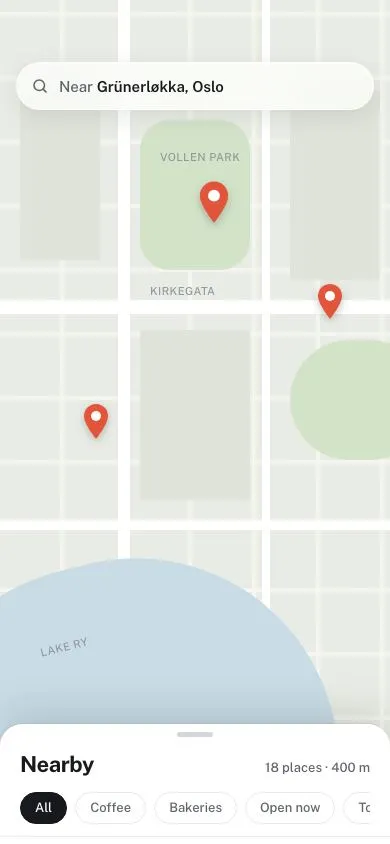
A stays map drawn in SVG with terracotta price pins, a three-detent sheet (count, card carousel, list), pin-to-card sync, Search this area after a pan, and locate-me.
Preview
Use it
Free to use · credit appreciated1 Once, in your project
npx skills add SusanAcharya/Design-Lounge 2 Then ask
Using the Design Lounge skill, build "Map with price pins and listing sheet" (piece phone-map-listings) in my stack. Match its brief; restyle it onto my product's theme.
No skill? Paste the brief instead. It carries the numbers, tokens and behaviour.
<!-- Design Lounge Nº 307 · "Map with price pins and listing sheet" · www.designlounge.live -->

# Map with price pins and listing sheet

> **Build brief for a coding agent.** Rebuild this piece in the reader's stack. If they haven't said which stack, ask once, then default to semantic HTML + CSS + a little vanilla JS. Match the numbers below; don't "improve" them.

## What it is

The map screen of "Tarn", a booking app for stays in small old towns. The whole screen is a hand-drawn town map in SVG: sand ground, cream streets, a sage park, a grey-teal river, italic serif street names. There are no map tiles. Terracotta price pills mark ten stays. A sheet at the bottom rests at three heights. Peek shows only the count. Half shows a sideways carousel of cards. Full shows a plain list.

The look is editorial travel: a warm paper palette, serif titles (Newsreader), a plain sans for data (Instrument Sans), 14px radii. Terracotta is used only for pins and the selected row underline. The detail worth copying is the sync: tapping a pin enlarges it and turns it ink, the carousel scrolls to its card, and scrolling the carousel moves the selection back onto the pins. Dragging the map shows a "Search this area" pill. Tapping it recounts the stays that are actually on screen.

This is not `ios-bottom-sheet-detents`. That piece is about the sheet gesture over a CSS map. This one is about pins, cards and the area search. The sheet here changes its content per detent.

## Reference behaviour

1. First frame: map offset so eight pins fit between the search bar and the sheet. Sheet at **half**. Heading "8 stays". The first card, "The Rope Walk Rooms", has a 2px ink ring, and its pin (€142) is ink and 1.22× larger.
2. Top bar, 54px from the top: a 48px tall search button "Alfaro old town / 12 – 15 Nov · 2 guests" and a 48×48 filters button. Both cream, 14px radius, soft shadow.
3. A locate button (48×48) floats 16px from the right, 12px above the sheet top. It follows the sheet as it moves and hides at full.
4. Tap a pin: it becomes `aria-pressed="true"`, ink fill, scale 1.22 over 240ms. The previous pin returns to terracotta at 1×. The carousel scrolls smoothly to that card and rings it. If the sheet was at peek it rises to half.
5. Swipe the carousel: cards snap to their left edge. 120ms after scrolling stops, the card nearest the left edge becomes selected and its pin enlarges.
6. Tap a card or a list row: it becomes selected and its pin enlarges.
7. Drag the map with a finger or mouse: the map follows 1:1, clamped to its 960×1240 edges. Movement under 6px counts as a tap, not a drag. After a real drag, the "Search this area" pill slides down 12px and fades in over 300ms, centred under the top bar.
8. Tap "Search this area": its icon spins and the label reads "Searching" for 650ms. Then the pill hides, the heading shows the number of pins now in the open map area, the carousel and list hold only those stays, and pins outside it fade to 45%.
9. If no pins are in the area, the carousel says "No stays in this area. Move the map or zoom out."
10. Tap locate: the map glides back to the start offset over 520ms with expo-out easing. The "Search this area" pill shows, because the area changed.
11. Drag the sheet header up or down: it follows the finger. Past the top or bottom detent it moves at 25% (rubber band). On release it snaps to the nearest detent over 420ms. A fast flick (over 0.4px/ms) moves one detent in that direction.
12. Tap the grabber: cycles peek → half → full → peek. With the grabber focused, ArrowUp and ArrowDown move one detent.
13. Peek: heading and subline only. The carousel is hidden. Half: carousel visible. Full: carousel hidden, the vertical list fades in and scrolls inside the sheet. The selected row has a 2px terracotta underline on its title.
14. The "you are here" dot is ink with a 3px cream ring. A thin ring grows and fades every 2.8s. It stops under reduced motion.

## Structure

```
390 × 844 (Lounge draws the status bar)
┌──────────────────────────────────────┐
│                                      │ 54
│ ┌ ⌕ Alfaro old town ─────────┐ ┌──┐  │ top bar: 48 tall, gap 8
│ └ 12 – 15 Nov · 2 guests ────┘ └──┘  │
│        ( ⟳ Search this area )        │ pill 44, top 114 (after a pan)

… 237 more lines. Copy or download for the full brief. Loading the source…Brief
277 linesBuild brief for a coding agent. Rebuild this piece in the reader’s stack. If they haven’t said which stack, ask once, then default to semantic HTML + CSS + a little vanilla JS. Match the numbers below; don’t “improve” them.
What it is
The map screen of “Tarn”, a booking app for stays in small old towns. The whole screen is a hand-drawn town map in SVG: sand ground, cream streets, a sage park, a grey-teal river, italic serif street names. There are no map tiles. Terracotta price pills mark ten stays. A sheet at the bottom rests at three heights. Peek shows only the count. Half shows a sideways carousel of cards. Full shows a plain list.
The look is editorial travel: a warm paper palette, serif titles (Newsreader), a plain sans for data (Instrument Sans), 14px radii. Terracotta is used only for pins and the selected row underline. The detail worth copying is the sync: tapping a pin enlarges it and turns it ink, the carousel scrolls to its card, and scrolling the carousel moves the selection back onto the pins. Dragging the map shows a “Search this area” pill. Tapping it recounts the stays that are actually on screen.
This is not ios-bottom-sheet-detents. That piece is about the sheet gesture over a CSS map. This one is about pins, cards and the area search. The sheet here changes its content per detent.
Reference behaviour
- First frame: map offset so eight pins fit between the search bar and the sheet. Sheet at half. Heading “8 stays”. The first card, “The Rope Walk Rooms”, has a 2px ink ring, and its pin (€142) is ink and 1.22× larger.
- Top bar, 54px from the top: a 48px tall search button “Alfaro old town / 12 – 15 Nov · 2 guests” and a 48×48 filters button. Both cream, 14px radius, soft shadow.
- A locate button (48×48) floats 16px from the right, 12px above the sheet top. It follows the sheet as it moves and hides at full.
- Tap a pin: it becomes
aria-pressed="true", ink fill, scale 1.22 over 240ms. The previous pin returns to terracotta at 1×. The carousel scrolls smoothly to that card and rings it. If the sheet was at peek it rises to half. - Swipe the carousel: cards snap to their left edge. 120ms after scrolling stops, the card nearest the left edge becomes selected and its pin enlarges.
- Tap a card or a list row: it becomes selected and its pin enlarges.
- Drag the map with a finger or mouse: the map follows 1:1, clamped to its 960×1240 edges. Movement under 6px counts as a tap, not a drag. After a real drag, the “Search this area” pill slides down 12px and fades in over 300ms, centred under the top bar.
- Tap “Search this area”: its icon spins and the label reads “Searching” for 650ms. Then the pill hides, the heading shows the number of pins now in the open map area, the carousel and list hold only those stays, and pins outside it fade to 45%.
- If no pins are in the area, the carousel says “No stays in this area. Move the map or zoom out.”
- Tap locate: the map glides back to the start offset over 520ms with expo-out easing. The “Search this area” pill shows, because the area changed.
- Drag the sheet header up or down: it follows the finger. Past the top or bottom detent it moves at 25% (rubber band). On release it snaps to the nearest detent over 420ms. A fast flick (over 0.4px/ms) moves one detent in that direction.
- Tap the grabber: cycles peek → half → full → peek. With the grabber focused, ArrowUp and ArrowDown move one detent.
- Peek: heading and subline only. The carousel is hidden. Half: carousel visible. Full: carousel hidden, the vertical list fades in and scrolls inside the sheet. The selected row has a 2px terracotta underline on its title.
- The “you are here” dot is ink with a 3px cream ring. A thin ring grows and fades every 2.8s. It stops under reduced motion.
Structure
390 × 844 (Lounge draws the status bar)
┌──────────────────────────────────────┐
│                                      │ 54
│ ┌ ⌕ Alfaro old town ─────────┐ ┌──┐  │ top bar: 48 tall, gap 8
│ └ 12 – 15 Nov · 2 guests ────┘ └──┘  │
│        ( ⟳ Search this area )        │ pill 44, top 114 (after a pan)
│   €142●      €96         €74         │
│  Rope Walk      €88    ┌ Old Mint ┐  │ map: SVG 960×1240, offset -245,-110
│        €109            └ Park ────┘  │
│ €121    •you   €215       €188       │ pins 30 tall, tip on the spot
│ ── Quay Street ─────────────────     │
│ ~~~~~~~~~ RIVER LENN ~~~~~~~~~  [⌖]  │ locate 48×48, 12 above sheet
├──────────── ▬ ───────────────────────┤ sheet top, radius 20
│ 8 stays            Per night, fees in│ h1 serif 24
│ In this part of Alfaro old town      │ ← peek ends here (+34)
│ ┌───────────────────┐ ┌──────        │
│ │  CSS facade art   │ │              │ card 76% wide, max 300
│ │  148 tall         │ │              │
│ ├───────────────────┤ │              │
│ │ The Rope Walk Rooms│ │             │ serif 18
│ │ Guesthouse · ★ 4.92│ │             │
│ │ €142 night         │ │             │ ← half ends here (+34)
│ └───────────────────┘ └──────        │
└──────────────────────────────────────┘
full: sheet top 112px from the top, list rows 88px thumb + text#mapis a full-screendivwithtouch-action: none. Inside it,#layer(960×1240) holds thesvg, the location dot, and the pin buttons. Pan bytransform: translate()on the layer.- The SVG draws, in order: sand rect, slightly darker block rects, minor streets (8px cream strokes), park path, tree dots, river (62px darker stroke under a 54px stroke), main roads (20px edge under 15px cream), bridge, then text labels.
- Pins are HTML
buttons placed withleft/topin map pixels, so text stays crisp and they are focusable. - The top bar is a flex row of two buttons. “Search this area” is a separate button.
- The sheet is a
sectionlabelled by itsh1. Children: a header (grabber button, heading row, subline) and a body holding the carousel (role="list") and the full list (role="list"), stacked in the same box. - One visually hidden
aria-live="polite"paragraph.
Tokens
:root {
  /* map */
  --sand: #e8dcc2;        /* ground */
  --block: #e1d3b6;       /* building blocks */
  --street: #f7f1e3;      /* minor streets */
  --road: #fbf8f0;        /* main roads */
  --road-edge: #d6c6a6;
  --park: #c7cfa2;
  --tree: #b3bf8a;
  --river: #aec4c1;
  --river-bank: #9db6b3;
  --map-label: #7a6c58;
  --river-label: #4f6866;

  /* ui */
  --surface: #fbf7ee;     /* bars, sheet */
  --card: #ffffff;
  --ink: #1e1a16;
  --ink-2: #4f463c;
  --ink-3: #73685a;
  --line: #e2d6c0;
  --grabber: #cdbfa6;
  --pin: #b84a26;         /* terracotta */
  --pin-ink: #fff8ef;
  --focus: #b84a26;

  /* type */
  --serif: "Newsreader", Georgia, serif;
  --sans: "Instrument Sans", system-ui, sans-serif;

  /* shape and depth */
  --r: 14px;
  --r-sheet: 20px;
  --shadow: 0 1px 2px rgba(30,26,22,.12), 0 6px 18px rgba(30,26,22,.12);
  --shadow-sheet: 0 -1px 0 var(--line), 0 -8px 28px rgba(30,26,22,.14);

  /* layout */
  --top-clear: 54px;
  --bottom-clear: 34px;
  --full-top: 112px;

  /* motion */
  --ease: cubic-bezier(0.2, 0.7, 0.2, 1);
  --sheet-ease: cubic-bezier(0.32, 0.72, 0, 1);
  --expo: cubic-bezier(0.16, 1, 0.3, 1);
}
Typography
| Role | Family | Size | Weight | Line-height | Notes |
|---|---|---|---|---|---|
| Sheet heading | Newsreader | 24px | 600 | 1.15 | -0.01em, “8 stays” |
| Card / row title | Newsreader | 18px | 600 | 1.2 | ellipsis, curly apostrophes |
| Search place | Newsreader | 16px | 600 | 1.2 | ellipsis |
| Map labels | Newsreader italic | 13px | 500 | — | 0.02em; river label 0.2em caps |
| Pin price | Instrument Sans | 14px | 600 | 30px box | tabular figures |
| Meta | Instrument Sans | 13px | 400 | 1.4 | --ink-2 |
| Price | Instrument Sans | 15px / 14px | 600 / 400 | 1.4 | “€142” ink, “night” --ink-3 |
| Search dates, note | Instrument Sans | 12px | 400 | 1.4 | --ink-3 |
| Area pill | Instrument Sans | 14px | 600 | 1.4 | cream on ink |
Serif carries names and places. Numbers stay in the sans.
Motion
| Thing | Trigger | Property | From → to | Duration | Easing | Reduced motion |
|---|---|---|---|---|---|---|
| Pin select | tap pin, card, row, swipe | scale, fill | 1, terracotta → 1.22, ink | 240ms / 160ms | --expo / --ease | instant |
| Carousel scroll | pin tap | scrollLeft | current → card left − 20px | browser smooth | — | behavior: auto |
| Sheet snap | release, grabber, keys | translateY | current → detent | 420ms | --sheet-ease | instant |
| Locate button | sheet moves | translateY | follows sheet | 420ms | --sheet-ease | instant |
| Area pill in | map drag ends | translateY, opacity | -12px, 0 → 0, 1 | 300ms / 200ms | --expo | instant |
| Area pill busy | tap | icon rotate | 0 → 360°, loop | 800ms | linear | no spin, no 650ms wait |
| Map glide | locate | translate | current → start offset | 520ms | --expo | instant |
| Carousel ↔ list | detent change | opacity | 0 ↔ 1 | 200ms | --ease | instant |
| You-are-here ring | always | scale, opacity | 0.4, 0.5 → 1.4, 0 | 2.8s loop | --ease | removed |
While a finger is on the map or the sheet, remove transitions so movement is 1:1.
States
- Pin resting: terracotta fill, cream text, small shadow, 10px tail made from a rotated square.
- Pin selected: ink fill, scale 1.22 from the tail,
z-indexabove the rest,aria-pressed="true". - Pin outside the searched area: opacity 0.45, still tappable.
- Card selected:
box-shadow: 0 0 0 2px var(--ink),aria-current="true". - Row selected: title underlined 2px terracotta, 4px offset.
- Area pill: hidden until a drag; “Searching” with spinning icon while busy.
- Locate: hidden (opacity 0, no pointer events) at full.
- Sheet peek: carousel
visibility: hiddenso it cannot take focus. - Empty area: one line of help text in place of the carousel.
- Map dragging: cursor
grabbing. - Focus-visible: 2px terracotta outline, 2px offset, on pins, cards, rows, bars and grabber.
Accessibility
- The map container has a label: “Map of Alfaro old town. Drag to move.” The SVG is
aria-hidden. - Each pin is a button named “The Rope Walk Rooms, €142 a night” with
aria-pressed. Pins are in the tab order, so keyboard users can pick stays without dragging. - The grabber is a button named “Resize list. Half open.” (updates per detent). Enter cycles detents; ArrowUp and ArrowDown step.
- Cards and rows are buttons with
role="listitem"insiderole="list"; the selected one hasaria-current="true". - The live region announces “Quay Street Loft, €188 a night, rated 4.97” on selection and “5 stays in this area” after a search.
- Hit targets: pins 44px wide minimum and 30px tall with an invisible 7px pad above and below (44px total); bar buttons 48px; area pill 44px; grabber 24px tall across the full sheet width plus the header drag area.
- Contrast: cream
#fff8efon terracotta#b84a26is 4.9:1. Ink on surface is over 16:1.--ink-3on surface is 5.1:1.
Responsive rules
- At 360×780 the map shows fewer pins at start; the count reflects what fits. The search label ellipsizes. Cards stay 76% wide so the next card peeks.
- The half detent is head + 258px + 34px, capped at 62% of the viewport height. Full is always 112px from the top.
- Recompute detents on resize. Never let the sheet or carousel cause page-level horizontal scroll; the body is
overflow: hidden. - At tablet width, put the list in a 380px left panel and the map on the right. Drop the sheet.
- Do not draw a status bar. The top bar sits at 54px. The sheet pads 34px at the bottom.
Acceptance checklist
Always
- The map is drawn in SVG with streets, a park and a river. No tiles, no images.
- Pins are buttons showing the price; tapping one enlarges it and changes its fill.
- Pin, card and list selection are always the same stay.
- Swiping the carousel updates the selected pin after scrolling stops.
- The sheet has three detents: peek shows the count, half shows a carousel, full shows a list.
- Sheet drag snaps to the nearest detent; a fast flick moves one detent.
- Dragging the map shows “Search this area”; tapping it recounts the stays on screen.
- The locate button re-centres the map and rides above the sheet.
- Taps under 6px of movement select pins; real drags never select.
- Focus is visible on every control; every hit target is 44px or more.
- No horizontal page scroll at 360 wide.
This demo
- Brand Tarn; search bar reads “Alfaro old town / 12 – 15 Nov · 2 guests”.
- First frame: half detent, “8 stays”, The Rope Walk Rooms (€142) selected.
- Map labels: Old Mint Park, Quay Street, Rope Walk, RIVER LENN, Tanners’ Green.
- Pins terracotta
#b84a26, selected pin#1e1a16at 1.22×. - Full detent top edge is 112px from the top of the screen.
- Ten stays exist; two start off screen (Tanners Row No. 4, The Ferry Lofts).
Implementation notes
1. Pan with a tap threshold. Do not capture the pointer until it moves 6px, or pin clicks break. Swallow the click that ends a drag in the capture phase.
let md = null, dragged = false;
map.addEventListener('pointerdown', e => { md = { x: e.clientX, y: e.clientY, px: pos.x, py: pos.y, id: e.pointerId }; dragged = false; });
map.addEventListener('pointermove', e => {
  if (!md) return;
  const dx = e.clientX - md.x, dy = e.clientY - md.y;
  if (!dragged && Math.hypot(dx, dy) > 6) { dragged = true; map.setPointerCapture(md.id); }
  if (!dragged) return;
  pos.x = Math.min(0, Math.max(innerWidth - 960, md.px + dx));
  pos.y = Math.min(0, Math.max(innerHeight - 1240, md.py + dy));
  layer.style.transform = `translate(${pos.x}px, ${pos.y}px)`;
});
map.addEventListener('pointerup', () => { if (md && dragged) areaPill.classList.add('show'); md = null; });
map.addEventListener('click', e => { if (dragged) { e.stopPropagation(); dragged = false; } }, true);
2. “In this area” is a screen test, not a radius. A stay counts if its pin tip lands inside the open map: 20px in from the sides, below the top bar (140px), and above the half sheet.
const inView = l => {
  const sx = l.x + pos.x, sy = l.y + pos.y;
  return sx > 20 && sx < innerWidth - 20 && sy > 140 && sy < innerHeight - vis('half') + 24;
};
3. Carousel to pin without a loop. When a pin scrolls the carousel, set a syncing flag for 500ms so the scroll handler does not select a card mid-scroll. Otherwise debounce scroll by 120ms and pick the card whose offsetLeft - 20 is nearest scrollLeft.
car.addEventListener('scroll', () => {
  if (syncing) return;
  clearTimeout(st);
  st = setTimeout(() => {
    const c = [...car.children].reduce((b, x) =>
      Math.abs(x.offsetLeft - 20 - car.scrollLeft) < Math.abs(b.offsetLeft - 20 - car.scrollLeft) ? x : b);
    select(+c.dataset.i, 'car');
  }, 120);
});
4. CSS facade art. Each card image is a sky colour, a gabled wall from clip-path, and a window grid from two repeating gradients over a shutter colour. Three custom properties per stay (--wall, --sky, --shut) give ten different houses for no bytes.
Other mistakes to avoid:
- Pins as SVG text inside the map. They blur when scaled and cannot take focus.
- Scaling the pin from its centre. Scale from the tail (
transform-origin: 50% 100%) so it stays on its spot. - Leaving the carousel focusable at peek.
- Showing “Search this area” on load. It appears only after the user moves the map.
- Terracotta on buttons and links. It belongs to pins only.
- A blue “you are here” dot. Here it is ink, so the one accent stays terracotta.
Rebuild order:
- Draw the SVG map at 960×1240 and place it in a pannable layer.
- Add pins from data in map pixels; add the location dot.
- Add the top bar and locate button.
- Build the sheet with three detents, drag, flick and keys.
- Build the carousel and the list from the same data.
- Wire selection across pins, cards and rows.
- Add the pan threshold and “Search this area” with the screen test.
- Add the live region, reduced motion, and test at 360 wide.
Details
- Palette
- Type
- Newsreader · Instrument Sans
- Motion
- Subtle motion
- Build
- Multi-step
- Tags
Studied
Icon MuseumLet the icons be the only colour. Give each one a shelf, a lift on hover, and a quiet label.
All sourcesOn the shelves