Nº 612 of 613
Pencil annotations features
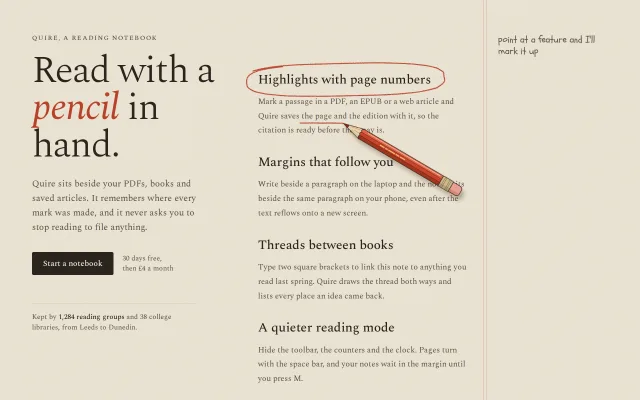
A drawn red pencil travels to the hovered feature and sketches a loose circle, an underline, an arrow, a margin note and a doodle in real time.
Preview
Use it
Free to use · credit appreciated1 Once, in your project · Node 22.20+
npx skills add SusanAcharya/Design-Lounge 2 Then ask
Using the Design Lounge skill, build "Pencil annotations features" (piece features-pencil-annotations) in my stack. Match its brief; restyle it onto my product's theme.
No skill? Paste the brief instead. It carries the numbers, tokens and behaviour.
<!-- Design Lounge Nº 612 · "Pencil annotations features" · www.designlounge.live -->

# Pencil annotations features

> **Build brief for a coding agent.** Rebuild this piece in the reader's stack. If they haven't said which stack, ask once, then default to semantic HTML + CSS + a little vanilla JS. Match the numbers below; don't "improve" them.

## What it is

A features section for "Quire", an invented reading notebook. Four features sit in a 420px column on grainy cream paper, beside a notebook margin marked by a pale double red rule. A red-lead pencil, drawn in inline SVG with a scalloped paint edge, a brass ferrule and a pink eraser, rests on the page. Hover, focus or tap a feature and the pencil lifts, travels to it and sketches, stroke by stroke: a loose superellipse loop around the title, a wavy underline under one key phrase, a swooping arrow into the margin, a two-line handwritten note (real text, revealed as the tip passes), then a small doodle. The detail worth copying is that the pencil tip is driven by `getPointAtLength` on the same path whose `stroke-dashoffset` is shrinking, so the line appears exactly under the lead.

## Reference behaviour

1. First frame: feature 1 ("Highlights with page numbers") draws itself on load. The pencil starts resting low in the margin (x = page width − 230, y = 690) and travels to the loop start.
2. Draw order for every feature: loop, underline, arrow shaft, arrowhead, note line 1, note line 2, doodle. Between strokes the pencil lifts (`.up`: larger, softer shadow) and moves on an eased arc that rises 10px at mid-travel and tilts −6°.
3. Stroke duration is `min(900, 160 + length × 1.25)` ms; travel is `min(560, 180 + distance × 0.55)` ms with cubic in-out. Note lines reveal with `clip-path: inset(-6px X% -6px -4px)` over `260 + width × 3.2` ms while the tip bounces 0 to 5px like handwriting.
4. When done, the pencil travels to its rest point: 22px right of and 62px below the doodle's top-left on desktop. It stays there. The annotations stay on the last chosen feature.
5. Hovering (`mouseenter` on the `<li>`), focusing the title button, or clicking selects a feature. Selecting a new feature fades the old drawing out (240ms) and hides the old note, then draws the new one. Clicking the current feature replays it.
6. A new selection mid-drawing cancels the old run with a token counter; nothing draws on top of the cancelled strokes.
7. Window resize redraws the current feature instantly (120ms debounce).
8. Reduced motion: every stroke is set to `stroke-dashoffset: 0`, notes show whole and the pencil jumps to rest. No requestAnimationFrame runs.
9. Phone (≤ 760px): one column. The note sits below the paragraph, indented 40px; the arrow becomes a small hook in the left gutter, the doodle sits right of the note and the pencil (scale 0.55) rests at the right edge, partly off the page.

## Structure

```
1280 × 800, .page grid 380px | 1fr, gap 72, padding 64 64 48
┌──────────────────────┬───────────────────────────────┬──────────────┐
│ QUIRE, A READING ... │                      ║║ point at a feature │
│ Read with a          │ (Highlights with page numbers)~~>  p. 214, 2nd  │
│ pencil in            │ Mark a passage ... the page and   edition,     │
│ hand.   76px Spectral│ the edition ~~~~ ...           ║║ it cites      │
│                      │                                ║║ itself!   ☆   │
│ lede 18px, 350 max   │ Margins that follow you        ║║     \pencil   │
│ [Start a notebook]   │ Threads between books          ║║      \        │
│ 30 days free ...     │ A quieter reading mode         ║║               │
│ ─────────            │  feats 420w, 34px gap          ║║ notes x=480   │
│ Kept by 1,284 ...    │                     rule x=450 ║║ width 230     │
└──────────────────────┴───────────────────────────────┴──────────────┘
 #ink SVG and .pencil are absolute over the whole .page
```

… 153 more lines. Copy or download for the full brief. Loading the source…Brief
193 linesBuild brief for a coding agent. Rebuild this piece in the reader’s stack. If they haven’t said which stack, ask once, then default to semantic HTML + CSS + a little vanilla JS. Match the numbers below; don’t “improve” them.
What it is
A features section for “Quire”, an invented reading notebook. Four features sit in a 420px column on grainy cream paper, beside a notebook margin marked by a pale double red rule. A red-lead pencil, drawn in inline SVG with a scalloped paint edge, a brass ferrule and a pink eraser, rests on the page. Hover, focus or tap a feature and the pencil lifts, travels to it and sketches, stroke by stroke: a loose superellipse loop around the title, a wavy underline under one key phrase, a swooping arrow into the margin, a two-line handwritten note (real text, revealed as the tip passes), then a small doodle. The detail worth copying is that the pencil tip is driven by getPointAtLength on the same path whose stroke-dashoffset is shrinking, so the line appears exactly under the lead.
Reference behaviour
- First frame: feature 1 (“Highlights with page numbers”) draws itself on load. The pencil starts resting low in the margin (x = page width − 230, y = 690) and travels to the loop start.
- Draw order for every feature: loop, underline, arrow shaft, arrowhead, note line 1, note line 2, doodle. Between strokes the pencil lifts (
.up: larger, softer shadow) and moves on an eased arc that rises 10px at mid-travel and tilts −6°. - Stroke duration is
min(900, 160 + length × 1.25)ms; travel ismin(560, 180 + distance × 0.55)ms with cubic in-out. Note lines reveal withclip-path: inset(-6px X% -6px -4px)over260 + width × 3.2ms while the tip bounces 0 to 5px like handwriting. - When done, the pencil travels to its rest point: 22px right of and 62px below the doodle’s top-left on desktop. It stays there. The annotations stay on the last chosen feature.
- Hovering (
mouseenteron the<li>), focusing the title button, or clicking selects a feature. Selecting a new feature fades the old drawing out (240ms) and hides the old note, then draws the new one. Clicking the current feature replays it. - A new selection mid-drawing cancels the old run with a token counter; nothing draws on top of the cancelled strokes.
- Window resize redraws the current feature instantly (120ms debounce).
- Reduced motion: every stroke is set to
stroke-dashoffset: 0, notes show whole and the pencil jumps to rest. No requestAnimationFrame runs. - Phone (≤ 760px): one column. The note sits below the paragraph, indented 40px; the arrow becomes a small hook in the left gutter, the doodle sits right of the note and the pencil (scale 0.55) rests at the right edge, partly off the page.
Structure
1280 × 800, .page grid 380px | 1fr, gap 72, padding 64 64 48
┌──────────────────────┬───────────────────────────────┬──────────────┐
│ QUIRE, A READING ... │                      ║║ point at a feature │
│ Read with a          │ (Highlights with page numbers)~~>  p. 214, 2nd  │
│ pencil in            │ Mark a passage ... the page and   edition,     │
│ hand.   76px Spectral│ the edition ~~~~ ...           ║║ it cites      │
│                      │                                ║║ itself!   ☆   │
│ lede 18px, 350 max   │ Margins that follow you        ║║     \pencil   │
│ [Start a notebook]   │ Threads between books          ║║      \        │
│ 30 days free ...     │ A quieter reading mode         ║║               │
│ ─────────            │  feats 420w, 34px gap          ║║ notes x=480   │
│ Kept by 1,284 ...    │                     rule x=450 ║║ width 230     │
└──────────────────────┴───────────────────────────────┴──────────────┘
 #ink SVG and .pencil are absolute over the whole .page
<main class="page">: grid,position: relative,overflow: clip(the resting pencil hangs off the edge)..intro<section>: kicker<p>,<h1>with<em>pencil</em>, lede,.cta(one<button>and a price<span>),.keptparagraph with a 1px#D9CDB6top rule..sheet<section aria-label>:::beforedraws the margin rule (5px wide box, 1px--ruleleft and right borders) atleft: 450px..hinthandwritten line,aria-hidden.<ul class="feats">: four<li class="feat">, each<h3><button aria-pressed><span class="t">Title</span></button></h3>, a<p>containing one<span class="u">key phrase, and<p class="note">with two<span>lines.<svg id="ink" aria-hidden>: one<g filter="url(#graphite)">per drawing, with<path>children built at runtime.<div class="pencil" aria-hidden>><div>(rotate + scale) ><svg 312×32>with the tip at the element origin.
Tokens
:root {
  /* colour */
  --paper: #f3ecdd;      /* page */
  --ink: #2a251e;        /* headline, titles, button fill */
  --ink-2: #5a5246;      /* body, kicker, hint (6.5:1) */
  --rule: #e2b3a6;       /* margin double rule */
  --lead: #b8412a;       /* annotation strokes, em word */
  --note: #a3311b;       /* handwritten note text (5.9:1 on paper) */
  --kept-rule: #d9cdb6;
  --wood: #ecd0a8; --paint: #c8452c; --paint-hi: #de6446; --paint-lo: #a3361f;
  --brass: #cdb98c; --eraser: #e8a092; --pencil-line: #2b2620;

  /* type */
  --serif: "Spectral", Georgia, serif;
  --hand: "Schoolbell", "Comic Sans MS", cursive;
  --fs-display: 76px; --fs-title: 26px; --fs-lede: 18px; --fs-body: 16px;
  --fs-note: 21px; --fs-hint: 19px; --fs-meta: 14px; --fs-kicker: 13px;

  /* layout */
  --col: 380px; --feat: 420px; --note-x: 480px; --note-w: 230px;
  --gap: 72px; --pad: 64px; --feat-gap: 34px;
  --radius-btn: 3px;

  /* strokes */
  --stroke: 2.1px; --pencil-scale: .9; --pencil-scale-phone: .55; --pencil-angle: 32deg;
  --shadow-rest: drop-shadow(5px 9px 4px rgba(70, 48, 24, .3));
  --shadow-up: drop-shadow(14px 22px 9px rgba(70, 48, 24, .18));

  /* motion */
  --ease: cubic-bezier(.2, .7, .2, 1);
  --t-fast: 180ms; --t-erase: 240ms; --t-lift: 260ms;
}
Typography
| Role | Family | Size | Weight | Line-height | Tracking | Case |
|---|---|---|---|---|---|---|
| Kicker | Spectral | 13px | 500 | 1 | +0.14em | UPPERCASE |
| Headline | Spectral | 76px | 300 (em: 400 italic, --lead) | 0.98 | −0.025em | sentence |
| Lede | Spectral | 18px | 400 | 1.6 | 0 | sentence |
| Button | Spectral | 16px | 500 | 1 | 0 | sentence |
| Price, kept | Spectral | 14px | 400 (b: 500) | 1.4 / 1.5 | 0 | sentence |
| Feature title | Spectral | 26px | 500 | 1.2 | −0.01em | sentence |
| Feature body | Spectral | 16px | 400 | 1.8 | 0 | sentence |
| Margin note | Schoolbell | 21px | 400 | 1.2 | 0 | lowercase-ish |
| Hint | Schoolbell | 19px | 400 | 1.2 | 0 | lowercase |
Body line-height is 1.8 on purpose: the underline sits 2.2px under the phrase’s box and must clear the next line’s ascenders.
Motion
| Element | Trigger | Property | From → To | Duration | Easing | Reduced motion |
|---|---|---|---|---|---|---|
| Pencil travel | between strokes | translate, rotate | point → point, arc −10px, tilt −6° | min(560, 180 + d × 0.55) | cubic in-out | jump to rest |
| Pencil lift | travel start/end | filter | rest → up shadow | 260ms | --ease | none |
| Stroke draw | per path | stroke-dashoffset | L → 0 | min(900, 160 + L × 1.25) | linear in t (it is a drawing hand) | 0 at once |
| Pencil while drawing | per frame | rotate | 32° ± 1.6° (sin 24t) | with stroke | — | none |
| Note line | per span | clip-path inset right | 100% → 0 | 260 + w × 3.2 | linear | none |
| Note tip bounce | per frame | translateY | 0 → −5px, abs(sin(x/9)) | with line | — | none |
| Old drawing | new select | opacity | 1 → 0, then remove at 280ms | 240ms | --ease | none |
| Button | hover | background | #2A251E → #4A3F31 | 180ms | --ease | none |
States
- Selected feature:
.feat.on; its notevisibility: visible; its title buttonaria-pressed="true". All other notesvisibility: hidden(they keep their space on phones so nothing jumps). - Unselected features: full colour. Never dim them; body copy must stay 4.5:1.
- Title focus-visible: 2px
--leadoutline, 6px offset, 2px radius. - Pencil resting: angle 32°, shadow
--shadow-rest. Lifted: class.up,--shadow-up. - Drawing interrupted: old strokes fade, the new run starts from wherever the pencil is.
Accessibility
- Feature titles are real
<button>s inside<h3>witharia-pressed. Tab moves through the four; focus selects and draws, same as hover. - The
#inkSVG, the pencil and the hint arearia-hidden="true". Notes are real text in the DOM, so screen readers read them in place. - Annotation strokes never cross text: the loop is a superellipse (exponent 3) padded 24px × 12px (16 × 10 on phones), the underline sits under the phrase box, the arrow arcs above the title line only 24px.
- Contrast:
--note5.9:1,--ink-26.5:1 on--paper. The grain is at most 0.2 alpha of a dark brown, measured behind the text. - No filter on text. The displacement filter is on SVG strokes only.
Responsive rules
- ≥ 1280: as specified; 1024 to 1279 keeps the grid and lets the margin column shrink to its 230px note width.
- ≤ 760: single column, padding 56 / 20; headline 50px; titles 23px, max-width 300px; note static,
margin: 14px 0 0 40px, max-width 200px, 20px; hint text switches to “tap a feature and I’ll mark it up”; margin rule hidden; pencil scale 0.55. - On phones the pencil starts at the right edge (x = width − 40, y = 470) and rests at
min(doodle + 58, width − 18). - No horizontal scroll:
.page { overflow: clip }.
Acceptance checklist
Always
- Hover, focus and tap all select a feature and draw the same five marks in the same order.
- The pencil tip sits on the end of the line being drawn on every frame.
- Annotations stay on the last selected feature; selecting another fades the old one in 240ms.
- A selection mid-drawing cancels cleanly, no half strokes left behind.
- No annotation stroke crosses any glyph at 1280 or 390.
- Margin notes are DOM text at ≥ 4.5:1, revealed with clip-path, not painted into the SVG.
- Reduced motion shows the finished drawing and resting pencil with no animation frames.
- At 390 the note is below the paragraph, the pencil is visible and tap works; no sideways scroll.
This demo
- Headline is “Read with a pencil in hand.” at 76px Spectral 300 with italic red “pencil”.
- Four features: Highlights with page numbers, Margins that follow you, Threads between books, A quieter reading mode.
- Notes read “p. 214, 2nd edition, / it cites itself!”, “same spot on every / screen, even reflowed”, “ch. 3 now links back / to the Vane essay”, “no clock, no badges, / just the page”.
- Doodles: star with three sparks, paper plane with trail, open book with a looped thread, steaming cup.
- Pencil is red (
#C8452Cface,#DE6446and#A3361Fsides) with a scalloped paint edge, brass ferrule with four ridges and pink eraser.
Implementation notes
Drive the pencil from the stroke it is drawing. One tween writes both the dash offset and the pencil transform:
const L = path.getTotalLength();
path.style.strokeDasharray = L + ' ' + (L + 2);
path.style.strokeDashoffset = L;
const pt = (k) => { const q = path.getPointAtLength(k); return [q.x * k0 + ox, q.y * k0 + oy]; };
await travel(pt(0), my);
await tween(Math.min(900, 160 + L * 1.25), (q) => {
  path.style.strokeDashoffset = L * (1 - q);
  place(...pt(L * q), 32 + Math.sin(q * 24) * 1.6);
}, my);
A loop that clears a wide title. An ellipse padded 20px still clips the corners of a 340px title. A superellipse with exponent 3, drawn 1.08 turns with a slight inward spiral, clears them and leaves the overlapping hand-drawn ends:
const se = (v) => Math.sign(v) * Math.pow(Math.abs(v), 2 / 3);
for (let k = 0; k <= 48; k++) {
  const q = k / 48, a = -2.6 + Math.PI * 2.16 * q;
  const s = 1.012 + (rand() - .5) * .018 - (q - .5) * .045;
  pts.push([cx + se(Math.cos(a)) * rx * s, cy + se(Math.sin(a)) * ry * s]);
}
Join points with quadratic curves through midpoints so the line stays smooth. Seed the random so each feature always gets the same wobble.
Shadow in screen space. Put the drop-shadow filter on the outer .pencil (translate only) and the rotation on the inner div. If you filter the rotated element, the shadow rotates with the pencil and falls the wrong way.
Common mistakes: measuring before fonts load (wait for document.fonts.ready); drawing the note in SVG text (it must be real text for contrast and screen readers); leaving the pencil at rest on top of copy, which fails contrast; dimming unselected features.
Details
- Palette
- Type
- Spectral · Schoolbell
- Motion
- Rich motion
- Build
- Multi-step
- Tags
Studied
UseArticleLet the visitor press the controls and watch the card change. Thick black edges and hard shadows keep it friendly.
All sourcesSimilar
Paper cutout steps
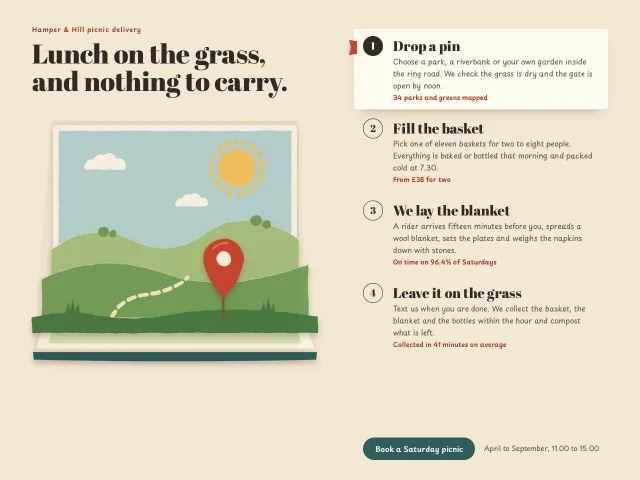
Four picnic delivery steps beside a pop-up book whose stacked paper layers rise, bounce and parallax with the pointer as each step is chosen.
Hand-drawn text annotations
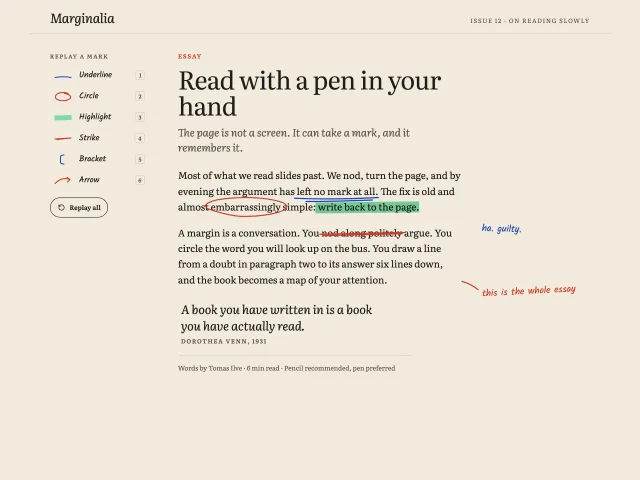
An essay page where six pen marks (underline, circle, highlight, strike, bracket, arrow) draw onto the text on scroll, with a picker that replays each one.
Engraved caravan footer
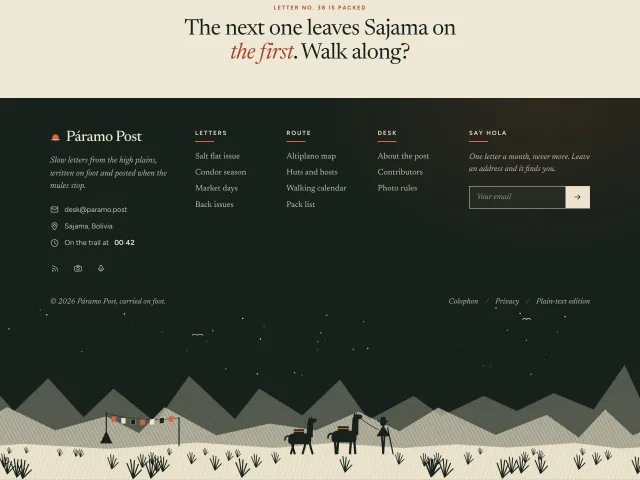
A dark five-column footer with a ticking local time and an email form, ending in an engraved night plain where a herder and two pack llamas walk across.
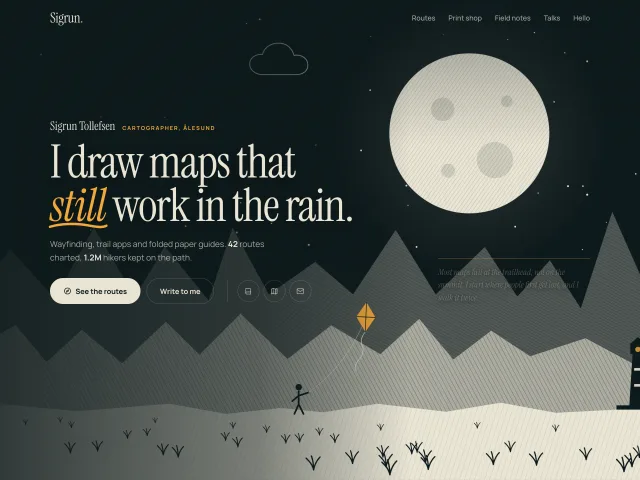
Engraved moonrise hero plate
A night portfolio hero drawn like an engraving: hatched ridges, a rising moon, drifting outline clouds, a kite flyer and a lighthouse, with rising headline lines and a drawn underline.
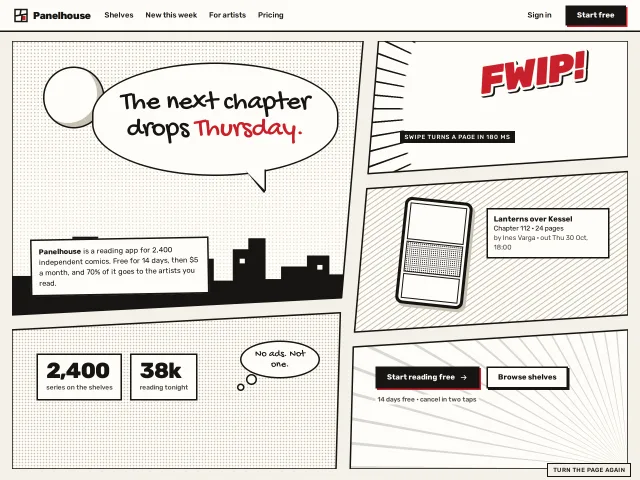
Manga page hero
A hero laid out as a manga page: five slanted panels with real gutters, a speech-bubble headline, CSS screentones and speed lines, panels that turn in one by one.
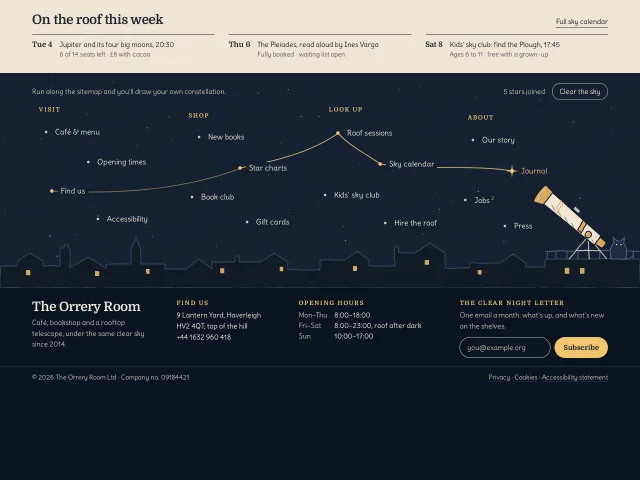
Constellation footer links
A night-sky footer for an invented café and rooftop telescope: links are stars, and each one you hover is inked to the last while a drawn telescope turns to it.