Nº 611 of 613
Telescope focus features
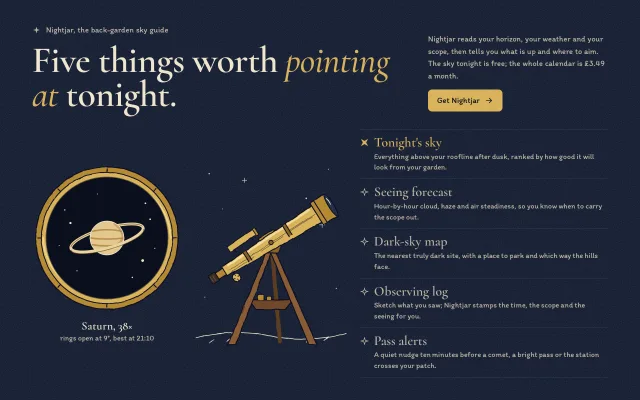
Features section for a stargazing app: a hand-drawn brass telescope swivels toward the hovered feature while a round eyepiece view pulls a drawn scene from blur to sharp.
Preview
Use it
Free to use · credit appreciated1 Once, in your project · Node 22.20+
npx skills add SusanAcharya/Design-Lounge 2 Then ask
Using the Design Lounge skill, build "Telescope focus features" (piece features-telescope-focus) in my stack. Match its brief; restyle it onto my product's theme.
No skill? Paste the brief instead. It carries the numbers, tokens and behaviour.
<!-- Design Lounge Nº 611 · "Telescope focus features" · www.designlounge.live -->

# Telescope focus features

> **Build brief for a coding agent.** Rebuild this piece in the reader's stack. If they haven't said which stack, ask once, then default to semantic HTML + CSS + a little vanilla JS. Match the numbers below; don't "improve" them.

## What it is

The features block of Nightjar, an invented back-garden astronomy app. Three columns on grainy night-navy: a round brass eyepiece view, a hand-drawn brass refractor on a wooden tripod, and a list of five features set in Cormorant and Itim. Hovering, focusing or tapping a feature swivels the telescope's tube toward that row and racks the eyepiece into focus on a small drawing for it: Saturn, a moon behind cloud, a dark-sky map pin, a sketchbook page, a comet. The focus pull is an SVG `feGaussianBlur` animated from 9 to 0 on the drawing only; text never sits on blur. The detail worth copying is that the selection has two physical answers at once, where the instrument points and what it sees.

## Reference behaviour

1. First frame: "Tonight's sky" selected (brass title, filled four-point star marker rotated 45°), tube aimed up toward that row, the eyepiece showing a sharp Saturn, caption "Saturn, 38×" / "rings open at 9°, best at 21:10".
2. Hover (`mouseenter`), keyboard focus, or click/tap on another feature selects it. Only one is selected.
3. On select: the tube rotates about the tripod head (170, 196 in the 340×440 viewBox) to the angle from the pivot to the row's vertical centre, clamped to ±32°, in 700ms with a slight overshoot.
4. At the same time the eyepiece swaps to that feature's vignette and its blur runs 9 → 3 → 0 over 760ms (SMIL `animate` on `stdDeviation`, started with `beginElement()`), the focus knob on the tube turns another 140°, and the caption below the eyepiece updates.
5. Arrow Up/Left and Down/Right move the selection (wrapping), Home and End jump to the first and last; focus follows the selection (roving tabindex).
6. Window resize re-aims the tube at the current row.
7. At ≤ 760px the tube uses fixed angles per row: −24°, −12°, 0°, 12°, 24°.
8. Reduced motion: the tube and knob snap (1ms transitions) and the blur animation is not started, so the new vignette appears sharp.
9. The "Get Nightjar" button is the one primary action; it brightens to `#e8c773` on hover.

## Structure

```
1280 × 800, night #121A2E with a 200px SVG-noise grain tile
section  grid 300 | 300 | 1fr, gap 0 28, pad 48 64 36
┌──────────────────────── .head (grid 1fr | 360, gap 56, align end) ────────────────────────┐
│ ✦ Nightjar, the back-garden sky guide   (Itim 16, brass)  │ Nightjar reads your horizon… │
│ Five things worth pointing at tonight.  (Cormorant 74/600, │ (Itim 16, cream-2)          │
│                         "pointing at" brass italic 500)   │ [ Get Nightjar → ] 44px     │
└────────────────────────────────────────────────────────────────────────────────────────────┘
┌─ .eye 300 ───────┐ ┌─ .scope 300 (viewBox 340×440) ─┐ ┌─ ul.list[role=tablist] ─────────┐
│   ╭──brass rim──╮ │ │   ·        +       ·          │ │ ✦ Tonight's sky   (27px brass)  │
│  │  ( Saturn )   │ │ │        finder ▭               │ │   Everything above your… 15px   │
│  │   field r128  │ │ │  ▯=eyepiece====tube====◖lens  │ │ ✧ Seeing forecast               │
│   ╰─────────────╯ │ │          ◡ knob   ▾ head      │ │ ✧ Dark-sky map                  │
│  Saturn, 38×      │ │            / | \  tripod      │ │ ✧ Observing log                 │
│  rings open at 9° │ │           /  ▭  \ tray        │ │ ✧ Pass alerts                   │
└───────────────────┘ │  ~~~~~~~ horizon ~~~~~~~      │ └──── 1px #2C3854 rules ─────────┘

… 159 more lines. Copy or download for the full brief. Loading the source…Brief
199 linesBuild brief for a coding agent. Rebuild this piece in the reader’s stack. If they haven’t said which stack, ask once, then default to semantic HTML + CSS + a little vanilla JS. Match the numbers below; don’t “improve” them.
What it is
The features block of Nightjar, an invented back-garden astronomy app. Three columns on grainy night-navy: a round brass eyepiece view, a hand-drawn brass refractor on a wooden tripod, and a list of five features set in Cormorant and Itim. Hovering, focusing or tapping a feature swivels the telescope’s tube toward that row and racks the eyepiece into focus on a small drawing for it: Saturn, a moon behind cloud, a dark-sky map pin, a sketchbook page, a comet. The focus pull is an SVG feGaussianBlur animated from 9 to 0 on the drawing only; text never sits on blur. The detail worth copying is that the selection has two physical answers at once, where the instrument points and what it sees.
Reference behaviour
- First frame: “Tonight’s sky” selected (brass title, filled four-point star marker rotated 45°), tube aimed up toward that row, the eyepiece showing a sharp Saturn, caption “Saturn, 38×” / “rings open at 9°, best at 21:10”.
- Hover (
mouseenter), keyboard focus, or click/tap on another feature selects it. Only one is selected. - On select: the tube rotates about the tripod head (170, 196 in the 340×440 viewBox) to the angle from the pivot to the row’s vertical centre, clamped to ±32°, in 700ms with a slight overshoot.
- At the same time the eyepiece swaps to that feature’s vignette and its blur runs 9 → 3 → 0 over 760ms (SMIL
animateonstdDeviation, started withbeginElement()), the focus knob on the tube turns another 140°, and the caption below the eyepiece updates. - Arrow Up/Left and Down/Right move the selection (wrapping), Home and End jump to the first and last; focus follows the selection (roving tabindex).
- Window resize re-aims the tube at the current row.
- At ≤ 760px the tube uses fixed angles per row: −24°, −12°, 0°, 12°, 24°.
- Reduced motion: the tube and knob snap (1ms transitions) and the blur animation is not started, so the new vignette appears sharp.
- The “Get Nightjar” button is the one primary action; it brightens to
#e8c773on hover.
Structure
1280 × 800, night #121A2E with a 200px SVG-noise grain tile
section  grid 300 | 300 | 1fr, gap 0 28, pad 48 64 36
┌──────────────────────── .head (grid 1fr | 360, gap 56, align end) ────────────────────────┐
│ ✦ Nightjar, the back-garden sky guide   (Itim 16, brass)  │ Nightjar reads your horizon… │
│ Five things worth pointing at tonight.  (Cormorant 74/600, │ (Itim 16, cream-2)          │
│                         "pointing at" brass italic 500)   │ [ Get Nightjar → ] 44px     │
└────────────────────────────────────────────────────────────────────────────────────────────┘
┌─ .eye 300 ───────┐ ┌─ .scope 300 (viewBox 340×440) ─┐ ┌─ ul.list[role=tablist] ─────────┐
│   ╭──brass rim──╮ │ │   ·        +       ·          │ │ ✦ Tonight's sky   (27px brass)  │
│  │  ( Saturn )   │ │ │        finder ▭               │ │   Everything above your… 15px   │
│  │   field r128  │ │ │  ▯=eyepiece====tube====◖lens  │ │ ✧ Seeing forecast               │
│   ╰─────────────╯ │ │          ◡ knob   ▾ head      │ │ ✧ Dark-sky map                  │
│  Saturn, 38×      │ │            / | \  tripod      │ │ ✧ Observing log                 │
│  rings open at 9° │ │           /  ▭  \ tray        │ │ ✧ Pass alerts                   │
└───────────────────┘ │  ~~~~~~~ horizon ~~~~~~~      │ └──── 1px #2C3854 rules ─────────┘
                      └────────────────────────────────┘
<section aria-labelledby="feat-h">;.headholds the kicker,h2#feat-hwith<em>, a paragraph anda.get..eye#panel[role=tabpanel][aria-labelledby=t0..t4]: an SVG (viewBox 320×320,role=img) with the rim (r 152 and 140, eight tick marks), the field (r 128,#0a0f1d), a clip circle r 126, oneg[filter=url(#focus)]containing shared stars and fiveg.v[data-v]vignettes (only.ondisplays), and a 10px inner shadow ring. Below itp.cap#cap[aria-live=polite]with a<b>line..scope[aria-hidden=true]: the telescope SVG (viewBox 340×440): stars, horizon, back leg, tray with two eyepiece cases, two front legs, brass head,g#tube(tube, bands, dew shield, lens, finder, focuser, eyepiece,g#knob), pivot bolt.ul.list[role=tablist][aria-orientation=vertical]with fiveli > button.f[role=tab][aria-controls=panel], each containingsvg.m(marker),span.t(title) andspan.d(description), anddata-cap="title|detail"for the caption.
Tokens
:root {
  /* colour */
  --night: #121a2e;     /* page ground */
  --night-2: #18223a;
  --field: #0a0f1d;     /* inside the eyepiece */
  --line: #2c3854;      /* list rules */
  --cream: #efe6cf;     /* headline, selected caption, stars */
  --cream-2: #bdb6a4;   /* body copy, idle titles, markers */
  --brass: #d9b35c;     /* accent: selected title, em, button, tube */
  --brass-2: #b58a35;   /* rim, dew shield, focuser */
  --brass-3: #8a6424;   /* bands, head, hatching */
  --wood: #8b5b35;      /* tripod legs; back leg #5d3c22, tray #6f4729 */
  --ink: #0b1120;       /* every drawn line, button label */
  --highlight: #f6dc98; /* tube top highlight */

  /* type */
  --serif: "Cormorant", Georgia, serif;
  --hand: "Itim", ui-rounded, sans-serif;
  --fs-h2: 74px; --fs-title: 27px; --fs-cap-b: 23px; --fs-body: 16px; --fs-desc: 15px;

  /* shape and space */
  --r: 8px;
  --sp-1: 8px; --sp-2: 12px; --sp-3: 28px; --sp-4: 48px; --sp-5: 64px;
  --stroke: 2.2px; --hatch: 1.2px;

  /* motion */
  --t-swivel: 700ms; --t-focus: 760ms; --t-micro: 160ms;
  --ease: cubic-bezier(.2,.7,.2,1);
  --swing: cubic-bezier(.3,1.35,.5,1);
}
Typography
| Role | Family | Size | Weight | Line-height | Tracking | Case |
|---|---|---|---|---|---|---|
| Kicker | Itim | 16px | 400 | 1.5 | 0 | sentence |
| Headline | Cormorant | 74px | 600, em 500 italic | 0.92 | −0.015em | sentence |
| Head paragraph | Itim | 16px | 400 | 1.55 | 0 | sentence |
| Button | Itim | 16px | 400 | 44px box | 0 | sentence |
| Feature title | Cormorant | 27px | 600 | 1.1 | 0 | title-ish |
| Feature description | Itim | 15px | 400 | 1.45 | 0 | sentence |
| Caption title | Cormorant | 23px | 600 | 1.1 | 0 | sentence |
| Caption detail | Itim | 15px | 400 | 1.5 | 0 | sentence |
Motion
| Element | Trigger | Property | From → To | Duration | Easing | Reduced motion |
|---|---|---|---|---|---|---|
Tube #tube | select | transform rotate about (170,196) | current → atan2 angle, clamp ±32° | 700ms | --swing | 1ms snap |
| Eyepiece blur | select | stdDeviation | 9 → 3 → 0 (keyTimes 0, .5, 1) | 760ms | linear SMIL | not started |
| Focus knob | select | rotate about (62,222) | +140° per change | 760ms | --ease | 1ms snap |
| Marker star | select | rotate, scale, fill | 0, 1, none → 45°, 1.15, brass | 400ms | --swing | 1ms |
| Feature title | hover / select | colour | cream-2 → cream / brass | 160ms | --ease | 1ms |
| Button | hover | background | #d9b35c → #e8c773 | 160ms | --ease | 1ms |
Nothing loops. The blur is on the vignette group inside the SVG, never on HTML text.
States
- Selected tab:
aria-selected="true", title--brass, marker filled brass and rotated 45°,tabindex=0. - Idle tab: title and description
--cream-2(8.6:1 on night), outline marker. - Hover: title
--cream, and hover also selects. - Focus-visible: 2px
--brassoutline, 2px offset on the row, 3px on the button. - Focusing: for 760ms after a change the vignette is blurred; the caption is already final.
- Narrow: fixed tube angles per row index.
Accessibility
- Tabs pattern:
role=tablist(vertical),role=tabbuttons witharia-controls="panel", and the panel’saria-labelledbypoints at the selected tab. - Roving tabindex; arrows, Home and End move selection and focus. Hover selection is a convenience only.
- The eyepiece SVG is
role=imgtitled “The eyepiece view”; the caption isaria-live="polite"so the new subject is read out. - The telescope is decorative and
aria-hidden. - Contrast: cream on night 13.9:1, cream-2 on night 8.6:1, brass on night 8.7:1, ink on brass button 9.5:1. No text sits on the drawings, the grain is too faint to matter.
- Hit targets: rows are at least 48px tall on phones; the button is 44px.
Responsive rules
- ≥ 1280: as specified.
- 1024: the third column narrows; descriptions wrap to three lines; aim keeps working from measured positions.
- ≤ 760: two columns (eyepiece left, telescope right) above a full-width list, padding 28 20 40, headline 46px with line-height 1.04 and the em on its own line, titles 24px, caption 14px / 20px, rows min 48px.
- 390: the eyepiece and telescope sit side by side under the header, both drawings scale with their column; tapping a row selects it; nothing scrolls sideways.
Acceptance checklist
Always
- Both drawings are inline SVG with 2.2px round-capped ink lines and a turbulence displacement filter (
.04, scale 3 on the telescope, 2.4 on the rim). - Hover, focus and tap each select a feature, and exactly one is selected.
- The tube rotates about the tripod head toward the selected row, clamped to ±32°, 700ms with overshoot.
- The eyepiece swaps vignette and the SVG blur runs 9 → 0 in 760ms; no CSS
filteris applied to text. - The caption below the eyepiece updates and is announced politely.
- Arrow keys, Home and End move selection with roving tabindex.
- Reduced motion snaps the tube and shows the new vignette sharp.
- At 390px the telescope and eyepiece sit above the list and the tap interaction still aims the tube.
- One primary button only.
This demo
- Product: Nightjar; headline “Five things worth pointing at tonight.” with “pointing at” in brass italic.
- Features in order: Tonight’s sky, Seeing forecast, Dark-sky map, Observing log, Pass alerts.
- Captions: Saturn, 38× / Seeing 4 of 5 / Bortle 3, 26 min away / Log No. 112 / Comet C/2026 K1.
- Price line “The sky tonight is free; the whole calendar is £3.49 a month.”
Implementation notes
Focus pull with SVG, not CSS filters. One filter on the vignette group; restart its animation on each change.
<filter id="focus" x="-20%" y="-20%" width="140%" height="140%">
  <feGaussianBlur stdDeviation="0">
    <animate id="blur" attributeName="stdDeviation" values="9;3;0"
             keyTimes="0;.5;1" dur="760ms" begin="indefinite" fill="freeze"/>
  </feGaussianBlur>
</filter>
<g clip-path="url(#fld)"><g filter="url(#focus)"> …five g.v vignettes… </g></g>
if (!matchMedia('(prefers-reduced-motion: reduce)').matches && blur.beginElement) blur.beginElement();Aim at the row, from the pivot’s real position. Convert the pivot from viewBox units to screen pixels with the SVG’s rendered scale.
function aim() {
  let a;
  if (narrow.matches) a = [-24, -12, 0, 12, 24][cur];
  else {
    const p = svg.getBoundingClientRect(), s = p.width / 340, r = tabs[cur].getBoundingClientRect();
    a = Math.atan2(r.top + r.height / 2 - (p.top + 196 * s), r.left - (p.left + 170 * s)) * 180 / Math.PI;
    a = Math.max(-32, Math.min(32, a));
  }
  tube.style.transform = 'rotate(' + a.toFixed(1) + 'deg)';
}
#tube { transform-box: view-box; transform-origin: 170px 196px;
transition: transform 700ms cubic-bezier(.3,1.35,.5,1) }Draw the ring behind and in front of Saturn. Paint the full ring ellipse first, then the planet, then only the lower arc again (A80 21 -16 0 0), so the ring passes behind the globe.
Common mistakes: blurring the caption or the list with CSS filter; putting the description on the stars; rotating the tube about its own centre instead of the tripod head; letting the tube swing past ±32° so the lens points at the headline; making the brass headline word share a tight 0.92 line on phones, where descenders collide (use 1.04 there).
Details
- Palette
- Type
- Cormorant · Itim
- Motion
- Rich motion
- Build
- One session
- Tags
Studied
LinearShow the product doing the work. Fade it at the edges and keep one colour for what matters.
All sourcesSimilar
Tabbed feature preview
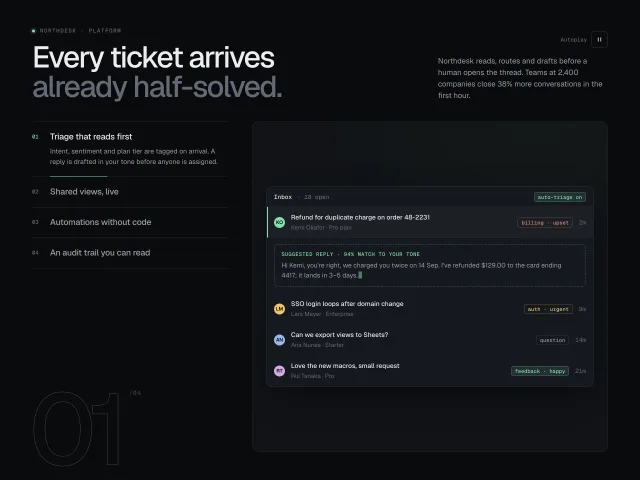
Four vertical feature tabs with 6s autoplay progress hairlines; the preview pane crossfades between CSS-built product UIs, with a giant outlined step numeral.
Accordion with media swap
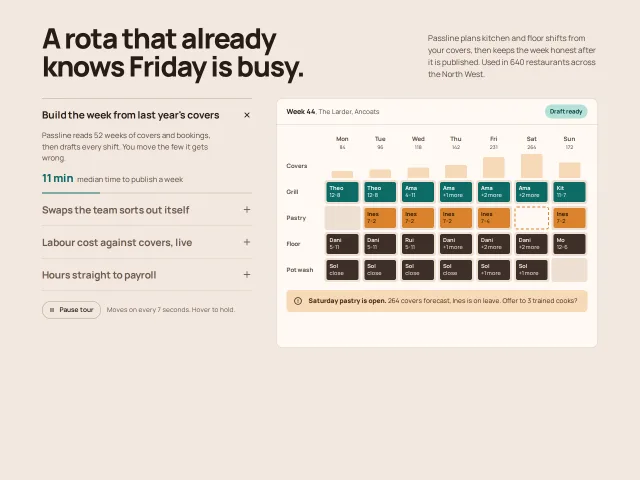
Four features in a vertical accordion; opening one crossfades a drawn product screen on the right, and a 7s progress bar advances the tour until you hover.
Isometric figure triptych
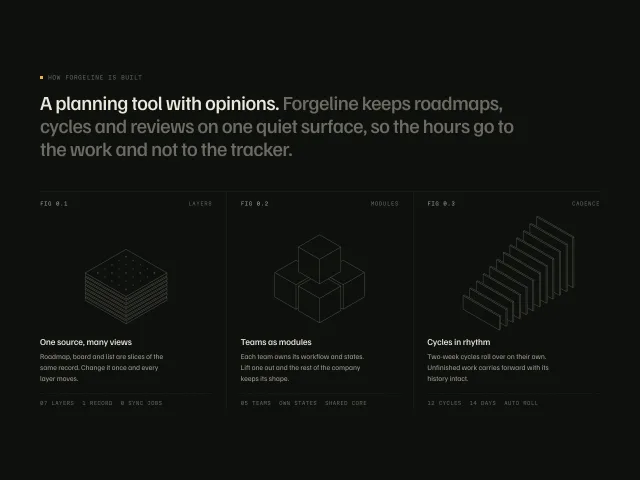
Three hairline isometric drawings captioned FIG 0.1–0.3 under a two-tone statement; hovering a column explodes its drawing, lights one amber part and dims the others.
Constellation footer links
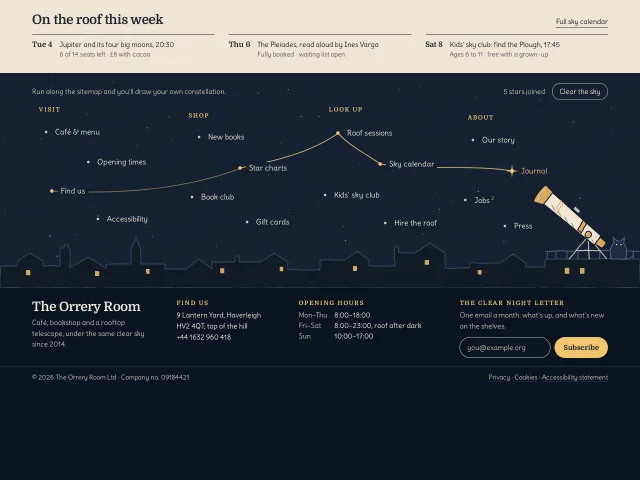
A night-sky footer for an invented café and rooftop telescope: links are stars, and each one you hover is inked to the last while a drawn telescope turns to it.
Engraved caravan footer
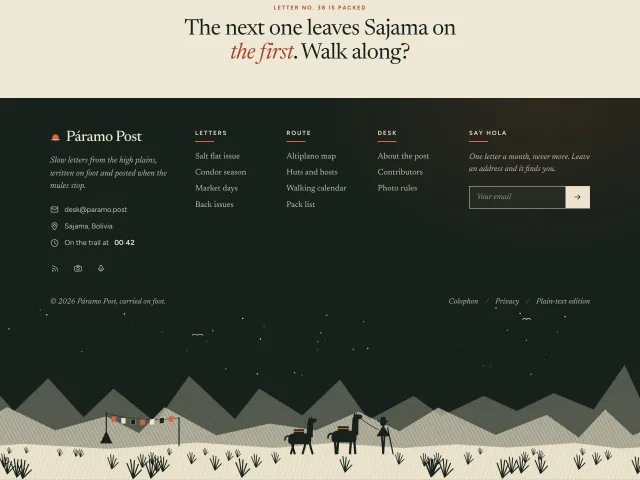
A dark five-column footer with a ticking local time and an email form, ending in an engraved night plain where a herder and two pack llamas walk across.
Engraved moonrise hero plate
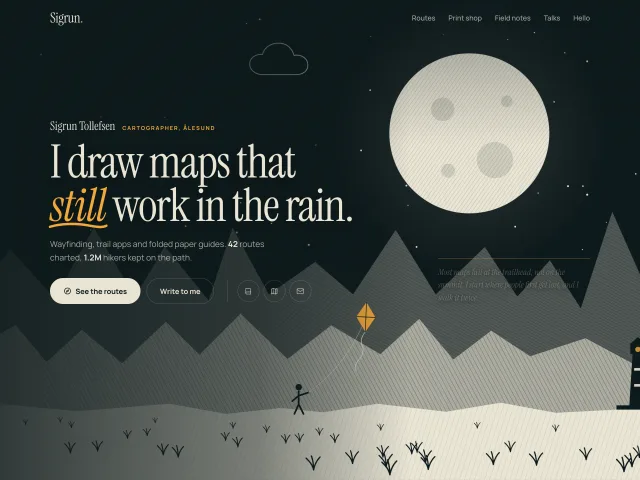
A night portfolio hero drawn like an engraving: hatched ridges, a rising moon, drifting outline clouds, a kite flyer and a lighthouse, with rising headline lines and a drawn underline.