Nº 655 of 677
Brutalist notes with hard-cut swipe
A notes app in raw brutalism: a 178px date, 3–6px black rules, stacked bordered notes, swipe-left archive with a hard cut, and an inverted press state.
Preview
Use it
Free to use · credit appreciated1 Once, in your project · Node 22.20+
npx skills add SusanAcharya/Design-Lounge 2 Then ask
Using the Design Lounge skill, build "Brutalist notes with hard-cut swipe" (piece style-brutalist-notes) in my stack. Match its brief; restyle it onto my product's theme.
No skill? Paste the brief instead. It carries the numbers, tokens and behaviour.
<!-- Design Lounge Nº 655 · "Brutalist notes with hard-cut swipe" · www.designlounge.live -->

# Brutalist notes with hard-cut swipe

> **Build brief for a coding agent.** Rebuild this piece in the reader's stack. If they haven't said which stack, ask once, then default to semantic HTML + CSS + a little vanilla JS. Match the numbers below; don't "improve" them.

## What it is

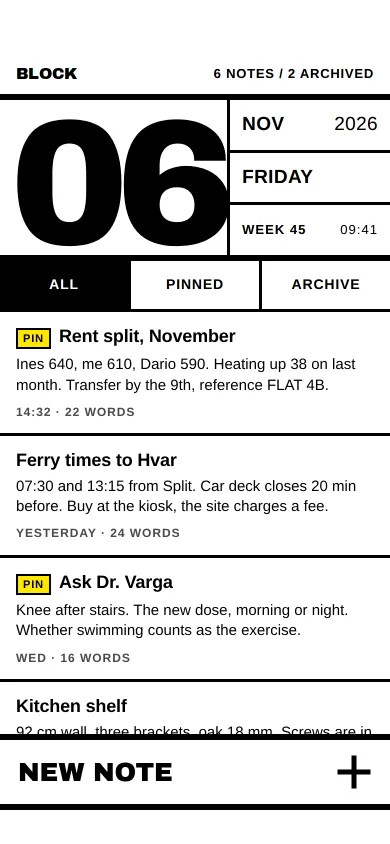
The home screen of "BLOCK", an invented notes app that treats the phone like a printed ledger. Pure white and pure black (this piece is about them), 3px and 6px rules, zero radius, zero shadows, one signal yellow `#FFE600`. A 178px "06" in Archivo Black anchors the top beside a ruled date stack; notes are full-width blocks separated by 3px rules; a 76px "NEW NOTE" slab sits in the thumb zone. Nothing eases: a note follows the finger 1:1, turns black the instant it passes the archive threshold, and on release is simply gone, with the list closing up in the same frame and a yellow undo strip cut in above the compose slab. Worth copying: brutalism that is fast and readable. Body text is the system grotesk at 15px on white at 21:1, and every state change is a hard cut instead of a transition.

The component language is its own, but it keeps iOS behaviour where users expect it: swipe-left to archive, an undo window, a modal composer, 48px+ targets.

## Reference behaviour

1. First frame at 390 × 844 (status bar drawn by the Lounge; content starts at 54px). A 40px bar: "BLOCK" (Archivo Black 16px) left, "6 NOTES / 2 ARCHIVED" (13/700, 0.06em, uppercase) right. A 6px black rule under it.
2. Date block, bounded by a 6px bottom rule: "06" in Archivo Black 178px, line-height 0.78, tracking −0.07em, 16px top padding, 10px left. To its right, behind a 3px left rule, three stacked cells split by 3px rules: "NOV … 2026", "FRIDAY", "WEEK 45 … 09:41" (19px/700 uppercase; the last row 13px/0.08em).
3. Tabs: three equal 48px cells "ALL", "PINNED", "ARCHIVE" (14/700, 0.06em), separated by 3px rules with a 3px bottom rule. Selected is inverted (black fill, white text). Pressing any tab flashes yellow while held.
4. Notes list fills the rest and scrolls (scrollbar hidden). Each note: 14px 16px padding; title 18/700 with an optional "PIN" tag (11/700 on yellow with a 2px black border); a two-line clamped excerpt 15px/1.35; meta "14:32 · 22 WORDS" (12/700, 0.08em, `#4A4A4A`). Notes are divided by 3px black rules. Six live notes, two archived.
5. Press a note: it inverts to black with white text for as long as the finger is down.
6. Drag a note left (horizontal intent after 8px, so vertical scroll still works): it follows the finger 1:1 with no easing; behind it a yellow underlay reads "ARCHIVE" in Archivo Black 20px, right-aligned 16px in. Rightward drag is clamped at 0.
7. Past 110px the note snaps to inverted black and the underlay word changes to "RELEASE", both in one frame.
8. Release past 110px: the note is removed and the list re-renders in the same frame (no slide, no collapse animation). The tally updates to "5 NOTES / 3 ARCHIVED". A 52px yellow strip appears above the compose slab: "Archived: Rent split, November" and a bordered "UNDO" cell. It disappears after 5000ms.
9. Release before 110px: the note jumps back to 0 in one frame.
10. UNDO restores the note in place and hides the strip.
11. "ARCHIVE" tab lists archived notes; there the underlay reads "RESTORE" and the same gesture restores. An empty filter shows "NOTHING ARCHIVED" (Archivo Black 34px) and "Swipe a note left to archive it."
12. "NEW NOTE" slab (76px, 6px rules top and bottom, Archivo Black 26px, a 36px square-capped plus at the right) inverts while pressed and on release cuts to a full-screen composer: a 52px bar "NEW NOTE · Fri 6 Nov", a 56px title input (Archivo Black 24px uppercase), a textarea, and a 76px row of "CANCEL" (white) and "SAVE" (black). Save adds the note at the top with "09:41 · N WORDS", switches to ALL, and cuts back.
13. Keyboard: Tab reaches tabs, notes, undo and compose. On a focused note, Delete or Backspace archives (or restores) it and moves focus to the first note. Escape closes the composer.
14. Reduced motion: nothing changes, because nothing animates. The rule `* { transition: none; animation: none }` keeps it that way.

## Structure

```
390 × 844
┌──────────────────────────────────────┐
│ 54 status (Lounge)                   │
│ BLOCK              6 NOTES / 2 ARCH. │ 40 bar
│██████████████████████████████████████│ 6 rule
│  ███   ███  ┃ NOV            2026    │ date block ~158
│ █   █ █     ┃━━━━━━━━━━━━━━━━━━━━━━━━│
│ █   █ ████  ┃ FRIDAY                 │ "06" 178px

… 172 more lines. Copy or download for the full brief. Loading the source…Brief
212 linesBuild brief for a coding agent. Rebuild this piece in the reader’s stack. If they haven’t said which stack, ask once, then default to semantic HTML + CSS + a little vanilla JS. Match the numbers below; don’t “improve” them.
What it is
The home screen of “BLOCK”, an invented notes app that treats the phone like a printed ledger. Pure white and pure black (this piece is about them), 3px and 6px rules, zero radius, zero shadows, one signal yellow #FFE600. A 178px “06” in Archivo Black anchors the top beside a ruled date stack; notes are full-width blocks separated by 3px rules; a 76px “NEW NOTE” slab sits in the thumb zone. Nothing eases: a note follows the finger 1:1, turns black the instant it passes the archive threshold, and on release is simply gone, with the list closing up in the same frame and a yellow undo strip cut in above the compose slab. Worth copying: brutalism that is fast and readable. Body text is the system grotesk at 15px on white at 21:1, and every state change is a hard cut instead of a transition.
The component language is its own, but it keeps iOS behaviour where users expect it: swipe-left to archive, an undo window, a modal composer, 48px+ targets.
Reference behaviour
- First frame at 390 × 844 (status bar drawn by the Lounge; content starts at 54px). A 40px bar: “BLOCK” (Archivo Black 16px) left, “6 NOTES / 2 ARCHIVED” (13/700, 0.06em, uppercase) right. A 6px black rule under it.
- Date block, bounded by a 6px bottom rule: “06” in Archivo Black 178px, line-height 0.78, tracking −0.07em, 16px top padding, 10px left. To its right, behind a 3px left rule, three stacked cells split by 3px rules: “NOV … 2026”, “FRIDAY”, “WEEK 45 … 09:41” (19px/700 uppercase; the last row 13px/0.08em).
- Tabs: three equal 48px cells “ALL”, “PINNED”, “ARCHIVE” (14/700, 0.06em), separated by 3px rules with a 3px bottom rule. Selected is inverted (black fill, white text). Pressing any tab flashes yellow while held.
- Notes list fills the rest and scrolls (scrollbar hidden). Each note: 14px 16px padding; title 18/700 with an optional “PIN” tag (11/700 on yellow with a 2px black border); a two-line clamped excerpt 15px/1.35; meta “14:32 · 22 WORDS” (12/700, 0.08em,
#4A4A4A). Notes are divided by 3px black rules. Six live notes, two archived. - Press a note: it inverts to black with white text for as long as the finger is down.
- Drag a note left (horizontal intent after 8px, so vertical scroll still works): it follows the finger 1:1 with no easing; behind it a yellow underlay reads “ARCHIVE” in Archivo Black 20px, right-aligned 16px in. Rightward drag is clamped at 0.
- Past 110px the note snaps to inverted black and the underlay word changes to “RELEASE”, both in one frame.
- Release past 110px: the note is removed and the list re-renders in the same frame (no slide, no collapse animation). The tally updates to “5 NOTES / 3 ARCHIVED”. A 52px yellow strip appears above the compose slab: “Archived: Rent split, November” and a bordered “UNDO” cell. It disappears after 5000ms.
- Release before 110px: the note jumps back to 0 in one frame.
- UNDO restores the note in place and hides the strip.
- “ARCHIVE” tab lists archived notes; there the underlay reads “RESTORE” and the same gesture restores. An empty filter shows “NOTHING ARCHIVED” (Archivo Black 34px) and “Swipe a note left to archive it.”
- “NEW NOTE” slab (76px, 6px rules top and bottom, Archivo Black 26px, a 36px square-capped plus at the right) inverts while pressed and on release cuts to a full-screen composer: a 52px bar “NEW NOTE · Fri 6 Nov”, a 56px title input (Archivo Black 24px uppercase), a textarea, and a 76px row of “CANCEL” (white) and “SAVE” (black). Save adds the note at the top with “09:41 · N WORDS”, switches to ALL, and cuts back.
- Keyboard: Tab reaches tabs, notes, undo and compose. On a focused note, Delete or Backspace archives (or restores) it and moves focus to the first note. Escape closes the composer.
- Reduced motion: nothing changes, because nothing animates. The rule
* { transition: none; animation: none }keeps it that way.
Structure
390 × 844
┌──────────────────────────────────────┐
│ 54 status (Lounge)                   │
│ BLOCK              6 NOTES / 2 ARCH. │ 40 bar
│██████████████████████████████████████│ 6 rule
│  ███   ███  ┃ NOV            2026    │ date block ~158
│ █   █ █     ┃━━━━━━━━━━━━━━━━━━━━━━━━│
│ █   █ ████  ┃ FRIDAY                 │ "06" 178px
│ █   █ █   █ ┃━━━━━━━━━━━━━━━━━━━━━━━━│
│  ███   ███  ┃ WEEK 45         09:41  │
│██████████████████████████████████████│ 6 rule
│▓▓▓ALL▓▓▓▓┃   PINNED   ┃   ARCHIVE   │ 48 tabs
│━━━━━━━━━━━━━━━━━━━━━━━━━━━━━━━━━━━━━━│ 3 rule
│ [PIN] Rent split, November           │ note ~117
│ Ines 640, me 610, Dario 590. Heat…   │
│ 14:32 · 22 WORDS                     │
│━━━━━━━━━━━━━━━━━━━━━━━━━━━━━━━━━━━━━━│
│ Ferry times to Hvar …                │ list scrolls
│━━━━━━━━━━━━━━━━━━━━━━━━━━━━━━━━━━━━━━│
│ (yellow undo strip, 52, when shown)  │
│██████████████████████████████████████│ 6
│ NEW NOTE                         ╋   │ 76 compose slab
│██████████████████████████████████████│ 6
└──────────────────────────────────────┘ 34 home indicator
<main class="app">: flex column,padding: 54px 0 34px,overflow: hidden.- Bar:
<div>with<b>and the live tally<span>. Rules are 6px<div>s or borders. <header class="date">:<h1 aria-label="Friday 6 November 2026">06</h1>and anaria-hidden<ul>of three cells.<div role="tablist">with three<button role="tab" aria-selected>.<ul class="list">: each<li>holds.under(aria-hidden) and.note(role="button" tabindex="0") with<h3>,<p>,<small>..undostrip with a<span>and<button>;<button class="new">.- Composer
<section role="dialog" aria-modal="true">with labelled<input>and<textarea>,visibility: hiddenuntil open. <p aria-live="polite">for archive, restore, undo and save.
Tokens
:root {
  --paper: #ffffff;           /* ground; pure white on purpose */
  --ink: #000000;             /* text, rules, inverted fills */
  --grey: #4a4a4a;            /* meta, 8.9:1 on white */
  --grey-inv: #d6d6d6;        /* meta on black while pressed, 14:1 */
  --signal: #ffe600;          /* PIN tag, underlay, undo strip, focus; black on it 18:1 */
  --black: "Archivo Black", Impact, sans-serif;
  --sys: "Helvetica Neue", Helvetica, Arial, system-ui, sans-serif;
  --fs-date: 178px; --fs-empty: 34px; --fs-compose: 26px; --fs-input: 24px; --fs-under: 20px;
  --fs-cell: 19px; --fs-title: 18px; --fs-logo: 16px; --fs-body: 15px; --fs-tab: 14px;
  --fs-bar: 13px; --fs-meta: 12px; --fs-tag: 11px;
  --rule: 6px;                /* structural rules */
  --line: 3px;                /* note dividers, cell splits, inputs */
  --radius: 0;
  --shadow: none;
  --sp-pad-x: 16px; --sp-note-y: 14px;
  --h-bar: 40px; --h-tab: 48px; --h-undo: 52px; --h-compose: 76px; --h-input: 56px;
  --swipe-intent: 8px;        /* horizontal before the drag takes over */
  --swipe-threshold: 110px;
  --undo-ms: 5000ms;
  --motion: none;             /* every change is a one-frame cut */
  --focus: 4px solid var(--signal), 0 0 0 7px var(--ink);
}
Typography
| Role | Family | Size | Weight | Line-height | Tracking | Case |
|---|---|---|---|---|---|---|
| Giant date | Archivo Black | 178px | 400 (black by design) | 0.78 | −0.07em | numerals |
| Compose slab, Save/Cancel | Archivo Black | 26px / 22px | 400 | 1 | −0.01em | upper |
| Title input | Archivo Black | 24px | 400 | 1 | 0 | upper |
| Underlay word, Undo | Archivo Black | 20px / 16px | 400 | 1 | 0 | upper |
| Logo | Archivo Black | 16px | 400 | 1 | 0 | upper |
| Date cells | system grotesk | 19px | 700 | 1 | 0.02em | upper |
| Note title | system grotesk | 18px | 700 | 1.15 | −0.01em | sentence |
| Note body, textarea | system grotesk | 15px / 17px | 400 | 1.35 / 1.4 | 0 | sentence |
| Tabs | system grotesk | 14px | 700 | 1 | 0.06em | upper |
| Bar tally | system grotesk | 13px | 700 | 1 | 0.06em | upper |
| Meta | system grotesk | 12px | 700 | 1.35 | 0.08em | upper |
| PIN tag | system grotesk | 11px | 700 | 1 | 0.08em | upper |
Motion
There is no eased motion. Everything below happens in a single frame.
| Thing | Trigger | Change | Timing | Reduced motion |
|---|---|---|---|---|
| Note follow | horizontal drag after 8px | translateX = min(0, dx) | per pointermove, no transition | same |
| Armed | dx < −110px | note inverts, underlay “ARCHIVE” → “RELEASE” | one frame | same |
| Archive | release while armed | note removed, list re-renders | one frame | same |
| Cancel | release before 110px | translateX → 0 | one frame | same |
| Undo strip | archive | hidden removed; re-hidden after 5000ms | cut | same |
| Press | :active on note, tab, slab | inverted fill (tabs flash yellow) | while held | same |
| Composer | NEW NOTE / Save / Cancel | visibility toggled | cut | same |
States
- Note pressed: black fill, white text, meta
#D6D6D6. - Note armed: same as pressed, plus underlay word “RELEASE”.
- Tab selected: black fill, white text,
aria-selected="true"; tab pressed: yellow fill. - Compose pressed: black fill, white text and plus.
- Undo strip visible: yellow, 3px top rule; UNDO cell separated by a 3px rule, inverts to black on yellow text while pressed.
- Empty: “NOTHING ARCHIVED” or “NO NOTES” in Archivo Black 34px with one line of help.
- Focus-visible: 4px yellow outline plus a 7px black ring outside it (visible on white, black and yellow alike).
- Inputs focused: inset 3px yellow inside the 3px black border.
Accessibility
- Notes are
role="button"with a label of title, meta and the instruction “Press Delete to archive.” Delete and Backspace archive or restore, so the swipe is never the only path. - The tab row is a
tablist; selection is announced througharia-selected. - Archive, restore, undo and save are announced in a polite live region (“Archived Rent split, November. Undo available.”).
- The date
<h1>carries the full date inaria-label; the decorative cell stack is hidden. - Composer is a modal dialog; focus goes to the title input on open and back to NEW NOTE on close; Escape closes.
- Contrast: black on white 21:1,
#4A4A4A8.9:1, black on yellow 18:1, white on black 21:1. Inputs have 3px black borders (21:1 against white). - Targets: tabs 48px, notes about 117px tall, undo 52px, compose 76px, Save/Cancel 76px.
Responsive rules
- At 360 wide, the date drops to 160px and the cell stack keeps its 19px text; titles wrap to two lines rather than truncate.
- Under 760px tall, the date block shrinks to 132px numerals and the cells to 16px; the compose slab stays 76px.
- Above 430px the column centres at 430px with 6px rules on both sides.
- At tablet width, put the date block and tabs in a left column (320px) and the list on the right; the compose slab spans the bottom of the list column.
Acceptance checklist
Always
- No border radius and no box shadow anywhere; separation is 3px and 6px solid black rules.
- Body text is a system grotesk at 15px; display type is one heavy grotesk.
- A note follows the finger 1:1 with no transition, and only after 8px of horizontal intent.
- Past 110px the note inverts and the underlay word changes in the same frame.
- Release archives with no animation; the list closes up in the same frame.
- An undo strip appears for 5000ms and restores the note in place.
- Every pressable thing has an inverted (or yellow) pressed state.
- Delete/Backspace archives a focused note; Escape closes the composer.
- The closed composer is
visibility: hidden. - Primary action (compose) sits in the lower third with 34px clear below it.
This demo
- Date “06”, “NOV 2026”, “FRIDAY”, “WEEK 45 09:41”; tally “6 NOTES / 2 ARCHIVED”.
- Notes: Rent split, November (PIN); Ferry times to Hvar; Ask Dr. Varga (PIN); Kitchen shelf; Book club, 19 Nov; Gifts for Mum.
- Archived: Boiler code; Moving boxes.
Implementation notes
1. Swipe with intent, then hard cut. Wait for 8px of mostly horizontal travel before capturing the pointer, so the list still scrolls. Keep touch-action: pan-y on the note.
list.addEventListener('pointermove', (e) => {
  if (!sw) return;
  const dx = Math.min(0, e.clientX - sw.x), dy = e.clientY - sw.y;
  if (!sw.live) {
    if (Math.abs(dx) > 8 && Math.abs(dx) > Math.abs(dy)) { sw.live = true; sw.el.setPointerCapture(e.pointerId); }
    else return;
  }
  sw.el.style.transform = `translateX(${dx}px)`;           // no transition, ever
  const armed = dx < -110;
  if (armed !== sw.armed) { sw.armed = armed; sw.el.classList.toggle('armed', armed);
    sw.el.previousElementSibling.textContent = armed ? 'Release' : 'Archive'; }
});
2. Re-render instead of animating removal. On release past the threshold, flip the data and rebuild the list. The removed row simply is not there in the next frame, which is the point.
const archive = (i) => { notes[i].arc = !notes[i].arc; render();
  undoText.textContent = 'Archived: ' + notes[i].t; undo.hidden = false;
  clearTimeout(t); t = setTimeout(() => (undo.hidden = true), 5000); };
3. A focus ring that works on white, black and yellow. A single outline colour disappears on one of the three grounds. Stack a yellow outline and a black box-shadow ring.
:focus-visible { outline: 4px solid #ffe600; outline-offset: 0; box-shadow: 0 0 0 7px #000; }Common mistakes: adding a “snappy” 80ms transition (it reads as polish, not brutalism, and makes the cut feel late); using grey borders to soften the rules; letting the 178px date push the list under the fold at 844 (line-height 0.78 is what keeps the block at about 158px).
Details
- Palette
- Type
- Archivo Black
- Motion
- Subtle motion
- Build
- One session
- Tags
Studied
Tailwind CSS docsPut each instruction next to its code. Draw the grid with thin lines and let the empty sides carry a faint hatch.
All sourcesSimilar
New note composer
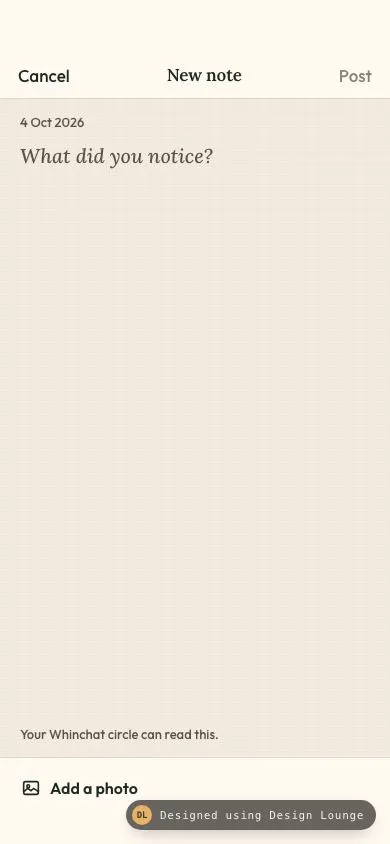
Whinchat's new-note screen. Post stays off until the body has text, four drawn thumbs appear on request, and Cancel opens a discard sheet on a dirty draft.
Phone notification centre
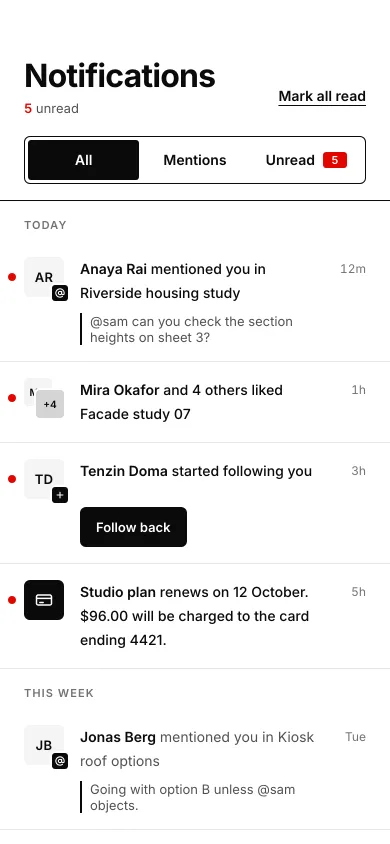
A Swiss phone notification list: Today, This week and Earlier groups, red unread dots, a three-way filter, tap to read, and Mark all read with a stagger.
Tessel sliding tile puzzle
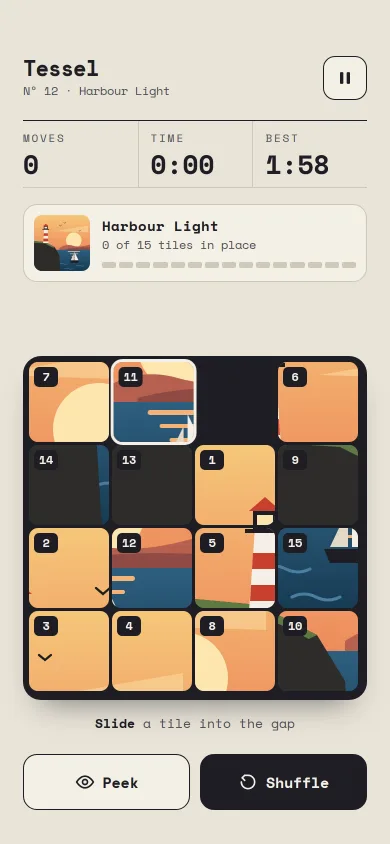
A playable 4×4 sliding puzzle of an SVG harbour scene: spring-snapped tiles, tap, swipe or arrow keys, peek, pause, a solved ripple and a result card.
Juniper home screen widget stack
A phone home screen for one app family: small and medium widgets, a swipeable smart stack, long-press jiggle with remove badges and a widget gallery sheet.
Fintech home
A banking home screen: dark balance card with a 40px tabular amount and a blur-to-hide toggle, four circular quick actions, day-grouped transactions with initial avatars, under a glass top bar.
Grouped settings list
An iOS-style settings screen: inset grouped sections with 44px rows, coloured icon squares, 51×31 spring toggles with a stretching knob, chevron rows with values, footers and a profile row.