Nº 667 of 677
Kids app parental gate
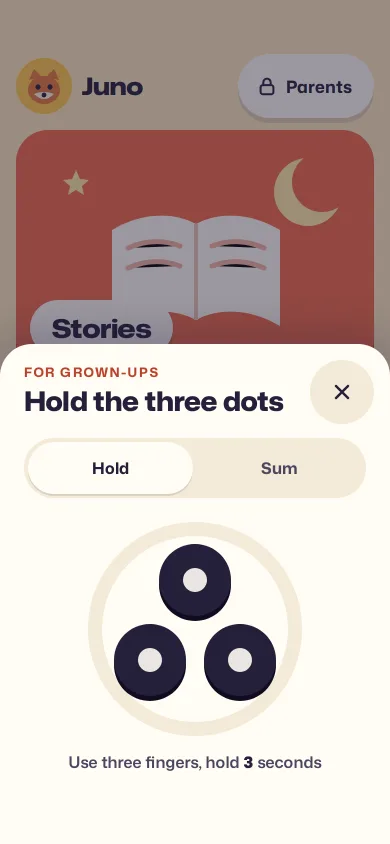
A kids home with big picture tiles where Parents and Buy open a grown-up gate: hold three dots for 3 seconds or solve "seven plus five".
Preview
Use it
Free to use · credit appreciated1 Once, in your project · Node 22.20+
npx skills add SusanAcharya/Design-Lounge 2 Then ask
Using the Design Lounge skill, build "Kids app parental gate" (piece kids-parent-gate) in my stack. Match its brief; restyle it onto my product's theme.
No skill? Paste the brief instead. It carries the numbers, tokens and behaviour.
<!-- Design Lounge Nº 667 · "Kids app parental gate" · www.designlounge.live -->

# Kids app parental gate

> **Build brief for a coding agent.** Rebuild this piece in the reader's stack. If they haven't said which stack, ask once, then default to semantic HTML + CSS + a little vanilla JS. Match the numbers below; don't "improve" them.

## What it is

The home screen of a fictional kids app, "Burrow", for ages 4 to 8, and the parental gate that guards everything a child must not reach alone: the Parents corner and the "£2.99" button on a story pack. The home is three big picture tiles (Stories, Draw, Sounds) on butter yellow, labelled on white pills. Parents or the price opens a bottom sheet "For grown-ups" with two checks an adult can do and a pre-reader can't: hold three dots with three fingers for 3 seconds while a tomato ring fills, or tap the answer to a sum written in words ("seven plus five"). Pass, and a calm Grown-ups area slides in with a screen-time limit and purchases switched off. The detail worth copying: a child who fails is never told off. A wrong sum or three quick taps on the dots just closes the sheet, with no message, no red, no sound, and the home is exactly as it was.

This is the pattern App Store guideline 1.3 asks for in the Kids category: no purchase, settings or outside link without a gate. Language: iOS 26-ish (bottom sheet on the iOS sheet curve, 32px sheet radius, 64px targets, white plates with a 5px soft lip).

## Reference behaviour

1. First frame: the home under a 45% ink scrim, with the gate sheet already up (no slide on load): kicker "FOR GROWN-UPS", title "Hold the three dots", Close (64px), the Hold/Sum segmented control on Hold, three 72px ink dots in a triangle inside a 230px track ring, hint "Use three fingers, hold 3 seconds". The Stories tile and its label show above the sheet.
2. Touch: each dot tracks its own pointer id. While all three are held the ring fills clockwise from 12 o'clock over 3000ms (rAF, delta capped at 50ms), held dots turn tomato-dark `#B9432A` with a sun-yellow centre and press to 0.9 scale, and the hint counts "Keep holding, 2", "1". Letting go of any dot drains the ring back to empty at 400ms for a full ring. A fine pointer (mouse) counts one held dot as three so the gate can be tried on a desktop; ship the three-finger rule on touch.
3. Keyboard: the dot group is one focusable button; holding Space fills the ring (repeat events ignored), releasing drains it.
4. Ring full: hint says "Thank you", the live region says "Grown-up check passed.", 260ms later the sheet drops and the Grown-ups area slides in from the right (420ms iOS sheet curve). Focus goes to "Back to Burrow".
5. Child fail on Hold: three taps shorter than 500ms each with no hold, and the sheet closes calmly 300ms after the third. Focus returns to the button that opened it.
6. Sum tab: title becomes "Solve the sum", the question is two random numbers 3–9 written as words ("eight plus four"), an answer box (180 × 64, 2px `#9A8F7A` border, "?" when empty) and a 5 × 2 keypad of 64px keys. Digits fill the box; when the length matches the answer it checks itself. Right: pass as in step 4. Wrong: close calmly after 300ms. Each opening of Sum makes a new sum. Number keys on a hardware keyboard type too.
7. Close (×), the scrim, or Escape close the sheet. Nothing on the home changes.
8. Opening from "£2.99" lands in the Grown-ups area with the Purchases card ringed in sun yellow for 1.2s and scrolled into view.
9. Grown-ups area: "Screen time today, 34 min of 45 min" with a teal bar at 75%; the daily limit buttons 30 min / 45 min / 1 hour / None (pressed state ink fill) rewrite the caption and the bar; "Wind-down at 7:30 pm" switch on. Purchases: "Allow purchases" switch off ("Off. No one can buy."); the Ocean pack row's "Buy £2.99" is disabled until purchases are on, then says "On. Each buy asks for your passcode." Buying sets it to "Bought". Note: "Burrow has no ads and no links out of the app." A Child card: "Juno, age 5 · Read-to-me on · Pictures first".
10. "Back to Burrow" (or Escape) slides the area away and returns focus to Parents.

## Structure

```
390 × 844, butter #FBE8BE, column padding 54 / 16 / 34, gap 12
┌──────────────────────────────────────┐
│ 54px clear                           │
│ (fox) Juno              [🔒 Parents] │ 64h row, Parents pill 64h
│ ┌──────────────────────────────────┐ │
│ │   ☆        [open book]      ☾    │ │ Stories tile 358 × 240, tomato
│ │ [ Stories ]                      │ │ label pill 56h at 14,14 from bottom
│ └──────────────────────────────────┘ │
│ ┌───────────────┐ ┌───────────────┐  │ Draw (teal) / Sounds (cobalt)
│ │  crayons      │ │  drum         │  │ 173 × 210 each, gap 12
│ │ [ Draw ]      │ │ [ Sounds ]    │  │
│ └───────────────┘ └───────────────┘  │

… 179 more lines. Copy or download for the full brief. Loading the source…Brief
219 linesBuild brief for a coding agent. Rebuild this piece in the reader’s stack. If they haven’t said which stack, ask once, then default to semantic HTML + CSS + a little vanilla JS. Match the numbers below; don’t “improve” them.
What it is
The home screen of a fictional kids app, “Burrow”, for ages 4 to 8, and the parental gate that guards everything a child must not reach alone: the Parents corner and the “£2.99” button on a story pack. The home is three big picture tiles (Stories, Draw, Sounds) on butter yellow, labelled on white pills. Parents or the price opens a bottom sheet “For grown-ups” with two checks an adult can do and a pre-reader can’t: hold three dots with three fingers for 3 seconds while a tomato ring fills, or tap the answer to a sum written in words (“seven plus five”). Pass, and a calm Grown-ups area slides in with a screen-time limit and purchases switched off. The detail worth copying: a child who fails is never told off. A wrong sum or three quick taps on the dots just closes the sheet, with no message, no red, no sound, and the home is exactly as it was.
This is the pattern App Store guideline 1.3 asks for in the Kids category: no purchase, settings or outside link without a gate. Language: iOS 26-ish (bottom sheet on the iOS sheet curve, 32px sheet radius, 64px targets, white plates with a 5px soft lip).
Reference behaviour
- First frame: the home under a 45% ink scrim, with the gate sheet already up (no slide on load): kicker “FOR GROWN-UPS”, title “Hold the three dots”, Close (64px), the Hold/Sum segmented control on Hold, three 72px ink dots in a triangle inside a 230px track ring, hint “Use three fingers, hold 3 seconds”. The Stories tile and its label show above the sheet.
- Touch: each dot tracks its own pointer id. While all three are held the ring fills clockwise from 12 o’clock over 3000ms (rAF, delta capped at 50ms), held dots turn tomato-dark
#B9432Awith a sun-yellow centre and press to 0.9 scale, and the hint counts “Keep holding, 2”, “1”. Letting go of any dot drains the ring back to empty at 400ms for a full ring. A fine pointer (mouse) counts one held dot as three so the gate can be tried on a desktop; ship the three-finger rule on touch. - Keyboard: the dot group is one focusable button; holding Space fills the ring (repeat events ignored), releasing drains it.
- Ring full: hint says “Thank you”, the live region says “Grown-up check passed.”, 260ms later the sheet drops and the Grown-ups area slides in from the right (420ms iOS sheet curve). Focus goes to “Back to Burrow”.
- Child fail on Hold: three taps shorter than 500ms each with no hold, and the sheet closes calmly 300ms after the third. Focus returns to the button that opened it.
- Sum tab: title becomes “Solve the sum”, the question is two random numbers 3–9 written as words (“eight plus four”), an answer box (180 × 64, 2px
#9A8F7Aborder, ”?” when empty) and a 5 × 2 keypad of 64px keys. Digits fill the box; when the length matches the answer it checks itself. Right: pass as in step 4. Wrong: close calmly after 300ms. Each opening of Sum makes a new sum. Number keys on a hardware keyboard type too. - Close (×), the scrim, or Escape close the sheet. Nothing on the home changes.
- Opening from “£2.99” lands in the Grown-ups area with the Purchases card ringed in sun yellow for 1.2s and scrolled into view.
- Grown-ups area: “Screen time today, 34 min of 45 min” with a teal bar at 75%; the daily limit buttons 30 min / 45 min / 1 hour / None (pressed state ink fill) rewrite the caption and the bar; “Wind-down at 7:30 pm” switch on. Purchases: “Allow purchases” switch off (“Off. No one can buy.”); the Ocean pack row’s “Buy £2.99” is disabled until purchases are on, then says “On. Each buy asks for your passcode.” Buying sets it to “Bought”. Note: “Burrow has no ads and no links out of the app.” A Child card: “Juno, age 5 · Read-to-me on · Pictures first”.
- “Back to Burrow” (or Escape) slides the area away and returns focus to Parents.
Structure
390 × 844, butter #FBE8BE, column padding 54 / 16 / 34, gap 12
┌──────────────────────────────────────┐
│ 54px clear                           │
│ (fox) Juno              [🔒 Parents] │ 64h row, Parents pill 64h
│ ┌──────────────────────────────────┐ │
│ │   ☆        [open book]      ☾    │ │ Stories tile 358 × 240, tomato
│ │ [ Stories ]                      │ │ label pill 56h at 14,14 from bottom
│ └──────────────────────────────────┘ │
│ ┌───────────────┐ ┌───────────────┐  │ Draw (teal) / Sounds (cobalt)
│ │  crayons      │ │  drum         │  │ 173 × 210 each, gap 12
│ │ [ Draw ]      │ │ [ Sounds ]    │  │
│ └───────────────┘ └───────────────┘  │
│ [fish] Ocean pack          [🔒 £2.99]│ pack card 118h, Get pill 64h
│ 34px clear                           │
└──────────────────────────────────────┘
Gate sheet: fixed bottom, 390 × 500, radius 32 top, padding 22 / 24 / 34
  kicker + title (27px)          (×) 64
  [  Hold  |  Sum  ]  60h segmented, 4px inset
  ring 230 (r 100, stroke 14) with dots at (115,66) (70,146) (160,146)
  hint 16px
Grown-ups: fixed full screen, #F6F1E6, slides from the right, scrollsmain.homeholds the header (div.kid,button.parents[aria-haspopup=dialog]), threebutton.tilewith ansvg.artandspan.lab, anddiv.packwithbutton.get. The home isinertwhile a gate or the grown-up area is open.div.scrim,section.sheet[role=dialog][aria-modal][aria-labelledby]. Inside: header,div.seg[role=tablist]with tworole=tabbuttons, tworole=tabpanelpanels.- Hold panel:
div.hold[role=button][tabindex=0]with the ringsvgand threespan.dot;p.hint. - Sum panel:
p.q,div.ans[role=status],div.padof 10 buttons. section.grown[role=dialog]with threediv.card; switches arebutton[role=switch][aria-checked]; limit buttons usearia-pressed.- Closed sheet and closed area are
visibility:hidden, not only translated.
Tokens
:root {
  /* surfaces */
  --butter: #FBE8BE;      /* page */
  --plate: #FFFCF4;       /* label pills, cards, sheet */
  --well: #F3EAD7;        /* segmented track, keys, close button */
  --line: #EAD9B3;        /* card edges, key lip */
  --grown: #F6F1E6;       /* grown-up area */
  /* ink */
  --ink: #24203A;         /* text, dots, dark buttons */
  --ink-2: #4B4660;       /* secondary text */
  --answer-edge: #9A8F7A; /* 3:1 on plate */
  /* tiles */
  --tomato: #EF6A47;  --tomato-d: #B9432A;  /* Stories, ring fill, kicker text (dark) */
  --teal: #1F9C8F;    --teal-d: #167267;    /* Draw, usage bar */
  --cobalt: #3D63D6;  --cobalt-d: #2B48A6;  /* Sounds */
  --sun: #FFC94A;                            /* fox badge, held dot centre, highlight ring */
  /* states */
  --ok: #1F7A55;          /* switch on */
  --off: #8C8496;         /* switch off track */
  --scrim: rgba(36,32,58,.45);
  /* type */
  --sans: "Mona Sans", system-ui, sans-serif;   /* wdth 75–125, wght 400–900 */
  --wide: 125%;           /* font-stretch for kid labels */
  --fs-tile: 26px; --fs-title: 27px; --fs-q: 32px; --fs-key: 24px; --fs-body: 16px; --fs-kick: 13px;
  /* shape */
  --r-tile: 32px; --r-sheet: 32px; --r-card: 24px; --r-key: 20px; --r-pill: 999px;
  --hit: 64px; --dot: 72px; --ring: 230px; --ring-stroke: 14px;
  --lip: 0 5px 0 rgba(36,32,58,.14);
  --sheet-sh: 0 -14px 40px rgba(36,32,58,.22);
  /* motion */
  --ease: cubic-bezier(.2,.7,.2,1);
  --sheet-ease: cubic-bezier(.32,.72,0,1);
  --spring: cubic-bezier(.34,1.56,.64,1);
  --t-micro: 160ms; --t-layout: 320ms; --t-sheet: 420ms; --hold: 3000ms; --drain: 400ms;
}
Typography
One variable family at two widths: wide (125%) and heavy for what a child sees, normal width for what a parent reads.
| Role | Size | Weight | Width | Line-height | Notes |
|---|---|---|---|---|---|
| Tile label | 26px | 800 | 125% | 1 | on a 56px white pill |
| Child name | 24px | 800 | 125% | 1 | −0.01em |
| Sheet title | 27px | 800 | 110% | 1.1 | −0.015em |
| Sum question | 32px | 800 | 112% | 1.1 | lower case words |
| Answer, keys | 32px / 24px | 800 / 700 | 100% | 1 | tabular numerals |
| Kicker, card heads | 13px | 700 | 100% | 1 | caps, 0.12em |
| Grown-ups title | 30px | 800 | 100% | 1 | −0.02em |
| Body, hints | 14–16px | 500–600 | 100% | 1.35 | |
| Buttons | 15–17px | 700 | 100% | 1 | nowrap |
Motion
| What | Trigger | Property | From → to | Duration / easing | Reduced motion |
|---|---|---|---|---|---|
| Sheet | Parents / £2.99 | transform | translate(-50%,104%) → 0 | 420ms --sheet-ease | opacity 200ms |
| Scrim | with sheet | opacity | 0 → 1 | 420ms --ease | same |
| Ring fill | all dots held | stroke-dashoffset | 628.3 → 0 | 3000ms linear progress, rAF | same (it is the feedback) |
| Ring drain | a dot released | stroke-dashoffset | current → 628.3 | 400ms per full ring | same |
| Held dot | pointer down | scale, colour | 1 → 0.9, ink → tomato-dark | 160ms --spring | colour only |
| Grown-ups | pass +260ms | translateX | 104% → 0 | 420ms --sheet-ease | opacity 200ms |
| Purchases ring | opened from Buy | box-shadow | 4px sun → 0 | 1.2s, holds 60% | static ring |
| Switch knob | toggle | translateX | 0 → 24px | 320ms --spring | instant |
| Tile press | active | scale | 1 → 0.97 | 160ms --spring | none |
States
- Sheet closed:
visibility:hidden, translated 104% down; home not inert. - Hold idle: ink dots with cream centres; ring track
--well. - Holding: held dots tomato-dark with sun centre; ring tomato; hint counts down in whole seconds.
- Draining: ring shrinks; hint returns to the instruction at 0.
- Calm fail: the sheet simply closes. No error copy, colour or sound.
- Segmented: selected segment is a plate with a 2px lip; other text
--ink-2. - Answer empty: a ”?” in
--ink-2. - Buy disabled:
#E6DCC6fill,#5A5468text (5.3:1). - Switch: off
--offtrack, on--oktrack, white 30px knob. - Focus-visible: 4px
--inkoutline, 4px offset everywhere.
Accessibility
- Both overlays are
role=dialog,aria-modal=true, labelled by their heading; the home getsinertwhile one is open. - Focus moves to the dot group when the sheet opens, to “Back to Burrow” when the area opens, and back to the opener on close.
- The dot group is
role=buttonwith the label “Hold all three dots for 3 seconds. Keyboard: hold Space.” - Tabs use
role=tablist/tab/tabpanelwitharia-selectedandaria-controls. - Escape closes the sheet and the area. Number keys type into the sum.
- A polite live region says “Grown-up check passed.” and “Ocean pack bought.”
- Contrast: ink on butter and plate above 13:1; tomato-dark kicker on plate 5.3:1; tile labels sit on white pills, never on the tile colour.
- Hit targets: every child-facing control 64px; dots 72px; keys 64px tall; grown-up controls 48–52px.
Responsive rules
- At 360 wide: tiles keep their heights, the duo columns become 158px, labels stay 26px; the keypad keys shrink to 56px wide and stay 64px tall.
- Shorter than 780: the sheet keeps 500px and the scrimmed home shows less; never shrink the dots below 64px.
- At tablet width: home stays a 390px column; the sheet becomes a centred 420px card 40px above the bottom; the grown-up area becomes a 520px side panel.
Acceptance checklist
Always
- Every purchase, settings entry and outside link sits behind the gate.
- Hold needs all three dots on touch (one per pointer id) for 3000ms; releasing drains the ring.
- Space held on the focused dot group fills the ring; repeats are ignored.
- The sum is written in words with both numbers 3–9 and checks itself at the answer’s length.
- A wrong sum, or three taps under 500ms, closes the sheet calmly with no message.
- Closed overlays are
visibility:hidden; the home isinertwhile one is open. - Child-facing targets are at least 64px; dots 72px.
- Purchases default to off; Buy stays disabled until they are on.
- Focus moves into each overlay and back to its opener; Escape closes.
-
document.documentElement.scrollWidthis 390; reduced motion swaps slides for fades.
This demo
- Home tiles Stories (tomato), Draw (teal), Sounds (cobalt); child “Juno” with a fox badge.
- Ocean pack, 6 new stories, £2.99.
- Screen time 34 min of 45 min; limits 30 min, 45 min, 1 hour, None; wind-down 7:30 pm.
- Note “Burrow has no ads and no links out of the app.”
Implementation notes
Track each finger, not each click. Store which dot each pointer id holds; the count of held dots is the gate condition:
const held = new Set(), byPointer = {};
hold.addEventListener('pointerdown', e => {
  const d = e.target.closest('.dot'); if (!d) return;
  e.preventDefault(); hold.setPointerCapture(e.pointerId);
  byPointer[e.pointerId] = +d.dataset.d; held.add(+d.dataset.d); run();
});
['pointerup', 'pointercancel'].forEach(t => hold.addEventListener(t, e => {
  const d = byPointer[e.pointerId]; if (d === undefined) return;
  delete byPointer[e.pointerId]; held.delete(d); run();
}));
const enough = () => keyHeld || held.size >= (matchMedia('(pointer: fine)').matches ? 1 : 3);
Set touch-action:none on the dot group or the browser will treat a three-finger hold as a zoom.
One loop fills and drains. The ring is a circle with stroke-dasharray equal to its circumference (2π × 100 = 628.3), rotated −90° so it starts at 12 o’clock:
function tick(ts) {
  const dt = Math.min(ts - (last || ts), 50); last = ts;
  p = enough() ? Math.min(1, p + dt / 3000) : Math.max(0, p - dt / 400);
  fill.style.strokeDashoffset = 628.3 * (1 - p);
  if (p >= 1) return pass();
  if (p <= 0 && !enough()) { raf = 0; return; }
  raf = requestAnimationFrame(tick);
}
Write the numbers as words. “7 + 5” is readable by many five-year-olds; “seven plus five” is not, which is the point. Common mistakes: showing “Wrong, try again” (a child will brute-force it, and it reads as a scolding), keeping the same sum after a failure, and leaving the closed sheet merely translated so its text still counts as on the page.
Details
- Palette
- Type
- Mona Sans
- Motion
- Subtle motion
- Build
- One session
- Tags
Similar
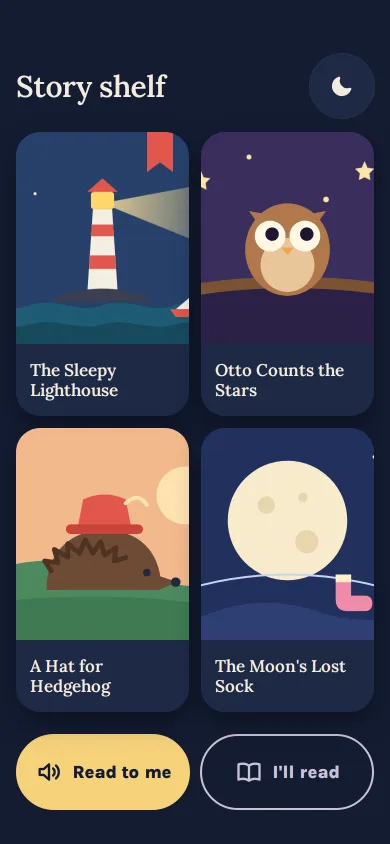
Kids bedtime story shelf
A bedtime shelf of four SVG-drawn covers, read-to-me or I'll-read, big story text where each word lights as it is read, swipe page turns and a calm The end.
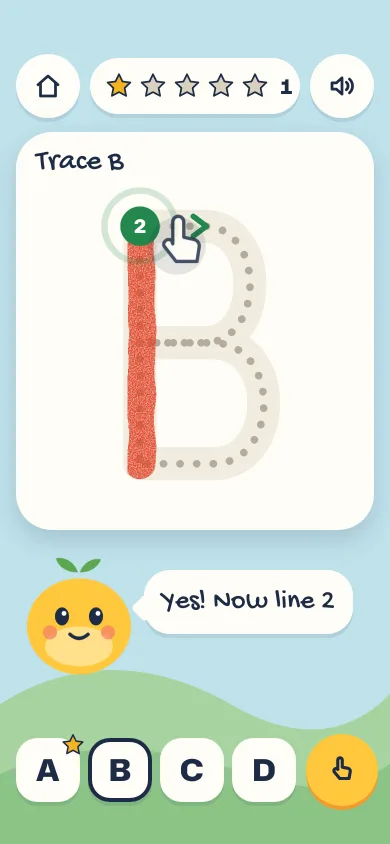
Kids letter tracing with Pom
A finger-tracing screen for ages 4 to 8: dotted letter with start dot and arrow, crayon paint, gentle drift help, a spoken "B, ball" and stars that only grow.
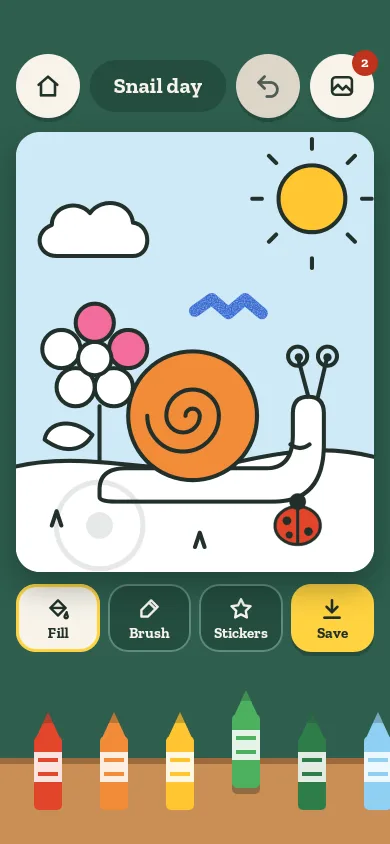
Kids colouring canvas
A colouring screen for ages 4 to 8: tap a region to flood it from the tap point, brush with a waxy crayon, stamp stickers, undo, and save to an in-memory gallery.
Toggle switch set
Six toggle temperaments (classic, icon thumb, day/night, squish, labelled, segmented) in a smart-home preferences card with a live status index.
Mood pill that morphs into a card
Five capsule pills for a mood check-in. Tap one and it springs open into a card with feeling chips, the others shrink aside, and the room light shifts to its hue.
Payment received banner
An in-app banner for money in: the amount counts up, the balance follows, View receipt unfolds a slip, Split opens a sheet, and a grouped stack fans out on tap.